
Google LiteRT-LM: Run Gemma 4 Locally on Any Device (2026 Setup Guide)
How to run Gemma 4 locally with Google's new LiteRT-LM framework. Works on Android, iOS, Raspberry Pi, desktop — one CLI command, no cloud, no API key.
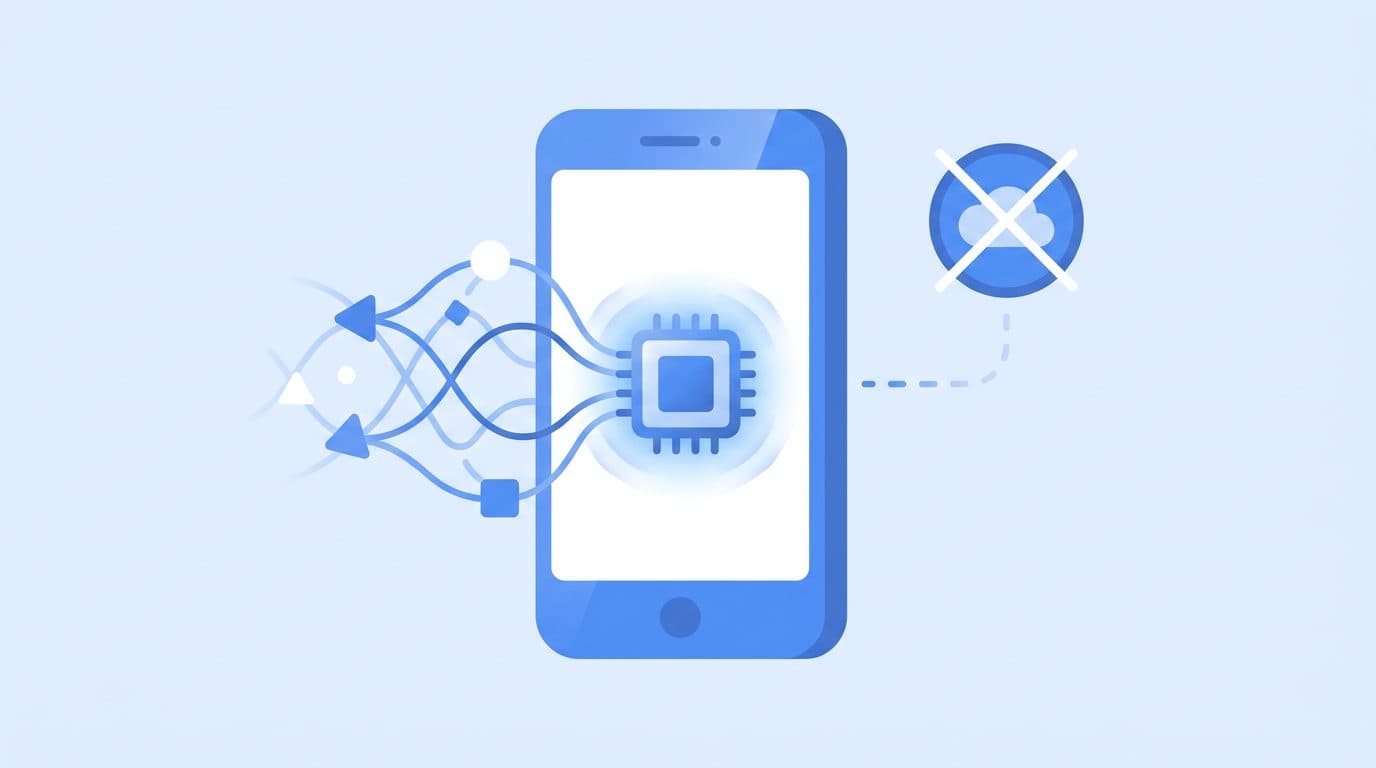
Google just open-sourced the inference engine that powers on-device AI in Chrome, Chromebook Plus, and Pixel Watch — and it now supports Gemma 4.
It's called LiteRT-LM. It runs on Android, iOS, desktop, Raspberry Pi, and any ARM or x86 device. It uses GPU and NPU acceleration where available. And setup takes a single command.
If you've been waiting for a clean, well-maintained framework to run Gemma 4 locally — this is it.
What Is LiteRT-LM?
LiteRT-LM is Google's production-ready, open-source inference framework for deploying large language models on edge devices. It's the runtime that ships inside real Google products — so it's not an experimental project. It's production-tested at scale.
The name comes from LiteRT (formerly TensorFlow Lite), Google's on-device ML runtime that's been running models on Android and iOS for years. LiteRT-LM is the large language model layer built on top of it.
Key points:
- Cross-platform: Android, iOS, Web, Desktop (Linux, macOS, Windows via WSL), IoT and Raspberry Pi
- Hardware acceleration: GPU via Vulkan/Metal/OpenGL, NPU via Android Neural Networks API
- Multi-modal: Vision and audio inputs supported (model-dependent)
- Tool use: Function calling for agentic workflows
- Broad model support: Gemma (all sizes), Llama 3.x, Phi-4, Qwen 2.5 and more
- Open source: Apache 2.0 license
The April 2026 release added full Gemma 4 support — specifically the E2B (Edge 2B) variant designed for device deployment, plus larger 4B and 12B models for desktop-class hardware.
Why Run LLMs On-Device?
Before diving into setup, it's worth understanding why on-device inference is worth caring about:
Privacy: Your prompts, documents, and responses never leave your device. No data is sent to Google, OpenAI, or anyone else. For personal, medical, legal, or business data, this matters.
Cost: Zero API costs. After setup, every query is free. For high-volume use cases (internal tools, automation, batch processing), this is significant.
Latency: No network round-trip. On modern hardware with NPU or GPU acceleration, first-token latency is under 500ms for small models.
Offline use: Works without internet. On planes, in basements, in air-gapped environments.
Control: Specific model versions, fine-tuned weights, custom system prompts — you control everything. The model doesn't change without your permission.
System Requirements
LiteRT-LM is designed to run on a wide range of hardware. Here's what you need depending on your setup:
Minimum (E2B model — 2 billion parameters):
- RAM: 3GB free
- Storage: ~1.5GB for model
- Compute: Any modern CPU; NPU or GPU optional but speeds things up significantly
Recommended for E2B:
- Android: Snapdragon 8 Gen 2 or newer, or equivalent Dimensity/Kirin chipset with dedicated NPU
- Desktop: 8GB+ RAM, GPU with 4GB+ VRAM (any NVIDIA/AMD/Intel GPU with Vulkan support)
- Raspberry Pi 5 or newer
For larger models (4B, 12B):
- 4B: 8GB RAM minimum, GPU recommended
- 12B: 16GB RAM minimum, 8GB+ GPU VRAM strongly recommended
Not sure what VRAM your machine has? See our VRAM guide for AI models before downloading.
Setup on Desktop (Linux / macOS / Windows WSL)
If you're new to running terminal commands, our terminal beginners guide covers the basics before you start.
Step 1: Install LiteRT-LM
pip install litert-lm
That's the core install. The CLI tool litert-lm is now available in your terminal.
Step 2: Run Gemma 4 E2B
litert-lm run \
  --from-huggingface-repo=litert-community/gemma-4-E2B-it-litert-lm \
  gemma-4-E2B-it.litertlm \
  --prompt="What is the capital of France?"
On first run, LiteRT-LM downloads the model from HuggingFace (~1.5GB). Subsequent runs use the cached file.
Step 3: Interactive Chat Mode
For back-and-forth conversation, drop the --prompt flag:
litert-lm run \
  --from-huggingface-repo=litert-community/gemma-4-E2B-it-litert-lm \
  gemma-4-E2B-it.litertlm
You'll get a prompt where you can type messages. Type exit to quit.
Using a Larger Model (4B or 12B)
For better reasoning and longer contexts:
# Gemma 4 4B — good balance for desktop
litert-lm run \
  --from-huggingface-repo=litert-community/gemma-4-4B-it-litert-lm \
  gemma-4-4B-it.litertlm

# Gemma 4 12B — best quality, needs 16GB+ RAM
litert-lm run \
  --from-huggingface-repo=litert-community/gemma-4-12B-it-litert-lm \
  gemma-4-12B-it.litertlm
Setup on Android
Google provides the AI Edge Gallery app as the quickest way to try LiteRT-LM on Android — no coding required.
- Install AI Edge Gallery from the GitHub releases page (APK sideload)
- Open the app and tap Download Model
- Select Gemma 4 E2B
- Once downloaded, tap Chat — it runs entirely on your device
For developers building Android apps, the LiteRT-LM Android SDK is available via Maven:
// build.gradle.kts
implementation("com.google.ai.edge.litert:litert-lm-android:1.0.0")
The SDK provides LiteRtLm.create(modelPath) to load a model and session.generateResponse(prompt) for inference.
Setup on iOS
iOS support is available through the Swift package:
// Package.swift
.package(url: "https://github.com/google-ai-edge/LiteRT-LM", from: "1.0.0")
import LiteRTLM

let model = try LiteRtLmModel(path: Bundle.main.path(forResource: "gemma-4-E2B-it", ofType: "litertlm")!)
let session = try model.createSession()
let response = try await session.generateResponse(for: "Explain quantum computing simply.")
print(response)
Models run on the Neural Engine where available (A12 Bionic and newer). Performance on recent iPhone/iPad hardware is impressive — the E2B model generates ~20-30 tokens per second on an A17 Pro.
Setup on Raspberry Pi
Raspberry Pi 5 is the minimum recommended version. The E2B model runs on CPU-only inference:
# Install on Raspberry Pi OS (arm64)
pip install litert-lm

# Run — CPU only, expect ~2-5 tokens/sec on RPi 5
litert-lm run \
  --from-huggingface-repo=litert-community/gemma-4-E2B-it-litert-lm \
  gemma-4-E2B-it.litertlm \
  --prompt="Summarize the water cycle."
Practical RPi use cases: local voice assistant, offline document Q&A, home automation intelligence, educational tools for students.
LiteRT-LM vs. Other Local Inference Options
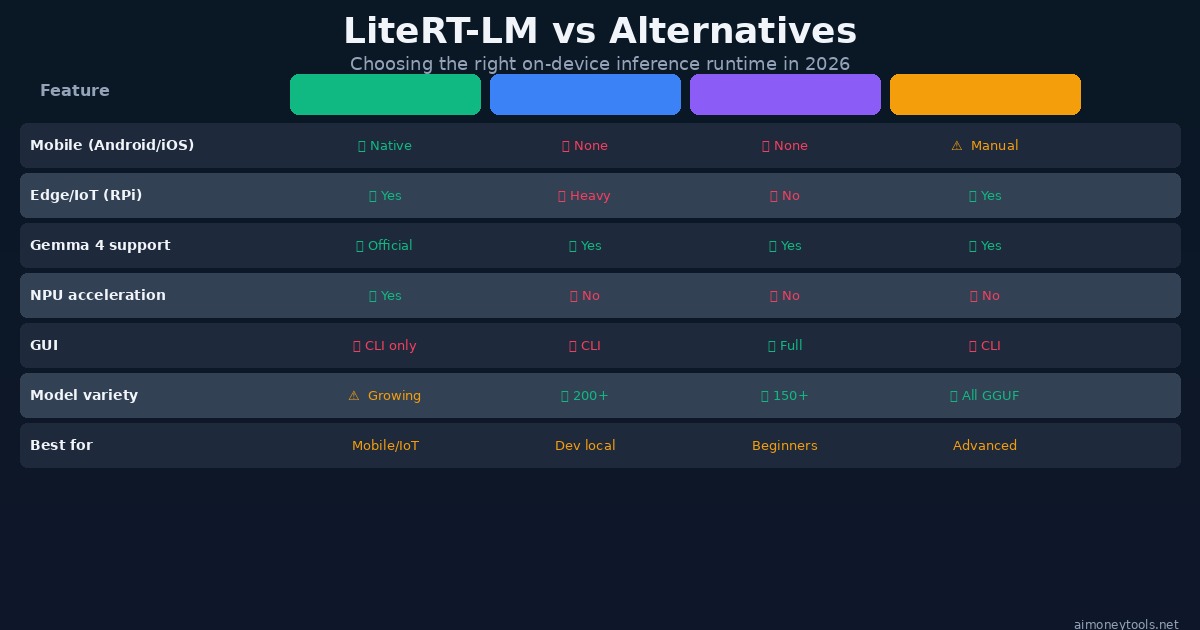
There are several ways to run LLMs locally. Here's how LiteRT-LM fits in:
LiteRT-LM is the only option with real mobile and IoT support. If you need to run a model on Android, iOS, or embedded hardware, there's no comparable alternative with NPU acceleration and Google's production backing. For desktop-only use, Ollama or LM Studio may be more convenient.
Ollama is the easiest desktop setup with the widest model library (200+ models). Great for developers and daily use. No mobile support.
LM Studio provides a full GUI, making it the friendliest option for non-technical users. Excellent for Windows/Mac desktop, zero for mobile.
llama.cpp offers the deepest hardware compatibility and quantization control, but requires more technical setup. Best for advanced users who need maximum performance tuning.
For most people: use LiteRT-LM for mobile/IoT, Ollama for desktop development, LM Studio for GUI users.
Using LiteRT-LM with Python (API Integration)
Beyond the CLI, LiteRT-LM provides a clean Python API for integrating into your own scripts:
from litert_lm import LiteRtLm, GenerateConfig

# Load model
model = LiteRtLm.from_huggingface(
    repo="litert-community/gemma-4-E2B-it-litert-lm",
    filename="gemma-4-E2B-it.litertlm"
)

# Create session
session = model.create_session()

# Generate
config = GenerateConfig(max_tokens=256, temperature=0.7)
response = session.generate(
    prompt="Write a Python function that finds prime numbers.",
    config=config
)
print(response.text)
This makes it straightforward to build tools that use local AI: document summarizers, code review bots, local chatbots for internal knowledge bases (pair with RAG — see our RAG explainer), or any privacy-sensitive workflow.
Performance Benchmarks
Here's what to realistically expect on different hardware based on published benchmarks:
| Device | Model | Tokens/sec | First Token |
|---|---|---|---|
| Pixel 9 Pro (Tensor G4 NPU) | Gemma 4 E2B | ~28 t/s | ~320ms |
| iPhone 15 Pro (A17 Neural Engine) | Gemma 4 E2B | ~31 t/s | ~280ms |
| M3 MacBook Pro (GPU) | Gemma 4 12B | ~22 t/s | ~410ms |
| RTX 4070 desktop | Gemma 4 12B | ~38 t/s | ~180ms |
| Raspberry Pi 5 (CPU) | Gemma 4 E2B | ~3 t/s | ~1.8s |
For context, GPT-4o typically responds at 50-80 tokens/sec via API — but with network latency and queue time, effective performance is often similar or slower than local NPU inference for short queries.
What Google Is Using This For
LiteRT-LM already powers real Google products in production:
- Google Chrome: On-device AI features (Summarize, Help me write) on supported hardware
- Chromebook Plus: Built-in AI assistant runs Gemma locally on the device
- Pixel Watch: On-device health and fitness AI
- Gboard: Smart reply and autocomplete on Pixel phones
The fact that Google ships this in consumer products is the strongest signal of its reliability. It's not a research framework — it's production inference infrastructure that's been validated on billions of devices.
Frequently Asked Questions
What's the difference between LiteRT and LiteRT-LM? LiteRT (formerly TensorFlow Lite) is Google's general on-device ML runtime for models like image classifiers and object detectors. LiteRT-LM is a specialized layer specifically built for large language models — it handles autoregressive generation, KV caching, tokenization, and the larger memory footprints that LLMs require.
Can I fine-tune models with LiteRT-LM?
No — LiteRT-LM is inference-only. Fine-tuning happens on more powerful hardware and then the resulting weights are converted to the .litertlm format for edge deployment. Google provides conversion tools in the repository.
Does LiteRT-LM support quantized models?
Yes. The .litertlm format includes INT4 and INT8 quantization natively. The E2B model weights are quantized by default to fit on device-class hardware without significant quality loss.
Which Gemma 4 model should I use for my phone? The E2B (Edge 2B) variant is specifically designed for smartphones. Phones from 2023 onward with a dedicated NPU (Snapdragon 8 Gen 2/3, Apple A16/A17, Tensor G3/G4) handle it smoothly. Older phones can run it on CPU but expect slower generation.
Can I run multiple models simultaneously? Technically yes, but practically limited by RAM. On a device with 8GB RAM, running two models at once will cause significant slowdown. Load one model at a time for best performance.
Is LiteRT-LM free for commercial use? Yes. The framework is Apache 2.0 licensed. Gemma 4 model weights are licensed under Google's Gemma Terms of Use, which permits commercial use without fee.
What about privacy — does Google still collect data? When running via LiteRT-LM, inference happens entirely on your device. No prompt data is sent to Google's servers. The only network call is the one-time model download from HuggingFace. After that, the model runs fully offline.
Getting Started: Next Steps
LiteRT-LM's desktop CLI is the fastest path to running Gemma 4 locally today:
pip install litert-lm
litert-lm run --from-huggingface-repo=litert-community/gemma-4-E2B-it-litert-lm gemma-4-E2B-it.litertlm
Three minutes from zero to a local Gemma 4 inference session.
If you need cloud GPU access to test larger models before committing to a local setup, Ampere offers affordable per-hour cloud GPU instances — useful for benchmarking 12B models or running inference at scale.
For the broader Gemma 4 ecosystem, see our Gemma 4 setup guide for full local setup including VRAM optimization, and our MLX-VLM guide if you're on Apple Silicon and want the Mac-native inference path.

Alex the Engineer
•Founder & AI ArchitectSenior software engineer turned AI Agency owner. I build massive, scalable AI workflows and share the exact blueprints, financial models, and code I use to generate automated revenue in 2026.
Related Articles

How to Start an AI-Assisted Resume Writing Side Hustle in 2026 (Beginner's Guide)
A step-by-step guide to using AI resume tools to offer a paid resume and cover letter writing service — what to charge, which tools to use, and how to find your first clients.

How to Build and Sell AI Voice Receptionists to Local Businesses in 2026
A beginner's guide to building AI voice agents that answer business phone calls — the tools to use, what to charge, and how to find your first client.

How to Make Money on Fiverr with AI Tools in 2026: 7 Gigs You Can Start This Week
Discover 7 real Fiverr gigs you can launch using free and low-cost AI tools in 2026 — no experience required. Real pricing data, step-by-step setup, and tools that actually work.