
SEO Machine: Automate Your Blog Content with Claude Code (Setup Guide)
SEO Machine is a free Claude Code workspace that researches keywords, writes 2,000-word SEO articles, and optimizes them automatically. Here's how to set it up.
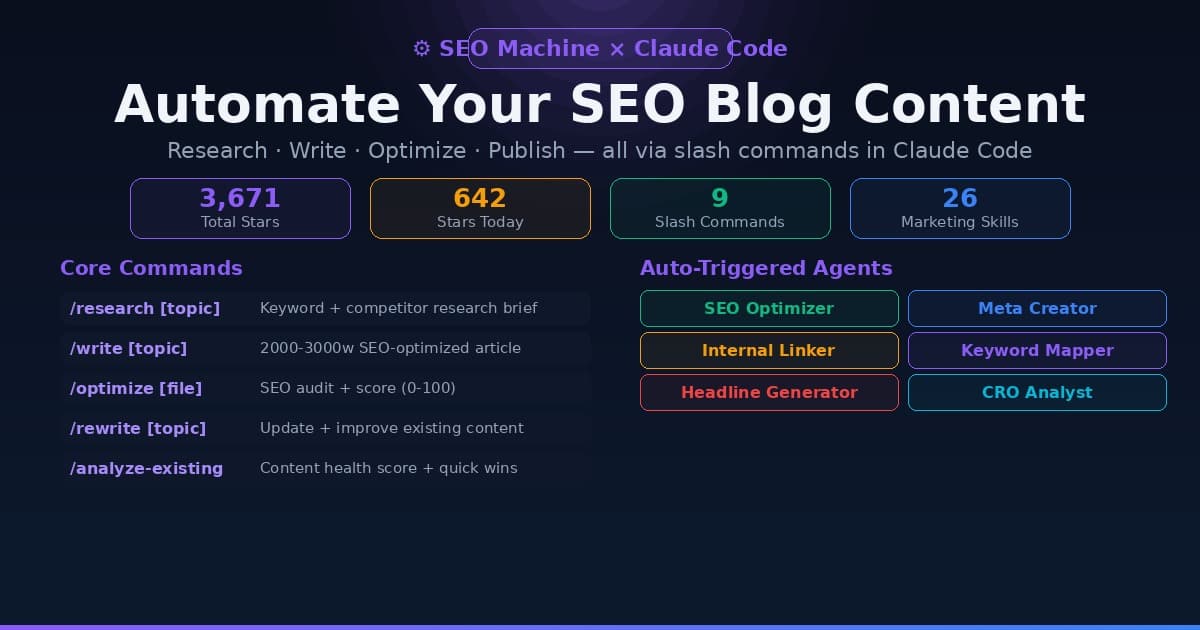
If you write blog content for SEO — whether you run a SaaS, an affiliate site, a local business, or a content agency — SEO Machine is the most practical Claude Code project to come out of GitHub this month.
It hit 3,671 total stars with 642 gained in a single day, landing it on GitHub's trending page this morning. The reason: it solves a real problem. Instead of prompting Claude to "write me an SEO article," SEO Machine gives Claude a full structured context — your brand voice, your internal links, your keyword targets, your competitors — and then lets you produce research-backed, optimized long-form content with a single slash command.
The result is more like having an SEO-trained content assistant than running prompts.
What you need to get started: Claude Code (Anthropic's coding agent) and an Anthropic API account. SEO Machine is the workspace configuration that runs on top of it — it's free and open source.
What SEO Machine Actually Does
SEO Machine is not a SaaS product. It's a Claude Code workspace — a structured folder with context files, custom slash commands, and specialized agents that work together inside Claude Code.
When you type /research content marketing for SaaS, Claude doesn't just Google it. It performs competitor analysis across the top 10 results, identifies content gaps, maps keyword clusters, and outputs a structured research brief to your /research/ folder. Then when you type /write, it uses that brief plus your brand voice file, style guide, and internal link map to produce a 2,000–3,000 word article that reads like your team wrote it.
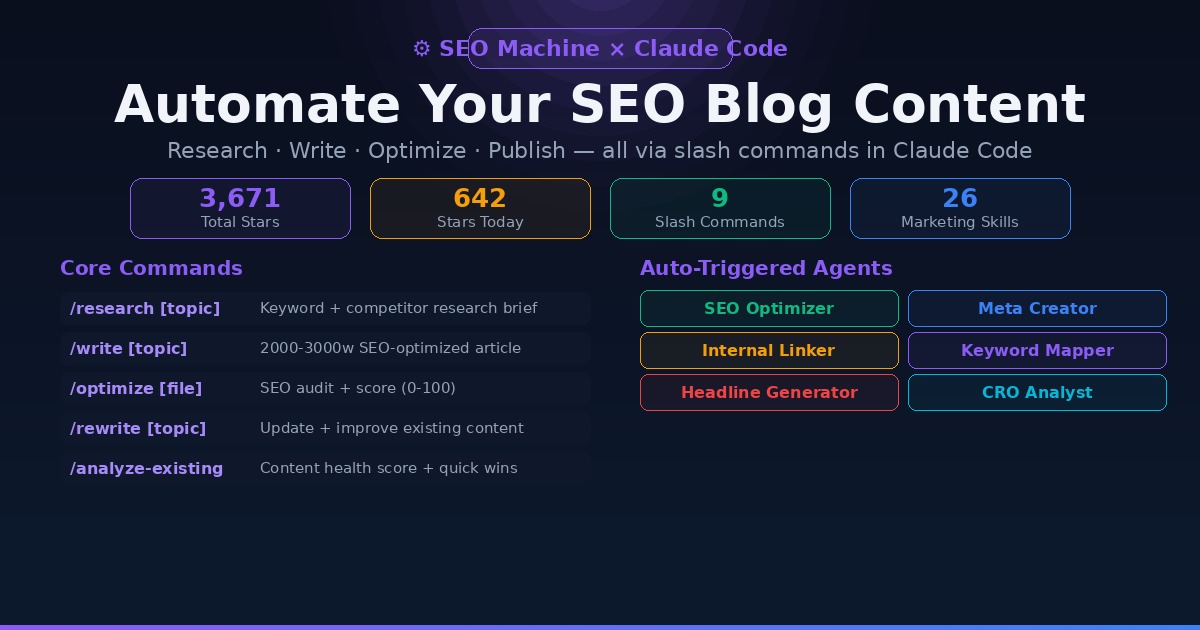
Here's what the system includes:
- 9 core slash commands covering research, writing, optimization, analysis, rewriting, and publishing
- Specialized agents that auto-run after
/write: SEO optimizer, meta creator, internal linker, keyword mapper - 26 marketing skills for copywriting, CRO, A/B testing, email sequences, and pricing strategy
- SEO scoring — every article gets a 0-100 quality rating with specific improvement recommendations
- Data integrations — connects to Google Analytics 4, Google Search Console, and DataForSEO for real performance data
- WordPress publishing via REST API with Yoast SEO metadata via
/publish-draft
The core workflow looks like this:
/research [topic] → /write [topic] → /optimize [file] → /publish-draft [file]
Each step builds on the previous one, and the output files are saved to structured directories (/research/, /drafts/, /rewrites/, /published/) so everything stays organized.
Prerequisites
Before you install SEO Machine, you need:
-
Claude Code — Anthropic's AI coding agent. It runs in your terminal against the Anthropic API. If you've used Cursor or GitHub Copilot but want something that can read/write files and run multi-step tasks, Claude Code is the equivalent for Anthropic's models.
-
Anthropic API account — Claude Code bills per token through the API. A full research + write + optimize run for one article typically uses 50,000–150,000 tokens depending on article length and how many agents trigger. At current API rates, expect roughly $0.50–$2.00 per article at Claude 4.x pricing.
-
Python 3 — for the data integration modules (GA4, GSC, DataForSEO). If you're already running local AI models, you have this. Our terminal beginners guide covers Python setup if you're starting from zero.
Installation
# 1. Clone the repository
git clone https://github.com/TheCraigHewitt/seomachine.git
cd seomachine

# 2. Install Python dependencies
pip install -r data_sources/requirements.txt

# 3. Open in Claude Code
claude-code .
The Python install pulls in GA4/GSC integration libraries, DataForSEO API client, NLP libraries (nltk, textstat for readability scoring), scikit-learn for content analysis, and BeautifulSoup for scraping competitor pages.
After opening in Claude Code, your next step — and the most important one — is filling out the context files.
Setting Up Your Context Files
This is what separates a mediocre output from one that actually sounds like your brand. SEO Machine ships with template context files in the /context/ directory. You fill them out once, and every article Claude writes afterward uses them automatically.
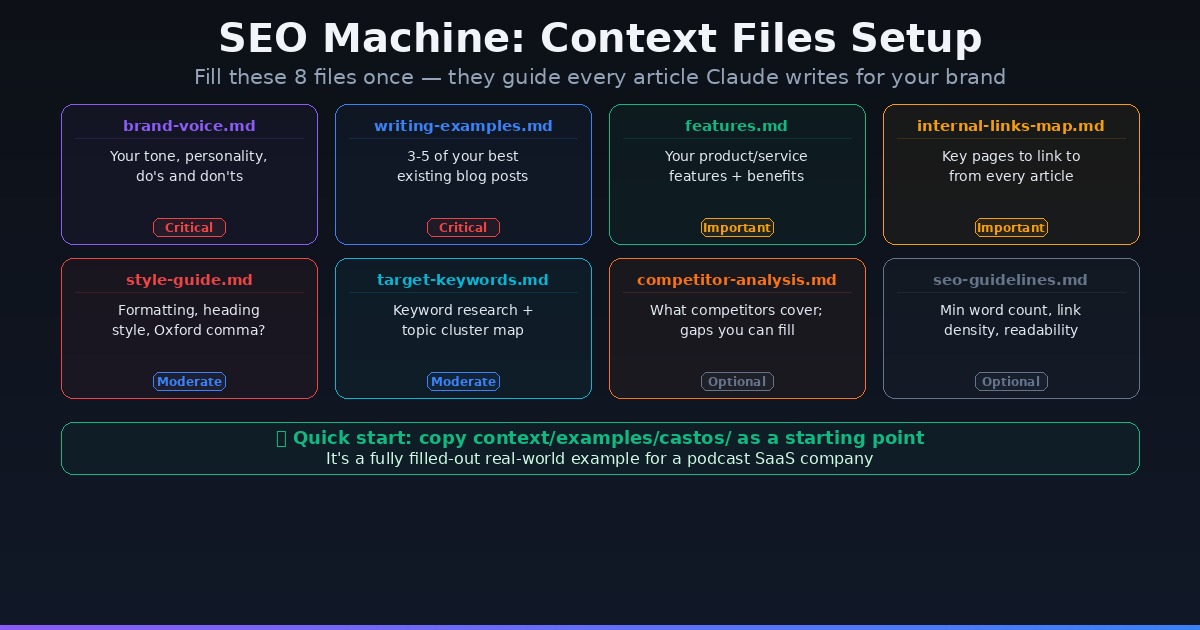
Here are the 8 files and what to put in each:
brand-voice.md (Critical)
Describe your brand's tone, personality, and writing do's and don'ts. Examples: "We write like a knowledgeable friend, not a textbook. We use contractions. We avoid corporate jargon. We never say 'leverage' or 'utilize.'" The more specific you are here, the more consistently Claude will match your voice.
writing-examples.md (Critical)
Paste in 3-5 of your best existing blog posts — the ones you're most proud of. Claude uses these as reference for pacing, structure, depth, and style. This is the fastest way to get consistent output.
features.md (Important)
List your product or service features and the benefits each one delivers. Claude uses this to naturally integrate your offering into relevant articles rather than awkwardly shoehorning a sales pitch.
internal-links-map.md (Important)
Map your key pages — the ones you most want to link to from blog content. Structure it as: page URL → target keyword → when to link. The Internal Linker agent reads this file after every /write run and suggests exactly where to place links.
style-guide.md (Moderate)
Formatting preferences: H2 vs H3 structure, bullet vs numbered lists, Oxford comma, preferred date format, whether you capitalize "internet," etc.
target-keywords.md (Moderate)
Your keyword research and topic clusters. Paste in your primary keywords, secondary variations, and any topic clusters you're targeting. Claude uses this to check keyword density and ensure new articles hit your targets without keyword stuffing.
competitor-analysis.md (Optional)
Add notes on what your top 3-5 competitors cover well, where their content is thin, and topics they haven't addressed. The /research-gaps command builds on this file to find opportunities.
seo-guidelines.md (Optional)
Your personal SEO rules: minimum word count, maximum link density, readability targets, required sections (FAQ, summary, etc.). The default file has sensible rules already in place — review and adjust for your standards.
Quick start tip: The repo includes a fully completed example for a fictional podcast SaaS company in examples/castos/. Copy those files as your starting point and edit from there — much faster than writing from scratch.
The Core Workflow
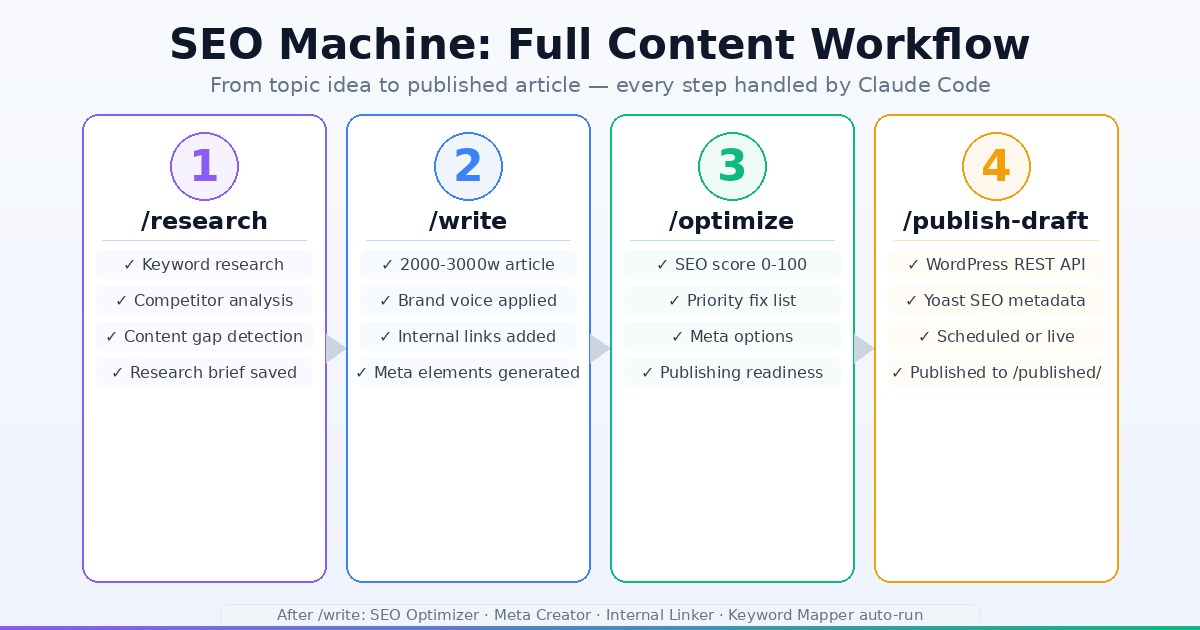
Step 1: Research
/research [topic]
Claude analyzes the top 10 search results for your topic, identifies gaps in what they cover, maps primary and secondary keywords, and generates a structured research brief. Output is saved to /research/brief-[topic]-[date].md.
Example: /research best project management tools for remote teams
The brief includes: primary + secondary keywords, competitor analysis summary, recommended article outline, internal linking strategy, and a preview of meta elements.
Step 2: Write
/write [topic or research brief]
With the research brief in hand, Claude writes a 2,000–3,000+ word article. It reads your brand-voice.md, writing-examples.md, internal-links-map.md, and target-keywords.md simultaneously. The article lands in /drafts/.
After writing, four agents run automatically:
- SEO Optimizer — on-page recommendations (keyword placement, header structure, internal linking)
- Meta Creator — generates 3-4 title + description options
- Internal Linker — maps where to add your internal links from your link map
- Keyword Mapper — keyword density and placement analysis
Step 3: Optimize
/optimize [draft file]
Final pass before publishing. Generates an SEO score from 0-100, lists priority fixes (e.g., "add H3 under second section," "increase keyword density in intro from 0.3% to 0.8%"), and produces a publishing readiness assessment.
Step 4: Publish
/publish-draft [file]
Pushes directly to WordPress via REST API with Yoast SEO metadata populated. If you're not on WordPress, you can export the draft and paste manually — the metadata (title, description, focus keyword) is always generated regardless.
Updating Existing Content
This is one of SEO Machine's more underrated features. Instead of starting fresh, you can run:
/analyze-existing [URL or file path]
Claude fetches and analyzes the existing post, evaluates its SEO performance, identifies outdated sections, scores it 0-100, and produces a prioritized rewrite brief. Then:
/rewrite [topic or analysis file]
Produces an updated version that refreshes stats, fills gaps, improves optimization, and preserves what already works — with a before/after comparison and change summary saved to /rewrites/.
For anyone with an existing blog that's been producing thin content, this workflow is immediately valuable.
Other Useful Commands
| Command | What it does |
|---|---|
/priorities |
Pulls GA4 + GSC data to identify your highest-impact content opportunities |
/research-serp [keyword] |
SERP analysis for a specific target keyword |
/research-gaps |
Content gap analysis vs competitors |
/research-trending |
Trending topic opportunities in your niche |
/scrub [file] |
Removes AI watermarks — em-dashes, filler phrases, robotic patterns |
/landing-write [topic] |
Conversion-optimized landing page instead of blog post |
/landing-audit [file] |
CRO audit on an existing landing page |
The /scrub command is worth noting. It specifically targets the patterns that AI-detection tools flag: overuse of em-dashes, opener phrases like "In today's rapidly evolving landscape," and formulaic sentence structures. Running it before publish gives you cleaner, more human-sounding output.
Data Integrations
SEO Machine connects to three data sources to make decisions based on actual performance rather than guesses:
Google Analytics 4 — The /priorities command pulls page traffic data to surface your underperforming articles with existing traffic (high impressions, low CTR) as rewrite candidates.
Google Search Console — Position data, click-through rates, and impression counts feed directly into the content prioritization workflow. If a page is ranking position 8-15 with significant impressions, SEO Machine flags it as a quick-win optimization target.
DataForSEO — Keyword difficulty, search volume, and SERP feature data inform the /research output so you're targeting keywords with realistic ranking potential.
Setup for all three is through API keys in the data_sources/ config files. If you only want to use the writing workflow without data integrations, you can skip this step entirely — the core commands work fine without it.
Who Should Use This
Content agencies running multiple client blogs benefit the most. The context file system lets you maintain separate brand voices, style guides, and keyword targets for each client in separate folders.
SaaS companies producing product-led content: load your feature list, competitor analysis, and internal link map once, then produce detailed comparison articles, tutorial posts, and feature explainers at consistent quality.
Affiliate bloggers who need volume with quality control: the /analyze-existing + /rewrite workflow on older thin content combined with fresh article production can significantly move the needle on organic traffic.
Solo founders who understand SEO but don't have time to write: SEO Machine lowers the time investment from 3-4 hours per article to 20-30 minutes of oversight while maintaining output quality.
What it's not ideal for: pure news/commentary content where you need a human perspective, or highly technical deep-dives where source accuracy is critical and Claude's knowledge cutoff matters.
Real Cost Breakdown
SEO Machine is free and open source. Your costs are:
- Claude Code — Anthropic charges per token through the API. A full research + write + optimize run on a 2,500-word article averages 60,000–120,000 tokens. At current pricing (~$3/million input + $15/million output), estimate $0.75–$2.50 per article.
- DataForSEO — Has a free tier with limited credits. Paid plans start at $20/month for higher volume.
- GA4 + GSC — Free from Google.
At 20 articles/month, API costs run roughly $15–$50 depending on article length and how many rewrites you run. For comparison, a single freelance blog post typically runs $150–$500.
Frequently Asked Questions
Do I need Claude Code specifically, or can I use another AI coding tool? SEO Machine's slash commands and agent system are built for Claude Code specifically. The context loading and agent auto-execution rely on Claude Code's architecture. You could adapt the context files for other systems, but out of the box it's a Claude Code workspace.
Can I use this without the WordPress integration?
Yes. The /publish-draft command is optional. Every article is saved as a markdown file in /drafts/ regardless. You can copy that into whatever CMS you use.
How does it handle multilingual content?
Claude's underlying models support multilingual output. You can specify language requirements in your style-guide.md or in the command itself: /write best project tools for remote teams — write in French.
Is there a risk of duplicate content across articles?
The research phase looks at your existing /published/ directory when identifying gaps, which reduces overlap. For competitive niches, running /research-gaps explicitly before writing new articles gives you a fuller picture of what you've already covered.
Can I run it on Windows? Claude Code itself is cross-platform. The Python dependencies (BeautifulSoup, nltk, etc.) are also cross-platform. Windows should work, though the setup experience is smoother on macOS or Linux. See our terminal beginners guide for Windows terminal setup if needed.
SEO Machine is the kind of project that gets GitHub-trending because it solves a real problem instead of demoing a capability. Keyword research, competitor analysis, brand-consistent writing, SEO scoring, and internal linking — all through slash commands in a tool you already pay for via API.
Running multiple AI tools for content production? See our breakdown of AI tools for content creators — and if you want an AI chatbot trained on your own brand content, CustomGPT lets you build one without writing any code.

Alex the Engineer
•Founder & AI ArchitectSenior software engineer turned AI Agency owner. I build massive, scalable AI workflows and share the exact blueprints, financial models, and code I use to generate automated revenue in 2026.
Related Articles

How to Start an AI-Assisted Resume Writing Side Hustle in 2026 (Beginner's Guide)
A step-by-step guide to using AI resume tools to offer a paid resume and cover letter writing service — what to charge, which tools to use, and how to find your first clients.

How to Build and Sell AI Voice Receptionists to Local Businesses in 2026
A beginner's guide to building AI voice agents that answer business phone calls — the tools to use, what to charge, and how to find your first client.

How to Make Money on Fiverr with AI Tools in 2026: 7 Gigs You Can Start This Week
Discover 7 real Fiverr gigs you can launch using free and low-cost AI tools in 2026 — no experience required. Real pricing data, step-by-step setup, and tools that actually work.