
Qwen3.6-27B Review: The 27B Model That Beats a 397B Giant on Coding
Alibaba's Qwen3.6-27B was released April 22, 2026. It scores 77.2% on SWE-bench Verified, outperforms a 397B MoE model, and runs on 18GB VRAM. Here's what you need to know.

Alibaba dropped Qwen3.6-27B on April 22, 2026 — and the benchmark story is impossible to ignore. A 27-billion parameter dense model just outscored a 397-billion parameter MoE giant on coding. If you run local AI, this is the model to watch in 2026.
Here's a full breakdown of what it does, how it compares, and exactly how to run it.
What Is Qwen3.6-27B?
Qwen3.6-27B is the first open-weight release from Alibaba's Qwen3.6 model family. It's a dense language model — meaning all 27 billion parameters are active on every token, unlike MoE (Mixture of Experts) models that only activate a fraction at a time.
It ships under the Apache 2.0 license, which means you can use it commercially, fine-tune it, and self-host it without paying Alibaba a cent.
Key specs at a glance:
| Spec | Value |
|---|---|
| Parameters | 27B (dense) |
| Context Length | 262K natively (up to 1M with extension) |
| VRAM Required | ~18GB (fits a single RTX 4090 or 3090) |
| License | Apache 2.0 |
| Release Date | April 22, 2026 |
| Vision | Yes (multimodal) |
The Benchmark That Matters: SWE-bench Verified
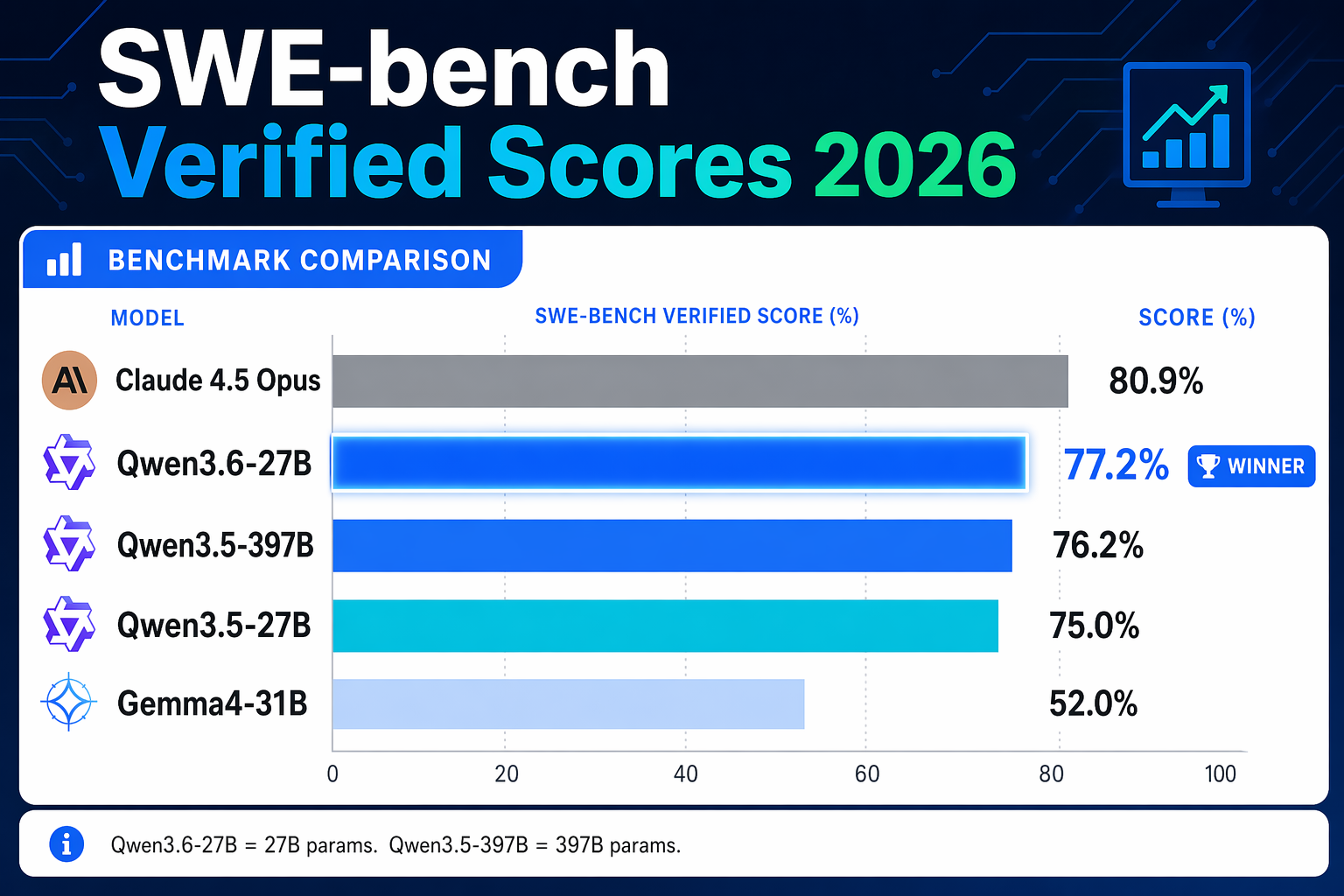
SWE-bench Verified is the gold standard for evaluating coding agents. It tests real-world software engineering tasks — finding bugs, writing fixes, navigating codebases. Here's how Qwen3.6-27B stacks up:
| Model | SWE-bench Verified | Parameters |
|---|---|---|
| Qwen3.6-27B | 77.2% | 27B |
| Qwen3.5-397B-A17B | 76.2% | 397B |
| Qwen3.5-27B | 75.0% | 27B |
| Claude 4.5 Opus | 80.9% | — |
The headline: a 27B model now outperforms a model nearly 15x its size on coding. Efficiency has reached a turning point.
On Terminal-Bench 2.0 — a benchmark testing autonomous terminal operation — Qwen3.6-27B scores 59.3%, matching Claude 4.5 Opus exactly and surpassing Qwen3.5-397B-A17B (52.5%).
What's Actually New in Qwen3.6
Agentic Coding
The model is explicitly designed for agentic workflows. It handles frontend development tasks, navigates entire repositories, and maintains reasoning context across long coding sessions. This isn't just an incremental update — Alibaba rebuilt the fine-tuning pipeline around real developer workflows based on community feedback.
Thinking Preservation
Qwen3.6 introduces a new feature called Thinking Preservation that retains reasoning chains from prior messages in the conversation. In practice, this means the model doesn't "forget" the logic it used three turns ago when writing code — it builds on it. That's a major quality-of-life improvement for iterative coding sessions.
Vision Encoder
The 27B model includes a vision encoder. You can send it screenshots, diagrams, and code photos. This makes it useful for frontend work where you're referencing UI mockups, or debugging by sharing error screenshots directly.
1 Million Token Context (Extendable)
The native context is 262,144 tokens — already massive. With the optional extension, it reaches 1,010,000 tokens. That's the entire codebase of most production apps loaded at once.
Hardware Requirements
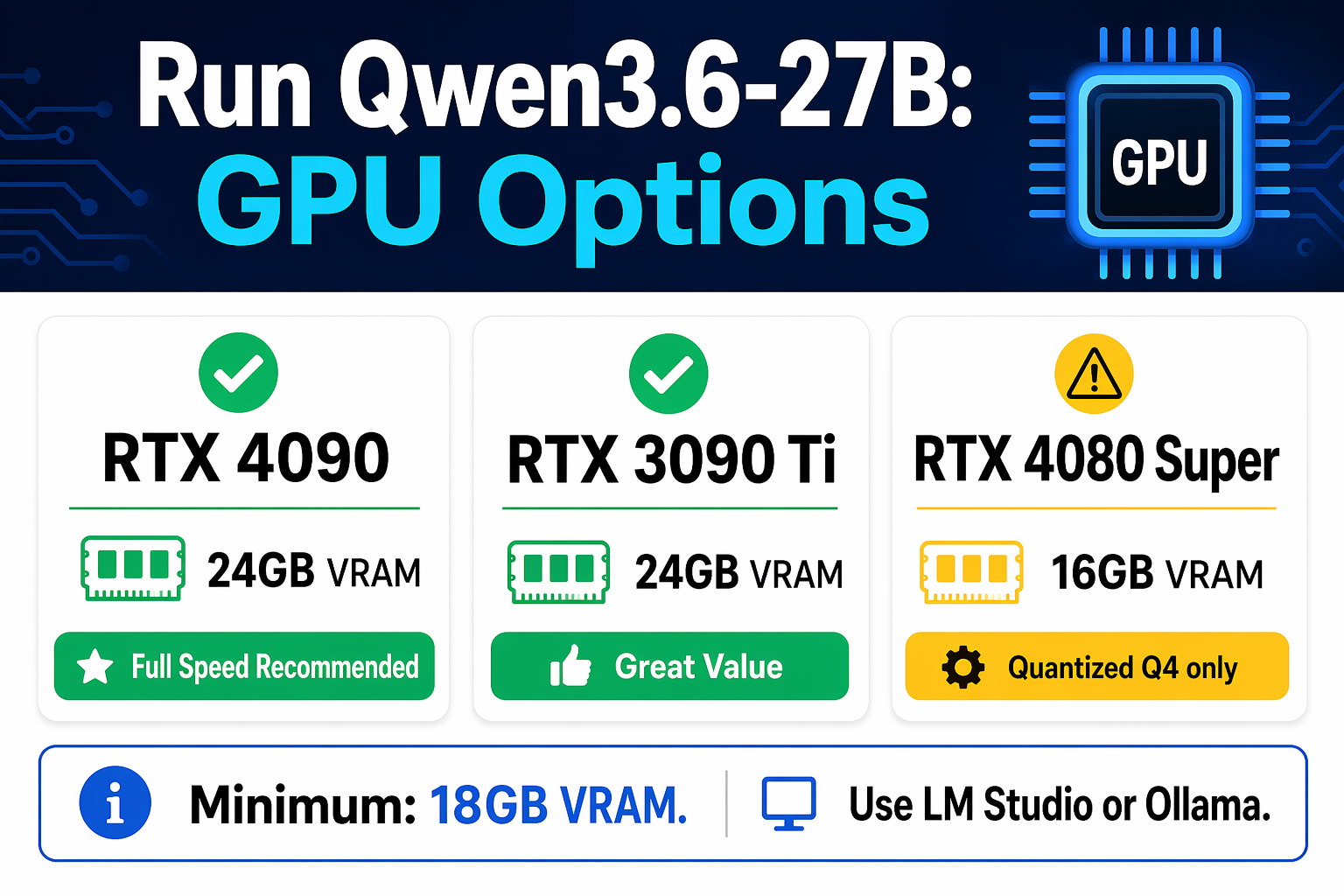
This is where Qwen3.6-27B shines for the local AI community: it runs on 18GB VRAM.
That puts it within reach of:
- RTX 4090 (24GB) — plenty of headroom
- RTX 3090 (24GB) — comfortable
- RTX 4080 (16GB) — possible with 4-bit quantization
- M2/M3 Max Mac (up to 128GB unified memory) — runs well via MLX
If you're not sure how much VRAM your machine has, check the VRAM guide for AI before downloading.
For quantized versions (Q4_K_M), expect ~15-16GB VRAM usage. That makes it accessible to the widest range of consumer hardware available today.
How to Run Qwen3.6-27B Locally
Option 1: Ollama (Easiest)
ollama pull qwen3.6:27b
ollama run qwen3.6:27b
If you're new to running models via the terminal, the terminal beginner's guide walks through everything from opening a terminal to running your first command.
Option 2: LM Studio (GUI)
- Open LM Studio
- Search for "Qwen3.6-27B"
- Download a GGUF variant (Q4_K_M recommended for 16-18GB VRAM)
- Load and chat
LM Studio is the easiest path if you prefer a graphical interface over command-line tools.
Option 3: Hugging Face + vLLM (Production)
pip install vllm
vllm serve Qwen/Qwen3.6-27B --max-model-len 32768
vLLM gives you an OpenAI-compatible API endpoint — perfect for building apps on top of the model.
Option 4: API (No Hardware Needed)
Qwen3.6-27B is available via the Qwen Studio API if you don't want to run it locally. The API pricing is competitive with GPT-4o-mini for most use cases.
Who Should Use This Model?
Developers and AI builders are the obvious target. If you're building code agents, autonomous coding pipelines, or any workflow that involves writing and debugging code, Qwen3.6-27B is the best open-weight option available right now at this size.
Local AI enthusiasts who have been waiting for a 27B model that punches at the 100B+ class should take note. This is the moment.
Entrepreneurs building AI-powered tools should consider wrapping it in a product interface. Platforms like CustomGPT let you build custom AI assistants on top of models like this — adding your own knowledge base, brand, and workflow — without writing infrastructure code.
Qwen3.6-27B vs Qwen3.6 Plus
You might already know Qwen 3.6 Plus — Alibaba's hosted model with the 1M token context window we covered in our Qwen 3.6 Plus review. What's the difference?
| Qwen3.6-27B | Qwen3.6 Plus | |
|---|---|---|
| Open weights | Yes (Apache 2.0) | No (API only) |
| Self-hostable | Yes | No |
| SWE-bench | 77.2% | Not published |
| Best for | Local AI, agentic coding | Chat, long-context analysis |
| VRAM needed | ~18GB | None (cloud) |
Frequently Asked Questions
Is Qwen3.6-27B free to use commercially? Yes. It's released under Apache 2.0, which allows commercial use, modification, and redistribution without royalties.
How does Qwen3.6-27B compare to Llama 4? In coding benchmarks, Qwen3.6-27B outperforms Llama 4 Scout (109B). For raw coding agent tasks, Qwen3.6-27B is the better choice right now.
What is Thinking Preservation? It's a feature that retains the model's internal reasoning chain from previous messages. Instead of each reply starting fresh, the model can reference the logic it used earlier in the conversation.
Can I run it on a Mac? Yes. On Apple Silicon with MLX, an M2/M3 Max with 32GB+ unified memory can run Qwen3.6-27B comfortably. Q4 quantized variants work well on 32GB.
Does it support function calling / tool use? Yes. Qwen3.6-27B supports structured tool calling, making it compatible with agent frameworks like LangChain, AutoGen, and CrewAI without extra configuration.
Where can I download it? On Hugging Face: Qwen/Qwen3.6-27B. GGUF quantized versions are available from community quantizers within hours of the original release.
What VRAM do I actually need? Full precision (BF16): ~54GB. 8-bit quantization: ~27GB. 4-bit quantization (Q4_K_M): ~15-17GB. The Q4 version fits on a single RTX 4090 or 3090 with room to spare.
Bottom Line
Qwen3.6-27B closes the gap between open-weight and frontier models on coding. Getting 77.2% on SWE-bench Verified from a 27B dense model — a score that beats a model 15x its size — is the kind of result that changes how people think about what "local AI" is capable of in 2026.
If you're running local models and you haven't downloaded this yet, it's worth testing. The hardware bar is reasonable, the license is commercial-friendly, and the benchmark results are real.
Want to build products on top of models like this? CustomGPT lets you wrap any open-weight model in a custom AI assistant without infrastructure headaches.

Alex the Engineer
•Founder & AI ArchitectSenior software engineer turned AI Agency owner. I build massive, scalable AI workflows and share the exact blueprints, financial models, and code I use to generate automated revenue in 2026.
Related Articles

How to Start an AI-Assisted Resume Writing Side Hustle in 2026 (Beginner's Guide)
A step-by-step guide to using AI resume tools to offer a paid resume and cover letter writing service — what to charge, which tools to use, and how to find your first clients.

How to Build and Sell AI Voice Receptionists to Local Businesses in 2026
A beginner's guide to building AI voice agents that answer business phone calls — the tools to use, what to charge, and how to find your first client.

How to Make Money on Fiverr with AI Tools in 2026: 7 Gigs You Can Start This Week
Discover 7 real Fiverr gigs you can launch using free and low-cost AI tools in 2026 — no experience required. Real pricing data, step-by-step setup, and tools that actually work.