
Apple's New Siri AI at WWDC 2026: What It Means for Every iPhone User
Apple unveiled Siri AI at WWDC 2026 — powered by Google Gemini, with on-screen awareness, image generation, and full conversation memory. Here is what changes for everyday iPhone users.
Apple just made every iPhone user an AI user — whether they intended to be one or not.
At WWDC 2026 on June 8, Apple announced Siri AI: a completely rebuilt version of Siri powered by Google's Gemini AI models under the hood. This is not a minor update. The original Siri — a voice assistant that set timers, played music, and fumbled most other requests — is gone. What replaces it is a conversational AI that can see your screen, search your personal data, generate images, and take actions across every app on your device.
Here is a complete breakdown of what was announced, what it actually does, which devices get it, and what it means for you.
What Is Siri AI? The Short Version
Siri AI is Apple's next-generation AI assistant, announced at WWDC 2026 and arriving in iOS 27, iPadOS 27, macOS 27, and visionOS 27 this fall.
The biggest technical change: Siri is now powered by Google Gemini through a multi-year partnership Apple announced alongside Nvidia. Instead of Apple's neural engine doing all the AI work alone, your requests can now route through Gemini — giving Siri dramatically more capability while Apple maintains its privacy-first architecture between on-device processing and cloud inference.
The result is an assistant that can genuinely hold a conversation, understand context across apps, and take action rather than just answer questions.
The 7 Biggest Things Siri AI Can Do That Old Siri Could Not

1. See and Understand Your Screen
Siri AI has what Apple calls "on-screen awareness." It can read whatever is currently visible on your display and answer questions about it — a webpage you are reading, a menu in an app, a document, an email, a product page. You no longer have to copy text and paste it into a separate app. Just ask Siri about what you see.
Example: You are on a restaurant menu website. You can ask "Is anything here vegetarian?" and Siri reads the menu on your screen to answer.
2. Search and Understand Your Personal Data
Old Siri could search your calendar. New Siri AI can search across messages, emails, photos, notes, and other apps — and it understands meaning, not just keywords.
Ask it to find "the photo of the sunset from the trip last August" and it knows what you mean. Ask "what did Sarah say about the budget last month?" and it finds the right conversation. This all happens privately, on your device, without your messages being sent to a server to process.
3. Take System-Wide App Actions
New "App Actions" let Siri complete multi-step tasks that span multiple apps. Instead of Siri telling you what to do, it does it for you. You can ask Siri to draft a reply to an email thread, create a calendar event based on something mentioned in a message, order a repeat of something you bought before, or file a support ticket — the capability depends on whether the app developer has added Siri integration, but Apple is opening the APIs to all developers.
4. Generate Images Directly
Image Playground is a new built-in image generation feature. Type a description — "a watercolor painting of a mountain cabin in winter" — and Siri AI generates it on your device. You can use generated images in messages, notes, presentations, or any compatible app.
This puts AI image generation inside every iPhone without needing a separate app, subscription, or service. For creative projects, social posts, or personal use, it is a meaningful capability addition.
5. Hold Real Conversations
Old Siri reset after every request. New Siri AI remembers context within a session — so you can ask follow-up questions naturally.
"What is the capital of Australia?" → "What is the population?" → Siri knows you still mean Australia. You can also reference previous answers: "Can you make that shorter?" or "Explain the third point in more detail." This is the conversational behavior people expected from Siri for a decade.
6. Monitor Web Pages with Safari Notify Me
A small but useful feature buried in the announcement: Safari now includes Notify Me, which lets you track a web page and get alerted when it changes. Set it on a product page to catch a restock. Set it on a news article to follow updates. Set it on a visa or application status page. This runs in the background and pushes an alert when the page changes, without you having to check manually.
7. Use a Standalone Siri App
There is now a dedicated Siri app that works like a proper AI chat interface — with full conversation history synced via iCloud across your iPhone, iPad, Mac, and Apple Watch. You can scroll back through previous conversations, continue from where you left off, and search past exchanges. This puts Siri on equal footing with ChatGPT and Claude as a daily chat tool, at least in interface terms.
What Devices Get Siri AI?
Siri AI requires recent hardware because of the processing demands. Here is what is supported:
- iPhone: iPhone 16 (all models), iPhone 15 Pro, iPhone 15 Pro Max
- iPad: iPad with M1 chip or later, iPad Pro, iPad Air M1+
- Mac: Any Mac with M1 chip or later
- Apple Watch: Series 9 or later (limited feature set)
If you have an iPhone 15 (standard, non-Pro), an iPhone 14, or anything older, you will not get Siri AI. This is a meaningful cut-off. The standard iPhone 15 — which is still a recent device — is excluded. This is likely to drive significant upgrade traffic toward iPhone 16 models when iOS 27 launches in fall 2026.
The Privacy Architecture: How Apple and Google Split the Work
Apple has spent years marketing privacy as its core differentiator against Google and Meta. Integrating Google Gemini is a notable shift, and the question of where your data goes is legitimate.
Apple's stated architecture works like this: requests that can be handled entirely on-device are handled on-device. Only requests that require broader knowledge — world information, complex reasoning, queries that go beyond your personal data — are sent to Gemini's servers. And when they are, Apple says the data is processed under Apple's privacy policies without building a persistent profile tied to your identity.
Whether you trust that depends on how much you trust Apple's enforcement of those policies on a third-party partner. For most users, it is a reasonable trade-off. For users with strict privacy requirements — enterprise, legal, medical — the on-device processing for personal data queries is worth understanding specifically.
Old Siri vs New Siri AI: What Actually Changed
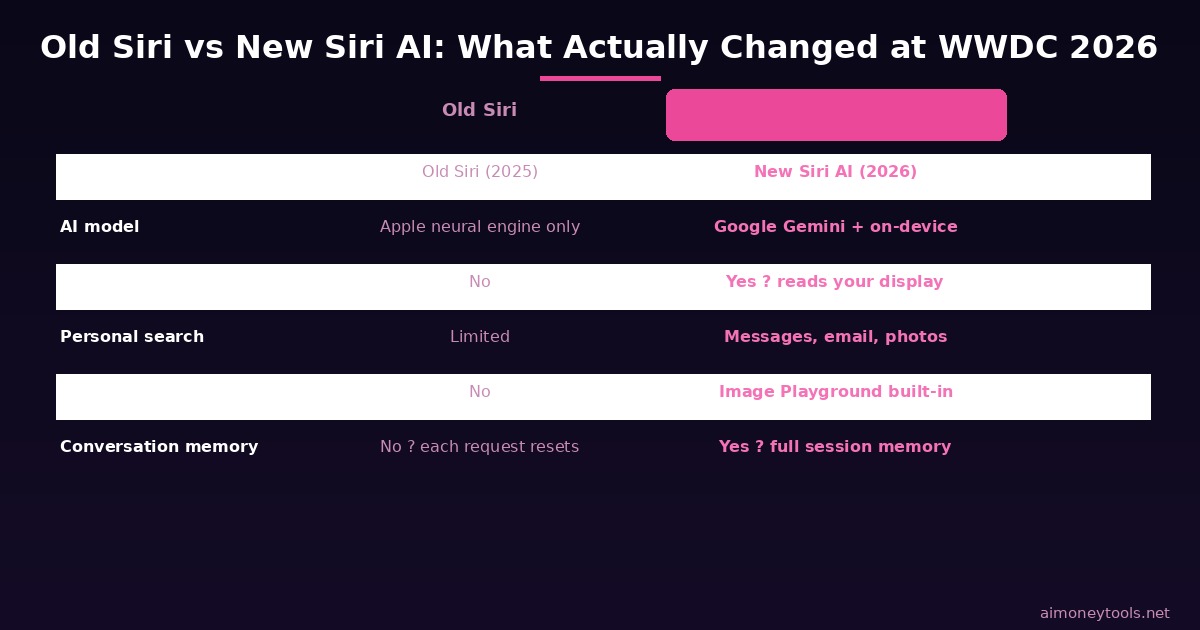
The comparison above shows the key differences. The headline shift: old Siri had no session memory, no screen awareness, no image generation, and no standalone app. It was a voice lookup tool that occasionally launched apps. New Siri AI is closer to having Claude or ChatGPT built into your phone — with the added advantage of integration with Apple's entire ecosystem.
When Does Siri AI Launch? And Is It Free?
Siri AI arrives in iOS 27, which Apple typically releases in September following a WWDC preview. A developer beta should land within weeks of the WWDC announcement. Public betas usually arrive in July.
The features described above are included with iOS 27 at no additional cost for supported devices. Image generation via Image Playground, web access, and the standalone Siri app are all part of the free iOS 27 update. Apple has not announced a paid tier for Siri AI, though developer API access to underlying Apple Intelligence features will likely have its own pricing.
Currently, iOS 27 is available in English only, with Siri AI launching initially in English for beta testing. Additional languages will follow, with Apple targeting rapid expansion ahead of the full fall release.
What This Means for AI Beginners
If you have been curious about AI tools — ChatGPT, Claude, Gemini — but have not gotten around to setting up accounts or learning how to use them, you now have an on-ramp built into your phone.
Siri AI is the lowest-friction way to start using AI in daily life. You do not need to:
- Create an account on a separate platform
- Learn prompt engineering
- Pay a monthly subscription
- Switch apps to access AI capabilities
You just talk to your phone the way you always have, except Siri actually works now.
That said, dedicated AI platforms still have clear advantages for power users. If you want to use AI for content creation, business tasks, building a custom chatbot for your website, or more complex workflows, tools like CustomGPT give you a level of customization and control that a general-purpose phone assistant cannot match. CustomGPT lets you upload your own documents and build a specialized assistant trained on your exact content — something Siri AI is not designed to do.
Think of Siri AI as the introduction to AI for people who haven't made the jump yet. For serious work, the dedicated platforms are still the better tool.
The Bigger Picture: Apple + Google Is a Strategic Shift
The Apple-Google Gemini deal deserves attention beyond the features list. For years, Apple kept its AI architecture entirely proprietary. Integrating a competitor's model — especially Google's — signals that Apple decided winning in AI is more important than the optics of the partnership.
This also gives Google an extraordinary distribution advantage. Apple has more than 1.5 billion active iPhones globally. Gemini is now the engine powering Siri for every one of those users who upgrades to iOS 27. For Google, this is arguably the biggest consumer AI distribution deal in history. For users, it means the quality floor for AI on iPhones just jumped significantly.
The Claude Mythos signals circulating on Twitter today (multiple sources indicating a possible Anthropic release tomorrow) suggest the competitive dynamics are accelerating fast. Apple's WWDC announcement, Anthropic's potential next move, and the ongoing competition between frontier labs are all happening in a compressed window.
Frequently Asked Questions
Is Siri AI free? Yes. Siri AI is included at no charge with iOS 27 for supported devices. There is no subscription required for the consumer features announced at WWDC 2026.
Which iPhone models support Siri AI? iPhone 16 (all models) and iPhone 15 Pro / iPhone 15 Pro Max. Standard iPhone 15 and all iPhone 14 models and earlier are not supported.
Does Siri AI send my messages and photos to Google? Apple's architecture keeps personal data queries (messages, photos, emails) on-device. Only general knowledge requests are sent to Gemini's servers, under Apple's privacy policies. Apple has stated that Google does not receive a profile of your activity.
Is Siri AI better than ChatGPT or Claude? Siri AI is deeply integrated with Apple's ecosystem — it can take actions across your apps and access your personal data in a way that ChatGPT or Claude cannot. For general reasoning, writing, and complex tasks, dedicated AI assistants like ChatGPT (GPT-5.x) and Claude (Opus 4.8) are still more capable. Siri AI's advantage is convenience and integration, not raw AI performance.
Can Siri AI build me a custom chatbot for my business? No. Siri AI is a personal assistant for your own device. For building a custom AI assistant trained on your business content, a no-code platform like CustomGPT is the right tool — it lets you upload documents, set your own instructions, and embed a chatbot on your website.
When will Siri AI come to languages other than English? Apple launched iOS 27 Siri AI in English first. Additional languages are expected to roll out in 2026–2027. Apple has not given specific language-by-language timelines beyond the initial English release.
Do I need to update to iOS 27 to get Siri AI? Yes. Siri AI is part of iOS 27, expected in fall 2026. The current iOS 26 does not include Siri AI features.
What is Apple Intelligence and how is it different from Siri AI? Apple Intelligence is the broader umbrella of AI features across Apple's platforms — including writing tools, photo editing, notification summaries, and image generation. Siri AI is the conversational AI assistant component within Apple Intelligence. They overlap significantly but are not the same: Apple Intelligence includes features that work without speaking to Siri.

Alex the Engineer
•Founder & AI ArchitectSenior software engineer turned AI Agency owner. I build massive, scalable AI workflows and share the exact blueprints, financial models, and code I use to generate automated revenue in 2026.
Related Articles

How to Install Python for AI in 2026: The Complete Beginner's Guide
Step-by-step guide to install Python 3.12 for AI on Windows, Mac, and Linux. Covers PATH setup, pip, virtual environments, and the core AI libraries every beginner needs.

Anthropic Is Going Public: What the IPO Means for Claude Users in 2026
Anthropic just filed confidential IPO paperwork with the SEC. Here is what that actually means for everyday Claude users, whether prices will change, and what happens next.