
Qwen 3.6 Plus: The Free AI With a 1 Million Token Memory (Beginner's Guide)
Qwen 3.6 Plus from Alibaba launched March 2026 with a 1 million token context window — bigger than ChatGPT. Here's what that means for you and how to try it for free.
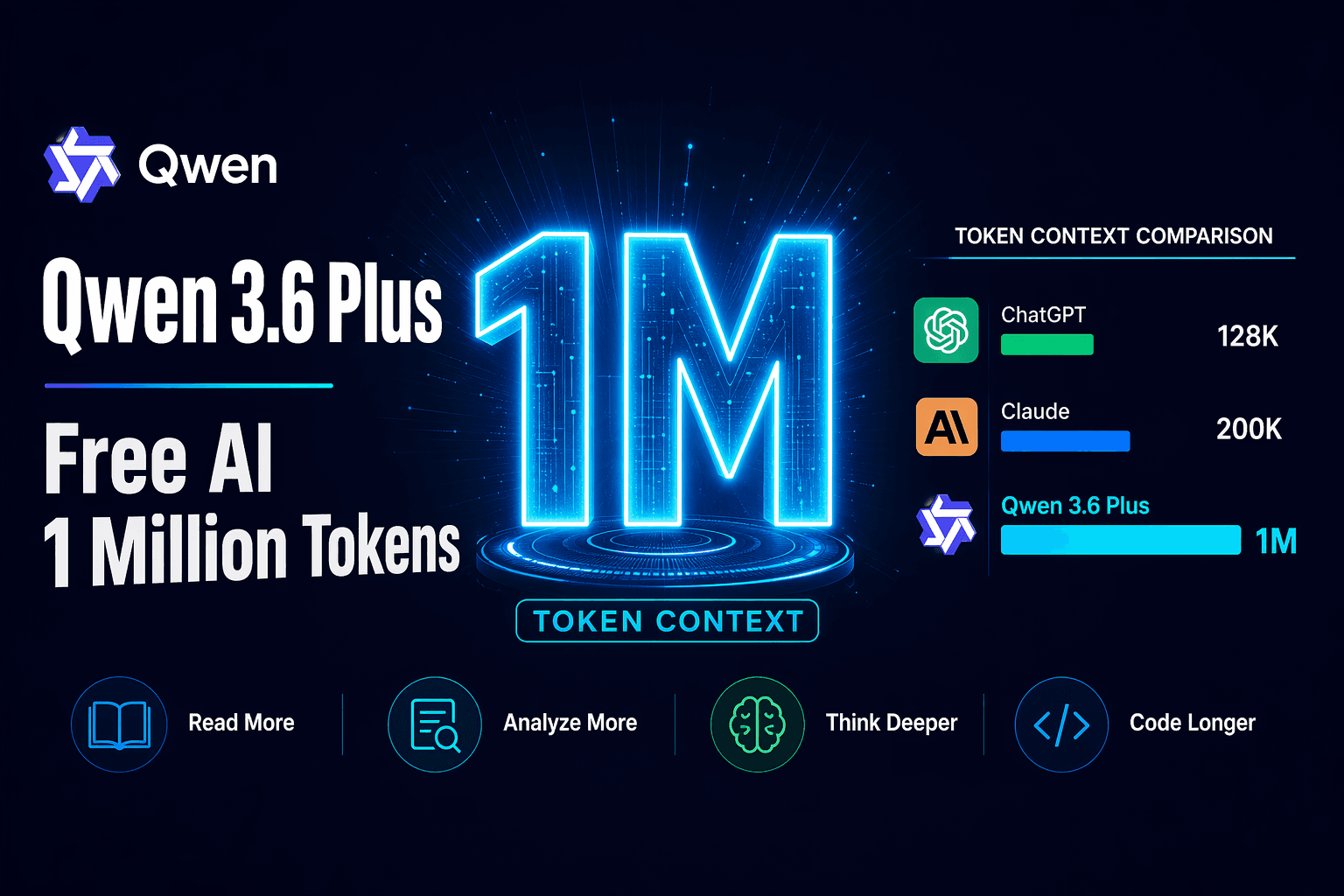
A new AI model just showed up from Alibaba — and the one number everyone keeps talking about is 1 million tokens.
That's Qwen 3.6 Plus, released on March 30, 2026. It's free to try, it's genuinely impressive, and if you haven't heard of it yet, this guide explains exactly what it can do and whether it matters to you.
What Is Qwen 3.6 Plus?
Qwen (pronounced "chwen") is Alibaba's AI model family. If you've used ChatGPT or Claude, this is the same category — a large language model you can type to and get intelligent responses from.
Qwen 3.6 Plus is their latest proprietary model. It sits at the high end of their lineup — more capable than their standard models, built specifically for tasks that require long thinking and multi-step reasoning.
The "Plus" tier from Alibaba has historically meant: powerful, API-accessible, and significantly cheaper than competing Western models. Qwen 3.6 Plus follows that pattern, and adds one upgrade that changes the game for a lot of use cases.
The 1 Million Token Context Window — What That Actually Means
Every AI has a "memory limit" — the maximum amount of text it can hold in its head at once. This is called a context window.
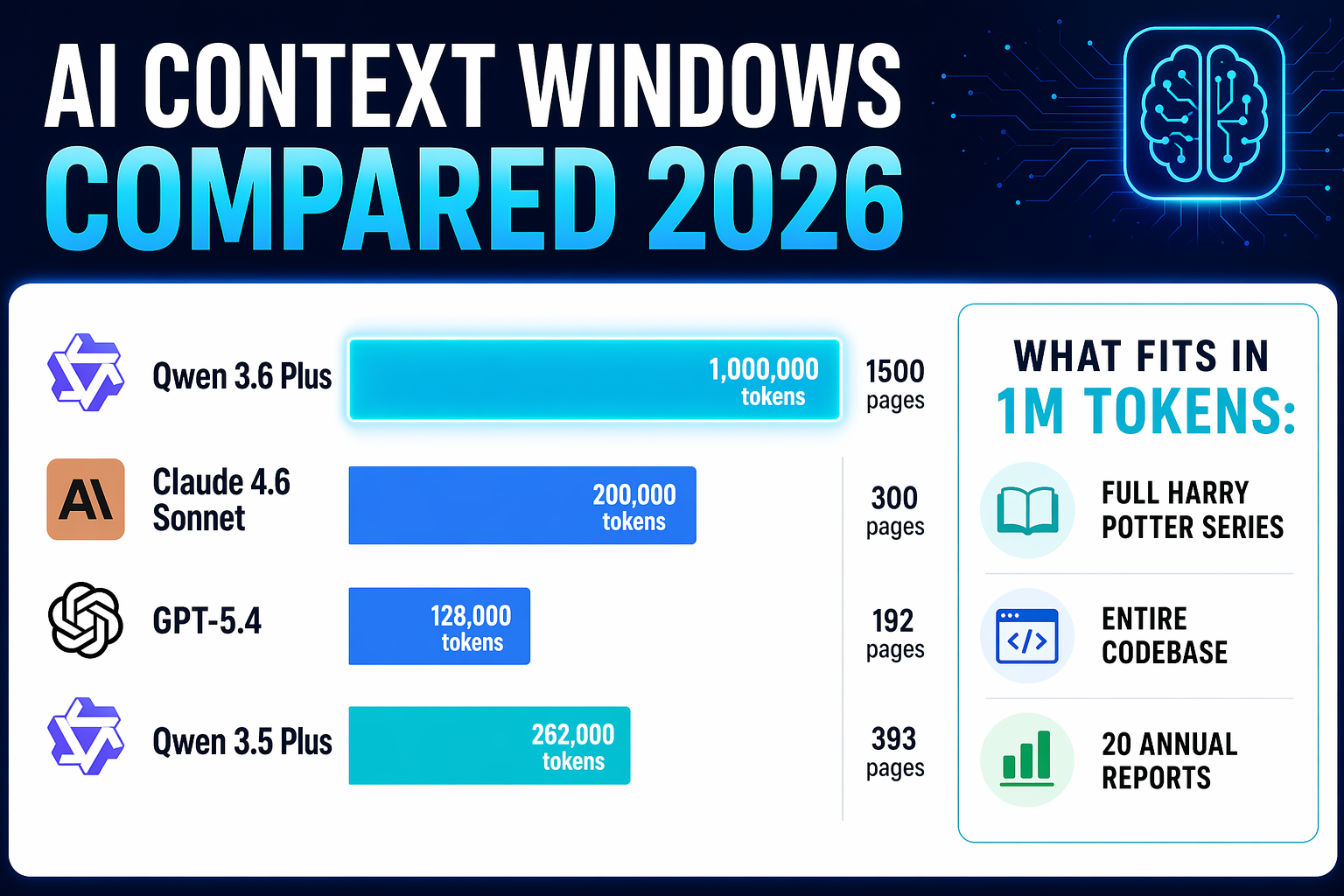
ChatGPT (GPT-5.4) has a 128,000 token context window by default. Claude 4.6 Sonnet sits at around 200,000. Qwen 3.6 Plus comes in at 1 million tokens.
To put that in plain terms:
- 1 million tokens = roughly 750,000 words
- That's approximately 1,500 pages of dense text
- The entire Harry Potter series is about 1 million words — so Qwen 3.6 Plus could, in theory, hold the full series in its context and answer questions about it
Its previous version, Qwen 3.5 Plus, had a 262,000 token window. The jump to 1 million is nearly a 4× increase.
Why the Context Window Matters for Real Tasks
Here are situations where a larger context window directly helps you:
Analyzing long documents — Instead of uploading a PDF and getting a summary, you can paste the entire thing and ask precise questions. Annual reports, legal contracts, academic papers — no truncation.
Long research sessions — The AI remembers everything you said in the conversation, even hours later. It doesn't "forget" early context the way smaller models do when conversations get long.
Working with your writing — Paste a whole book chapter, a full script, or a lengthy report and ask for edits, rewrites, or structural feedback.
Complex projects — If you're working on a business plan, a research project, or a technical document, you can keep the entire context in play across a long back-and-forth session.
What's New: Always-On Reasoning
Qwen 3.5 had a thinking/non-thinking toggle. You could choose "thinking mode" for hard problems or "fast mode" for quick answers.
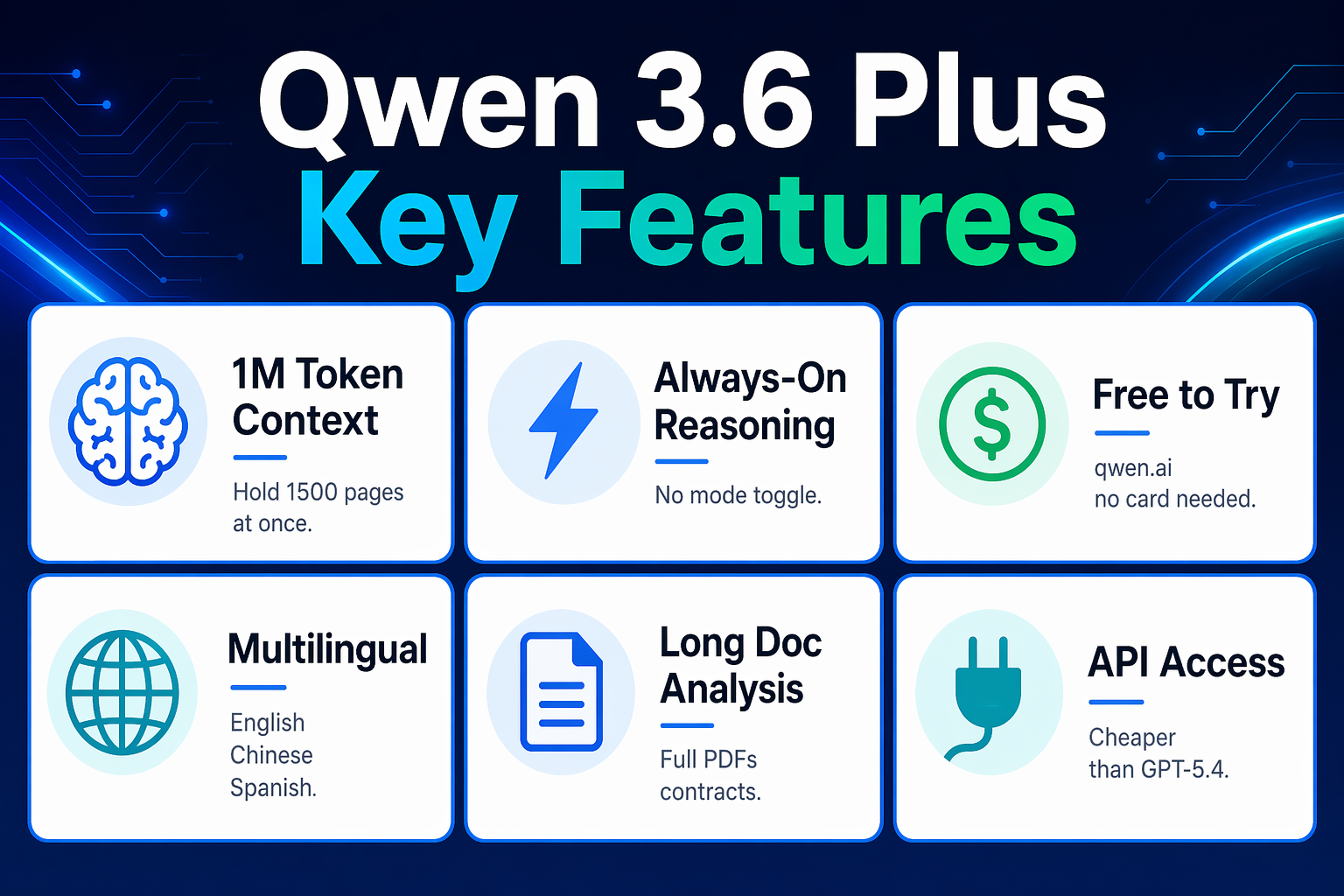
Qwen 3.6 Plus removes the toggle. Chain-of-thought reasoning is always on — but it adapts automatically. Simple questions get a brief, direct answer. Complex questions trigger deeper analysis. You don't have to configure anything.
This matters because you get better, more consistent answers without needing to remember to activate reasoning mode before asking a hard question. For beginners especially, this is a real improvement — the model just works well by default.
How to Try Qwen 3.6 Plus for Free
There are two main ways to access Qwen 3.6 Plus without spending anything upfront:
Option 1: Qwen Studio (No Account Required for Trial)
Go to qwen.ai — Alibaba's official Qwen interface. It functions like ChatGPT, but with access to Qwen models including the 3.6 Plus. The interface supports text conversations, document uploads, image understanding, and more. This is the easiest path if you just want to try it without any technical setup.
Option 2: OpenRouter (Free API Tier)
OpenRouter is a platform that gives you access to 100+ AI models through one account. Qwen 3.6 Plus was made available there on release day, including a free tier with rate limits.
OpenRouter is useful if you want to compare Qwen 3.6 Plus against other models side-by-side, or if you're connecting it to an AI tool that supports custom API endpoints (like TypingMind, OpenClaw, or similar apps).
To use it:
- Create a free account at openrouter.ai
- Search for
qwen/qwen3.6-plus-preview - Use it directly in the OpenRouter chat — no code needed
The free tier has usage limits, but it's enough to run real tests and form an opinion about whether the model works for your needs.
How Qwen 3.6 Plus Compares to ChatGPT
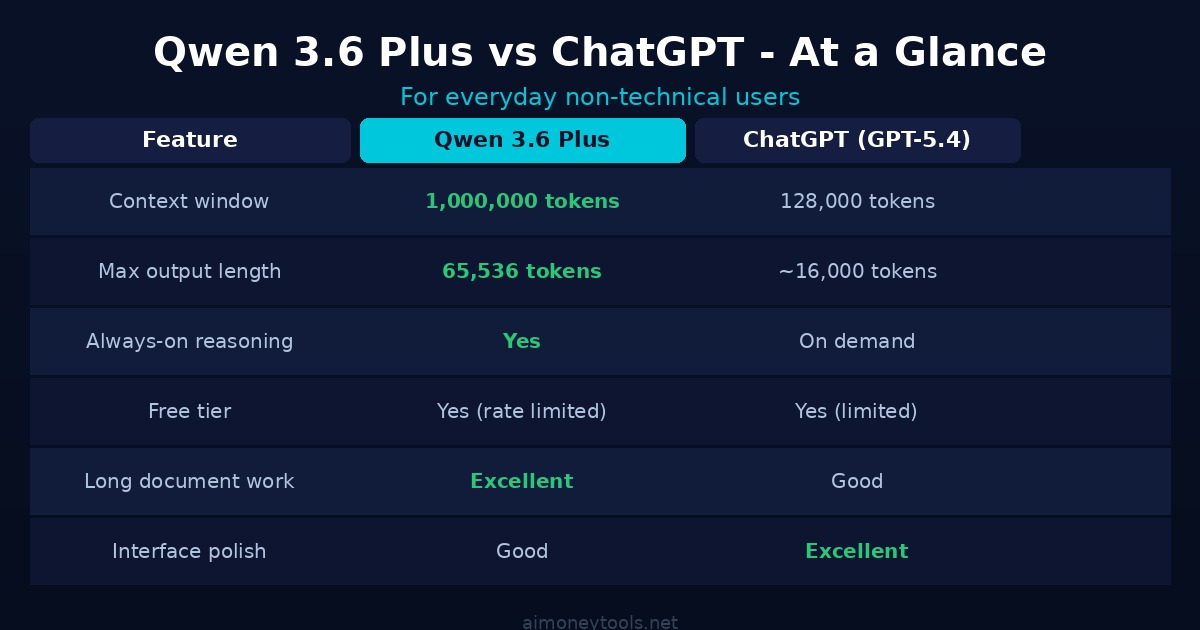
Here's an honest comparison for everyday use:
| Feature | Qwen 3.6 Plus | ChatGPT (GPT-5.4) |
|---|---|---|
| Context window | 1,000,000 tokens | 128,000 tokens |
| Max output length | 65,536 tokens | ~16,000 tokens |
| Reasoning | Always-on | On demand |
| Free tier | Yes (rate limited) | Yes (limited) |
| API cost | Cheaper | More expensive |
| Best for | Long documents, research, coding | General use, writing, conversation |
For most casual use, ChatGPT and Qwen 3.6 Plus are comparable in quality. Where Qwen 3.6 Plus pulls ahead is anything that requires holding more information in memory — long documents, extended projects, and research-heavy tasks.
For coding specifically, early testing from developers suggests Qwen 3.6 Plus is a significant step up from its predecessor. It handles multi-step coding tasks (read a file, make a change, test it, fix errors) better than most comparable free models. That said, it's API-only for now — no downloadable version for running locally.
Who Should Actually Use This?
You'll get the most value from Qwen 3.6 Plus if you:
- Regularly work with long documents (contracts, reports, research papers)
- Need to ask detailed questions across a large body of text
- Are building or testing AI tools and want a capable free model to work with
- Are cost-conscious and need more context than ChatGPT's default provides
It may not be your first choice if you:
- Prefer a well-polished consumer interface (ChatGPT and Claude have a head start here)
- Need image generation (that's a separate Qwen tool, not part of 3.6 Plus)
- Want to run the model locally on your own computer (no open weights yet)
The Bigger Picture: Why This Release Matters
Qwen 3.6 Plus is part of a broader pattern: Chinese AI labs are building models that are genuinely competitive with GPT-5.4 and Claude 4.6, and often making them available free or at significantly lower cost.
For people building AI-powered products or tools, this changes the economics. Qwen 3.6 Plus has been sitting at #5 on OpenRouter's usage rankings since shortly after release — that's not hype, that's developers actually switching to it.
The 1 million token context window is particularly significant because it opens up use cases that simply weren't practical before. Processing an entire legal case file. Summarizing a year's worth of meeting transcripts. Answering questions about a multi-hundred-page technical manual. These tasks either required expensive enterprise models or just weren't possible with standard tools.
Qwen 3.6 Plus makes them accessible at free or near-free pricing.
One Limitation Worth Knowing
Qwen 3.6 Plus is API-only. There are no downloadable model weights, which means you can't run it on your own computer or hardware. This is a conscious choice by Alibaba — the model is hosted on their infrastructure, and prompt and completion data may be used to improve the model (OpenRouter notes this on their listing).
If data privacy is a concern for your use case, that's worth factoring in before using it for sensitive documents.
Frequently Asked Questions
Is Qwen 3.6 Plus free to use?
Yes, there is a free tier available through OpenRouter and through Alibaba's own Qwen Studio at qwen.ai. The free tiers have rate limits, but are enough for regular individual use and testing. Paid API access is available for higher-volume needs.
What is a 1 million token context window?
It's the maximum amount of text the AI can "hold in memory" at once. 1 million tokens is roughly 750,000 words, or about 1,500 pages of dense text. This lets you paste very long documents directly into your conversation and get accurate, detailed answers about them.
How does Qwen 3.6 Plus compare to ChatGPT?
For everyday tasks, they're comparable. Qwen 3.6 Plus has a dramatically larger context window (1M vs 128K tokens) and is cheaper via the API. ChatGPT has a more polished interface and larger user community. For long-document analysis and extended research sessions, Qwen 3.6 Plus has an advantage.
Can I run Qwen 3.6 Plus locally on my computer?
Not yet. As of April 2026, Qwen 3.6 Plus is API-only — there are no downloadable model weights. You need to access it through Qwen Studio, OpenRouter, or the DashScope API. Alibaba's previous models have eventually received open-weight releases, so this may change.
Who makes Qwen and is it trustworthy?
Qwen is made by Alibaba Cloud, one of China's largest technology companies. The model itself functions like any other large language model. If you have concerns about data privacy, review Alibaba's data policies before using it for sensitive work, and note that OpenRouter discloses that prompt data may be used for model improvement.
What is the maximum output length for Qwen 3.6 Plus?
Qwen 3.6 Plus supports a maximum output of 65,536 tokens — significantly higher than most models. This makes it well-suited for generating long-form content, detailed analysis, or comprehensive code in a single response.
Is Qwen 3.6 Plus good for writing and content creation?
Yes. The long context window is particularly useful for writing tasks — you can paste in a full draft, outline, or reference document and get detailed feedback or rewrites in context. For content creators who work with long-form content, it's worth trying alongside your existing tools.

Alex the Engineer
•Founder & AI ArchitectSenior software engineer turned AI Agency owner. I build massive, scalable AI workflows and share the exact blueprints, financial models, and code I use to generate automated revenue in 2026.
Related Articles
How to Master AI Engineering in 30 Days (2026 Roadmap)
The exact 30-day path from zero to building real AI products — RAG chatbots, agents, production systems. What actually works in 2026.

Best Multi-Agent AI Systems for Small Business (2026)
Discover how multi-agent AI systems like Openclaw and CrewAI are replacing traditional software stacks for small businesses in 2026.
How to Connect to the OpenAI API: A 2026 No-Code Guide
Learn how to connect to the OpenAI API without writing code. Set up automated AI workflows and scale your side hustle using Make.com and API keys.