
Microsoft MAI-Thinking-1 Explained: Microsoft's First Reasoning AI Model (2026)
Microsoft launched MAI-Thinking-1 at Build 2026 — its first reasoning AI model. Here's what it is, how it compares to Claude and GPT, and what it means for everyday users of GitHub Copilot, PowerPoint, and Microsoft 365.
Microsoft just built its own AI models from scratch — and the results are impressive enough to turn heads.
At Microsoft Build 2026 on June 2, Satya Nadella announced MAI-Thinking-1, the company's first in-house reasoning AI model. Alongside it came six more models covering image generation, transcription, voice synthesis, and code assistance. Together they form the MAI model family, built by Microsoft's AI Superintelligence team entirely on commercially licensed data.
This matters for everyday users — if you use GitHub Copilot, Microsoft Copilot, PowerPoint, OneDrive, or VS Code, you're already using or will soon use MAI models without having to change anything.
What Is MAI-Thinking-1?
MAI-Thinking-1 is Microsoft's first reasoning model. Unlike standard language models that respond immediately, reasoning models "think through" complex problems step by step before answering — similar to how Claude Opus, GPT-o1, or DeepSeek-R1 work.
The key specs (verified):
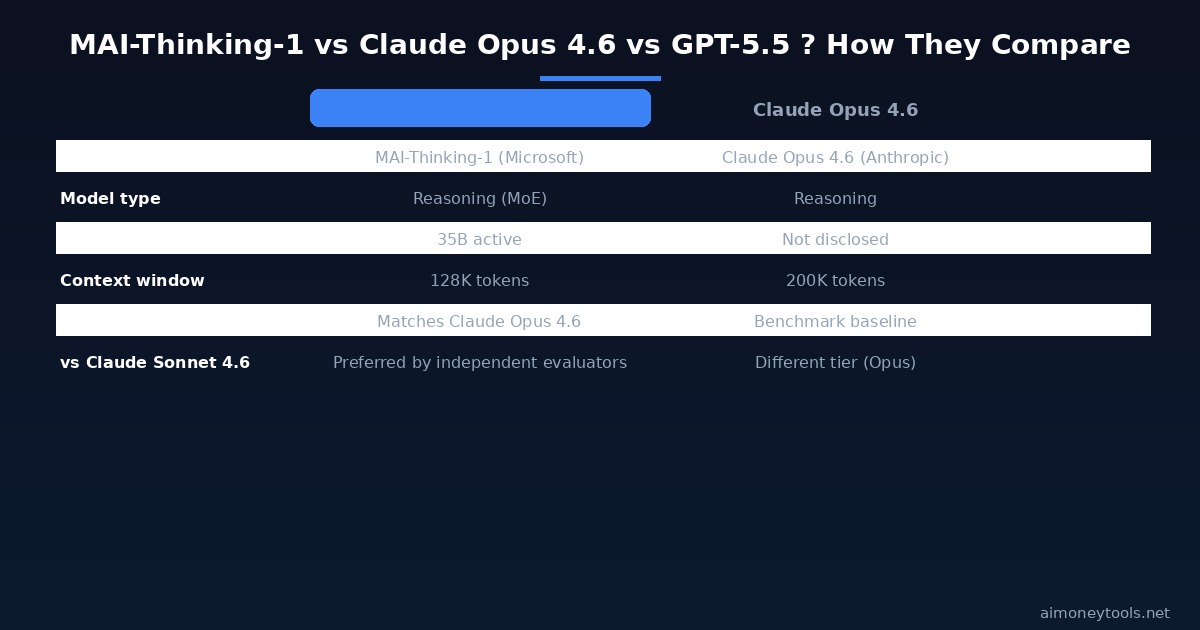
- 35 billion active parameters — mid-sized by current standards, similar to other efficient reasoning models
- 128K context window — enough for large codebases, long documents, or multi-step instructions
- Designed for: complex multi-step instructions, long context reasoning, and code generation
- Built from scratch on commercially licensed training data (no web scraping of copyrighted content)
How it compares to other models:
- Matches Claude Opus 4.6 on the SWE Bench Pro coding benchmark — a standard measure of AI ability to fix real-world software bugs
- Preferred over Claude Sonnet 4.6 by independent evaluators on broader reasoning tasks
That positions MAI-Thinking-1 roughly in the same tier as the upper-middle of today's frontier models — not the most powerful model available, but strong for its cost and efficiency focus.
Where you can try it: MAI-Thinking-1 is currently in private preview through Microsoft Foundry. A public preview and MAI Playground (a dedicated testing environment) are coming.
All 7 MAI Models: What Each One Does
Microsoft didn't launch just one model. Here's what each MAI model does and where it appears:

MAI-Thinking-1
Type: Reasoning model Available: Private preview, Microsoft Foundry Best for: Complex coding, multi-step problem solving, long-document analysis
MAI-Code-1
Type: Inference coding model (not reasoning — faster, cheaper) Available: Now in GitHub Copilot and VS Code Best for: Code completion, suggestions, bug fixes in everyday development
MAI-Image-2.5 (and MAI-Image-2.5 Flash)
Type: Text-to-image and image-to-model generation Available: Now live in PowerPoint and OneDrive; coming to Microsoft Foundry Best for: Creating presentation visuals, design mockups, auto-generated images from documents
MAI-Transcribe-1.5
Type: Speech-to-text transcription Available: Coming soon; supports 43 languages Best for: Meeting transcripts, voice notes, multilingual subtitles
MAI-Voice-2 (and MAI-Voice-2 Flash)
Type: Natural speech synthesis (text-to-speech) Available: Now live in 15+ additional languages with new voice options Best for: Voice assistants, accessibility features, Teams meeting narration
What This Means for Tools You Already Use
GitHub Copilot
MAI-Code-1 is now the inference model powering GitHub Copilot in VS Code and GitHub.com. You don't need to install anything — if you're a Copilot subscriber, you're already using it. MAI-Code-1 is optimized for speed and cost, so Copilot responses should be faster and cheaper to run on Microsoft's side.
PowerPoint and OneDrive
MAI-Image-2.5 is now live in PowerPoint's Designer feature. If you've ever used "Design Ideas" in PowerPoint to auto-generate slide layouts and visuals, MAI is the model handling it now. It's also coming to OneDrive for smart document summaries and image generation from files.
Teams and Outlook (Microsoft Scout)
Alongside the MAI models, Microsoft also announced Microsoft Scout — a proactive personal agent that handles scheduling, meeting prep, and routine tasks through Teams and Outlook without waiting for you to ask. It starts rolling out to Frontier (enterprise) customers first.
Microsoft's New Hardware: Surface RTX Spark Dev Box
On the hardware side, Microsoft announced the Surface RTX Spark Dev Box — a workstation powered by NVIDIA's RTX Spark chip:
- 1 petaflop of AI compute
- 128 GB of unified memory
- Runs models up to 120 billion parameters locally — that's enough for frontier-scale models without cloud API costs
If you're interested in running large AI models locally (like we covered in our Ollama + Open WebUI guide), this hardware points to where local AI is heading: laptop-class machines running models that previously required server-grade GPUs.
Where Will MAI Models Be Available?
Microsoft confirmed that MAI models will soon become available outside of its own products through third-party platforms:
- Fireworks AI — now generally available on Microsoft Foundry
- Baseten — coming soon
- OpenRouter — coming soon
This means developers will be able to call MAI-Thinking-1 via API on these platforms, similar to how you can call Claude or GPT-4o today.
How Does MAI-Thinking-1 Affect You?
This depends on how you use AI today:
If you're a Copilot / Microsoft 365 user: MAI-Code-1 is already powering your code suggestions. MAI-Image-2.5 is in your PowerPoint. You don't need to do anything differently — Microsoft is quietly upgrading the AI behind tools you already pay for.
If you're a developer: Watch for MAI-Thinking-1 in private preview on Foundry, and monitor OpenRouter for when it becomes available via API. If it holds its SWE Bench Pro performance at low cost, it could be an attractive option for coding-heavy workloads compared to Claude Opus 4.6 pricing.
If you're building an AI side hustle: More capable AI embedded in everyday tools means your clients get better results. The MAI-Image-2.5 model in PowerPoint, for example, makes AI-generated presentation design more accessible to non-technical small businesses — which is your opportunity if you're selling AI content or design services. Our AI automation agency guide covers how to package these tools into services.
If you're a beginner just exploring AI: MAI models are mostly running in the background of tools you might already use. The biggest visible change for you is MAI-Code-1 in GitHub Copilot if you write any code, and MAI-Image-2.5 in PowerPoint if you use Microsoft 365. Both are improvements to existing features, not new subscriptions.
Microsoft's Strategy: Independence from OpenAI
The launch of the MAI family signals something important: Microsoft is actively reducing its dependency on OpenAI.
For years, Microsoft's AI products (Copilot, Azure OpenAI Service, Bing) ran almost entirely on GPT models from OpenAI, where Microsoft has invested roughly $13 billion. The relationship remains, but building its own models gives Microsoft:
- Cost control — in-house models cost less to run than paying per-token to a third party
- IP ownership — models built on commercially licensed data can be used in enterprise contracts without copyright uncertainty
- Competitive differentiation — a model that matches Claude Opus 4.6 at lower cost is a real business advantage
This is the same move Google made with Gemini (replacing Google Brain's Bard), Meta with Llama, and Amazon with Nova. Microsoft is the last of the major cloud players to ship its own frontier-capable in-house models.
Frequently Asked Questions
Is MAI-Thinking-1 available to the public? Not yet for general use. It is in private preview via Microsoft Foundry as of June 2026. A public preview and dedicated MAI Playground are coming, but no date has been confirmed. MAI-Code-1 is already publicly available if you have GitHub Copilot.
Do I need a Microsoft account to use MAI models? For MAI-Code-1 via GitHub Copilot — yes, a Copilot subscription (free tier available for individual developers). For MAI-Image-2.5 in PowerPoint — yes, a Microsoft 365 subscription. For API access via Foundry or third-party platforms like OpenRouter — a developer account on those platforms, no Microsoft 365 required.
How does MAI-Thinking-1 compare to GPT-5.5 or Claude Fable 5? Microsoft has not published head-to-head benchmarks against GPT-5.5 or Claude Fable 5 (both released after Build 2026). What Microsoft verified: it matches Claude Opus 4.6 on SWE Bench Pro and was preferred over Claude Sonnet 4.6 by independent evaluators. It's designed as a cost-efficient reasoning model — comparable to the upper-middle tier, not the frontier. GPT-5.5 and Claude Fable 5 remain the strongest models overall.
What is the difference between MAI-Code-1 and MAI-Thinking-1? MAI-Code-1 is an inference model — fast and optimized for code suggestions in everyday use (GitHub Copilot). MAI-Thinking-1 is a reasoning model — slower, more expensive per call, designed for complex multi-step tasks. Think of it as the difference between a quick code autocomplete (Code-1) and a model that works through an architecture decision or debugs a complex bug from scratch (Thinking-1).
Can I use MAI models for free? MAI-Image-2.5 is included in Microsoft 365 (PowerPoint Designer). MAI-Code-1 via GitHub Copilot has a free tier for individual developers. MAI-Thinking-1 will eventually be priced as an API service — pricing has not been announced yet.
Will MAI replace ChatGPT or Claude for everyday use? Not anytime soon for general chat. MAI models are embedded in Microsoft's product stack (Copilot, 365, VS Code) rather than positioned as standalone chat interfaces. If you want a general-purpose AI assistant, ChatGPT and Claude still offer richer chat experiences. If you work inside Microsoft tools daily, you'll benefit from MAI automatically.
What is Microsoft Foundry? Microsoft Foundry is Microsoft's platform for enterprise AI development — similar to how Amazon Bedrock or Google Vertex AI work. It lets developers build and deploy AI applications using a mix of models (Microsoft's own MAI models, plus third-party models like Claude) with enterprise-grade governance, Azure data residency, and compliance features.
What happened to the rest of the Build 2026 announcements? MAI models were the main AI story but Build 2026 also included: Microsoft Discovery (scientific research platform, now generally available); Microsoft Execution Containers for Windows (agent-native sandboxing, in preview); and the Surface RTX Spark Dev Box announcement for local AI workloads.

Alex the Engineer
•Founder & AI ArchitectSenior software engineer turned AI Agency owner. I build massive, scalable AI workflows and share the exact blueprints, financial models, and code I use to generate automated revenue in 2026.
Related Articles

How to Start an AI-Assisted Resume Writing Side Hustle in 2026 (Beginner's Guide)
A step-by-step guide to using AI resume tools to offer a paid resume and cover letter writing service — what to charge, which tools to use, and how to find your first clients.

How to Build and Sell AI Voice Receptionists to Local Businesses in 2026
A beginner's guide to building AI voice agents that answer business phone calls — the tools to use, what to charge, and how to find your first client.

How to Make Money on Fiverr with AI Tools in 2026: 7 Gigs You Can Start This Week
Discover 7 real Fiverr gigs you can launch using free and low-cost AI tools in 2026 — no experience required. Real pricing data, step-by-step setup, and tools that actually work.