
How to Build and Sell AI Voice Receptionists to Local Businesses in 2026
A beginner's guide to building AI voice agents that answer business phone calls — the tools to use, what to charge, and how to find your first client.
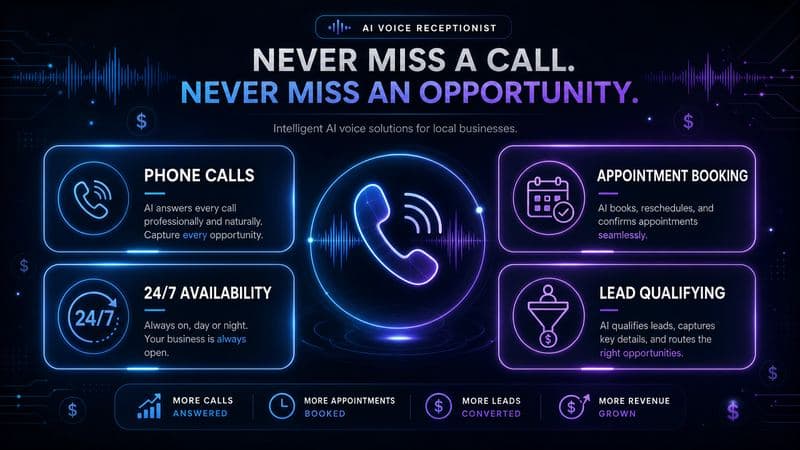
How to Build and Sell AI Voice Receptionists to Local Businesses in 2026
Every missed phone call is a missed customer for a small business. AI voice receptionists — automated phone agents that answer calls, book appointments, and qualify leads 24/7 — are one of the fastest-growing AI services beginners can build and sell in 2026, no coding required.
This guide covers the no-code tools to build one, what businesses actually pay, and how to land your first client this month.
What an AI Voice Receptionist Actually Does
Unlike a text-based chatbot, an AI voice receptionist answers real phone calls. It can:
- Answer common questions (hours, pricing, services)
- Book and reschedule appointments directly into a calendar
- Qualify leads before forwarding to a human
- Take messages and send them to the business owner via text or email
- Handle after-hours and overflow calls that would otherwise go to voicemail
The math is simple: a full-time human receptionist costs a business roughly $53,700/year in the US once salary and benefits are included, according to industry cost breakdowns. An AI voice receptionist typically costs the business $150–$300/month. That gap is the opportunity — you're the person who builds and manages it for them.
The No-Code Tools You'll Actually Use
You don't need to know how to code to build a working voice agent. Four platforms dominate this space right now:
| Tool | Best for | Notes |
|---|---|---|
| Bland AI | Simplest entry point | Per-minute pricing, easiest to get a call flow running fast |
| Retell AI | Appointment booking | Strong calendar integrations, good for service businesses |
| Vapi | Developers who want flexibility | More configurable, works well if you later want custom logic |
| Synthflow | No-code builders | Visual flow builder, good for beginners who want drag-and-drop |
All four offer free trial credits (commonly around $10) so you can build and test your first agent before spending anything. Start with Bland AI or Synthflow if you want the fastest path to a working demo.
Optional add-on: For businesses with a lot of FAQ content (menus, service lists, policies), you can connect a knowledge base like CustomGPT.ai to feed accurate answers into the voice agent's responses, so it doesn't hallucinate details about the business. This isn't required for a basic agent, but it noticeably improves answer accuracy for businesses with more complex offerings.
Disclosure: The CustomGPT.ai link above is an affiliate link.
Step-by-Step: Build Your First Voice Agent
1. Pick a niche
Don't try to serve every type of business. Pick one: dental offices, HVAC companies, salons, auto repair shops, or law firms are all strong starting points because they have high call volume and clear FAQ patterns.
2. Sign up and build a demo agent
Using Bland AI or Synthflow's free trial:
- Write a simple call script: greeting → identify the caller's need → route to booking, FAQ answer, or message-taking
- Record or select a voice (most platforms include several realistic voice options)
- Test the call flow yourself by calling the demo number the platform gives you
- Refine based on where the conversation breaks down
3. Connect a calendar (if offering appointment booking)
Retell AI and Synthflow both support direct calendar integrations (Google Calendar, Calendly). This is the single most valuable feature you can offer — businesses lose real revenue to unanswered calls that would have booked an appointment.
4. Create a short demo video
Record yourself calling your demo agent and screen-record the conversation. This is your single most effective sales tool — a 60-second video showing the agent actually working beats any written pitch.
A Simple Call Script to Start From
Most beginners overthink the script. Here's a basic structure that works for most service businesses:
Greeting: "Thanks for calling [Business Name], this is [Agent Name].
How can I help you today?"

Branch 1 — Booking request:
"I'd be happy to help you book an appointment. What day works best for you?"
→ Check calendar availability → Confirm time → Collect name and phone number

Branch 2 — General question (hours, pricing, services):
"Let me get that for you." → Answer from FAQ knowledge base
→ "Is there anything else I can help with?"

Branch 3 — Complex or unclear request:
"I want to make sure you get the right help — let me take your info
and have someone call you back within the hour."
→ Collect name, number, and brief reason for call
This three-branch structure covers roughly 80% of real call scenarios for most small businesses. Refine it after listening to a few real (or test) calls — you'll quickly see where callers get confused or the agent needs a clearer fallback.
Common Mistakes Beginners Make
Trying to handle everything with the AI. The best voice agents know when to hand off. Always build a clear "let me get someone to call you back" fallback for anything outside the script — a caller stuck in a confusing AI loop is worse than no automation at all.
Skipping the test-call phase. Call your own agent at least 10–15 times, from different angles (rushed caller, confused caller, angry caller) before showing it to a client. This is where you catch broken logic.
Underpricing to win the first client. It's tempting to offer your first agent for free or near-free. A small discount is fine, but working for free trains clients to undervalue the service — and makes it harder to raise prices later.
Ignoring the follow-up. After setup, check in with your client after the first week to review real call logs and fix anything that went wrong. This single step is what turns a one-time sale into a retained client.
What to Charge
Based on current market pricing for AI receptionist services, most small businesses pay in the $25–$300/month range depending on call volume and features, with $150–$300/month being typical for a small service business that wants full appointment booking.
A realistic beginner pricing structure:
- Setup fee: $200–$500 one-time (covers your time building and testing the agent)
- Monthly management: $99–$249/month (covers call minutes, your maintenance, and small script tweaks)
- Add-ons: Extra calendar integrations, CRM connections, or multi-language support at a premium
Many sellers structure this as setup + recurring retainer, which is where the real income comes from — one client at $150/month becomes predictable income, and 10 clients is $1,500/month in recurring revenue from work you mostly did once.
Where to Find Your First Client
You don't need a big audience to land your first deal. Here's what actually works:
Cold outreach to local businesses. Call or visit businesses in your chosen niche that you know have spotty phone coverage — after-hours calls going to voicemail is the tell. Offer a free demo call using their own business info.
Local Facebook groups and business associations. Many small business owners are active in local Chamber of Commerce or industry Facebook groups. A short demo video posted there generates interest fast.
Direct competitors' reviews. Search Google Maps reviews for local businesses in your niche and look for complaints like "never answered the phone" or "couldn't get through." Those businesses have a documented, provable problem you can solve.
Fiverr and Upwork. List "AI voice receptionist setup" as a service — this overlaps well with AI chatbot gigs already popular on freelance platforms, but voice agents face far less competition right now since most sellers are still focused on text-based chatbots.
A Note on Saturation
Some sellers online are asking whether this market is already saturated after voice agents went mainstream in 2025. In practice, most small businesses — especially outside major cities — still haven't heard of AI voice receptionists or don't know how to set one up themselves. The opportunity isn't in being first to market; it's in being the person who actually shows up, builds a working demo, and closes the deal. Niching down to one type of business and becoming known locally beats trying to compete broadly.
Realistic Income Timeline
- Week 1–2: Build 1–2 demo agents in your chosen niche using free trial credits
- Week 3–4: Reach out to 15–20 local businesses with a demo video; expect a handful of real conversations
- Month 2: First paying client at setup fee + monthly retainer
- Month 3–6: 3–5 clients at $99–$249/month each = $300–$1,200/month recurring, plus setup fees from new clients
This isn't overnight money — it requires real outreach and a working demo. But the recurring revenue model makes it more durable than one-off gig work once you have a handful of clients on retainer.
Getting Started
Sign up for Bland AI or Synthflow's free trial today and build one demo agent for a business type you already understand — even a business you've called yourself and noticed a gap in their phone coverage. Record your test call, and you have your first sales asset.
If you want to explore other AI-powered service ideas beyond voice agents, our guide on selling AI chatbots to local businesses covers the text-based version of this same opportunity — many sellers eventually offer both as a bundled package.
The tools are accessible, the market gap is real, and most local businesses have never been pitched this before. That's your opening.

Alex the Engineer
•Founder & AI ArchitectSenior software engineer turned AI Agency owner. I build massive, scalable AI workflows and share the exact blueprints, financial models, and code I use to generate automated revenue in 2026.
Related Articles
How to Start an AI-Assisted Resume Writing Side Hustle in 2026 (Beginner's Guide)
A step-by-step guide to using AI resume tools to offer a paid resume and cover letter writing service — what to charge, which tools to use, and how to find your first clients.
How to Make Money on Fiverr with AI Tools in 2026: 7 Gigs You Can Start This Week
Discover 7 real Fiverr gigs you can launch using free and low-cost AI tools in 2026 — no experience required. Real pricing data, step-by-step setup, and tools that actually work.