
How to Use Claude Code: A Beginner's Guide to Terminal AI Coding
Claude Code is Anthropic's terminal-based AI coding agent. This beginner's guide covers installation, first commands, key features, and how to use it for real coding tasks and side projects.

If you've been using Gemini CLI — or just heard that Google is shutting it down on June 18 — Claude Code is the most capable drop-in replacement available today.
But Claude Code is also worth learning on its own terms. It runs directly in your terminal, uses Anthropic's Claude Fable 5 model, and can read your files, write code, run tests, and reason through multi-step problems — all without leaving the command line.
This guide covers everything you need to get started as a beginner.
What Is Claude Code?
Claude Code is Anthropic's terminal-based AI coding agent. You install it once and then run it from any directory on your machine. From there you can:
- Ask it to write or refactor code in any language
- Have it read your existing project files and suggest improvements
- Run shell commands on your behalf (with your permission)
- Debug errors by analyzing your codebase
- Generate README files, documentation, tests, and boilerplate
- Work through multi-step tasks across multiple files in one session
It is not the same as using Claude in a browser. Claude Code has direct access to your local file system, which makes it dramatically more useful for actual development work. Think of it as a junior developer sitting next to you who can read all your files and type code on command.
What You Need Before You Start
System requirements:
- Mac, Linux, or Windows (with WSL2 recommended on Windows)
- Node.js version 18 or higher installed — check with
node --version - An Anthropic API key (free to create, small free credit given at sign-up)
- Basic comfort with a terminal (see our terminal basics guide if needed)
API key setup:
- Go to console.anthropic.com and create an account
- Under "API Keys", click "Create Key" — give it a name like "claude-code-local"
- Copy the key immediately — it starts with
sk-ant-and is only shown once
You'll use this key in the installation step below.
How to Install Claude Code

Open your terminal and run:
npm install -g @anthropic-ai/claude-code
This installs Claude Code globally so you can run it from any folder. Once installed, set your API key as an environment variable so Claude Code can authenticate:
Mac/Linux:
export ANTHROPIC_API_KEY="sk-ant-your-key-here"
To make this permanent (so you don't have to re-run it every session), add that line to your ~/.zshrc or ~/.bashrc file:
echo 'export ANTHROPIC_API_KEY="sk-ant-your-key-here"' >> ~/.zshrc
source ~/.zshrc
Windows (WSL2):
Add the same export line to your ~/.bashrc inside WSL2.
Verify the install worked:
claude --version
You should see the Claude Code version number. If you see "command not found", make sure your Node.js global bin path is in your PATH — run npm bin -g to find it and add it to PATH.
Your First Claude Code Session
Navigate to a project folder you want to work in:
cd ~/my-project
claude
This starts an interactive session. You'll see a prompt where you can type natural language instructions. Claude Code reads the files in your current directory and can act on them.
Try these starter commands:
> What files are in this directory? Give me an overview of the project.
> There's a bug in my login function in auth.js — can you find and fix it?
> Write a Python function that takes a list of URLs and checks which ones return a 200 status code.
> Add JSDoc comments to all functions in utils.js
Claude Code will show you a diff of any changes it wants to make and ask for your confirmation before writing anything to disk. You stay in control — it never edits files without your explicit approval.
Key Features Beginners Use Most
File-Aware Context
Claude Code reads your actual project files. When you ask "why is my login failing?", it doesn't just give generic advice — it looks at your code, spots the specific issue, and tells you exactly which line to fix. This is what makes it different from using Claude in a browser tab.
Multi-Step Task Chains
You can give Claude Code a longer task like "refactor this module to use async/await instead of callbacks" and it will work through the changes across multiple files, showing you each edit before applying it.
Shell Command Execution
Claude Code can run shell commands on your behalf — installing packages, running tests, checking git status. It always asks permission before running anything. You can whitelist common safe commands so it doesn't prompt every time.
CLAUDE.md Project Memory
Create a file called CLAUDE.md in the root of any project. Whatever you write in it, Claude Code reads at the start of every session. Use it to store project context:
# Project Context
- Stack: Node.js + Express + PostgreSQL
- Tests: run with `npm test`
- Do not edit /legacy/ folder — archived code only
- Follow Airbnb style guide for JS
This saves you from re-explaining your project every session. It's the single most useful thing you can set up as a regular Claude Code user.
Custom Slash Commands
In .claude/commands/, you can create markdown files that become reusable slash commands. For example, create .claude/commands/review.md with:
Review the last 3 commits using git log. For each changed file, check for:
- Logic errors
- Missing error handling
- Security issues (injection, XSS, hardcoded credentials)
Summarize findings in a numbered list.
Then in any session you can just type /review and Claude Code runs the full review workflow automatically.
What Claude Code Costs
Claude Code is billed on API usage — you pay per token used, not a flat monthly fee.
| Usage level | Estimated monthly cost |
|---|---|
| Light (personal projects, occasional use) | $3–8/month |
| Moderate (daily use, medium projects) | $10–25/month |
| Heavy (all-day coding, large codebases) | $40–80/month |
The default model is Claude Sonnet 4, which balances performance and cost. You can switch to Claude Fable 5 (the frontier model) for harder problems — it costs more per token but is significantly better at complex multi-file refactors and debugging.
To keep costs predictable, set a monthly spending limit in your Anthropic console under "Usage limits." Setting a $20 hard limit is a good starting point if you are new.
Claude Code vs the Alternatives
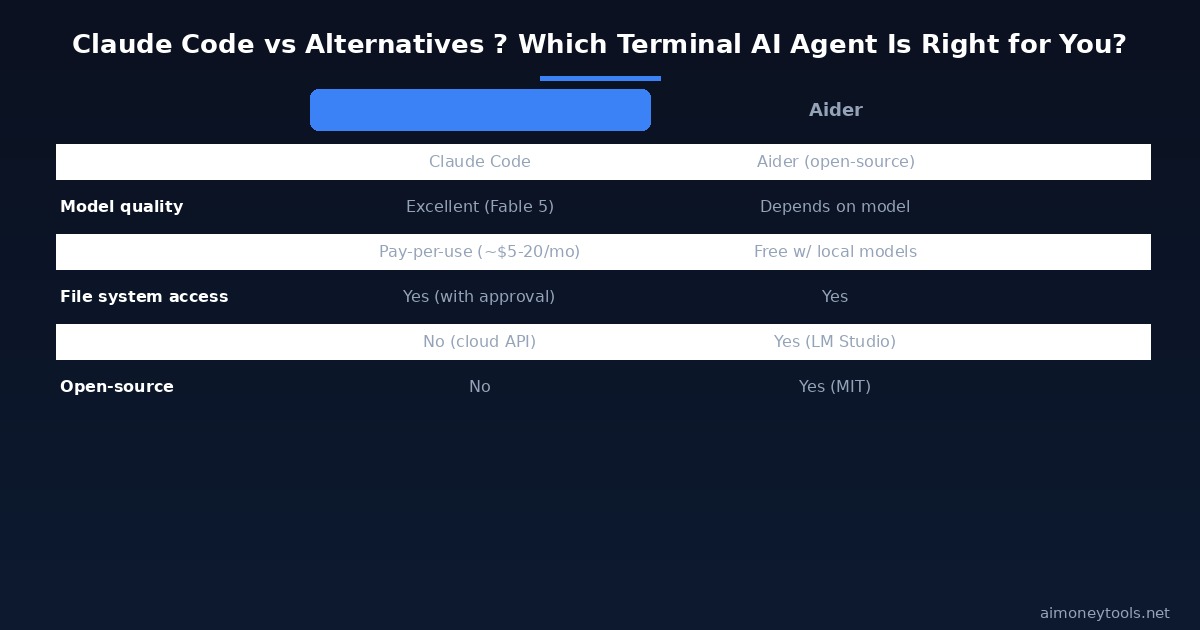
| Tool | Model | Free tier | Open-source | Best for |
|---|---|---|---|---|
| Claude Code | Claude Fable 5 | Small trial credit | No | Complex coding, reasoning, multi-file refactors |
| Antigravity CLI | Gemini (cloud) | TBA | No | Google ecosystem workflows |
| Aider | Any API endpoint | Yes (with local models) | Yes (MIT) | Open-source control, offline use |
| Cursor | Multiple | Yes (limited) | No | IDE users who want AI inline |
| GitHub Copilot | Multiple | No | No | IDE autocomplete focus |
Claude Code wins on reasoning quality — especially for debugging complex problems and working across large codebases. If cost is the main concern and you already have a local LM Studio setup (see our LM Studio + Llama 4 guide), Aider pointed at your local model is free.
Using Claude Code for Side Hustle Work
If you are using AI tools to build income streams, Claude Code is well-suited for:
Client scripts and automation: Many freelance developers charge $200–500 for short automation scripts (data scrapers, email processors, report generators). Claude Code can help you draft these faster, cutting your per-job time significantly.
Building micro-SaaS tools: Claude Code is strong at scaffolding new projects — setting up Express routes, database schemas, auth flows. You can go from idea to a working prototype in an afternoon, even as a beginner developer.
Content and data pipelines: If you build tools that process content (summarization, tagging, extraction), Claude Code can write the scripts while you handle the business side.
For businesses that want a client-facing AI product without building from scratch, CustomGPT lets you create a customized AI chatbot trained on your content — no terminal required.
If you need cloud GPU capacity for running larger models alongside your Claude Code workflow, Ampere offers cost-effective GPU instances built for AI inference workloads.
Frequently Asked Questions
Do I need to know how to code to use Claude Code? Some basic familiarity helps, but Claude Code is designed to be instructable in plain English. If you can describe what you want ("write a script that reads a CSV and sends each row to an API"), it can write and run the code. You will learn quickly by watching what it produces.
How is Claude Code different from using Claude in a browser? The browser version is stateless — it cannot see your files or run commands. Claude Code has local file system access, can execute shell commands (with your approval), maintains session context, and operates directly inside your project directory. It is fundamentally more capable for development work.
Is Claude Code safe to run on my machine? Claude Code asks permission before writing to files or running commands. You can review every change in the form of a diff before applying it. Avoid running it with elevated permissions on sensitive directories. Never include API keys or secrets in the files Claude Code reads — use environment variables instead.
What languages does Claude Code support? All major languages: Python, JavaScript, TypeScript, Go, Rust, Ruby, PHP, Java, C/C++, Bash, SQL, and more. It can also work with configuration files (YAML, JSON, TOML), Markdown, and Dockerfile content.
What is a CLAUDE.md file and do I need one? It is optional but strongly recommended. A CLAUDE.md file in your project root stores persistent context that Claude Code reads every session. Include your stack, test commands, style guide preferences, and any folders to avoid. This prevents repeating setup instructions each time you open a new session.
Can I use Claude Code without internet? No. Claude Code connects to Anthropic's API for all inference — it is not a local model. If you need offline AI coding, use Aider with a local LM Studio model.
My claude command is not found after install — what's wrong?
Your Node.js global bin directory is probably not in your PATH. Run npm bin -g to find the path (usually something like /usr/local/bin or ~/.npm-global/bin) and add it to your ~/.zshrc or ~/.bashrc. Then run source ~/.zshrc and try again.
How do I update Claude Code?
Run npm update -g @anthropic-ai/claude-code. Anthropic ships updates frequently — running a weekly update is good practice.

Alex the Engineer
•Founder & AI ArchitectSenior software engineer turned AI Agency owner. I build massive, scalable AI workflows and share the exact blueprints, financial models, and code I use to generate automated revenue in 2026.
Related Articles

How to Start an AI-Assisted Resume Writing Side Hustle in 2026 (Beginner's Guide)
A step-by-step guide to using AI resume tools to offer a paid resume and cover letter writing service — what to charge, which tools to use, and how to find your first clients.

How to Build and Sell AI Voice Receptionists to Local Businesses in 2026
A beginner's guide to building AI voice agents that answer business phone calls — the tools to use, what to charge, and how to find your first client.

How to Make Money on Fiverr with AI Tools in 2026: 7 Gigs You Can Start This Week
Discover 7 real Fiverr gigs you can launch using free and low-cost AI tools in 2026 — no experience required. Real pricing data, step-by-step setup, and tools that actually work.