
How to Use Claude Sonnet 4.6 API for Beginners (Complete Guide)
Step-by-step guide to set up Claude Sonnet 4.6 API with Python, Node.js, and cURL. 1M token context, $3/$15 per MTok pricing, and how to migrate from GPT-5.4.
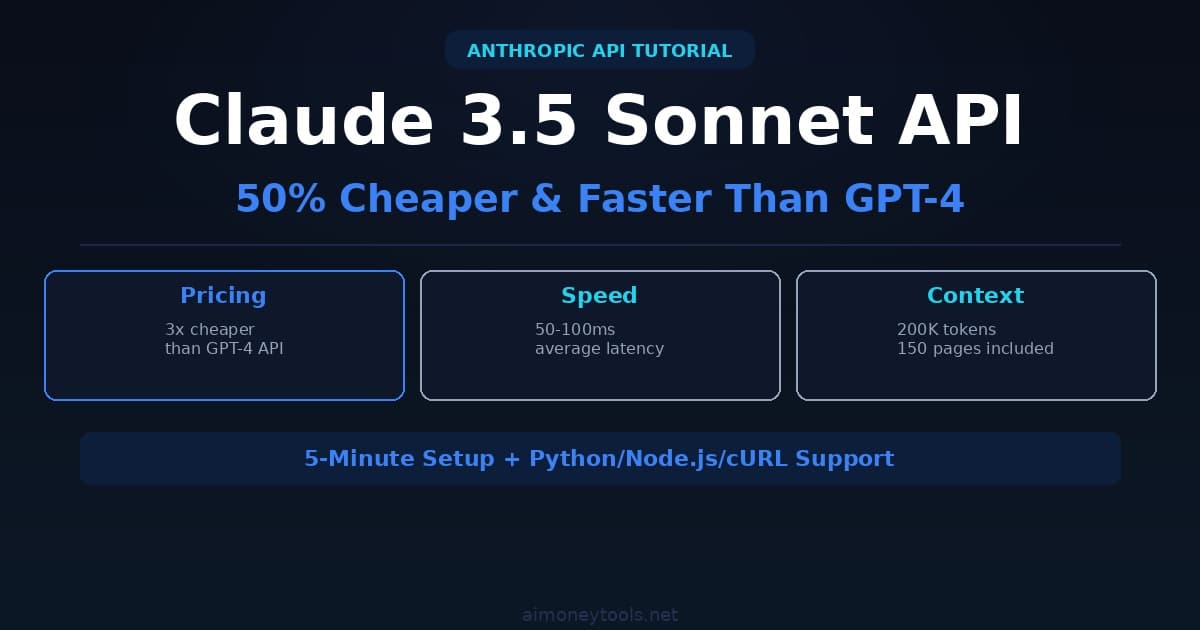
Claude Sonnet 4.6 is Anthropic's fastest production model as of April 2026. If you're coming from OpenAI's GPT-5.4, here's why Claude is worth the switch:
- 1M token context window — reads 750+ pages of text in a single call (GPT-5.4: 128K)
- $3/$15 per MTok (input/output) — same price as GPT-5.4 Turbo, but far more context
- Top reasoning — ranked #1 on instruction-following and structured output benchmarks
- API-compatible patterns — same structure as OpenAI SDK (migration is easy)
But the API setup intimidates beginners. Where do you get the API key? Which SDK? What's a token? This guide walks through every step — you'll have Claude running in 5 minutes.
What is Claude API?
Claude API lets you send text prompts to Claude and get responses programmatically. You pay per token (input + output), no monthly subscription required.
When to use Claude API:
- Building chatbots (customer support, lead qualification)
- Batch processing documents (summarization, extraction, classification)
- Automating content creation (blog drafts, email responses)
- Long-context tasks: analyze full codebases, PDFs, legal documents in one call
When NOT to use Claude API:
- One-off usage → use claude.ai web interface (free tier available)
- Need image generation → use DALL-E or Midjourney API instead
- Latency under 50ms → use Claude Haiku 4.5 (faster, cheaper: $1/$5 per MTok)
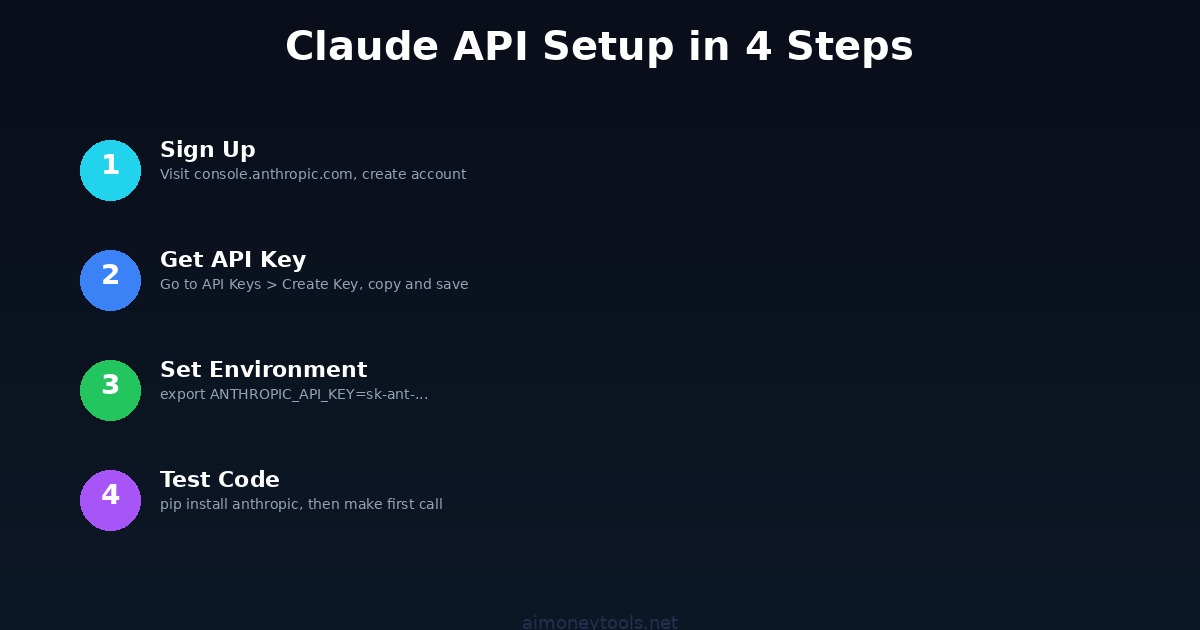
Step 1: Get an API Key
1.1 Create an Anthropic Account
Go to console.anthropic.com and sign up (email + password, no credit card for free tier).
1.2 Create an API Key
- Click API Keys in the left sidebar
- Click Create Key
- Name it
my-first-key(or anything) - Copy the key — save it now (you won't see it again)
Never share your key or commit it to Git. It grants full API access under your account.
1.3 Set Environment Variable
macOS/Linux:
export ANTHROPIC_API_KEY="sk-ant-..."
Windows (PowerShell):
$env:ANTHROPIC_API_KEY = "sk-ant-..."
Windows (Command Prompt):
set ANTHROPIC_API_KEY=sk-ant-...
Verify it's set:
echo $ANTHROPIC_API_KEY  # macOS/Linux
echo %ANTHROPIC_API_KEY%  # Windows
Step 2: Install the SDK
Claude has official SDKs for Python, Node.js, and Go. We'll cover Python (easiest for beginners).
Python:
pip install anthropic
Node.js:
npm install @anthropic-ai/sdk
Go:
go get github.com/anthropics/anthropic-sdk-go
Step 3: Make Your First API Call
Python
Create claude_hello.py:
import anthropic

client = anthropic.Anthropic()  # reads ANTHROPIC_API_KEY from env

message = client.messages.create(
    model="claude-sonnet-4-6",
    max_tokens=1024,
    messages=[
        {"role": "user", "content": "Explain quantum computing in one sentence."}
    ],
)

print(message.content[0].text)
Run it:
python claude_hello.py
Output:
Quantum computing uses quantum bits that exploit superposition and entanglement
to solve certain problems exponentially faster than classical computers.
Node.js
Create claude_hello.js:
import Anthropic from "@anthropic-ai/sdk";

const client = new Anthropic({ apiKey: process.env.ANTHROPIC_API_KEY });

async function main() {
  const message = await client.messages.create({
    model: "claude-sonnet-4-6",
    max_tokens: 1024,
    messages: [{ role: "user", content: "Explain quantum computing in one sentence." }],
  });
  console.log(message.content[0].text);
}

main();
cURL
curl https://api.anthropic.com/v1/messages \
  -H "x-api-key: $ANTHROPIC_API_KEY" \
  -H "anthropic-version: 2023-06-01" \
  -H "content-type: application/json" \
  -d '{
    "model": "claude-sonnet-4-6",
    "max_tokens": 1024,
    "messages": [
      {"role": "user", "content": "Explain quantum computing in one sentence."}
    ]
  }'
Step 4: Understand the Response Format
Every Claude call returns:
{
  "id": "msg-abc123",
  "type": "message",
  "role": "assistant",
  "content": [
    { "type": "text", "text": "Quantum computing uses quantum bits..." }
  ],
  "model": "claude-sonnet-4-6",
  "stop_reason": "end_turn",
  "usage": {
    "input_tokens": 15,
    "output_tokens": 25
  }
}
Key fields:
content[0].text— The actual responseusage.input_tokens— Cost:input_tokens × $3 / 1,000,000usage.output_tokens— Cost:output_tokens × $15 / 1,000,000stop_reason—end_turn(normal),max_tokens(truncated), orstop_sequence
Step 5: Build a Multi-Turn Conversation
Claude remembers history when you pass it explicitly. Here's a simple chatbot:
import anthropic

client = anthropic.Anthropic()
messages = []

def chat(user_input):
    messages.append({"role": "user", "content": user_input})

    response = client.messages.create(
        model="claude-sonnet-4-6",
        max_tokens=1024,
        system="You are a helpful assistant.",
        messages=messages,
    )

    reply = response.content[0].text
    messages.append({"role": "assistant", "content": reply})
    return reply

print(chat("What is Python?"))
print(chat("Give me 3 beginner project ideas."))
print(chat("Which one is easiest to start with?"))
Claude connects each message to the ones before — no extra setup needed.
Step 6: Add System Prompts
System prompts define Claude's behavior for the entire conversation:
response = client.messages.create(
    model="claude-sonnet-4-6",
    max_tokens=1024,
    system="""You are a friendly customer support agent for TechCorp Inc.
    - Be helpful and professional
    - Always offer a specific solution
    - If unsure, say "Let me find that for you" (never guess)
    - End every reply with "Is there anything else I can help with?"
    """,
    messages=[
        {"role": "user", "content": "My app keeps crashing. Help!"}
    ],
)

print(response.content[0].text)
Step 7: Migrating from GPT-5.4 to Claude Sonnet 4.6
If you're switching from OpenAI:
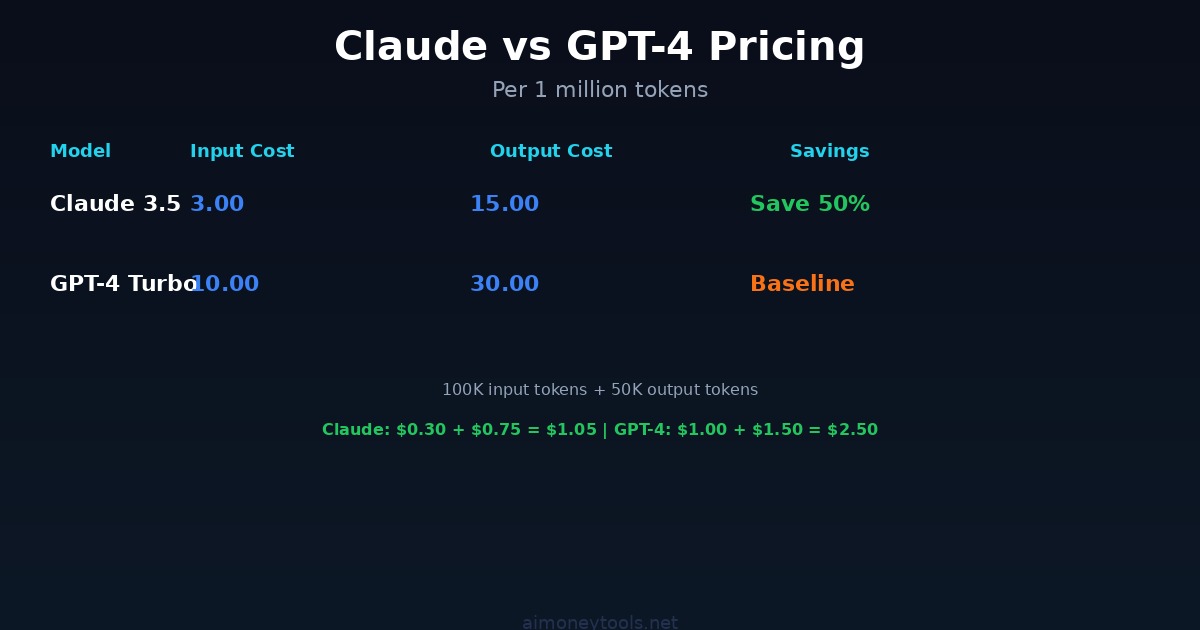
| Feature | GPT-5.4 Turbo | Claude Sonnet 4.6 |
|---|---|---|
| Cost (input) | $3 per MTok | $3 per MTok |
| Cost (output) | $15 per MTok | $15 per MTok |
| Context window | 128K tokens | 1M tokens |
| Reasoning | Strong | Strong |
| Vision | Yes | Yes |
| Function calling | Yes | Yes (tools) |
| Streaming | Yes | Yes |
The migration code is almost identical:
# Old (OpenAI)
from openai import OpenAI
client = OpenAI(api_key="sk-...")
response = client.chat.completions.create(
    model="gpt-5.4-turbo",
    messages=[{"role": "user", "content": "Hello"}]
)
text = response.choices[0].message.content

# New (Claude)
from anthropic import Anthropic
client = Anthropic(api_key="sk-ant-...")
response = client.messages.create(
    model="claude-sonnet-4-6",
    max_tokens=1024,
    messages=[{"role": "user", "content": "Hello"}]
)
text = response.content[0].text
Key differences:
messages.create()instead ofchat.completions.create()systemis a top-level parameter (not a role in messages)- Response is
content[0].textvschoices[0].message.content - No
temperatureby default (Claude's defaults are well-tuned)
Step 8: Pricing & Cost Optimization
Claude Sonnet 4.6 Pricing (April 2026)
- Input: $3 per 1M tokens
- Output: $15 per 1M tokens
- No monthly minimum — pay as you go
Example Real-World Costs
- Summarize a 10,000-word article: ~$0.02
- Customer support conversation (50 messages): ~$0.30–0.60
- Analyze a 300-page PDF (1M context): ~$1.50 input + responses
- Batch-process 1,000 documents: ~$20–40
Cost Optimization: Caching
If you call Claude repeatedly with the same large context (e.g., the same PDF or system prompt), enable prompt caching — saves up to 90% on cached tokens:
response = client.messages.create(
    model="claude-sonnet-4-6",
    max_tokens=1024,
    system=[
        {"type": "text", "text": "You are a helpful assistant."},
        {
            "type": "text",
            "text": "<<YOUR 100-PAGE DOCUMENT HERE>>",
            "cache_control": {"type": "ephemeral"}
        }
    ],
    messages=[{"role": "user", "content": "Summarize chapter 3."}],
)
First call caches the document. Each follow-up call costs ~90% less for that context.
Cost Optimization: Batch API
For non-urgent bulk jobs (1,000+ requests), use the Batch API to cut costs 50%:
# Submit 1,000 requests at once, get results within 24 hours
# Costs 50% less than real-time API
Troubleshooting
Error: "Invalid API Key"
Verify your key is exported:
echo $ANTHROPIC_API_KEY
If empty: re-run export ANTHROPIC_API_KEY="sk-ant-..." in the same terminal.
Error: "Model not found"
Use the exact string: claude-sonnet-4-6 (not claude-4, sonnet, or claude-4-6-sonnet).
Error: "Rate limited"
You're hitting per-minute limits. Add a retry with backoff:
import time
time.sleep(2)  # wait 2 seconds between calls
Or upgrade your usage tier on console.anthropic.com.
Error: "max_tokens too high"
Claude Sonnet 4.6 max output is 8,192 tokens. Set max_tokens=8192 as the ceiling.
Advanced: No-Code Claude Chatbots with CustomGPT
Want a custom chatbot trained on your documents without writing API code? CustomGPT wraps Claude's API with a visual builder:
- Upload your data (PDF, website, docs)
- CustomGPT trains on it automatically
- Get an embeddable chat widget
- Deploy to your website — no code needed
Practical use case: A support bot trained on your product FAQ → handles 70–80% of tickets automatically.
Key Takeaways
✓ Claude Sonnet 4.6 has a 1M token context window (reads 750+ pages in one call)
✓ Same price as GPT-5.4 Turbo at $3/$15 per MTok input/output
✓ Get API key from console.anthropic.com in 2 minutes
✓ Install: pip install anthropic
✓ Model string: claude-sonnet-4-6
✓ Multi-turn conversations: pass full message history each call
✓ Use prompt caching to cut costs 90% on repeated large contexts
✓ Migration from OpenAI is ~5 lines of code
Related Guides

Alex the Engineer
•Founder & AI ArchitectSenior software engineer turned AI Agency owner. I build massive, scalable AI workflows and share the exact blueprints, financial models, and code I use to generate automated revenue in 2026.
Related Articles

How to Start an AI-Assisted Resume Writing Side Hustle in 2026 (Beginner's Guide)
A step-by-step guide to using AI resume tools to offer a paid resume and cover letter writing service — what to charge, which tools to use, and how to find your first clients.

How to Build and Sell AI Voice Receptionists to Local Businesses in 2026
A beginner's guide to building AI voice agents that answer business phone calls — the tools to use, what to charge, and how to find your first client.

How to Make Money on Fiverr with AI Tools in 2026: 7 Gigs You Can Start This Week
Discover 7 real Fiverr gigs you can launch using free and low-cost AI tools in 2026 — no experience required. Real pricing data, step-by-step setup, and tools that actually work.