
How to Use ChatGPT for Business in 2026: The Practical Playbook
A no-fluff guide to using ChatGPT in your business today. From prompting basics to customer service, content, and when to upgrade to a custom AI tool.
ChatGPT turned three years old in 2026. In that time, it went from a novelty that impressed people at dinner parties to something that a lot of small businesses genuinely rely on every day.
If you are still unsure how to actually use it for your business — not just play with it — this is the guide you need. No hype. Just practical use cases, real prompting patterns, and honest advice on when ChatGPT is enough and when you need something more.
Why ChatGPT for Business Still Matters in 2026
With dozens of AI tools on the market, it is fair to ask whether ChatGPT is still the right starting point. The honest answer: yes, for most business owners.
Here is why:
- It handles 80% of common business writing tasks out of the box — emails, proposals, SOPs, social posts, job descriptions, onboarding docs
- The context window is large enough for real documents, not just quick answers
- The file upload and browsing features let it work with your actual data, not imaginary examples
- The learning curve is the lowest of any AI tool for non-technical users
That said, ChatGPT has real limits when you need something brand-specific, customer-facing, or deeply tied to your internal knowledge base. We will get to that.
7 Ways to Use ChatGPT for Your Business Right Now
1. First-Draft Everything
Stop staring at a blank page. Use ChatGPT to generate a working first draft of anything: client emails, proposals, invoices cover letters, meeting agendas, job postings. The draft will not be perfect, but it will be 70% there in 30 seconds — which means your total time investment drops from 40 minutes to 10.
Prompt to try:
"Write a professional follow-up email to a client who requested a quote from me 5 days ago and has not responded. Keep it warm, not pushy. My business does web design for small restaurants."
2. Customer Service Script Builder
If you have a team handling customer inquiries — or if you handle them yourself — ChatGPT is excellent at building response templates. Give it your common questions and it produces clean, on-brand answers you can save and reuse.
Prompt to try:
"Here are 3 common questions we get from customers. Write a friendly, professional response template for each. [paste questions]"
3. Content Planning and Outlines
If you run a blog, newsletter, LinkedIn page, or YouTube channel for your business, ChatGPT can generate a 3-month content calendar in minutes. You still need to write (or review) the content, but planning is the hardest part — and that is now instant.
Prompt to try:
"I run an accounting firm that helps small businesses. Give me 12 blog post ideas targeting first-time business owners, focused on topics they search when they are confused about taxes or cash flow."
4. Internal Documentation
Most small businesses run on undocumented tribal knowledge. ChatGPT can help you turn verbal processes into proper SOPs (Standard Operating Procedures) in an afternoon.
Prompt to try:
"I will describe how our client onboarding process works. Turn it into a clear, numbered SOP our team can follow. [describe your process in plain English]"
5. Ad Copy and Product Descriptions
A/B testing ad copy costs money. ChatGPT lets you generate 10 variations of a headline or description in 30 seconds — for free. Test better options before spending on paid traffic.
Prompt to try:
"Write 5 Google Ads headlines (max 30 characters each) and 3 description lines (max 90 characters each) for a local cleaning company in Winnipeg targeting homeowners."
6. Research and Summarization
Got a long industry report, a competitor's website, a legal contract, or a client brief you need to understand fast? Paste it in (or upload it) and ask ChatGPT to summarize it, extract the key points, or flag anything unusual.
Prompt to try:
"Summarize this 10-page marketing report in 5 bullet points. Highlight any metrics or recommendations that are directly actionable for a small business with a $2,000/month marketing budget."
7. Brainstorming Partner
This is underrated. ChatGPT is available at 2 AM when you are stuck on a decision. Use it to think out loud, stress-test ideas, or get an outside perspective on a business problem.
Prompt to try:
"I run a food delivery app and I am trying to decide between expanding to a second city now or focusing on improving retention in my current market first. What are the arguments for each, and what would you want to know to make this decision?"
How to Prompt ChatGPT for Business (The Short Version)
Bad prompts get generic results. Good prompts get useful ones. Three rules:
1. Give it context about your business. Don't say "write an email." Say "I run a bookkeeping firm that works with e-commerce stores."
2. Specify the output format. "Write 3 bullet points" or "write a 200-word email" is better than no instruction at all.
3. Tell it the audience. "For a non-technical business owner" or "for a hiring manager at a startup" will change the tone and vocabulary significantly.
The more specific you are, the less editing you need to do.
ChatGPT Free vs Plus vs Team: Which One Do You Need?
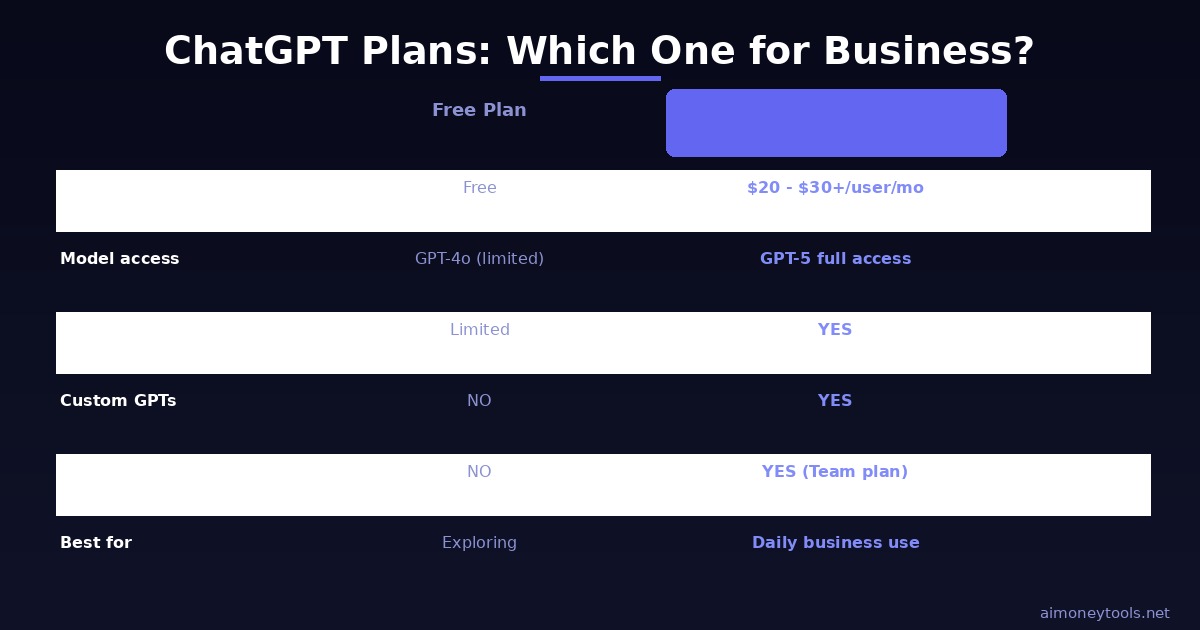
| Plan | Cost | Best for |
|---|---|---|
| Free | $0 | Exploring, light use, basic writing tasks |
| Plus | $20/mo | Solo operators using it daily for content and email |
| Team | $30/user/mo | Small teams who need shared workspaces and more context |
| Enterprise | Custom | Larger orgs needing data privacy and admin controls |
For most solo business owners and freelancers, Plus at $20/month is the right call — you get access to GPT-5, larger context, image uploads, and the ability to build custom GPTs.
If you are a team of 3 or more and you want shared memory and collaborative use, Team makes more sense.
When ChatGPT Is Not Enough
ChatGPT is a generalist. That is its strength and its limit.
If your business needs an AI that:
- Knows your specific products, pricing, and policies
- Can answer questions from customers on your website 24/7
- Handles booking requests, order lookups, or support tickets
- Stays within the boundaries of what your business actually offers
...then a general ChatGPT subscription will not cut it.
This is where purpose-built tools like CustomGPT are worth looking at. CustomGPT lets you build an AI trained on your own business content — your website, your documents, your FAQs — and deploy it as a customer-facing chatbot or internal knowledge tool. No coding required.
The practical difference: instead of ChatGPT making something up when it does not know your refund policy, your custom AI says exactly what your policy is, because that is what it was trained on.
Getting Started: 5 Steps to Use ChatGPT Effectively Today

Step 1: Sign up or upgrade to Plus Go to chat.openai.com and either create a free account or upgrade to Plus if you plan to use it daily.
Step 2: Write a "context block" for your business Keep a short paragraph describing your business in your notes app: what you do, who your customers are, your tone of voice. Paste it at the start of any chat when you need brand-specific output.
Step 3: Start with one repeating task Pick one thing you do every week — a newsletter, a client report, a social post — and start using ChatGPT for the first draft every time. Build the habit before expanding.
Step 4: Save your best prompts When a prompt gets you a great result, save it. Build a personal prompt library. This is the leverage that compounds over months.
Step 5: Upgrade when you need customization Once you hit the limits of what a general AI can do for your business (customer-facing use cases, knowledge base integration), explore CustomGPT or similar tools.
Related Reading
- Best ChatGPT Alternatives in 2026
- Claude API Tutorial for Beginners
- How to Make Money With AI in 2026
- AI Automation Ideas for Small Business 2026
Frequently Asked Questions
Is ChatGPT good for small business?
Yes. ChatGPT is one of the most practical AI tools for small businesses because it handles writing, research, customer communication, and documentation without any technical setup. Most small business owners see time savings on routine tasks within the first week.
How do I use ChatGPT for customer service?
You can use ChatGPT to build response templates for common questions, draft replies to difficult customer emails, and write your FAQ page. For a full customer-facing chatbot that knows your specific business, a tool like CustomGPT is a better fit since it can be trained on your actual content.
What is the difference between ChatGPT Free and ChatGPT Plus?
Free gives you access to GPT-4o with usage limits. Plus ($20/month) gives you higher limits, access to GPT-5, image and file upload, advanced data analysis, and the ability to create custom GPTs. For daily business use, Plus is worth the cost.
Can I use ChatGPT to write emails?
Yes. This is one of the strongest use cases. Give ChatGPT context about your business and the situation, and it can draft professional emails, follow-ups, proposals, and client communications quickly. You review and adjust the tone before sending.
Is ChatGPT safe to use for business data?
ChatGPT Plus and Team plans have privacy settings that prevent your conversations from being used for training data. For highly sensitive information (legal, financial, patient data), you should use the Enterprise plan or a self-hosted solution. Do not paste passwords, confidential contracts, or private customer data into any AI tool without verifying the privacy terms.
What is a Custom GPT and do I need one?
A Custom GPT is a version of ChatGPT you configure with specific instructions and optionally trained on your own documents. You can build one inside ChatGPT Plus using the GPT Builder. For a customer-facing AI trained on your full website and knowledge base, a dedicated product like CustomGPT handles that more robustly.
How much does ChatGPT cost for a team?
ChatGPT Team is $30 per user per month (as of 2026), which includes collaborative workspaces, shared custom GPTs, and higher context limits. Enterprise pricing is custom based on scale and security requirements.

Alex the Engineer
•Founder & AI ArchitectSenior software engineer turned AI Agency owner. I build massive, scalable AI workflows and share the exact blueprints, financial models, and code I use to generate automated revenue in 2026.
Related Articles

How to Start an AI-Assisted Resume Writing Side Hustle in 2026 (Beginner's Guide)
A step-by-step guide to using AI resume tools to offer a paid resume and cover letter writing service — what to charge, which tools to use, and how to find your first clients.

How to Build and Sell AI Voice Receptionists to Local Businesses in 2026
A beginner's guide to building AI voice agents that answer business phone calls — the tools to use, what to charge, and how to find your first client.

How to Make Money on Fiverr with AI Tools in 2026: 7 Gigs You Can Start This Week
Discover 7 real Fiverr gigs you can launch using free and low-cost AI tools in 2026 — no experience required. Real pricing data, step-by-step setup, and tools that actually work.