
15+ AI Automation Ideas to Save 20+ Hours Weekly
15+ real AI automation ideas deployed right now with n8n, CustomGPT, and Make — content pipelines, support bots, lead gen. Includes setup tips and income potential.
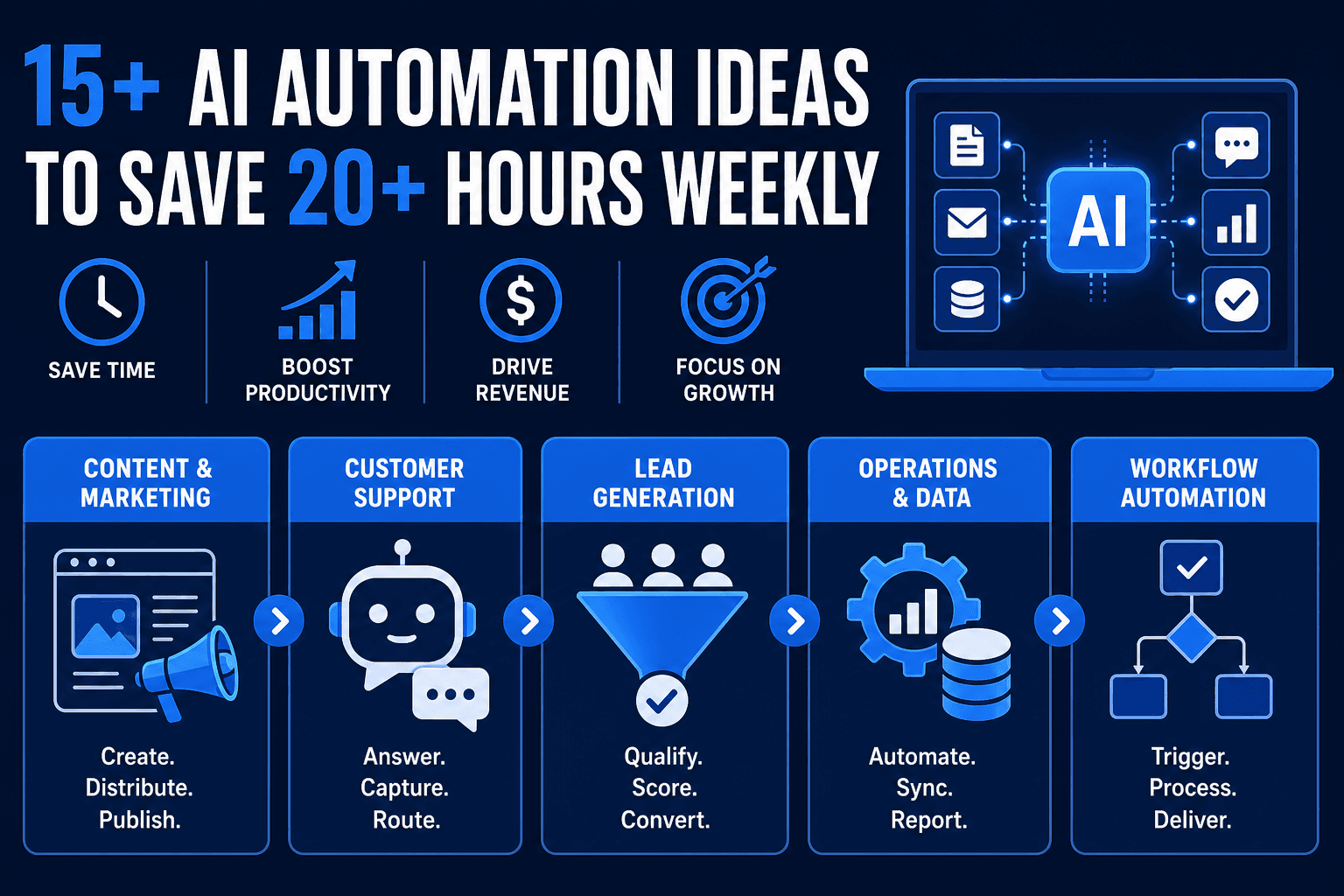
AI automation discussions often center on theoretical possibilities. This guide focuses on current deployments—the workflows builders are shipping right now to reclaim hours and generate revenue through client services.
Here are the practical applications currently delivering results, categorized by business function.
Content & Marketing Automation
Social media content pipelines
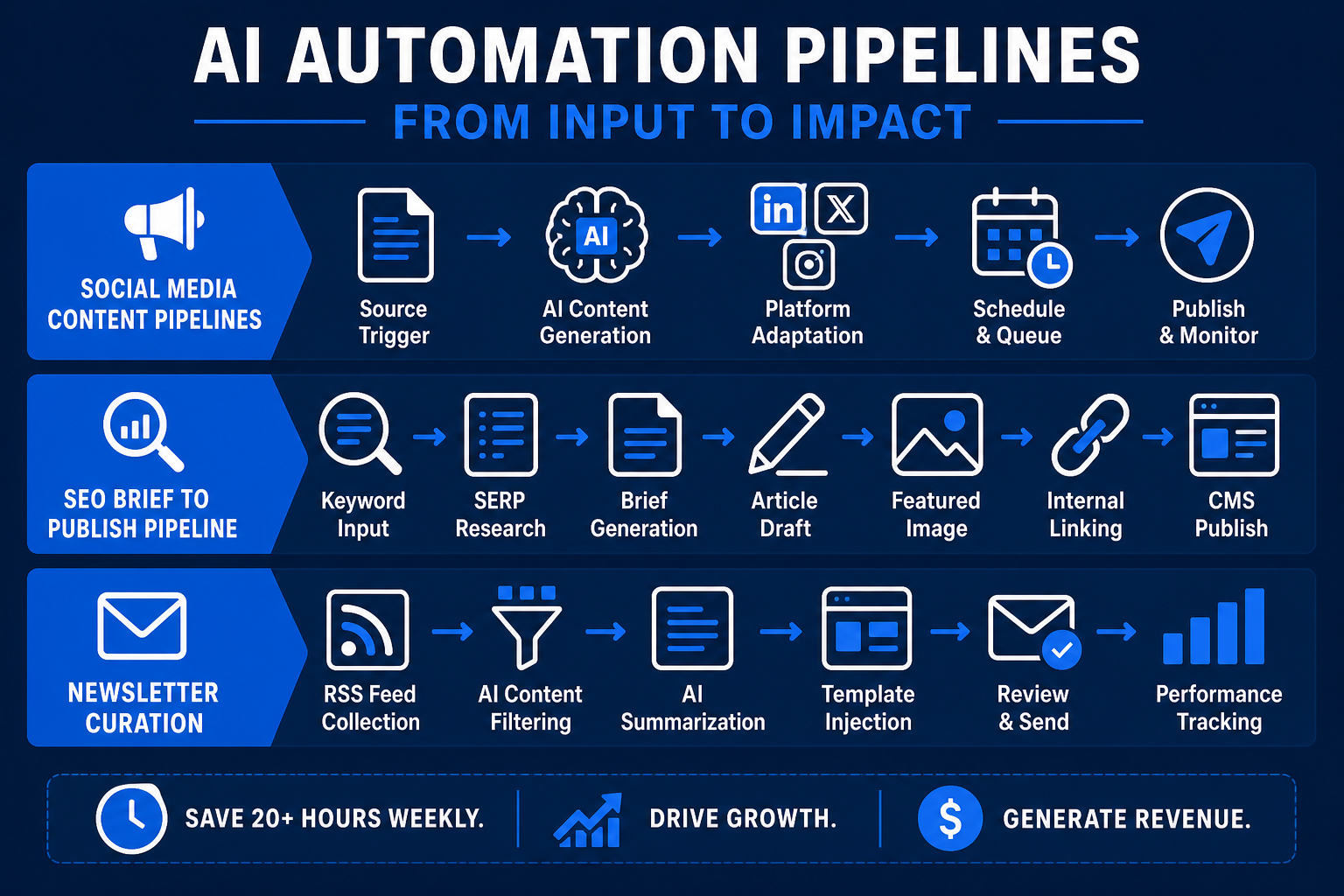
A common deployment involves a trigger (new blog post, video, or product launch) that automatically generates platform-specific posts. The system uses an LLM to rewrite the core message into multiple formats—LinkedIn summaries, X threads, or Instagram captions—and queues them for review or auto-publishing. By integrating logic that selects different "voices" for each platform, the content feels native rather than mass-produced.
Tools used: n8n or Make + OpenAI + Buffer/Typefully.
SEO brief → article → publish pipelines
Advanced operators utilize end-to-end pipelines where a keyword input triggers SERP research, structured brief generation, an article draft, a featured image prompt, and a CMS publish via API. These systems operate with minimal human intervention beyond the initial keyword selection. Modern iterations of this workflow include an automated internal linking step that searches the existing database for relevant articles to link to, improving SEO value without manual labor.
Newsletter curation
By combining RSS feeds with AI summarization and template injection, a weekly newsletter can be produced in minutes. This is effective in B2B niches like SaaS, finance, and legal tech. The AI scans for high-signal news, removes marketing fluff, and drafts the intro based on the week's most important themes. This approach allows a single person to manage multiple high-quality newsletters simultaneously.
Customer Support & Lead Qualification
FAQ chatbots on service business websites
A highly monetizable automation for freelancers involves building trained chatbots for local businesses like dental clinics or law offices. These bots answer frequent questions, capture lead data, and route complex queries to staff. They function as a first-line support tier that never sleeps, ensuring that simple queries about hours or pricing do not interrupt the skilled staff.
CustomGPT.ai is designed for this purpose—enabling the upload of existing business content to create a reliable chatbot quickly. Businesses typically pay monthly retainers for the maintenance of these systems.
Lead qualification sequences
Incoming form submissions are scored automatically. The AI evaluates the submission against an ideal customer profile, assigns a priority score, and prepares a personalized follow-up email draft for human review. This ensures high-value prospects receive immediate attention while low-fit leads are nurtured via automated paths. This reduces the "lead decay" that occurs when sales teams take too long to respond to inquiries.
Support ticket triage
High-volume inboxes in e-commerce or SaaS use AI to categorize tickets by urgency. The system auto-resolves common issues such as order status updates and password resets while escalating edge cases with a pre-written summary for the support agent. This ensures that agents walk into an organized queue where the context is already provided, saving minutes on every ticket.
Operations & Internal Workflows
Meeting transcript → action items
Following a call, a transcript is processed through a pipeline that extracts action items, assigns owners, and sets deadlines. This data is then populated directly into project management tools like Notion, Linear, or Asana. It eliminates the 30-minute post-meeting administrative burden. High-level teams also use this to generate summaries for leadership members who could not attend the call.
Invoice + contract processing
Accounting teams automate the intake of supplier invoices by using AI to extract vendor names, amounts, and due dates from PDFs. This data is then auto-entered into QuickBooks or Xero for final human review before payment. This reduces data entry errors and ensures that late fees are avoided through automated tracking of due dates.
Job application screening
HR teams at SMBs use n8n and AI to parse resumes against job descriptions. The system generates a fit score and gap summary, sorting candidates into tiers before the manual review process begins. This allows recruiters to focus on the top 5% of the applicant pool immediately. It is particularly useful for roles receiving hundreds of applications per week.
Research & Competitive Intelligence
Daily competitive monitoring
Automated pipelines monitor competitor websites, press releases, and reviews. Any detected changes trigger a summary report delivered to Slack. This reduces manual competitive research to a few minutes of daily review. Teams use this to track pricing changes, new feature launches, or shifts in marketing messaging in real-time.
Reddit + Hacker News signal monitoring
Tracking specific keywords or product names across online communities allows teams to stay informed. New relevant threads trigger summaries and sentiment analysis, which is vital for product teams and content marketers looking for emerging pain points. It acts as a 24/7 focus group that identifies trends before they reach mainstream news.
For running these research pipelines at scale, Ampere.sh provides cost-efficient cloud compute that keeps the economics viable even at high query volumes.
Sales Intelligence and Automated Outreach
For B2B organizations, the manual discovery and initial touchpoint phase is often a major bottleneck. Automating these steps allows sales teams to focus on closing rather than hunting.
Automated Prospect Discovery
Instead of manual searches on LinkedIn, builders create workflows that monitor "intent signals." For example, a workflow can trigger whenever a target company posts a specific job opening or receives a new round of funding. The system scrapes the company's "About" page to create a context file for better targeting.
Hyper-Personalized First Touch
Using the context file, an LLM drafts a personalized outreach email that references the specific signal and explains how the service solves a problem relevant to that milestone. This results in a custom-generated message that matches the sender's brand voice. This level of personalization increases open and response rates compared to generic templates.
Lead Enrichment and CRM Sync
Before the email is sent for review, the workflow uses tools like Apollo or Clay to find the prospect’s direct contact info. It then creates a record in the CRM (Salesforce or HubSpot) with all the gathered intelligence attached. This ensures the sales pipeline is always populated with high-quality, up-to-date data.
Practical Deep-Dive: Automated Local Business Onboarding
One of the most profitable automation services to sell is the "Automated Onboarding Sequence" for service providers like contractors and digital agencies. Manual onboarding is often where friction occurs; AI minimizes this by providing immediate feedback to the client.
Step 1: The Intelligent Intake Form
AI-powered intake forms use a logic layer to ask follow-up questions based on previous answers. If a client selects "Custom Software Development," the system dynamically asks for tech stack preferences. If they select "Marketing," it asks for current ad spend.
Step 2: Auto-Resource Provisioning
Once the form is submitted, an n8n workflow triggers. It creates a dedicated client folder in Google Drive and a new project board in Trello. It populates these spaces with template files customized with the client's logo and business name.
Step 3: Personalized Welcome Guide
The system takes the intake form data and feeds it into an LLM to generate a customized "Getting Started Guide" PDF. This guide references the client's specific goals, creating a high-touch experience without manual labor from the account manager.
Advanced Practical Section: Automated Omni-Channel Sentiment Analysis
Maintaining brand reputation across multiple platforms can be an exhaustive task. This practical workflow aggregates customer sentiment from various sources to provide a unified dashboard and alert system for marketing teams.
The Problem
Brands often miss critical feedback because it is buried in a Reddit thread, an obscure forum, or an Amazon review section. By the time a human sees it, the sentiment may have already spread.
The Automation Workflow
- Data Ingestion: Use APIs or scrapers to pull mentions from X (Twitter), Trustpilot, Reddit, and company email aliases into a central n8n workflow.
- Sentiment Analysis: The text is passed to an LLM (like Claude 3.5) with instructions to categorize the sentiment on a scale of 1-10. It also identifies the specific product or service mentioned.
- Alert Logic: If the sentiment score is below 3 (highly negative), the system sends an immediate priority alert to a Slack channel with a link to the original post.
- Drafting a Response: For neutral or slightly negative mentions, the AI drafts a supportive response for a community manager to approve.
- Trend Synthesis: Every Friday, the AI analyzes all mentions from the week and generates a "Brand Health Report" summarizing the most frequent complaints and praised features.
Automated Inventory and E-commerce Listing Optimization
E-commerce businesses dealing with large catalogs from multiple suppliers often struggle with inconsistent data and poor SEO. This workflow automates the transformation of raw supplier spreadsheets into high-quality listings.
Raw Data Ingestion and Cleaning
The workflow triggers whenever a new CSV or Excel file is uploaded to a designated folder in Google Drive. The system uses an LLM to parse the raw technical specifications, ensuring that measurements, materials, and brand names are standardized. This eliminates the manual task of reformatting inconsistent supplier data.
Product Description and Meta-Data Generation
The AI takes the technical specs and generates a benefit-driven product description tailored to the brand's voice. Simultaneously, it creates SEO-optimized meta titles and descriptions. By including a "reasoning" step, the LLM can decide which features are the most important for the target audience.
Image Optimization and Alt-Text
Using vision models, the workflow analyzes product images to generate descriptive alt-text, which is essential for web accessibility and image SEO. If the images are low-resolution, the system can trigger an API call to an upscaling service before the final assets are sent to the store.
Automated CMS Upload
Once the content and images are processed, the system connects via the Shopify or WooCommerce API to create a new product draft. It populates all fields—including price, weight, categories, and tags—and sends a notification to the store manager. The manager only needs to perform a short final check before publishing, reducing a multi-hour data entry task to a brief review.
Practical Deep-Dive: Automated Compliance and Regulation Monitoring
For businesses in finance, healthcare, or legal sectors, staying updated on regulatory shifts is a high-stakes requirement. This automation handles the heavy lifting of monitoring government gazettes and legal updates.
Step 1: Source Monitoring
The workflow monitors specific government feeds, RSS feeds from major law firms, and official documentation portals for new PDF uploads or announcements.
Step 2: Intelligent Extraction
When a new document is detected, an LLM parses the text to identify the industry, the specific regulation type, and the date of enforcement. This filters out irrelevant administrative noise.
Step 3: Impact Analysis
The system compares the new regulation against a "Company Operations Manual" or "SOP Database" stored in a vector database. It generates a summary explaining specifically how the new law affects current internal processes or service offerings.
Step 4: Stakeholder Notification
The final summary is sent via email or Slack to the relevant department heads (e.g., Legal, HR, or Finance) with the original document attached for reference. This ensures the team is aware of changes weeks before they typically appear in trade newsletters, allowing for proactive adjustments to strategy or compliance protocols.
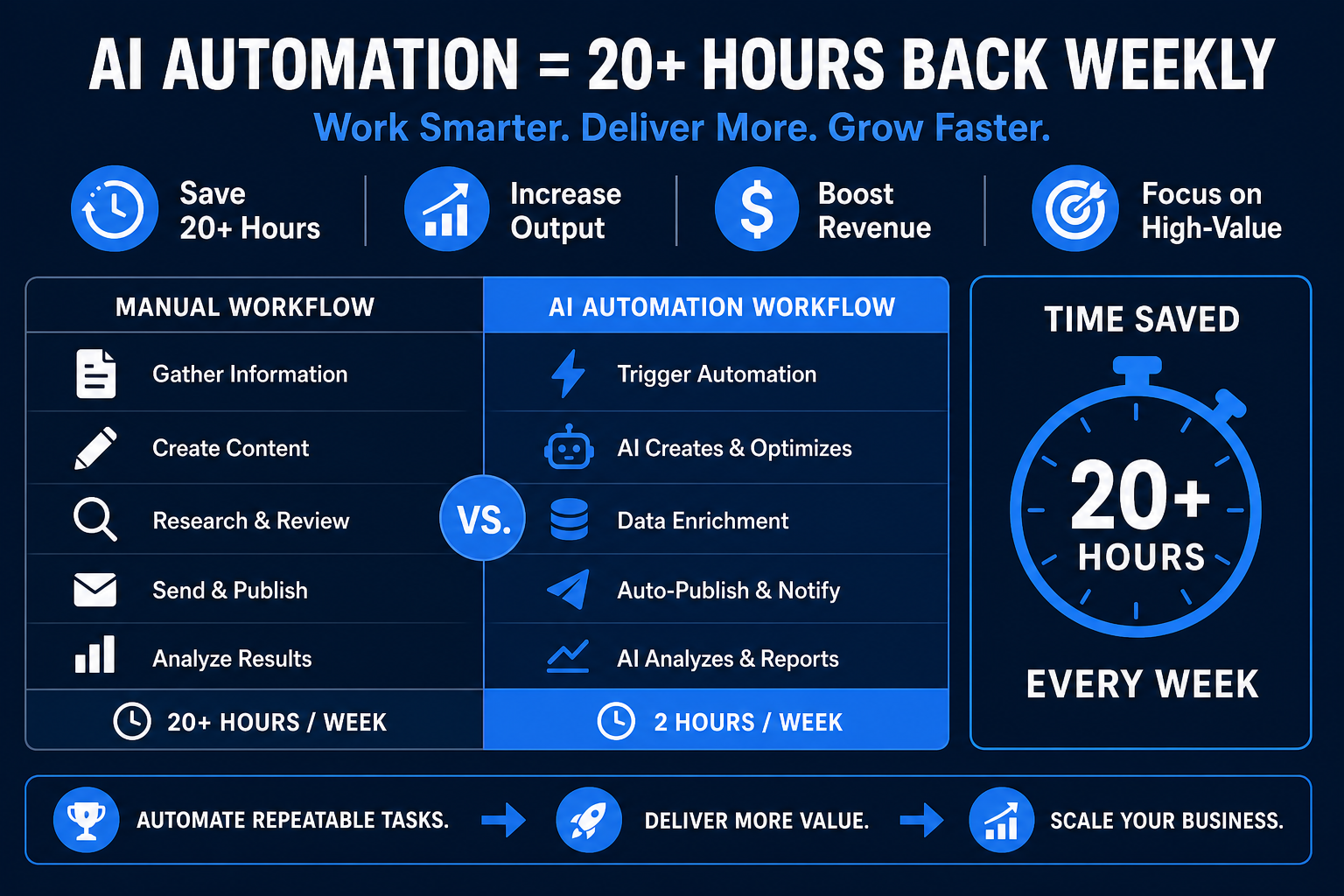
Key Takeaways
Practical Use Case: Automating a "Digital Second Brain"
One of the most effective workflows for solopreneurs is the Automated Research Ingestion Engine. This solves the problem of bookmarks being rarely revisited.
The Workflow Structure:
- Trigger: A new bookmark is added to Raindrop.io or Pocket.
- Processing: n8n pulls the URL content and requests a 3-bullet summary from an LLM focusing on actionable insights.
- Storage: The summary is formatted and pushed to a Notion database or an Obsidian vault.
Implementation Guide: The "Human-in-the-Loop" Model
Successful automations generally follow a Human-in-the-Loop (HITL) architecture to ensure quality:
- Extraction: AI pulls data from sources like emails or transcripts.
- Logic: Tools like n8n route data based on content and sentiment.
- Review Gate: The AI creates a "Draft" or "Task" that a human approves with one click before it goes live.
The Stack People Are Actually Using
The primary tools for professional-grade automation include:
| Layer | Popular Choices |
|---|---|
| Orchestration | n8n (self-hosted), Make, Zapier |
| AI reasoning | OpenAI GPT models, Claude 3.5, Gemini Pro |
| Chatbots | CustomGPT.ai, Voiceflow |
| Data | Airtable, Notion, Google Sheets |
| Compute | Ampere.sh, Replicate, Modal |
Frequently Asked Questions
What is the best tool for AI automation?
n8n is a leading choice for technical users seeking control and lower costs. Make is ideal for those who prefer visual no-code builders with a wide array of pre-built integrations. For building AI chatbots, CustomGPT.ai provides reliable results for business-specific data.
Do I need to know how to code to automate with AI?
No. Tools like n8n and Make use visual editors. While coding knowledge helps with custom API calls or complex JSON manipulation, it is not a requirement for most business use cases today.
How much can I earn automating workflows for businesses?
Freelance automation developers charge between $50 and $150 per hour. Productized services sell for $500 to $2,000 per project, while maintenance retainers range from $100 to $500 per month depending on the complexity of the systems.
What AI automation has the highest ROI for small businesses?
Customer support FAQ chatbots usually provide the highest measurable ROI by reducing call volume and capturing lead data during off-hours. This directly impacts both cost savings and revenue generation.
Is n8n better than Zapier for AI workflows?
For AI-heavy workflows, n8n is often superior because it supports complex branching logic and integrates easily with specialized LLMs without the high per-task costs associated with Zapier’s pricing model.

Alex the Engineer
•Founder & AI ArchitectSenior software engineer turned AI Agency owner. I build massive, scalable AI workflows and share the exact blueprints, financial models, and code I use to generate automated revenue in 2026.
Related Articles
AI Automation Agency: Build a $25k MRR AAA
Start an AI Automation Agency and hit $25K MRR with ~10 clients. Real retainer pricing, n8n + CustomGPT stack, and the exact workflows AAA agencies sell in 2026.
What Is GEO (Generative Engine Optimization)? The 2026 Guide
GEO means optimizing your content so AI tools like ChatGPT, Claude, and Perplexity cite and recommend it. Here's how it works — and why it won't replace SEO.
7 No-Code AI Side Hustles You Can Start Today (2026 Guide)
7 proven no-code AI side hustles for 2026 — no coding required. Earn $1K–$5K/month building chatbots, automating content, and selling AI services to local businesses.