
How to Run Llama 3 on Your PC with LM Studio: The Easy Way (2026 Guide)
Run Llama 3 locally on Windows, Mac, or Linux with LM Studio. No terminal needed. Step-by-step guide with ChatGPT-like UI, offline setup, and cost comparison.
If you've tried running AI models locally but got stuck at terminal commands, LM Studio solves that problem. It's a GUI app that lets you run Llama 3 locally without ever opening a command line.
Why run Llama 3 locally?
- Privacy: Your data never touches OpenAI, Claude, or any cloud
- Cost: Zero API fees after initial download
- Speed: 50–200ms responses (no internet latency)
- Offline: Works without internet after model loads
- Beginner-friendly: Point-and-click UI (no terminal)
Ollama users love the speed, but the terminal interface intimidates beginners. LM Studio fixes that: it's Ollama's GUI alternative with a ChatGPT-like interface. This guide walks you through a 10-minute setup.
What is Llama 3?
Llama 3 is Meta's open-source large language model (70B parameters). It's ranked #2 on performance benchmarks, behind only Claude Opus. Key specs:
| Model | Size | Speed | Quality | Cost |
|---|---|---|---|---|
| Llama 3 70B | 40GB (needs GPU) | Fast | Excellent | Free |
| Llama 3 8B | 5GB (CPU ok) | Very Fast | Good | Free |
| GPT-4 | Cloud only | Slow (API lag) | Excellent | $0.03–0.06 per 1K tokens |
| Claude 3.5 | Cloud only | Fast (API) | Excellent | $3–15 per 1M tokens |
Best use case for beginners: Llama 3 70B (best quality without API fees).
Prerequisites
Hardware
- GPU (highly recommended): NVIDIA, AMD, or Apple Silicon
- NVIDIA RTX 4060 or better (8GB VRAM)
- AMD Radeon RX 6700 or better
- Apple M1/M2/M3 (built-in GPU)
- CPU-only (slow but works): Intel i5/AMD Ryzen 5 or better + 64GB RAM
- Disk space: 40–50GB free (for Llama 3 70B model file)
Software
- Windows 10+ / macOS 11+ / Ubuntu 20.04+
- 16GB RAM minimum (32GB+ recommended for smooth operation)
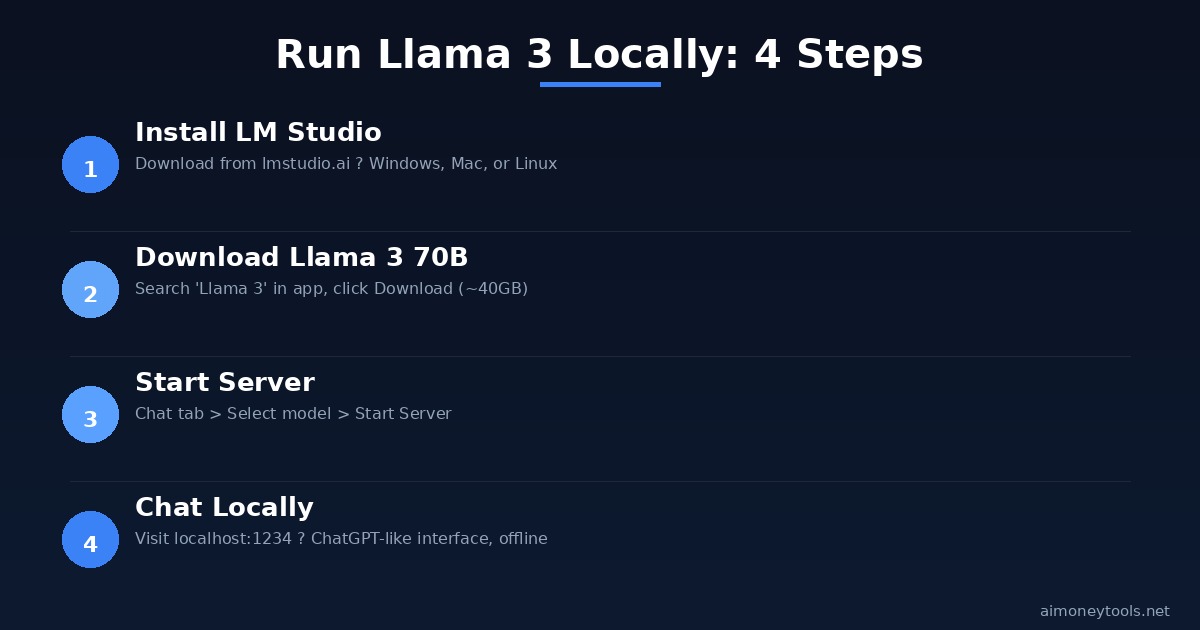
Step 1: Install LM Studio
Windows & Mac
- Go to lmstudio.ai
- Click "Download" → select your OS
- Run the installer (LMStudio-Setup.exe or LMStudio.dmg)
- Follow the prompts
Linux
# Download AppImage from https://lmstudio.ai
chmod +x LM\ Studio-*.AppImage
./LM\ Studio-*.AppImage
Verification: Open LM Studio. You should see a chat interface with a search box for models.
Step 2: Download Llama 3
Method 1: LM Studio Built-in (Easiest)
- Open LM Studio
- Click the Search icon (left sidebar)
- Search for "Llama 3"
- Select "Llama 3 70B" (full model)
- Or "Llama 3 8B" if your GPU has <16GB VRAM
- Click Download
- Wait 10–30 minutes (depending on internet speed)
What's happening: LM Studio downloads the model from Hugging Face (~40GB for 70B).
Method 2: Pre-Download via Command Line (Advanced)
If you want to use a quantized (smaller) version:
pip install ollama
ollama pull llama3:70b-q4_K_M  # Quantized 70B (22GB instead of 40GB)
ollama pull llama3:8b          # 8B model (5GB, faster)
Then in LM Studio: click Local → your model will appear.
Note: Quantized models (q4, q5) are smaller and faster but slightly less accurate. Good for limited VRAM.
Step 3: Set Up Chat Interface
Once Llama 3 downloads:
- Go to Chat tab (top left)
- Select Llama 3 from the dropdown
- Click Start Server
- Wait for "Server running on http://localhost:1234"
Now you have a local ChatGPT-like interface at http://localhost:1234.
Test it: Type "What is Llama 3?" and hit Enter.
Step 4: Performance Optimization (Optional)
To speed up responses, configure context window and token settings:
- Click Settings (gear icon)
- Under Model, set:
- Context Length: 2048 (default, good for most tasks)
- Max Tokens to Generate: 512–1024 (answer length)
- GPU Acceleration: Enabled (if your GPU is detected)
- Click Save
Performance expectations:
- GPU (NVIDIA RTX 3060+): 10–20 tokens/sec
- GPU (AMD RX 6700+): 8–15 tokens/sec
- Apple M1/M2: 5–10 tokens/sec
- CPU-only: 1–2 tokens/sec (slow)
Step 5: Use Llama 3 Locally
In-App Chat
- Type naturally
- Attach files (documents, code) for context
- Share conversations via copy-paste
Via Web Browser
Visit http://localhost:1234 from any browser on your network.
Via API (Advanced)
If you're a developer:
import requests

response = requests.post(
    "http://localhost:1234/v1/chat/completions",
    json={
        "model": "llama-3-70b",
        "messages": [{"role": "user", "content": "How do I learn Python?"}],
        "temperature": 0.7,
    }
)

print(response.json()["choices"][0]["message"]["content"])
This lets you use Llama 3 as a replacement for OpenAI's API (same interface, no cost).
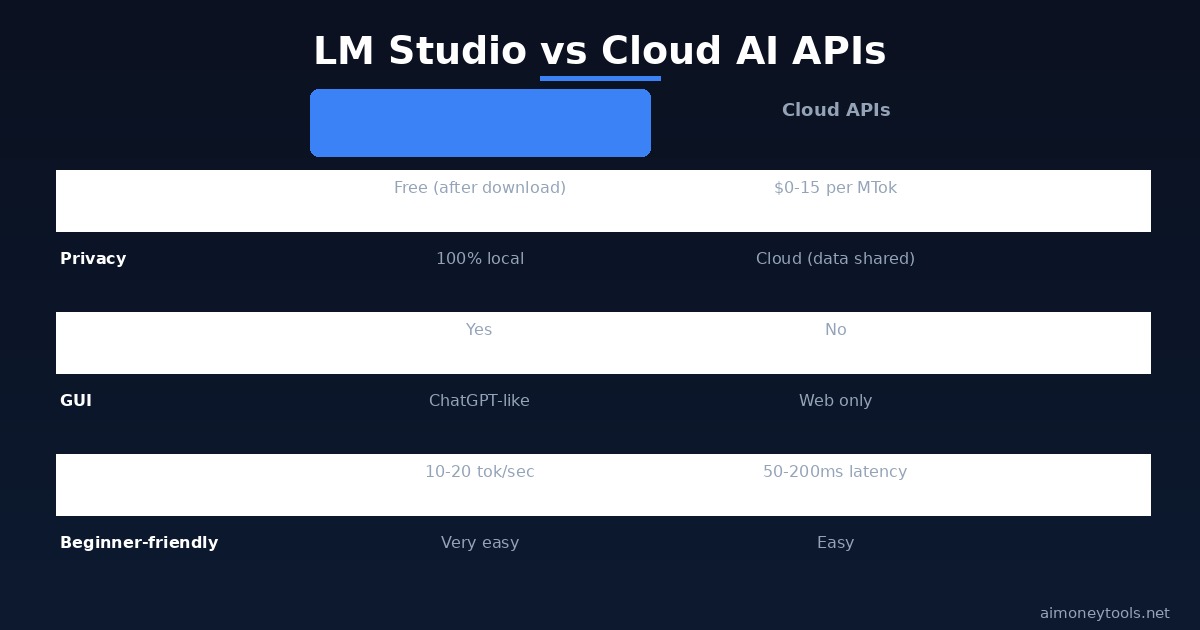
Comparing Setups: Ollama vs LM Studio vs Cloud APIs
| Feature | Ollama | LM Studio | GPT-4 API | Claude API |
|---|---|---|---|---|
| GUI | Terminal only | ChatGPT-like UI | Web only | Web only |
| Cost | Free | Free | $0.03–0.06/1K tokens | $3/1M tokens |
| Speed | Fast | Fast | Fast (API) | Fast (API) |
| Privacy | 100% local | 100% local | Sent to cloud | Sent to cloud |
| Offline | Yes | Yes | No | No |
| Beginner-friendly | Difficult | Very easy | Easy (web) | Easy (web) |
Best for beginners: LM Studio (GUI, free, local, works offline).
Troubleshooting
Error: "GPU not detected"
- Open Settings → GPU
- Check if your GPU drivers are installed
- For NVIDIA: install CUDA Toolkit 12.1+
- For AMD: install ROCm 5.7+
- Restart LM Studio
Model takes too long to load
- This is normal (first load = 2–5 minutes)
- After first load, startup is instant
- If stuck >10 min: restart LM Studio
Out of memory (OOM) error
- Your system doesn't have enough VRAM for 70B
- Solution: Download Llama 3 8B instead (5GB)
- Or use a quantized version:
llama3:70b-q4_K_M
Responses are slow/incomplete
- Reduce Max Tokens in Settings
- Use Llama 3 8B instead of 70B
- Close other programs (free up RAM)
Next Steps: Integration
After you're comfortable with Llama 3:
- Build a chatbot — Use the API endpoint to build a web app
- Fine-tune for your domain — Customize Llama 3 with your data
- Deploy to servers — Run LM Studio on a remote GPU for 24/7 access
- Sell AI services — Use Llama 3 as the backbone for local AI services
For deployment infrastructure: Check out Ampere.sh for affordable GPU hosting ($0.25–1.00/hr).
Key Takeaways
✓ LM Studio gives you ChatGPT-like UI for local LLMs ✓ Llama 3 is free, fast, and private (no cloud uploads) ✓ Installation: 5 minutes (LM Studio + download) ✓ Setup: 5 minutes (select model, start chat) ✓ Works offline once model loads ✓ 10–20 tokens/sec on modern GPUs ✓ Same API as OpenAI (for developers)
Related Guides

Alex the Engineer
•Founder & AI ArchitectSenior software engineer turned AI Agency owner. I build massive, scalable AI workflows and share the exact blueprints, financial models, and code I use to generate automated revenue in 2026.
Related Articles

How to Start an AI-Assisted Resume Writing Side Hustle in 2026 (Beginner's Guide)
A step-by-step guide to using AI resume tools to offer a paid resume and cover letter writing service — what to charge, which tools to use, and how to find your first clients.

How to Build and Sell AI Voice Receptionists to Local Businesses in 2026
A beginner's guide to building AI voice agents that answer business phone calls — the tools to use, what to charge, and how to find your first client.

How to Make Money on Fiverr with AI Tools in 2026: 7 Gigs You Can Start This Week
Discover 7 real Fiverr gigs you can launch using free and low-cost AI tools in 2026 — no experience required. Real pricing data, step-by-step setup, and tools that actually work.