
How to Get a Free Groq API Key and Start Using It Today (Beginner Guide 2026)
How to get a free Groq API key, install the Python SDK, and run your first AI request in under 10 minutes. Complete beginner guide — no credit card required.
If you've been looking for an AI API that's genuinely fast, genuinely free to start, and doesn't require entering a credit card — Groq is the one most developers haven't told their non-technical friends about yet.
While OpenAI charges per token and has rate limits that frustrate beginners, Groq offers a free tier that lets you make thousands of requests per day using the best open-source models in the world — Llama 4, Gemma 3, Mixtral — at speeds that feel instantaneous.
This guide covers everything you need to go from zero to running your first Groq API call in under 10 minutes.
What Is Groq?
Groq is an AI inference company based in San Jose that built custom hardware called the LPU (Language Processing Unit) specifically for running large language models. Unlike NVIDIA GPUs (which are general-purpose parallel processors), LPUs are designed specifically for the sequential, token-by-token nature of text generation.
The result: Groq can generate text at 200–800 tokens per second — typically 5-20× faster than equivalent GPU-based inference. When you ask a question and the answer appears to stream instantly rather than typing out word-by-word, that's the LPU in action.
Groq doesn't train its own models. Instead, it licenses and hosts open-source models from Meta, Google, and Mistral, letting you run them via API at extreme speed. Think of Groq as the "fast lane" for open-source AI — you bring the model choice, they bring the hardware.
What Can You Do With the Groq API?
- Build a chatbot that responds in near real-time (no streaming lag)
- Add AI to Python scripts, automations, or Make/n8n workflows
- Transcribe audio with Whisper (one of the best speech-to-text models)
- Process documents, summarize content, answer questions over text
- Test and compare open-source models without paying per query
The free tier is generous enough to run serious side projects: 14,400 requests per day, with per-model rate limits typically in the range of 30–100 requests per minute. For a personal project or small tool, you'll rarely hit these limits.
Step 1: Create a Groq Account
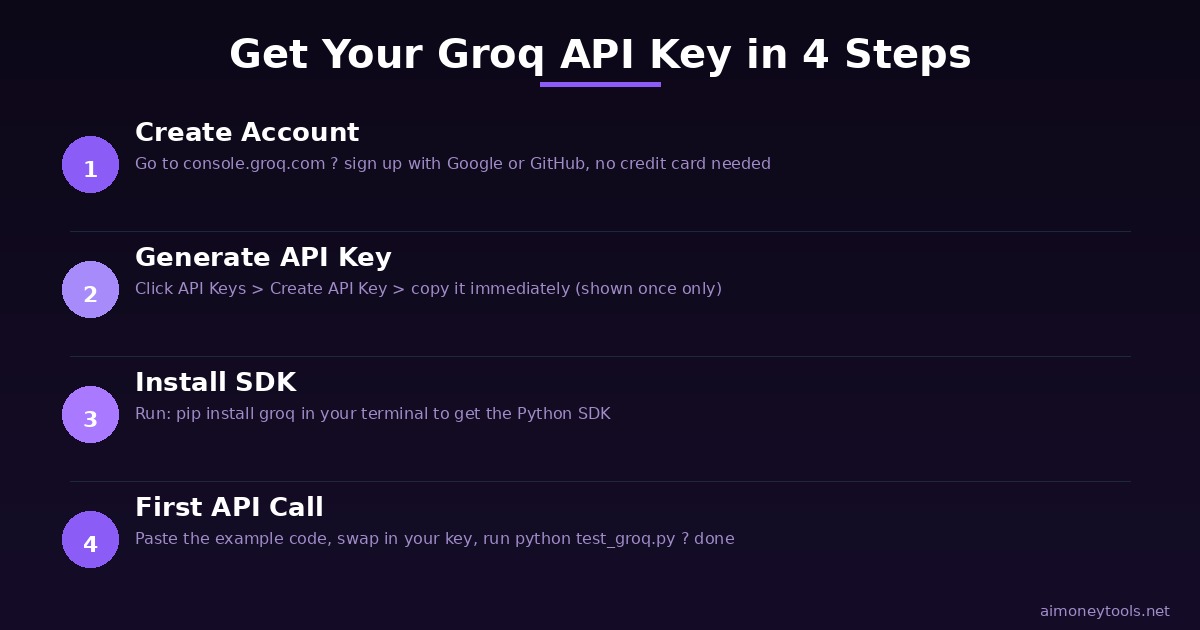
- Go to console.groq.com
- Sign up with Google, GitHub, or email — no credit card required
- Verify your email and log into the console
The process takes about 90 seconds. You're now on the free Developer tier.
Step 2: Generate Your API Key
Once inside the Groq console:
- Click "API Keys" in the left sidebar
- Click "Create API Key"
- Give it a name (e.g., "my-first-project")
- Click Create
- Copy the key immediately — you won't be able to see it again
Store it somewhere safe: a .env file in your project, a password manager, or your system's environment variables. Never paste your API key directly in code you'll share.
Step 3: Install the Groq SDK
Open your terminal and install the official Python SDK:
pip install groq
New to the terminal? Start with our beginner terminal guide before continuing.
Step 4: Your First API Call
Create a new file called test_groq.py and paste this code:
from groq import Groq

client = Groq(api_key="YOUR_API_KEY_HERE")

chat_completion = client.chat.completions.create(
    messages=[
        {
            "role": "user",
            "content": "What are 3 ways I can make money with AI in 2026?",
        }
    ],
    model="llama-4-scout-17b-16e-instruct",
)

print(chat_completion.choices[0].message.content)
Run it:
python test_groq.py
You should see a response appear almost immediately — faster than you'd expect from any cloud AI service.
Using environment variables (safer):
import os
from groq import Groq

client = Groq(api_key=os.environ.get("GROQ_API_KEY"))
Then set the variable in your shell: export GROQ_API_KEY=your_key_here
Step 5: Try Different Models
Groq supports multiple open-source models. Here are the most useful ones in 2026:
For chat and reasoning:
llama-4-scout-17b-16e-instruct— Meta's Llama 4 Scout. Great general-purpose model, fast, good for most tasks.llama-4-maverick-17b-128e-instruct— Llama 4 Maverick. More capable, longer context (128K), slightly slower.gemma2-9b-it— Google's Gemma 2 9B. Excellent instruction following, reliable outputs.mixtral-8x7b-32768— Mistral's MoE model. Great for technical tasks and coding.
For audio transcription:
whisper-large-v3— OpenAI's Whisper (open-source). Best general speech-to-text model available.whisper-large-v3-turbo— Faster version with slightly lower accuracy.
Swap out the model parameter in your code to try different ones:
# Try Gemma 2 instead
model="gemma2-9b-it"
Step 6: Transcribe Audio with Whisper (Bonus)
Groq also hosts Whisper for audio transcription — and again, it's faster than any other cloud provider:
from groq import Groq

client = Groq()

with open("audio_file.mp3", "rb") as f:
    transcription = client.audio.transcriptions.create(
        file=("audio_file.mp3", f.read()),
        model="whisper-large-v3",
        language="en",
    )

print(transcription.text)
This works with MP3, MP4, WAV, M4A, and FLAC files up to 25MB. For larger files, you'll need to split them first (use ffmpeg).
Groq vs. OpenRouter: Which Should You Use?
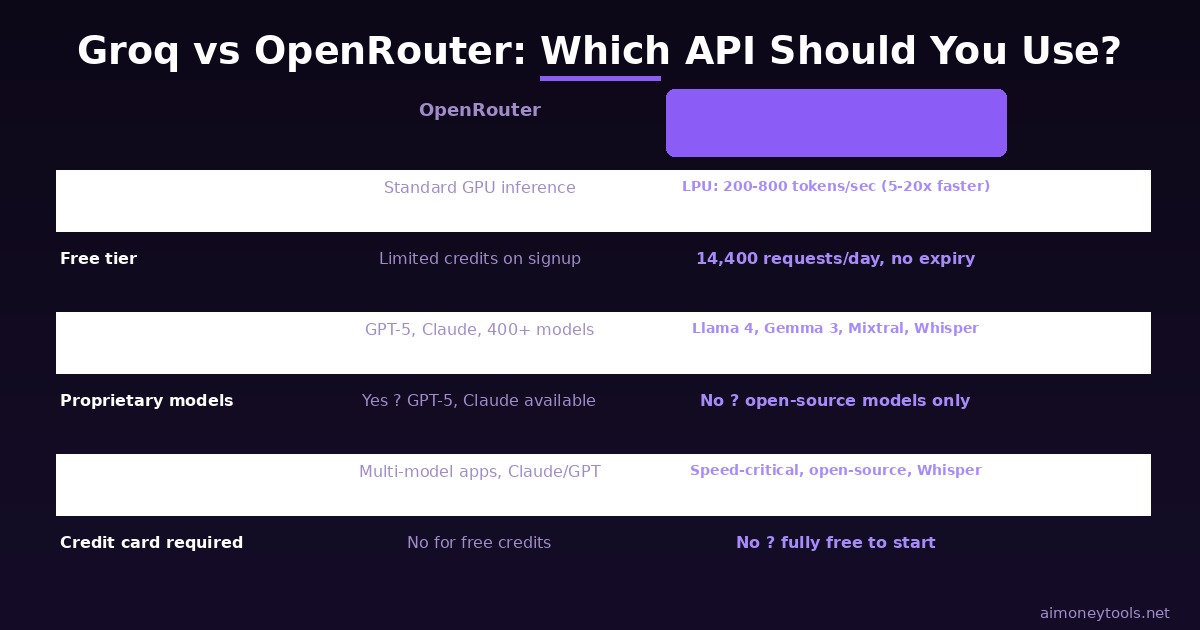
Both Groq and OpenRouter let you access multiple AI models via API. They solve slightly different problems:
Use Groq when:
- Speed is critical (chatbots, real-time apps, interactive tools)
- You want the simplest possible setup
- You're primarily using Llama, Gemma, or Whisper models
- You want a free tier with generous daily limits
Use OpenRouter when:
- You need access to GPT-5, Claude, or other proprietary models
- You want to compare many different models with one API key
- You need very long context windows (200K+) or specialized models
- You're building something that needs fallback across multiple providers
The good news: the Groq SDK uses the same OpenAI-compatible format as OpenRouter. If you've already built something with OpenRouter, you can often swap in Groq by just changing the base URL and model name. We have a full OpenRouter beginner guide if you want to compare.
Free Tier Limits (What You Actually Get)
Groq's free tier (as of 2026):
- 14,400 requests/day across all models
- Per-model rate limits: typically 30 RPM for larger models, up to 100 RPM for smaller
- Token limits: vary by model (30K–100K tokens/minute)
- No credit card required for the free tier
For reference: 14,400 requests/day means you could theoretically make a request every 6 seconds, all day, every day, for free. That's enough to run a small production chatbot, build a full automation workflow, or test hundreds of prompts during development.
When you need higher limits, paid plans start at $0.05/million tokens for Llama 4 — a fraction of GPT-5 pricing.
Frequently Asked Questions
Is the Groq API completely free? Yes for the free tier — no credit card, no trial period, no expiry. You get 14,400 requests/day with rate limits per model. Paid plans are available for production workloads that need higher throughput.
Which Groq model should a beginner start with?
llama-4-scout-17b-16e-instruct is the best starting point for most tasks — it's fast, capable, and handles a wide range of requests well. Try Gemma 2 9B if you want something that tends to follow instructions more precisely.
Can I use Groq without Python?
Yes. Groq has a REST API that works with any HTTP client. There are also community SDKs for JavaScript/Node.js, Go, and other languages. The Python SDK is the most polished and documented option for beginners, but the API format is identical to OpenAI's — so any OpenAI SDK will work if you override the base URL to https://api.groq.com/openai/v1.
Does Groq store my prompts or data? According to Groq's privacy policy, prompt data is not used for training. For sensitive business data, check the current policy at groq.com — and consider running models locally (see our Apertus Mini guide for fully offline inference) if privacy is a hard requirement.
What's the difference between Groq and NVIDIA GPU servers? NVIDIA GPUs are general-purpose parallel processors originally designed for graphics. They've been repurposed for AI very effectively, but their architecture isn't optimized for the sequential token generation that LLMs require. Groq's LPU is specifically designed for this pattern — it eliminates memory bandwidth bottlenecks that slow GPU inference. The practical result is 5-20× faster generation speeds at equivalent cost.
Can I use Groq in a Make or n8n automation?
Yes. Use Groq's OpenAI-compatible endpoint in any tool that supports a custom OpenAI base URL. In Make, use the OpenAI module and point the base URL to https://api.groq.com/openai/v1 with your Groq API key. In n8n, use the OpenAI node with the same override. This lets you add Groq-powered AI steps to any automation workflow.

Alex the Engineer
•Founder & AI ArchitectSenior software engineer turned AI Agency owner. I build massive, scalable AI workflows and share the exact blueprints, financial models, and code I use to generate automated revenue in 2026.
Related Articles

How to Start an AI-Assisted Resume Writing Side Hustle in 2026 (Beginner's Guide)
A step-by-step guide to using AI resume tools to offer a paid resume and cover letter writing service — what to charge, which tools to use, and how to find your first clients.

How to Build and Sell AI Voice Receptionists to Local Businesses in 2026
A beginner's guide to building AI voice agents that answer business phone calls — the tools to use, what to charge, and how to find your first client.

How to Make Money on Fiverr with AI Tools in 2026: 7 Gigs You Can Start This Week
Discover 7 real Fiverr gigs you can launch using free and low-cost AI tools in 2026 — no experience required. Real pricing data, step-by-step setup, and tools that actually work.