
Switzerland Just Released 16 Free AI Models You Can Run on Your Laptop (Apertus Mini Guide 2026)
Switzerland's EPFL and ETH Zurich released Apertus Mini — 16 tiny open-source AI models (0.5B–4B params) you can run locally on any laptop. Complete beginner's guide for Mac and Windows.
While the US AI labs compete over who has the biggest model, Switzerland just quietly dropped something that might matter more to you: 16 small AI models you can actually run on your own laptop, for free, with no cloud required.
The project is called Apertus Mini, and it was released on June 15, 2026 by the Swiss AI Initiative — a collaboration between EPFL, ETH Zurich, and the Swiss National Supercomputing Centre (CSCS). It hit the top of Hacker News this week with nearly 500 upvotes and one of the more interesting comment threads of the year.
Here's why it matters, and how to get started with it in the next 15 minutes.
What Is Apertus — and What's "Sovereign AI"?
Before diving into the Mini models, some context:
Apertus is a large language model built entirely by Swiss public universities. Not by a US tech company. Not by a Chinese lab. By EPFL and ETH Zurich — two of Europe's top research institutions — using Swiss government-funded computing infrastructure.
"Sovereign AI" is the concept that countries and organizations should be able to develop and run AI without being dependent on systems owned by foreign corporations. Think of it like energy independence, but for artificial intelligence.
Right now, if a European hospital, government agency, or university wants to use an AI model, they typically have to send their data to an American server (OpenAI, Anthropic, Google) or a Chinese lab (DeepSeek, Alibaba). That means foreign companies potentially seeing sensitive data. That's the problem sovereign AI tries to solve.
Apertus was built specifically to:
- Use fully open training data (no secret sources)
- Comply with the EU AI Act from day one (opt-out respected, no PII memorized)
- Be multilingual across 1,000+ languages — including smaller European languages that big US models often handle poorly
- Publish everything: weights, data, code, training methodology, alignment principles
The original Apertus 1.0 launched in September 2025 at 8B parameters. Now, June 2026, they've released Apertus Mini — a family of 16 smaller models distilled and quantized from the 8B teacher model, designed to run on consumer hardware.
What Is Apertus Mini?
Apertus Mini is a set of 16 small language models based on distillation and quantization of Apertus v1 (8B). The available base sizes are:
- 0.5B — 500 million parameters. Runs on basically anything.
- 1.5B — 1.5 billion parameters. Good balance of capability and speed.
- 4.0B — 4 billion parameters. Surprisingly capable for local use.
Each size comes in two flavors: a base model (pre-trained, for fine-tuning) and an instruct model (trained to follow instructions — what you want for chatting or tasks). On top of these 6 core models, 10 additional quantization levels give you the remaining 16 variants.
Why distillation? The team trained the smaller models using "knowledge distillation" — a technique where the large 8B "teacher" model's predictions are used to train the smaller "student" models. This is about 10x more efficient than training from scratch and produces better-performing small models than you'd get by just building a tiny model from zero.
The results are genuinely competitive. In multilingual benchmarks, Apertus 1.1 models match or beat similar-sized models from Qwen 3 and Mistral at equivalent parameter counts — and this was published at ICML 2026.
How to Download and Run Apertus Mini
The models are available on Hugging Face under the swiss-ai/apertus-mini collection. They're free, Apache 2.0 licensed (yes, commercial use is fine).
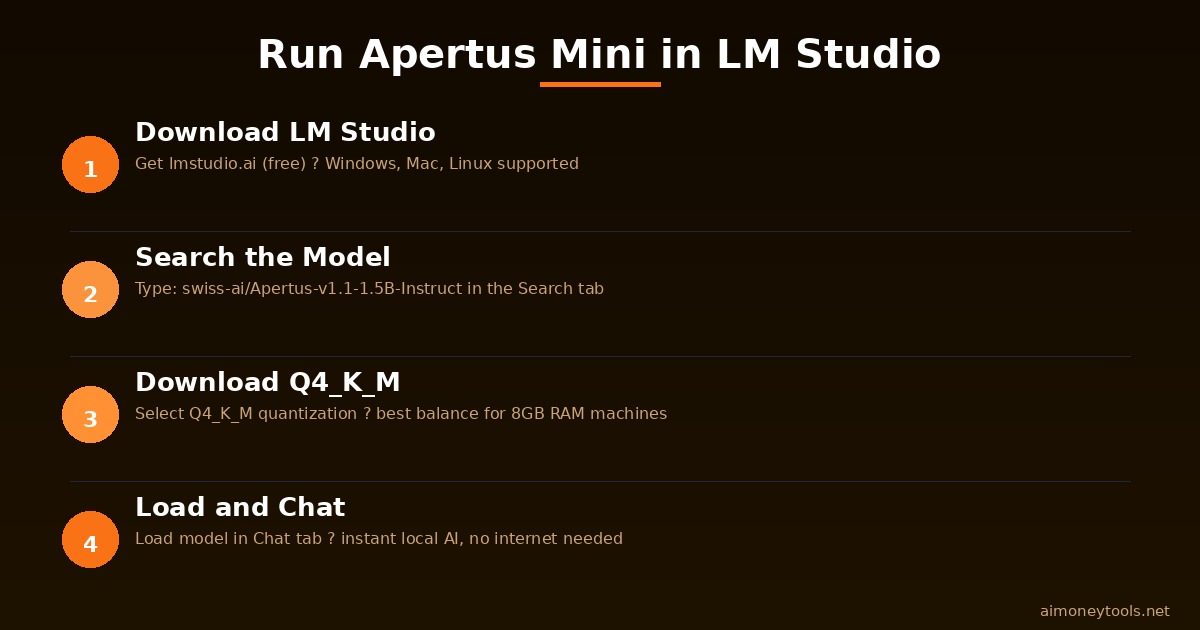
Option 1: LM Studio (Easiest — Windows, Mac, Linux)
If you want to chat with Apertus Mini the same way you'd use ChatGPT — but locally — LM Studio is your fastest path. The official Apertus docs even show a screenshot of the models running in LM Studio.
New to LM Studio? Check our terminal and local AI setup guide for context on running models locally, or our terminal beginners guide if command-line tools are new to you.
Steps:
- Download LM Studio from lmstudio.ai (free)
- Open LM Studio → Search tab
- Search:
swiss-ai/Apertus-v1.1-1.5B-Instruct - Select a quantization level — Q4_K_M is a good default for 8GB RAM machines
- Click Download → once downloaded, load it in the Chat tab
- Start chatting
Recommended models by RAM:
- 8GB RAM: Apertus 1.1 0.5B Q4 or 1.5B Q4
- 16GB RAM: Apertus 1.1 4.0B Q4 or Q5
- 32GB+ RAM: Apertus 1.1 4.0B Q8 (near full precision)
Not sure what your system has? Here's how to check your VRAM and RAM for running AI models.
Option 2: MLX for Apple Silicon (Mac M1/M2/M3/M4 — Best Performance)
If you have a Mac with Apple Silicon, the Apertus team released MLX-compressed versions optimized specifically for Apple's unified memory architecture. These run fast even on base M1 MacBooks.
pip install mlx-lm

mlx_lm.generate \
  --model swiss-ai/Apertus-v1.1-4B-Instruct-4bit-mlx \
  --prompt "Explain what sovereign AI means in simple terms"
The 4-bit and 6-bit MLX versions are designed for 8GB–16GB unified memory Macs. You don't need a powerful GPU — the Apple Silicon chip handles inference natively via Metal Performance Shaders.
Option 3: Python / Transformers (For Developers)
If you want to integrate Apertus Mini into a Python project:
from transformers import AutoTokenizer, AutoModelForCausalLM
import torch

model_id = "swiss-ai/Apertus-v1.1-4B-Instruct"
tokenizer = AutoTokenizer.from_pretrained(model_id)
model = AutoModelForCausalLM.from_pretrained(model_id, torch_dtype=torch.float16)

messages = [{"role": "user", "content": "What is sovereign AI and why does it matter?"}]
inputs = tokenizer.apply_chat_template(messages, return_tensors="pt")
outputs = model.generate(**inputs, max_new_tokens=200)
print(tokenizer.decode(outputs[0], skip_special_tokens=True))
The Apache 2.0 license means you can use this in commercial applications. Build a customer service bot, a document summarizer, an internal tool — without sending data to OpenAI.
Option 4: vLLM for GPU Servers
If you want to run Apertus Mini as a proper API server on a cloud GPU:
pip install vllm
python -m vllm.entrypoints.openai.api_server \
  --model swiss-ai/Apertus-v1.1-4B-Instruct-awq \
  --dtype auto
This gives you an OpenAI-compatible API endpoint running Apertus Mini on your own server. For affordable cloud GPU options, Ampere.sh offers hourly GPU rentals that cost a fraction of AWS.
What Can Apertus Mini Do?
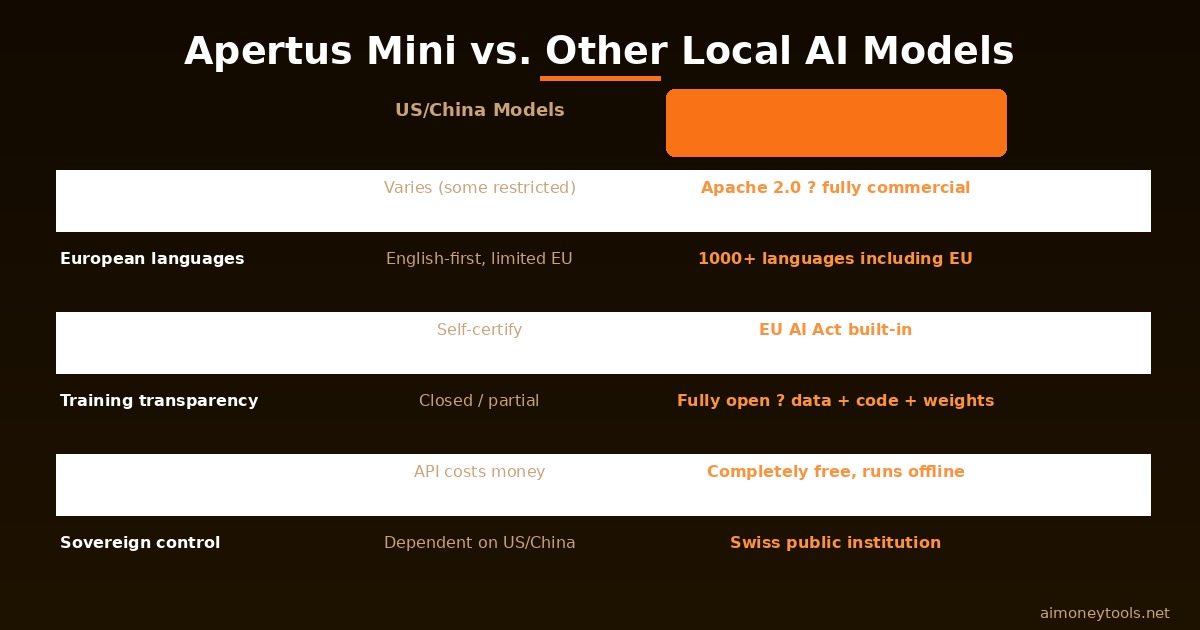
Since Apertus was trained on 1,000+ languages from verified, clean sources, it has a few genuine strengths over US models at equivalent sizes:
Multilingual quality: French, German, Italian, Spanish, Dutch, Polish and most European languages perform significantly better than equivalently-sized US models. If you're building something for European users, this matters.
EU AI Act compliance: The model cards document exactly what data was used and how PII was handled. For healthcare, legal, or government applications in Europe, this compliance documentation is valuable.
Reproducibility: The entire training pipeline is published. You can recreate the model from scratch. That's rare — GPT-5 and Claude Fable are black boxes; Apertus publishes everything.
Privacy: Since you run it locally, your data never leaves your device. For sensitive business documents, personal notes, or confidential code, this is the only way to use AI safely.
Is Apertus Mini Better Than GPT-5 or Claude?
For general reasoning and creative tasks, no — a 4B parameter model is not going to outperform a frontier model with billions more parameters. That's not the point.
Apertus Mini wins on:
- Privacy: no data sent anywhere
- Cost: free after hardware
- Multilingual support: especially for smaller European languages
- Latency: instant responses on local hardware, no API rate limits
- Offline use: planes, secure facilities, no-internet environments
Frontier models (GPT-5, Claude Fable 5, Gemini 3.5) still win on:
- Complex reasoning and code generation
- Multimodal tasks (vision, audio)
- Knowledge recency
The right mental model: Apertus Mini is like a very capable offline dictionary + assistant. It's not trying to be your everything — it's trying to be trustworthy, private, and actually yours.
Competitor Context: How Does It Compare?
Right now the small-model landscape for local AI looks like this:
| Model | Size | Language | Privacy |
|---|---|---|---|
| Apertus Mini 4B | 4B | 1000+ languages | Fully local, EU Act ✓ |
| Qwen 3 4B | 4B | Strong multilingual | Local |
| Llama 4 Scout | ~4B MoE | English-focused | Local |
| Phi-4 Mini | 3.8B | Decent multilingual | Local |
| Mistral 7B | 7B | Good multilingual | Local |
For pure performance, Qwen 3 4B is competitive. For European languages and documented compliance, Apertus Mini is the current best option.
Frequently Asked Questions
Is Apertus Mini free to use commercially? Yes. Apertus Mini is released under the Apache 2.0 license. You can use it, modify it, and build commercial products on top of it without royalties or attribution requirements (though crediting the Swiss AI Initiative is appreciated).
What's the difference between the base and instruct models? The base model is a raw pre-trained model designed for fine-tuning on your own data. The instruct model has been further trained on instruction-following data, so it responds naturally to chat-style prompts. If you just want to try it or build a chatbot, use the instruct model.
Does Apertus Mini support English? Yes — despite being a "European" model, English is included in the 1,000+ language training set and performs well. The edge case where Apertus Mini pulls ahead is smaller European languages (Dutch, Romanian, Czech, etc.) where US models are noticeably weaker.
What is a quantization level and which one should I pick? Quantization compresses the model weights to use less memory. Higher bits = better quality but more RAM required. For most beginners: Q4_K_M is the sweet spot. If you have lots of RAM (32GB+), Q8 gives nearly full precision. Q2 and Q3 are for very constrained hardware and have noticeable quality loss.
Can I fine-tune Apertus Mini on my own data? Yes — that's explicitly one of the use cases. The base models (non-instruct) are designed for fine-tuning. The published training pipeline and technical report at ICML 2026 (arXiv: 2605.29128) document the methodology.
What's the CSCS and who paid for this? CSCS (Swiss National Supercomputing Centre) is the government-funded supercomputing facility that provided the compute for training. The project was funded through Swiss-AI Initiative grants, which means Swiss taxpayers effectively funded a publicly available open AI model. That's the "sovereign AI" model in action.

Alex the Engineer
•Founder & AI ArchitectSenior software engineer turned AI Agency owner. I build massive, scalable AI workflows and share the exact blueprints, financial models, and code I use to generate automated revenue in 2026.
Related Articles

How to Start an AI-Assisted Resume Writing Side Hustle in 2026 (Beginner's Guide)
A step-by-step guide to using AI resume tools to offer a paid resume and cover letter writing service — what to charge, which tools to use, and how to find your first clients.

How to Build and Sell AI Voice Receptionists to Local Businesses in 2026
A beginner's guide to building AI voice agents that answer business phone calls — the tools to use, what to charge, and how to find your first client.

How to Make Money on Fiverr with AI Tools in 2026: 7 Gigs You Can Start This Week
Discover 7 real Fiverr gigs you can launch using free and low-cost AI tools in 2026 — no experience required. Real pricing data, step-by-step setup, and tools that actually work.