
Ghost Pepper: Free Local Speech-to-Text for Mac (No Cloud, No Subscription)
Ghost Pepper is a free macOS app that turns your voice into text using 100% local AI models. No cloud, no monthly fee. Install it in 3 minutes on Apple Silicon.
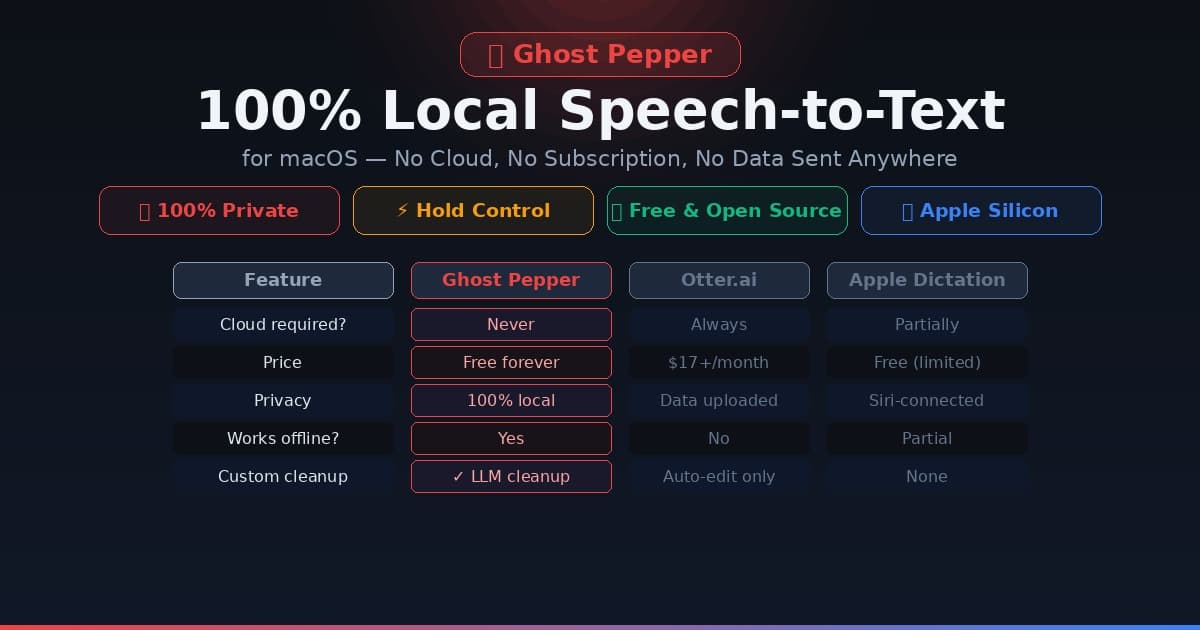
If you've ever paid $17/month for Otter.ai and thought "this is a lot for glorified transcription," you're going to appreciate Ghost Pepper.
Ghost Pepper is a free, open-source macOS app that transcribes your voice to text using entirely local AI models — no internet connection, no subscription, no data ever leaves your machine. Hold the Control key, speak, release — it transcribes and pastes directly into whatever field you're typing in. That's it.
It hit #26 on Hacker News this morning with over 400 upvotes and is trending on GitHub. It's free, local, and spicy — by design.
"It's spicy to offer something for free that other apps have raised $80M to build." — Ghost Pepper README
Requirements: macOS 14.0 or later, Apple Silicon Mac (M1 or newer). Intel Macs are not supported because the app runs AI models on the Neural Engine.
Why Local Speech-to-Text Matters
Every time you use a cloud transcription service — Otter.ai, Google Speech, Amazon Transcribe — your voice is uploaded to a remote server. Most services store recordings for quality improvement. Your medical notes, legal dictations, business strategy brainstorming: all of it hits someone else's infrastructure.
Ghost Pepper's answer: none of that happens. The Whisper model runs on your Mac's Neural Engine, the LLM cleanup runs locally too, and the transcription is injected directly into the active text field via macOS Accessibility APIs. There are no logs, no uploads, and the app has no network permissions for your audio.
For Mac users with Apple Silicon, this isn't even a performance compromise. The M3 Neural Engine can run Whisper small.en in under a second on a typical voice clip.
What Ghost Pepper Actually Does
The workflow is three steps:
- Hold Control — starts recording from your microphone
- Speak — say whatever you want to type
- Release Control — Whisper transcribes it, Qwen cleans it up, and it pastes automatically
"Clean up" means: filler words removed ("um", "uh", "like"), self-corrections handled ("I want to — actually let me rephrase that — I want to schedule"), and punctuation added naturally.
The result appears in any text field that accepts keyboard input: email composers, Notion, VS Code, Slack, terminal, browser address bar, anything. It uses Accessibility APIs to simulate a paste action, so it works system-wide without needing app-specific integrations.
How to Install Ghost Pepper
Installation takes under 3 minutes from zero to first transcription.
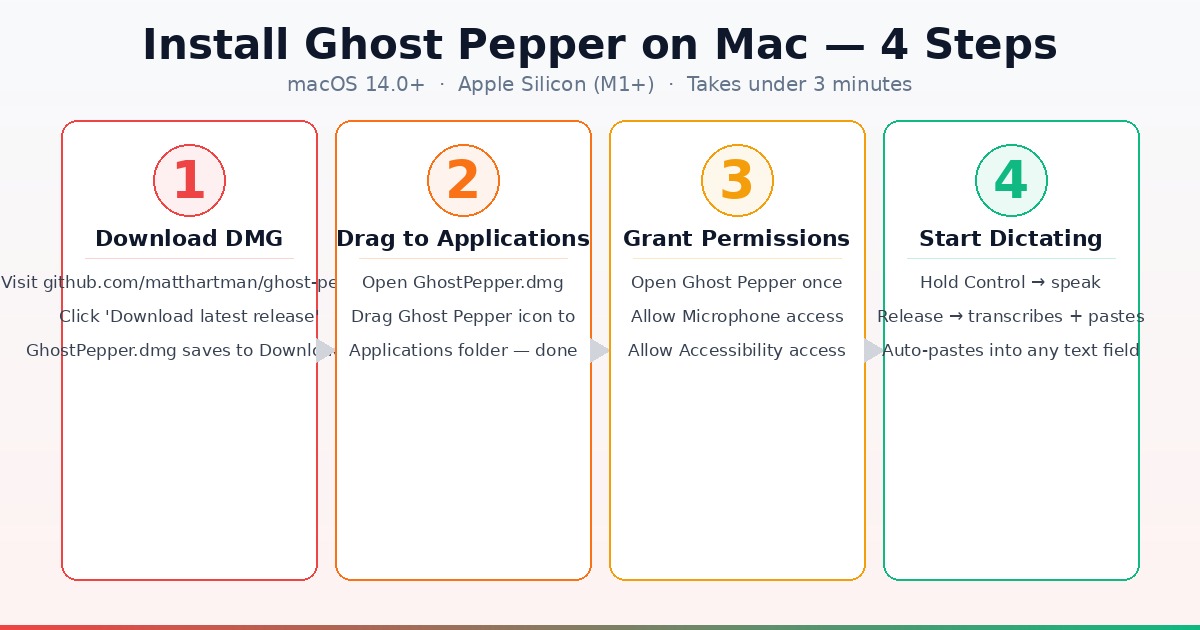
Step 1: Download the DMG
Go to github.com/matthartman/ghost-pepper and click the latest release link. Download GhostPepper.dmg — it's about 12 MB.
Step 2: Drag to Applications
Open the downloaded DMG file. Drag the Ghost Pepper icon to your Applications folder exactly like you would any other Mac app.
Step 3: Grant Permissions
Launch Ghost Pepper from Applications. macOS will ask for two permissions:
- Microphone — to record your voice (obvious)
- Accessibility — to simulate a paste action into the active app (this is how it types into any field without app-by-app integration)
Both permissions are required. If you accidentally deny one, go to System Settings → Privacy & Security to re-enable it.
If you're on a managed corporate Mac (Jamf, Kandji), ask your IT admin to pre-approve the Accessibility permission via MDM profile. The app's Team ID is BBVMGXR9AY if they need it.
Step 4: Start Dictating
Hold Control, speak your sentence or paragraph, release. The first time you use a model, it downloads automatically and caches locally. After that, transcriptions are instant.
Ghost Pepper lives in your menu bar — no Dock icon, no windows to manage. It launches at login by default (you can toggle this in Settings).
Choosing Your Models
Ghost Pepper uses two AI models working in sequence: a speech model to transcribe, and a cleanup LLM to polish the output. Both run completely locally.
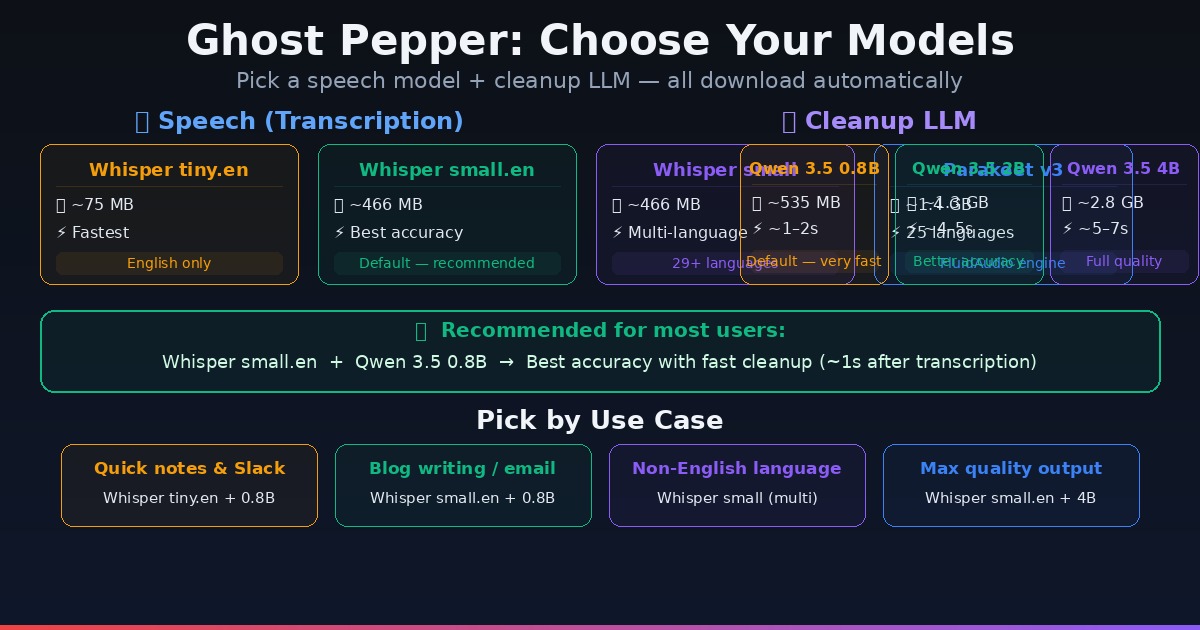
Speech Models
| Model | Size | Best For |
|---|---|---|
| Whisper tiny.en | ~75 MB | Fastest, English only |
| Whisper small.en | ~466 MB | Best accuracy, English only (default) |
| Whisper small (multilingual) | ~466 MB | 29+ language support |
| Parakeet v3 | ~1.4 GB | 25 languages via FluidAudio |
For most users: Whisper small.en. It's the default for good reason — the accuracy is noticeably better than tiny.en, and 466 MB is trivial storage on any modern Mac.
If you need to dictate in French, Spanish, German, Japanese, or another language, switch to Whisper small (multilingual) — same size, same speed, more languages.
Cleanup LLMs
After transcription, a small Qwen model removes filler words and handles self-corrections before pasting.
| Model | Size | Speed | Best For |
|---|---|---|---|
| Qwen 3.5 0.8B | ~535 MB | ~1–2s | Default — fast, good for most |
| Qwen 3.5 2B | ~1.3 GB | ~4–5s | More nuanced corrections |
| Qwen 3.5 4B | ~2.8 GB | ~5–7s | Maximum cleanup quality |
For most users: Qwen 3.5 0.8B. The speed advantage is significant in daily use — 1–2 seconds vs 5–7 seconds per clip. The quality difference matters most for complex speech with heavy editing or technical terms.
If you're dictating formal content like legal documents, medical notes, or detailed technical specs, the Qwen 3.5 4B is worth the extra wait.
To understand why model sizes matter for your available storage and RAM, see our guide on how to check VRAM for AI.
Where Ghost Pepper Works Best
The paste-anywhere design means it works in every context where you're typing:
Writing and notes:
- Notion, Obsidian, Bear, Apple Notes
- Google Docs, Word, Pages
- Email (Gmail in Chrome, Apple Mail, Spark)
Code and terminal:
- VS Code, Cursor, Xcode — dictate comments, docstrings, commit messages
- Terminal — dictate commands or longer CLI flags
Communication:
- Slack, Discord, Teams
- iMessage, WhatsApp web
Research and forms:
- Browser address bar (url dictation)
- Any form field on any website
- Search boxes (Google, ChatGPT, Perplexity)
The one context where it doesn't work is apps that don't respond to Accessibility paste — this is rare, but some sandboxed or hardened apps block simulated keystrokes. If you hit this, you can copy from clipboard manually after release.
Ghost Pepper vs. Alternatives
| Ghost Pepper | Otter.ai | Apple Dictation | Dragon Dictate | |
|---|---|---|---|---|
| Price | Free forever | $17–$40/month | Free | $200 one-time |
| Cloud required | Never | Always | Partial | No |
| Privacy | 100% local | Audio uploaded | Siri-connected | Local |
| macOS integration | Hold hotkey | Separate app | System-wide | System-wide |
| Cleanup/editing | LLM-based | Auto-edit | None | None |
| Works offline | Yes | No | Partial | Yes |
| Setup time | 3 minutes | Sign-up required | Built-in | Install + train |
Apple Dictation is the closest built-in alternative, but it routes through Siri infrastructure when enhanced mode is enabled and has no filler-word cleanup. Ghost Pepper beats it on privacy and output quality.
Dragon Dictate at $200 is a professional-grade option with deep macOS integration and custom vocabulary — worth it for professional transcriptionists or people who dictate 8+ hours per day. For everyone else, Ghost Pepper is the answer.
Practical Tips for Better Results
Speak in full sentences. The cleanup LLM is tuned to handle conversational English, not single words. "Um I need to send an email to Sarah about the project" comes out as "I need to send an email to Sarah about the project."
Pause before and after your clip. Ghost Pepper captures from when you hold Control to when you release. Starting your sentence half a second after pressing reduces the chance of cutting off the first word.
Use it for long text, not short commands. For quick single-word inserts, regular typing is faster. Ghost Pepper's strength is 2–5 sentence bursts — emails, Slack messages, notes, code comments.
Set up a custom cleanup prompt. In Settings, you can edit the cleanup instruction. If you're always dictating in a specific domain (legal, medical, code), customize the prompt to preserve technical terminology instead of rewriting it.
Combine with local AI workflows. If you're already running local models like Gemma 4 with LM Studio, you have the infrastructure for a fully offline AI writing stack: Ghost Pepper for voice input → LM Studio for AI-assisted drafting → no cloud required at any step.
Ghost Pepper vs. Professional Voiceover
Ghost Pepper is for dictation — turning your voice into typed text in real time. It's not a professional voiceover tool for YouTube videos, courses, or commercial audio production.
For that use case, the right tool is Murf.ai. Murf produces studio-quality AI voices in 20+ languages without recording equipment. It's what we use for all voiceover examples on this site. If you're a content creator who needs high-quality narration audio files (not just in-app typing), Murf is the better fit — Ghost Pepper is for writers and developers who dictate text into their Mac.
Frequently Asked Questions
Does Ghost Pepper work on Intel Macs? No. Ghost Pepper requires Apple Silicon (M1 or newer) because it runs AI models on the Neural Engine. Intel Mac users can try OpenAI Whisper directly via command line — see our terminal beginners guide to get started.
What happens if I accidentally close the app? Ghost Pepper lives in the menu bar and relaunches at login. If you quit it from the menu bar, the hotkey stops working until you relaunch from Applications. Check System Settings → General → Login Items to confirm it's set to launch automatically.
Can I change the hotkey? In the current version, the hotkey is fixed to Control. The developer has mentioned customizable hotkeys as a planned feature in the GitHub issues.
Is the recording stored anywhere? No. The README explicitly states: "No logging to disk — transcriptions are never written to files. Debug logs are in-memory only and disappear when the app quits." The source code is MIT licensed and auditable on GitHub.
Can it transcribe system audio or Zoom calls? No — Ghost Pepper records from the microphone only, not loopback or system audio. For call transcription, you'd need a separate tool like Fireflies or an Otter.ai integration.
How does the model download work? On first use, Ghost Pepper downloads the selected models from Hugging Face and caches them locally. You choose model size in Settings. Downloads happen in the background and are permanent — subsequent uses are instant. Total storage for the default configuration (Whisper small.en + Qwen 0.8B) is about 1 GB.
Ghost Pepper is free, private, and frankly overdelivers for a single-developer open-source project. For Mac users who dictate regularly — writers, developers, anyone who thinks faster than they type — it's the cleanest local AI integration available right now.
Download Ghost Pepper on GitHub →
Working on a full local AI setup? See our step-by-step guide to running Gemma 4 on Mac with LM Studio — Ghost Pepper pairs well with a local LLM for a completely offline AI writing workflow.

Alex the Engineer
•Founder & AI ArchitectSenior software engineer turned AI Agency owner. I build massive, scalable AI workflows and share the exact blueprints, financial models, and code I use to generate automated revenue in 2026.
Related Articles

How to Start an AI-Assisted Resume Writing Side Hustle in 2026 (Beginner's Guide)
A step-by-step guide to using AI resume tools to offer a paid resume and cover letter writing service — what to charge, which tools to use, and how to find your first clients.

How to Build and Sell AI Voice Receptionists to Local Businesses in 2026
A beginner's guide to building AI voice agents that answer business phone calls — the tools to use, what to charge, and how to find your first client.

How to Make Money on Fiverr with AI Tools in 2026: 7 Gigs You Can Start This Week
Discover 7 real Fiverr gigs you can launch using free and low-cost AI tools in 2026 — no experience required. Real pricing data, step-by-step setup, and tools that actually work.