
How to Start a Faceless AI YouTube Channel (Step-by-Step Guide for Beginners)
Learn how to start a faceless AI YouTube channel from scratch — no camera, no voice, no experience required. We cover free tools, niche selection, and how to publish your first video.
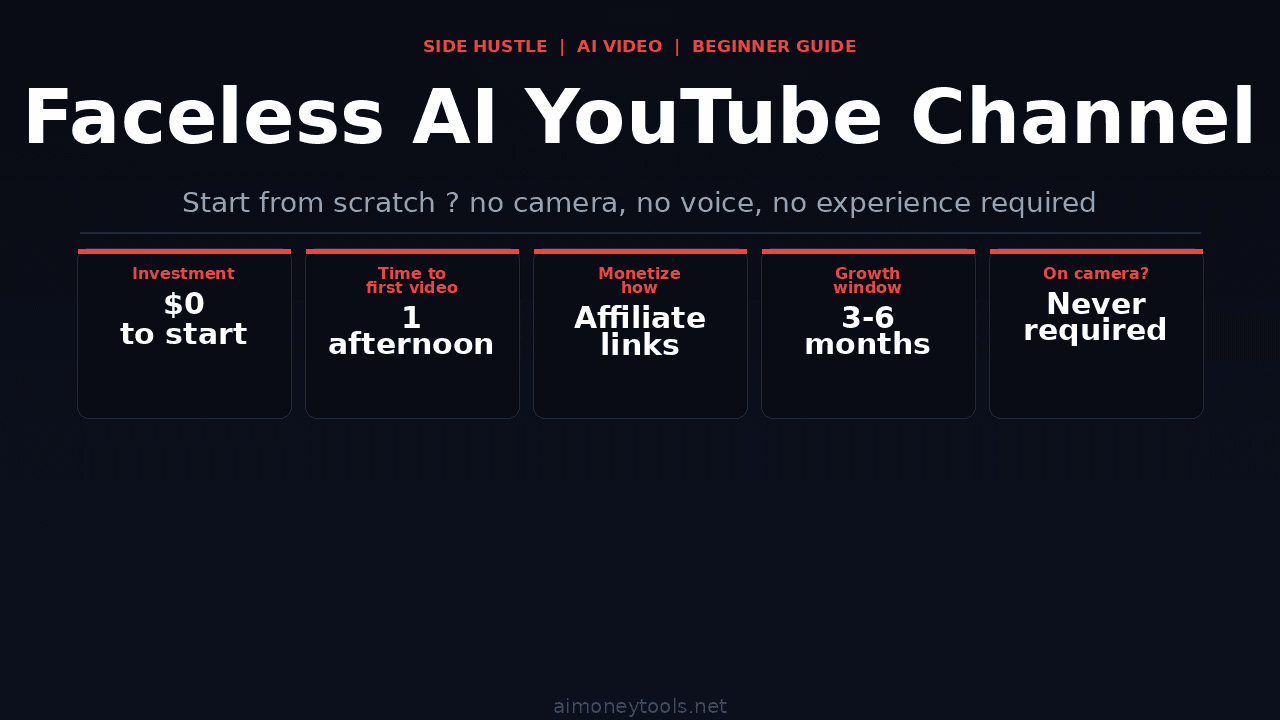
You do not need a camera. You do not need to be on screen. You do not need a professional voice or video editing experience. A faceless AI YouTube channel can be started in an afternoon — and in 2026, the tools to make it look professional are mostly free or close to it.
This guide covers everything a beginner needs to know: choosing a niche that works, the exact AI tools to use at each step, and how to get your first video published without spending hundreds of dollars.
What Is a Faceless AI YouTube Channel?
A faceless YouTube channel is one where the creator never appears on camera. Instead, videos are made up of screen recordings, stock footage, animations, AI voiceover, AI avatars, or a combination of all of these.
"AI-powered" means you are using AI tools to generate or assist with: the script, the voiceover, the visuals, the thumbnail, and sometimes the editing itself.
The result is a channel that looks like a production team made it — but it's one person with a laptop and a few free accounts.
Why Faceless Channels Work in 2026
Faceless channels perform well for a specific reason: YouTube's algorithm does not reward faces. It rewards watch time, click-through rate, and engagement. A well-edited explainer video with a clear AI voiceover and professional visuals can outperform a "talking head" video from a creator with 10 years of experience — if the topic is right and the packaging is compelling.
Many of the most-watched channels in categories like AI news, productivity, personal finance, tech explainers, and tutorials are faceless or mostly faceless. The audience does not care who is presenting. They care whether the information is useful.
Step 1: Choose a Niche That Works for Faceless Content
Not every niche works equally well. The best niches for faceless AI channels share these traits:
- Information-dense — audiences expect to learn something, not be entertained by a personality
- Growing search volume — you want YouTube search traffic, not just browse-traffic
- Underserved corners — you want sub-niches where the top channels are not already massive
Strong faceless niches for 2026:
- AI tool tutorials and reviews (high growth, search-driven)
- Personal finance for beginners (evergreen, huge audience)
- Tech explainers (what is X, how does Y work)
- Local business AI tools (low competition, commercial intent)
- Study guides and summaries (students + professionals)
- Passive income / side hustle ideas
Niches to avoid as a beginner: general news, political commentary, entertainment, and gaming — all dominated by large personality-driven channels.
The play: Pick a sub-niche inside one of the above categories. "AI tools for freelancers" beats "AI tools." "Side hustles for teachers" beats "side hustle ideas." Specificity is how beginners compete.
Step 2: Generate Your Script with AI
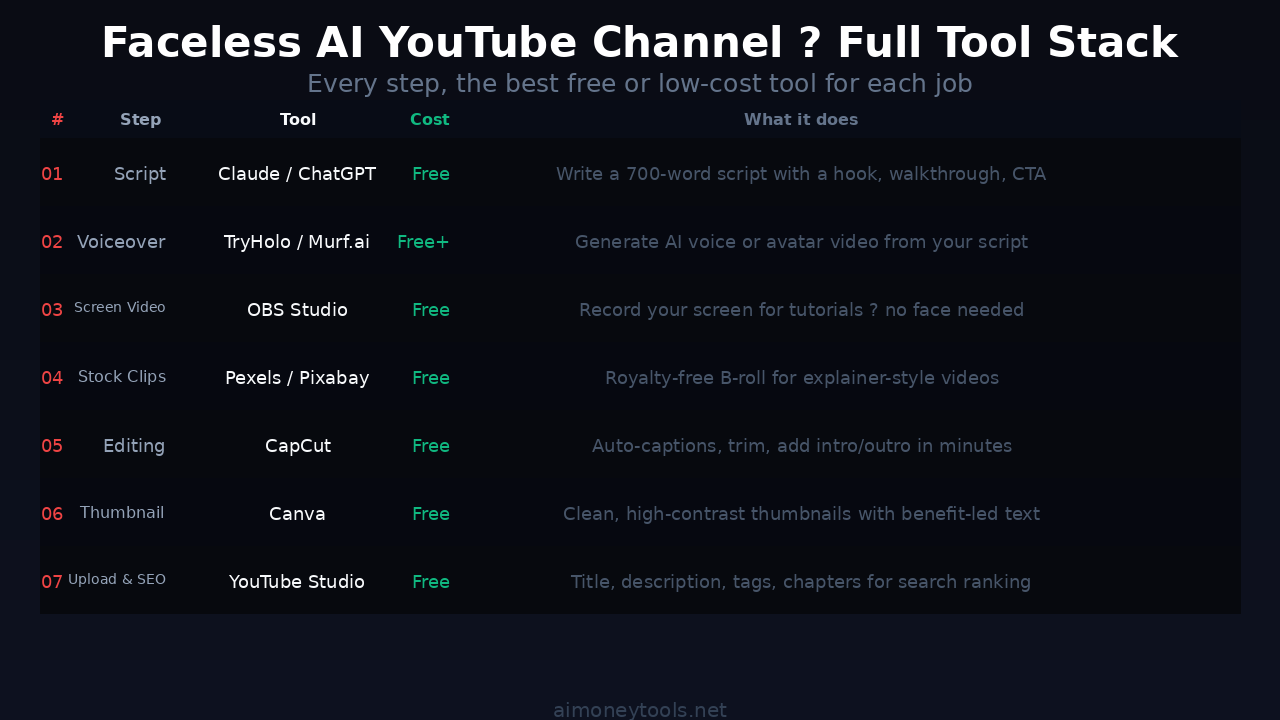
Every video starts with a script. Use Claude or ChatGPT for this — both are excellent.
A good prompt for Claude:
"Write a 700-word YouTube script about [topic] for beginners. No jargon. Hook in the first 15 seconds. Structure: hook, problem, solution, step-by-step walkthrough, call to action. Conversational tone — speak to one person."
Key rules for AI scripts:
- Always edit the script to add at least one real example or insight. Pure AI output sounds generic.
- Keep it under 900 words for a 6–8 minute video (average reading speed at script pace is ~120–140 words per minute)
- Write as if speaking, not as if writing — short sentences, pauses, rhetorical questions
Step 3: Generate AI Voiceover
Once the script is ready, you need a voice. You have two main options:
Option 1: Text-to-speech voice only (no avatar) Upload your script to a TTS tool and generate a natural-sounding voiceover. Good free options: ElevenLabs (limited free tier), Murf.ai (good for professional tone).
Option 2: AI video avatar — sync voice and a visual presenter This is where TryHolo comes in. TryHolo lets you generate a realistic AI avatar video from your script — the avatar speaks your script, moves naturally, and looks like a person presenting directly to camera. You are never on screen; the AI character is.
This is especially effective for:
- Tech and AI tool explainers (professional presenter look)
- Tutorials where you want a "host" style delivery
- Any niche where credibility and polish matter
Step 4: Create Your Visuals
Visuals depend on your video type:
Screen-recording-based tutorials: Use OBS Studio (free) or Loom to record your screen while narrating. You are never visible. The screen is the video.
Explainer / AI news style: Use stock footage from Pexels or Pixabay (free, no attribution required) combined with simple B-roll cutaways. Tools like CapCut or DaVinci Resolve can assemble these clips with your voiceover.
Presentation-style: Use Gamma or Google Slides to build a slide deck, screen-record the slides advancing while the voiceover plays. Simple, fast, effective.
AI avatar style: TryHolo or Synthesia generate video where an AI presenter delivers your script directly. You drop this into a simple video editor and add intro/outro sequences.
Step 5: Edit and Add Captions
Editing a faceless AI video is significantly simpler than traditional video editing because there are no jump cuts to manage around a person's face.
Basic workflow in CapCut (free):
- Import voiceover + visuals
- Sync clips to voiceover timing
- Add captions via CapCut's auto-captions feature (AI-generated, ~95% accuracy)
- Add simple intro/outro title cards
- Export at 1080p
Auto-captions are non-negotiable in 2026. YouTube's own data shows viewers watch captioned videos ~40% longer. CapCut generates them in under 60 seconds.
Step 6: Generate Your Thumbnail
Thumbnail CTR is one of the two metrics (with watch time) that determines whether YouTube promotes your video.
For faceless channels, effective thumbnails typically:
- Show text that states the key benefit (not the topic — the benefit)
- Use a simple icon or visual to reinforce the message
- Keep background clean and high-contrast
Generate thumbnail text ideas with: "Give me 5 YouTube thumbnail text options for a video about [topic]. Each should be under 6 words and promise a clear benefit."
Use Canva (free) to assemble the final thumbnail. AI-generated backgrounds from MidJourney or Leonardo.ai can elevate the production value.
Step 7: Upload Optimized for Search
YouTube SEO is not complex, but it's worth doing correctly:
Title: Lead with the keyword. Include the year. Keep it under 70 characters. Example: "How to Start a Faceless AI YouTube Channel in 2026 (No Camera)"
Description: First 150 characters matter most (above the fold). Include the main keyword in the first sentence. Add related keywords naturally throughout.
Tags: Add 8–12 tags. Start with your exact keyword, then broader variations, then related terms.
Category: Set to Education, Science & Technology, or How-to & Style depending on content type.
Chapters: Add timestamps manually or use YouTube's auto-chapter detection. Chapters improve watch time by letting viewers jump to relevant sections.
What to Expect: Realistic Growth Timeline
Faceless channels grow on a slower curve than personality channels in the first 3 months, then often accelerate because the content is more search-indexed and less dependent on the creator's personal brand.
Realistic expectations:
- Month 1: 0–200 views per video. This is normal. You are building an indexed library.
- Month 2–3: Search traffic starts. 200–1,000 views per video on newer content.
- Month 6: If you have published 3+ videos per week consistently, some videos start getting algorithm-driven browse traffic. This is when growth accelerates.
The channels that fail do so almost entirely due to inconsistency. One video every two weeks will not build momentum. Three videos per week for six months will.
How to Monetize a Faceless AI Channel
YouTube AdSense is the long-term target (threshold: 1,000 subscribers + 4,000 watch hours), but most early-stage channels make money before that via:
Affiliate links in description: For every tool you review or mention, drop an affiliate link. Viewers who buy through your link generate commission. For an AI tool niche, a well-placed CustomGPT link (customgpt.ai) in a chatbot tutorial can generate $30–$100+ per sale.
Sponsorships from small tools: At 500–2,000 subscribers, niche AI tool companies will often pay $50–$300 per video for a mention. You do not need a large audience — you need a targeted one.
Digital products: A video course or template pack sold via Gumroad. A good explainer channel in a professional niche can generate significant revenue this way long before hitting AdSense thresholds.
Key Takeaways
- A faceless AI YouTube channel requires no camera, no voice, and no editing experience — just the right tools
- The best niches for beginners are AI tools, productivity, personal finance, and tech explainers
- Script → voiceover → visuals → edit → optimize for search is the complete workflow
- TryHolo generates AI avatar videos from your script; CapCut handles editing and captions for free
- Monetize early via affiliate links; AdSense comes later
- Consistency over 3–6 months is the most reliable path to organic growth
FAQ
Do I need any experience to start a faceless AI YouTube channel?
No. The tools used in 2026 — AI voiceover, auto-captions, stock footage — are designed for beginners. If you can copy and paste a script into an app, you have the technical skills required.
How much does it cost to start?
The minimum cost is $0. OBS (screen recording), CapCut (editing), Pexels (stock footage), and a free ElevenLabs account (voiceover) can power your first 5–10 videos. TryHolo and Murf have free tiers. The main investment is time.
How many videos do I need to publish before getting views?
Most channels see meaningful search traffic after publishing 8–12 videos in a specific niche. YouTube needs enough content to understand what your channel is about before recommending it.
How long should each video be?
6–12 minutes is the sweet spot for most beginner niches. Long enough to qualify for mid-roll ads (eventually), short enough to maintain watch time. Tutorial videos can run 10–15 minutes without hurting retention.
Can I use AI-generated voices without getting flagged?
Yes. YouTube does not flag or penalize AI voiceover. Many large channels use AI voices exclusively. The only restriction is that you must disclose AI-generated content that depicts real people or simulates them in potentially misleading ways — which does not apply to standard AI narration.
What's the fastest niche to start getting views?
AI tool tutorials and reviews in 2026 have strong search demand and low competition in most sub-categories. A clear beginner-focused tutorial on a specific tool can rank in YouTube search within weeks if the SEO is done correctly.

Alex the Engineer
•Founder & AI ArchitectSenior software engineer turned AI Agency owner. I build massive, scalable AI workflows and share the exact blueprints, financial models, and code I use to generate automated revenue in 2026.
Related Articles

How to Start an AI-Assisted Resume Writing Side Hustle in 2026 (Beginner's Guide)
A step-by-step guide to using AI resume tools to offer a paid resume and cover letter writing service — what to charge, which tools to use, and how to find your first clients.

How to Build and Sell AI Voice Receptionists to Local Businesses in 2026
A beginner's guide to building AI voice agents that answer business phone calls — the tools to use, what to charge, and how to find your first client.

How to Make Money on Fiverr with AI Tools in 2026: 7 Gigs You Can Start This Week
Discover 7 real Fiverr gigs you can launch using free and low-cost AI tools in 2026 — no experience required. Real pricing data, step-by-step setup, and tools that actually work.