
How to Sell AI-Generated Digital Products on Gumroad: A Beginner's Guide
Learn how to create and sell AI-powered digital products on Gumroad — from prompt packs to Notion templates — with zero upfront cost and no audience needed.
Gumroad has paid out over $1 billion to creators since it launched. The majority of that wasn't from influencers with massive followings — it was from regular people selling useful digital downloads to a small but steady stream of buyers.
AI just cut the time it takes to create those products from weeks to hours.
This guide walks through exactly how to build and sell AI-powered digital products on Gumroad — the platforms, the process, the fees, and the products most likely to actually sell.
What Actually Sells on Gumroad
Not every digital product moves on Gumroad. The platform's buyers are primarily creators, freelancers, and professionals looking for tools that make their work faster or easier. That aligns well with what AI can produce.
The five categories with the strongest sell-through for AI-assisted creators right now:
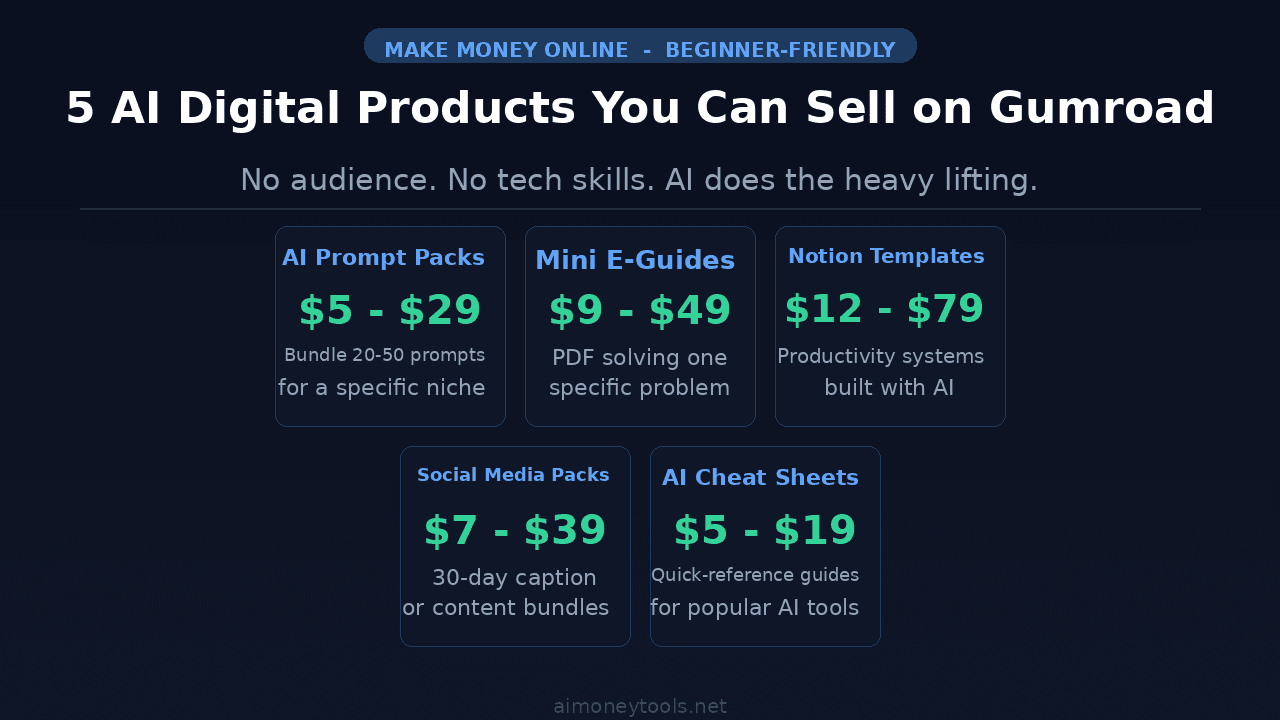
AI Prompt Packs — Curated collections of 20–50 prompts for a specific use case (copywriting, image generation, coding, journaling). Price range: $5–$29. These are fast to create, easy to update, and have low perceived risk for buyers.
Mini E-Guides — Short PDFs (10–30 pages) solving one specific problem. "How to write cold DMs that book calls." "How to set up automated invoicing with AI." The narrower the topic, the better they convert. Price range: $9–$49.
Notion Templates — Prebuilt Notion workspaces for project management, content calendars, CRM systems, habit trackers. AI can help design the structure and write the documentation. Price range: $12–$79.
Social Media Content Packs — 30-day caption packs, hook libraries, or hashtag strategy guides for specific niches (real estate agents, fitness coaches, SaaS founders). Price range: $7–$39.
AI Cheat Sheets — Quick-reference PDF guides covering how to use a specific AI tool effectively. Tools like ChatGPT, Claude, Midjourney, and Gemini all have active buyer bases. Price range: $5–$19.
The common thread: each solves a narrow problem for a clearly defined person. That's what makes products discoverable and easy to describe.
Creating Your First Product with AI
Pick one of the product types above. Then follow this workflow:
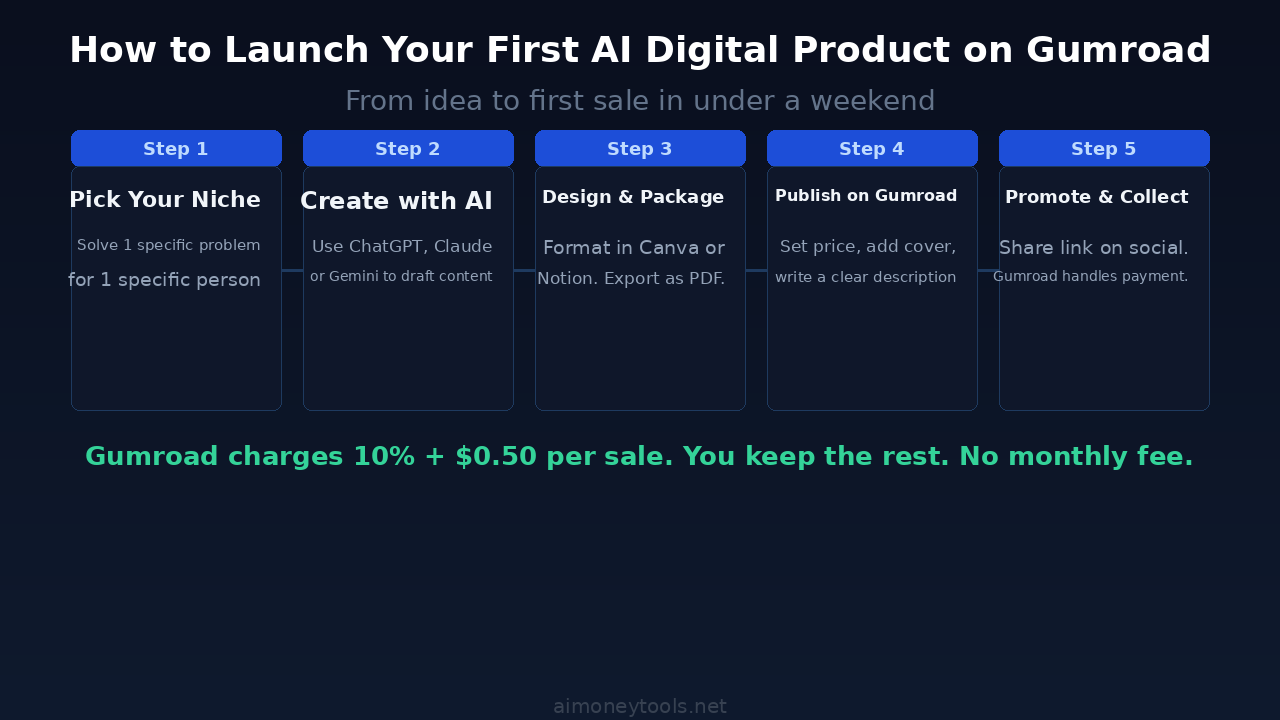
1. Define the exact buyer and problem. "Marketing freelancers who struggle to write cold outreach emails" is a better target than "marketers." The narrower your framing, the easier everything else gets — the product name, the description, even the cover image.
2. Use AI to generate the core content. ChatGPT, Claude, and Gemini are all capable of drafting prompt packs, outlining e-guides, and structuring templates based on a detailed brief. Spend time on your prompt inputs. Feed the AI examples of what you want the output to look like.
3. Edit and verify everything. AI content needs a human pass. Fix any vague advice, remove generic filler, and make sure every claim is accurate. This step also makes your product noticeably better than the average AI-generated dump others sell.
4. Design and package it. For PDFs: use Canva (free tier is fine). For Notion templates: export a shareable template link. Keep the design clean — Gumroad buyers judge products by covers and descriptions, not fancy layouts.
Setting Up Your Gumroad Listing
Creating an account on Gumroad takes about five minutes. There's no monthly subscription — the platform charges a flat fee per sale.
For your listing:
- Product name: Be specific. "30-Day Instagram Caption Pack for Real Estate Agents" beats "Social Media Pack."
- Cover image: 1280×720 is the ideal size. Make the text large enough to read at thumbnail scale.
- Description: Lead with what the buyer gets, not what you made. "You'll have 30 ready-to-post captions organized by theme" > "I created this using ChatGPT."
- Price: Start at $9–$29 for your first product. Low enough for impulse buys, high enough to feel valuable.
- File: Upload your PDF, zip file, or paste your Notion template link in the product details.
Gumroad handles payments, delivery, and tax collection automatically. Once it's live, buyers get an instant download link after purchase.
The Fee Reality: What You Actually Keep
Gumroad's fee structure is simple: 10% + $0.50 per direct sale, plus standard payment processing (2.9% + $0.30) charged by Stripe. There's no monthly fee.
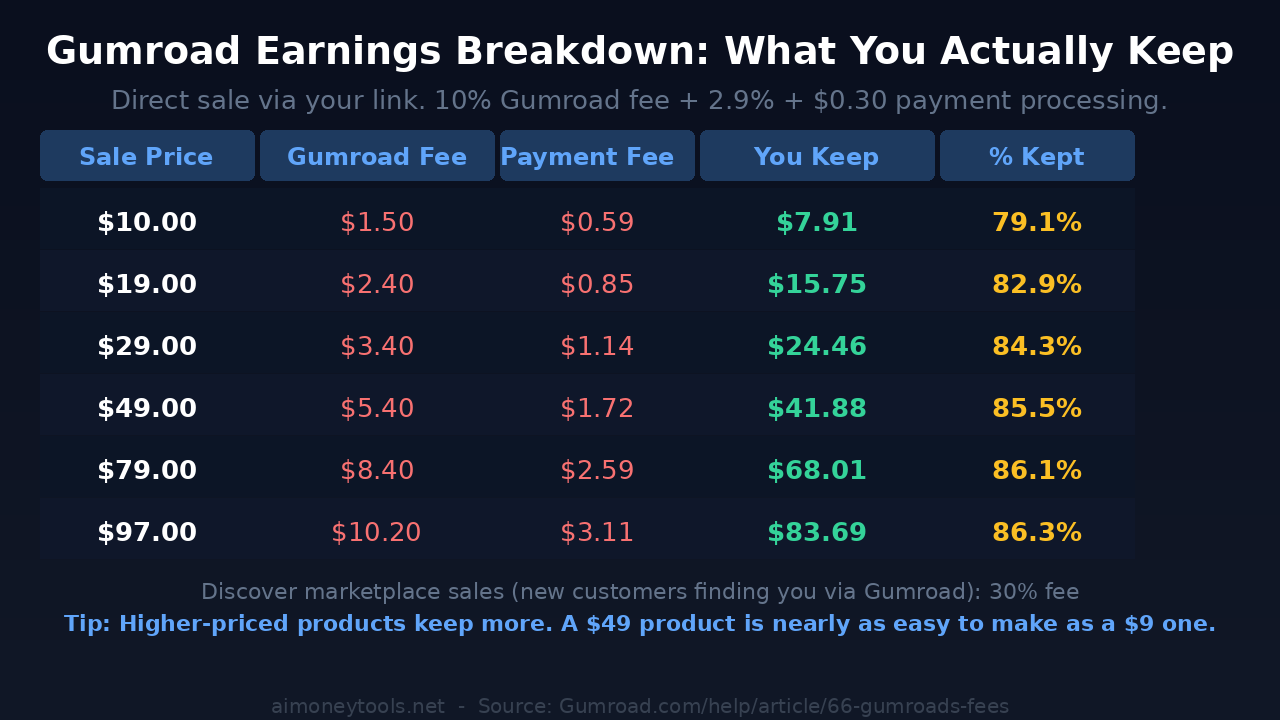
At $29, you keep about $24.46 — roughly 84%. At $49, you keep about $41.88 — around 85.5%. The margin improves as price goes up, which is why pricing higher (when the product warrants it) is always worth considering.
One important note: if customers discover your product through Gumroad's own marketplace search ("Discover"), the fee jumps to 30%. That's why building your own audience — even a small one — and sending them directly to your product link is the smarter long-term play.
Getting Your First Sales Without an Audience
You don't need followers to make sales, but you do need traffic. The lowest-friction starting points:
Reddit and niche communities. Find subreddits where your target buyer hangs out. Don't spam links. Answer questions, demonstrate knowledge, mention your product when relevant. Communities like r/ChatGPTPromptEngineering or niche-specific subreddits are often receptive to quality tools.
LinkedIn. A short post walking through how you use your own prompt pack — with real examples — tends to get traction in professional niches. Tag the problem, show the solution.
Pin your product link in your social bio. Minimal effort, permanent visibility.
Free sample → paid upgrade. Give away one or two prompts or a sample page, and sell the full pack. Lower friction for first-time buyers.
This is one of the most accessible AI side hustle ideas for beginners because the startup cost is essentially zero — just your time.
Pricing Strategy: Why Higher Usually Wins
The most common mistake first-time sellers make is pricing too low. A $5 product and a $25 product both require the same amount of effort to market. The $25 product converts at a similar rate once buyers trust the description, and it earns five times as much per sale.
The perceived quality of a $25 product is also higher than a $5 one — even if the content is identical. Buyers associate price with effort.
Start at $19–$29 for most products. Test $49 on anything that saves buyers significant time (a full Notion system, a comprehensive prompt library, a detailed playbook). If you're unsure, price it higher and offer a discount code to early buyers.
If you're looking for no-code AI side hustles that pay better as they scale, Gumroad digital products hold up well — each sale is the same work as the last one.
Key Takeaways
- AI prompt packs, mini e-guides, Notion templates, social media packs, and cheat sheets are the strongest product types for AI-assisted creators on Gumroad
- Create by defining a narrow problem, using AI to generate the core content, editing manually, and packaging in Canva or Notion
- Gumroad charges 10% + $0.50 per direct sale, with no monthly fee — you keep 79–86% depending on price
- Price higher: a $49 product earns 5x a $9 product and has similar conversion rates once described well
- Drive your own traffic to avoid the 30% Discover marketplace fee
- First sale is possible within days of publishing if you actively share in the right communities
Frequently Asked Questions
Do I need to disclose that my product was made with AI? Gumroad doesn't require it, but being transparent — "this was created with AI assistance and reviewed for accuracy" — tends to build more trust than hiding it. Buyers know AI exists.
Can I sell AI-generated images on Gumroad? Yes. AI-generated artwork, printables, and digital wallpapers are common products. Check the platform you used to generate the images for commercial use rights — most major tools (Midjourney, DALL-E 3, Stable Diffusion) allow commercial sales with appropriate licenses.
How long until I make my first sale? Varies widely. Sellers who actively promote on Reddit, LinkedIn, or niche communities in the first week often see a sale within days. Passive listing with no traffic can take weeks or months. Traffic is the variable — the product is just the asset.
What's the minimum payout threshold on Gumroad? Gumroad pays out weekly via direct deposit or PayPal once your balance is $10 or more.
Is Gumroad better than Payhip or Lemon Squeezy? Gumroad has a larger built-in marketplace (Discover) which can passively send you customers, though at a higher fee. Payhip has lower fees on its paid plans. Lemon Squeezy is better for software/SaaS licenses. For simple PDFs and digital downloads, Gumroad's setup speed and built-in discoverability make it the fastest starting point.
Can I bundle products later? Yes. Gumroad supports bundles natively. Once you have two or three related products, combining them at a slight discount is one of the most effective ways to increase average order value.

Alex the Engineer
•Founder & AI ArchitectSenior software engineer turned AI Agency owner. I build massive, scalable AI workflows and share the exact blueprints, financial models, and code I use to generate automated revenue in 2026.
Related Articles

How to Start an AI-Assisted Resume Writing Side Hustle in 2026 (Beginner's Guide)
A step-by-step guide to using AI resume tools to offer a paid resume and cover letter writing service — what to charge, which tools to use, and how to find your first clients.

How to Build and Sell AI Voice Receptionists to Local Businesses in 2026
A beginner's guide to building AI voice agents that answer business phone calls — the tools to use, what to charge, and how to find your first client.

How to Make Money on Fiverr with AI Tools in 2026: 7 Gigs You Can Start This Week
Discover 7 real Fiverr gigs you can launch using free and low-cost AI tools in 2026 — no experience required. Real pricing data, step-by-step setup, and tools that actually work.