
Obsidian Agent Skills 2026: Set Up Claude Code to Control Your Vault
Install the 5 official Obsidian agent skills from kepano and let Claude Code, Codex CLI, or OpenCode fully control your vault. Step-by-step setup guide with real commands.
The CEO of Obsidian just open-sourced the official way to let AI agents control your vault.
It's called obsidian-skills — a set of five agent skill files written by Steph Ango (kepano), Obsidian's creator. They teach Claude Code, Codex CLI, and OpenCode exactly how Obsidian works: the syntax, the CLI, the canvas format, and even how to extract clean web content for import. The repo went GitHub trending this week.
If you use Obsidian for notes, writing, or knowledge management and you also use AI coding agents — this is the missing glue.
What Are Agent Skills?
Agent skills are instruction files that tell an AI agent how to work within a specific domain. They follow the Agent Skills specification, a community standard that's gaining adoption across tools like Claude Code, Codex CLI, and OpenCode.
Each skill is a SKILL.md file — a structured markdown document that the AI reads before taking actions. It describes the syntax, file formats, idioms, and edge cases the agent needs to know to work correctly in that environment.
Think of it like an onboarding doc written specifically for an AI, not a human.
Without skills, Claude Code might try to create a note in Obsidian and write # Title instead of using YAML frontmatter properties. It might not know that [[wikilinks]] are how internal links work, or that callouts use a specific > [!note] syntax. Skills fix all of that.
The obsidian-skills repo is notable because it's not a third-party project — it's built by Obsidian's own CEO. These are the canonical, official skill definitions.
Why Skills Matter for Beginners
If you're new to using AI tools with your notes app, here's the practical problem skills solve: AI agents are generalists. They know a little about everything, but they don't automatically know the specific quirks of Obsidian's formatting rules. They might write perfectly readable markdown that still looks broken inside your vault, or create links that don't connect to anything.
Skills close that gap by giving the AI a cheat sheet — written in plain language — before it touches a single file. The result is an agent that behaves like it's been using Obsidian for years, not one that's guessing.
You don't need any coding experience to benefit from this setup. If you can follow a few terminal commands (which we'll walk through below), you can have AI agents managing your vault in under 15 minutes.
The 5 Official Skills
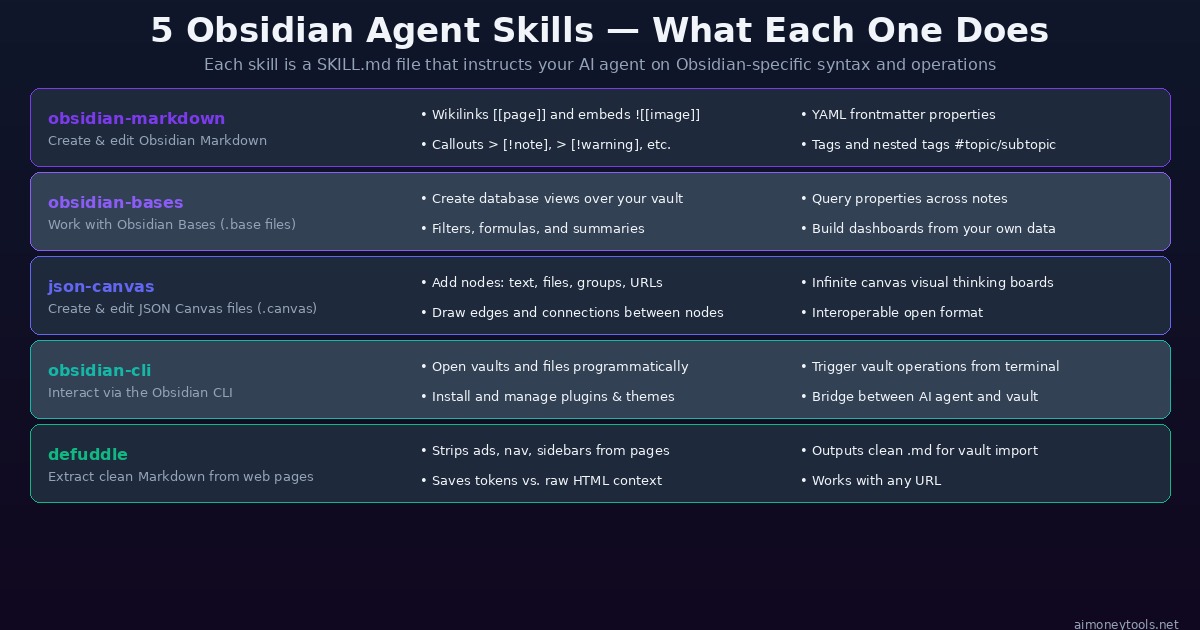
Here's a quick overview before we dive into each one:
| Skill | What It Covers | Best For |
|---|---|---|
| obsidian-markdown | Obsidian-flavored syntax | All users — foundational |
| obsidian-bases | Database views over your notes | Power users, project trackers |
| json-canvas | Visual canvas files | Visual thinkers, project mappers |
| obsidian-cli | Command-line vault control | Automation workflows |
| defuddle | Web content extraction to markdown | Researchers, content curators |
1. obsidian-markdown
Teaches the agent to write Obsidian Flavored Markdown correctly. This is not standard markdown — Obsidian has extensions that most AI models get wrong by default:
[[wikilinks]]for internal page links![[image.png]]for file embeds> [!note],> [!warning],> [!tip]for callouts- YAML frontmatter with typed properties (
date:,tags:, custom fields) - Nested tags like
#project/client-name
This skill is the foundation. Everything else builds on correct markdown syntax.
Why it matters in practice: If you've ever asked ChatGPT to write a note for Obsidian and then had to manually fix the formatting afterward — wikilinks that didn't resolve, callout blocks that rendered as plain text, properties that weren't recognized — this skill eliminates that cleanup work entirely. The agent writes correct Obsidian syntax the first time.
Who should prioritize this skill: Everyone. This is the baseline skill that makes every other interaction with your vault cleaner and more reliable. Even if you only ever use AI to draft notes or add frontmatter to existing files, obsidian-markdown is what makes those outputs usable without editing.
Pros:
- Eliminates formatting errors in AI-generated notes
- Handles the parts of Obsidian syntax that trip up most AI models
- Required for every other skill to work properly
Cons:
- Doesn't add new capabilities on its own — it's infrastructure, not features
- AI still needs access to your vault folder to act on what it knows
2. obsidian-bases
Covers Obsidian Bases — the database-style feature that lets you create structured views over your vault's notes. With this skill, an agent can:
- Create
.basefiles with filtered views of your notes - Write formulas and summaries across note properties
- Build dashboards that surface patterns in your knowledge base
- Query across notes without manual linking
This opens up workflows like "show me all notes tagged #project with status: active" — and have the AI generate and maintain that view for you.
Why it matters in practice: Obsidian Bases is a relatively new feature, and its syntax isn't something most AI models have been trained on extensively. Without this skill, asking an agent to create a Base file is a guessing game. With it, the agent understands the exact format, supported formulas, and how filtering logic works — so it can build functional dashboards on the first attempt.
Who should prioritize this skill: Anyone using Obsidian as a project management or task tracking system. If your vault contains notes with properties like status, priority, due-date, or client, the Bases skill lets you have an AI automatically build and update views across all of them — no manual setup required.
Best For: Freelancers tracking multiple client projects, students managing coursework, researchers organizing literature notes by topic or status.
Pros:
- Automates the creation of structured knowledge dashboards
- Works across your entire vault — surfaces patterns you might miss manually
- Saves significant time when managing large note collections
Cons:
- Only useful if you're already using or planning to use Obsidian Bases
- Requires your notes to have consistent frontmatter properties to query effectively
3. json-canvas
JSON Canvas is an open format for infinite canvas files (.canvas extension in Obsidian). This skill teaches the agent the exact JSON schema:
- Adding nodes: text nodes, file nodes, group nodes, URL nodes
- Drawing edges with directional connections and labels
- Organizing nodes into groups with colors and labels
- Reading and modifying existing canvas files
Practical use: ask your AI to map out a project canvas, generate a visual outline of a document, or create a knowledge map from a set of linked notes.
Why it matters in practice: Canvas files are stored as JSON — a structured data format that's readable by machines but tedious to write by hand. Without knowing the exact schema, an AI agent would produce invalid JSON that either fails to open or renders incorrectly. This skill gives the agent the precise structure it needs to generate valid, well-organized canvas files that open cleanly in Obsidian.
Who should prioritize this skill: Visual thinkers and people who use Obsidian Canvas to map out ideas, plan projects, or create relationship diagrams between concepts. If you've ever spent an hour manually arranging nodes on a canvas, having an AI draft the initial layout is a meaningful time saver.
Best For: Writers outlining complex projects, consultants mapping client workflows, anyone who thinks in diagrams rather than lists.
Pros:
- Generates valid canvas files automatically — no manual JSON editing
- Can create complex multi-node diagrams from a single prompt
- Useful for visualizing relationships between linked notes
Cons:
- Canvas is a visual medium — you'll still want to adjust layouts manually for presentation quality
- More niche than the markdown skill; only relevant if you actively use Obsidian Canvas
4. obsidian-cli
Covers the Obsidian CLI — a command-line tool for vault operations. This skill enables:
- Opening specific vaults and files programmatically
- Installing and managing plugins and themes from the terminal
- Triggering vault-level operations through scripts
- Bridging between what the AI wants to do and the actual Obsidian application
This is the most powerful skill for automation workflows — it lets the agent actually launch actions in Obsidian, not just edit files.
Why it matters in practice: The other four skills are about the AI understanding Obsidian's formats and writing correct files. This skill takes it a step further — it lets the agent interact with Obsidian as a running application. That means it can install plugins, switch vaults, open specific notes, and trigger application-level features directly from a terminal command. It's the difference between an AI that can write you a note and one that can actually manage your Obsidian setup end-to-end.
Who should prioritize this skill: Users who want to automate vault maintenance, developers building workflows around Obsidian, or anyone managing multiple vaults who wants to script repetitive operations. This is also the skill you need if you want the AI to install or configure plugins on your behalf.
Best For: Power users, productivity system builders, developers integrating Obsidian into larger workflows.
Pros:
- Enables true automation — the agent can take action, not just generate text
- Supports plugin and theme management from the terminal
- Bridges AI capabilities with Obsidian's application layer
Cons:
- Requires the Obsidian application to be installed and accessible
- More technical setup than the other skills
- Mistakes at the CLI level can affect your vault configuration — always back up first
5. defuddle
Defuddle is a web content extraction tool that strips pages down to clean, readable markdown. It removes ads, navigation, sidebars, and clutter — outputting just the content.
Why is this a vault skill? Because importing web content into Obsidian is a common workflow, and raw HTML is token-expensive and messy. With defuddle, the agent can fetch a URL, clean it, and save a lean markdown note in one step.
Why it matters in practice: If you've tried asking an AI to summarize or import a webpage, you've probably noticed that raw web content includes an enormous amount of noise — cookie banners, navigation menus, footer links, ad copy. All of that uses up context window space and confuses the main content. Defuddle strips all of that away before the AI processes it, making the output cleaner and faster to generate.
Who should prioritize this skill: Researchers, writers, and anyone who regularly saves articles, blog posts, or documentation into their vault for reference. If you use browser extensions like MarkDownload or Readwise Reader for the same purpose, defuddle gives your AI agent the same capability natively.
Best For: Researchers building literature review vaults, content creators tracking industry news, students saving course materials.
Pros:
- Removes web clutter before content enters your vault — cleaner notes
- Saves the manual copy-paste workflow for importing web content
- Works independently of Obsidian-specific features — useful in any markdown environment
Cons:
- Requires internet access and the ability to fetch URLs
- Output quality depends on the source page's structure — some sites are harder to clean than others
Setup: Install in Your Vault
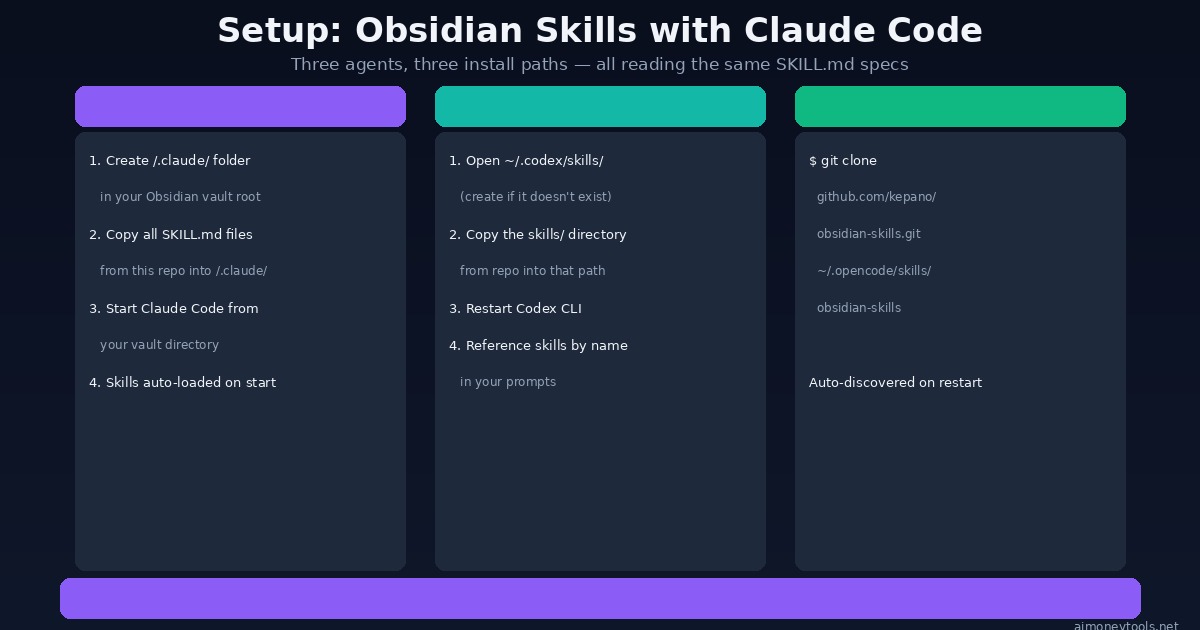
Before you start, a quick orientation: your Obsidian vault is just a folder on your computer. All of these setup options involve placing skill files inside or alongside that folder so your AI agent can find them automatically when you start a session. You're not modifying Obsidian itself — just adding some instruction files the AI will read.
Option 1: npx (Fastest — Any Agent)
npx skills add git@github.com:kepano/obsidian-skills.git
This is the fastest install path. The npx skills CLI handles placing the skill files in the right location for your configured agent.
When to use this: If you already have Node.js installed and just want skills working as quickly as possible across whatever agent you're using. This is the recommended starting point for most users.
Option 2: Claude Code
Claude Code looks for skills in a /.claude/ folder at the root of whatever directory it's working in.
- Open your Obsidian vault's folder in your terminal
- Create the
.claudedirectory if it doesn't exist:mkdir -p .claude - Clone the skills into it:
git clone https://github.com/kepano/obsidian-skills.git .claude/obsidian-skills - Copy just the
skills/contents into.claude/:cp -r .claude/obsidian-skills/skills/* .claude/ - Start Claude Code from your vault root:
claude
Skills load automatically. You can verify by asking Claude: "What Obsidian skills do you have loaded?"
Claude Code pricing note: Claude Code uses Anthropic's API, billed per token. There's no flat monthly fee for the CLI itself — you pay based on usage. For light vault management work, costs are typically low. For heavy batch operations across large vaults, monitor your usage.
Option 3: Codex CLI
# Create the skills directory if it doesn't exist
mkdir -p ~/.codex/skills

# Copy the skills
git clone https://github.com/kepano/obsidian-skills.git /tmp/obsidian-skills
cp -r /tmp/obsidian-skills/skills/* ~/.codex/skills/

# Restart Codex CLI
Codex CLI pricing note: Codex CLI connects to OpenAI's API. Costs depend on which model you select and how much text you process per session. As with Claude Code, light usage stays affordable — bulk vault operations will accumulate tokens faster.
Option 4: OpenCode
OpenCode auto-discovers SKILL.md files under ~/.opencode/skills/. Clone the full repo — don't copy just the inner folder:
git clone https://github.com/kepano/obsidian-skills.git ~/.opencode/skills/obsidian-skills
Restart OpenCode. No config file changes needed — skills are discovered automatically.
Which Agent Should You Use?
| Agent | API Required | Best For | Skill Discovery |
|---|---|---|---|
| Claude Code | Anthropic API | Complex reasoning, long context | Auto (.claude/ folder) |
| Codex CLI | OpenAI API | Code generation, scripting | Manual skills path |
| OpenCode | Varies by model | Open source flexibility | Auto (~/.opencode/skills/) |
If you're just starting out and don't have a strong preference, Claude Code is the most commonly referenced option in the obsidian-skills documentation and tends to handle long, unstructured vault content well.
What You Can Actually Do With This
Once skills are loaded, your agent understands Obsidian natively. Here are practical workflows:
Automated daily notes
"Create a daily note for today with these sections: Morning priorities,
Meeting notes, Evening review. Use my standard frontmatter template."
The agent will use correct YAML properties, Obsidian date formatting, and wikilinks — not generic markdown.
Knowledge base organization
"Scan my /Projects folder, identify notes missing a status property,
and add status: active to all of them."
The agent can read real files in your vault, understand the Obsidian property format, and make batch edits correctly.
Research import with defuddle
"Fetch this URL, extract the clean content with defuddle, and save it
as a note in my /Reading List folder with today's date and source URL."
No more manually copying content from web pages into your vault.
Canvas generation
"Create a canvas file showing the relationship between these 5 projects
with color-coded groups by priority."
The agent writes a valid .canvas JSON file your vault opens natively.
Plugin-assisted workflows
"Install the Dataview plugin via the Obsidian CLI, then create a
Dataview query note that shows all tasks due this week."
More Workflow Ideas for Beginners
These prompts work once skills are loaded and give you a feel for what's possible without any technical knowledge:
- "Review all notes in my /Ideas folder and add a one-sentence summary property to each one." — Batch-adds summaries to existing notes using correct frontmatter format.
- "Create a new note for the book I just finished: [title]. Include properties for author, date-finished, rating, and a section for key takeaways." — Generates a structured book note with proper Obsidian properties.
- "Find all notes in my vault that link to [[Project Alpha]] and list them." — Uses wikilink awareness to map your vault's connections.
- "Convert this rough outline into a proper Obsidian note with nested headers and callout blocks for the key warnings." — Formats unstructured text into polished Obsidian syntax.
Why This Matters Beyond Obsidian
The broader signal here is the Agent Skills specification gaining real adoption. When the CEO of a major productivity tool builds official skills for their own product, it validates the standard.
We're heading toward a world where every major tool ships an official SKILL.md — telling AI agents exactly how to work with that software. Obsidian is one of the first. This is a pattern that will likely spread to Notion, Linear, VS Code plugins, and more.
If you build tools for a living — or if you're learning to work with AI coding agents — understanding the Agent Skills spec now is the right move. New to command line tools? Our terminal beginners guide walks through everything you need to get comfortable.
What This Means for the Side Hustle Community
If you run a blog, research business, or content operation using Obsidian as your knowledge hub, this unlocks a real productivity lever. The ability to have an AI agent that natively understands your vault — not just generic markdown, but your specific property schemas, your tagging structure, your link patterns — means less time on vault maintenance and more time on the work that generates income.
In 2026, the competitive edge in knowledge work isn't just using AI tools — it's having AI tools that understand your specific environment. Obsidian-skills is a concrete example of what that looks like in practice.
Performance Note: Running AI Agents Locally
Claude Code and Codex CLI both connect to cloud APIs by default. If you're working with sensitive vault contents — personal notes, business data, private research — you may want to run a local model instead.
For local agent setups, you'll need capable hardware. Check our VRAM guide to see whether your machine can handle it. If you need cloud GPU access for testing larger models before committing to local hardware, Ampere offers affordable per-hour GPU instances with no long-term commitment.
Running locally also means your vault contents never leave your machine — no API calls, no data sent to external servers. For anyone managing sensitive client notes, personal journals, or proprietary research in their vault, that privacy guarantee is worth the extra setup effort.
Frequently Asked Questions
Do I need to pay for this?
No. The obsidian-skills repo is free and open source (MIT license). Obsidian itself is free for personal use. The AI agent (Claude Code, Codex CLI, etc.) is separate — Claude Code requires an Anthropic API key, Codex CLI requires an OpenAI API key. Local model alternatives exist that are completely free after setup.
Will this work with the free version of Obsidian? Yes. All five skills work with Obsidian's free tier. Obsidian Sync and Publish are paid features, but the vault operations covered by these skills don't require them.
Can I use this with ChatGPT? Not directly via the standard Agent Skills spec. The spec is primarily implemented in Claude Code, Codex CLI, and OpenCode. ChatGPT doesn't currently support the Agent Skills format natively, though you can manually paste skill content into a custom GPT's system instructions as a workaround.
Does the agent need to have Obsidian installed?
For the obsidian-cli skill, yes — the CLI communicates with the running Obsidian application. For the other skills (markdown, bases, canvas, defuddle), the agent just needs read/write access to your vault folder. The files are plain text and JSON.
What if I use a different note app? The obsidian-markdown, obsidian-bases, and json-canvas skills are Obsidian-specific. The defuddle skill works anywhere — it's just a web extraction tool that happens to output markdown. If you're on Logseq, Notion, or another PKM, look for community-built skills for those platforms.
Is my vault content sent anywhere? Only the contents you explicitly include in your prompts are sent to the AI provider's API. The agent reads files locally. It doesn't bulk-upload your vault. That said, anything you paste into a Claude Code prompt goes to Anthropic's servers — use a local model if full privacy is required.
Extended FAQ: Beginner Questions We Hear Most
Do I need to know how to code to use obsidian-skills? Not really. The setup involves copying a few terminal commands — all of which are provided above exactly as you need to run them. If you've never opened a terminal before, our terminal beginners guide will get you up to speed in about 20 minutes. The actual day-to-day use after setup is just writing prompts in plain English.
Can the agent accidentally delete my notes? It's possible in theory — any agent with write access to a folder can delete files. In practice, Claude Code and most agents ask for confirmation before destructive actions. Still, it's worth keeping a backup of your vault before your first session. Obsidian Sync (paid) handles this automatically, but even a simple folder copy to an external drive is sufficient protection.
How do skills interact with existing Obsidian plugins like Dataview or Templater? Skills give the agent knowledge of Obsidian's native formats. They don't automatically give the agent knowledge of every plugin's custom syntax. For plugins with complex query languages (like Dataview), you can manually append plugin documentation to your prompts, or look for community skill files that cover specific plugins. The obsidian-cli skill enables plugin installation — but writing Dataview queries correctly still benefits from additional context.
What's the difference between obsidian-skills and a custom GPT built for Obsidian? A custom GPT (like one built with CustomGPT) is a conversational interface that can answer questions about Obsidian or help you draft notes, but it doesn't have direct access to your local vault files. Obsidian-skills gives a CLI-based agent actual read/write access to your vault — it can create, edit, and organize real files on your computer. The use cases are complementary: custom GPTs for knowledge retrieval and Q&A, CLI agents for direct vault operations.
Will skills stay up to date as Obsidian adds new features?
Yes — the repo is maintained by Obsidian's own team. Since it's the official canonical source, expect it to be updated whenever Obsidian ships significant new features. You can pull the latest version at any time by running git pull in your skills directory.
Get Started
Install the skills now:
npx skills add git@github.com:kepano/obsidian-skills.git
Then start Claude Code from your vault root and try:
"Using the Obsidian skills you have, create a new note about my current
project with proper frontmatter, a summary section, and three action items."
The obsidian-skills repo is at github.com/kepano/obsidian-skills. It's actively maintained by Obsidian's own team — expect it to stay current as Obsidian evolves.
If you want to go deeper on running AI agents with your own data and tools, this is one of the most practical entry points available in 2026 — free, officially supported, and immediately useful for anyone already living in Obsidian.

Alex the Engineer
•Founder & AI ArchitectSenior software engineer turned AI Agency owner. I build massive, scalable AI workflows and share the exact blueprints, financial models, and code I use to generate automated revenue in 2026.
Related Articles

How to Start an AI-Assisted Resume Writing Side Hustle in 2026 (Beginner's Guide)
A step-by-step guide to using AI resume tools to offer a paid resume and cover letter writing service — what to charge, which tools to use, and how to find your first clients.

How to Build and Sell AI Voice Receptionists to Local Businesses in 2026
A beginner's guide to building AI voice agents that answer business phone calls — the tools to use, what to charge, and how to find your first client.

How to Make Money on Fiverr with AI Tools in 2026: 7 Gigs You Can Start This Week
Discover 7 real Fiverr gigs you can launch using free and low-cost AI tools in 2026 — no experience required. Real pricing data, step-by-step setup, and tools that actually work.