
How to Use the Claude API: A Beginner's Tutorial (2026)
Never used an API before? This step-by-step guide shows you how to send your first message with the Claude API in under 10 minutes — no coding experience needed.
You've probably heard people say "just use the API" when talking about AI. But if you've never worked with one before, that phrase means nothing. What even is an API? How do you use it? Why would you bother?
This guide answers all of that in plain English — and walks you through setting up the Claude API step by step, from zero to your first working AI response.
What Is an API? (The Simple Version)
An API (Application Programming Interface) is a way for your code to talk to a service. Think of it like a drive-through window: you say what you want, the kitchen makes it, and you get the result back.
The Claude API is Anthropic's way of letting you use Claude's AI brain inside your own scripts, apps, or tools — without going through the chat interface on Claude.ai. Instead of typing messages into a browser, you send them from your code and get responses back programmatically.
Why use the API instead of the website?
- Automate repetitive AI tasks (summarizing, writing, classifying)
- Build your own tools that use Claude under the hood
- Process large amounts of data (hundreds of documents, emails, entries)
- Integrate Claude into existing software
What You Need Before Starting
- A computer (Windows, Mac, or Linux)
- Python installed (follow our Python setup guide if you haven't done this yet)
- An internet connection
- About 10 minutes
That's it. You don't need to know how to code deeply — just enough to run a Python script. If you can open a terminal and type a command, you can do this.
Step 1: Create an Anthropic Account and Get Your API Key
Go to console.anthropic.com and sign up for a free account.
Once you're logged in:
- Click "API Keys" in the left sidebar
- Click "Create Key"
- Give it a name (e.g., "my-first-project")
- Copy the key — it starts with
sk-ant-...
Important: Save this key somewhere safe. You won't be able to see it again after you close this screen. If you lose it, just create a new one.
Anthropic gives new accounts a small free credit to start. You don't need a credit card to test.
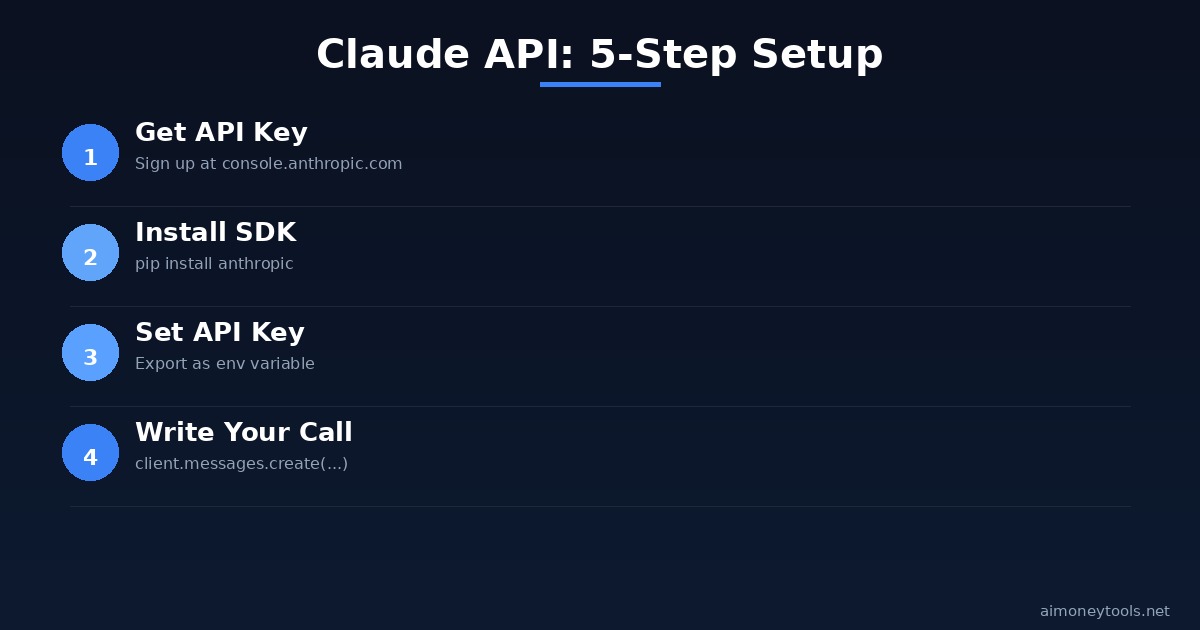
Step 2: Install the Claude SDK
The Anthropic SDK is a Python package that handles all the technical communication with the API for you. Open your terminal and run:
pip install anthropic
This downloads and installs the package. It takes about 30 seconds.
How to check it installed correctly:
python -c "import anthropic; print('Installed!')"
If you see Installed!, you're ready to go.
Step 3: Set Your API Key as an Environment Variable
Instead of typing your API key directly into your code (which is a security risk), you store it as an environment variable. This is standard practice and keeps your key out of files you might share.
On Mac/Linux, open your terminal and run:
export ANTHROPIC_API_KEY="sk-ant-your-key-here"
On Windows, open Command Prompt and run:
set ANTHROPIC_API_KEY=sk-ant-your-key-here
Replace sk-ant-your-key-here with your actual key.
Note: This setting only lasts for your current terminal session. To make it permanent, add the export line to your
~/.bashrcor~/.zshrcfile on Mac/Linux, or set it in System Environment Variables on Windows.
Step 4: Write Your First Claude API Call
Create a new file called hello_claude.py and paste this code:
import anthropic

# Create the client — it reads your API key automatically
client = anthropic.Anthropic()

# Send a message to Claude
message = client.messages.create(
    model="claude-sonnet-4-5",
    max_tokens=1024,
    messages=[
        {"role": "user", "content": "What is the Claude API and why would a beginner use it?"}
    ]
)

# Print Claude's response
print(message.content[0].text)
Save the file.
Step 5: Run Your Script
In your terminal, navigate to the folder where you saved hello_claude.py, then run:
python hello_claude.py
You should see Claude's response printed in your terminal. Congratulations — you just made your first API call.
Understanding the Code
Here's what each part does:
| Line | What it does |
|---|---|
import anthropic |
Loads the SDK you installed |
client = anthropic.Anthropic() |
Creates a client that reads your API key automatically |
model="claude-sonnet-4-5" |
Picks which Claude model to use (Sonnet is the best balance of speed and quality) |
max_tokens=1024 |
Limits how long Claude's response can be (1 token ≈ 0.75 words) |
messages=[...] |
The conversation — your question goes in "content" |
message.content[0].text |
Gets the actual text from Claude's response |
Which Claude Model Should You Use?
Anthropic offers several Claude models. For most beginners:
- claude-sonnet-4-5 — Best balance of speed, quality, and cost. Start here.
- claude-haiku-3-5 — Fastest and cheapest. Good for high-volume simple tasks.
- claude-opus-4 — Most powerful, but slower and more expensive. For complex reasoning tasks.
For a beginner learning project, always start with Sonnet.
Claude API vs ChatGPT API: What's Different?
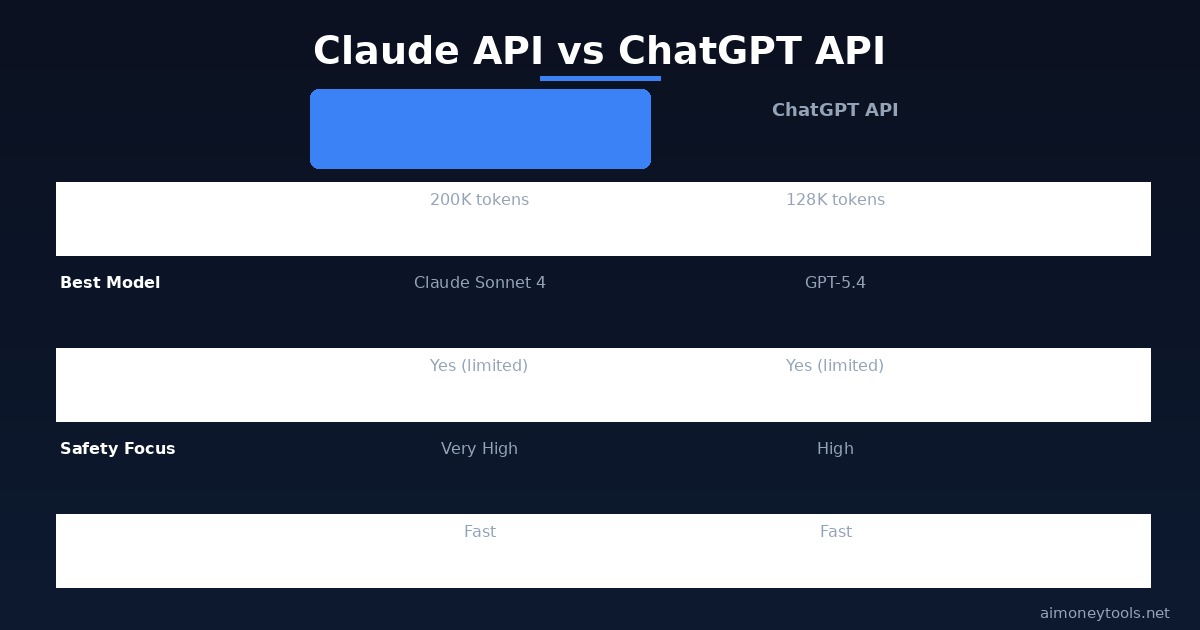
Both work similarly, and the code structure is almost identical. The key practical difference: Claude has a 200,000 token context window (vs 128K for GPT-4o), which means it can handle much longer documents in a single call. If you're summarizing or analyzing long files, Claude is better suited.
What Can You Build With This?
Once you have the API working, the possibilities are wide open. Here are beginner-friendly projects:
1. Batch email summarizer Feed 50 emails to Claude and get a 1-paragraph summary of each. Huge time saver.
2. Blog post generator Give Claude a title and 5 bullet points, get a full draft back.
3. Document Q&A bot Upload a PDF (or paste its text), then ask Claude questions about it.
4. Content classifier Automatically sort customer feedback into categories (bug report, feature request, complaint, etc.)
5. Grammar and tone checker Run every outgoing email through Claude before sending it.
Pricing: What Does the Claude API Cost?
Claude's API is priced per token (chunks of text):
- Haiku 3.5: ~$0.80 per 1M input tokens / $4 per 1M output
- Sonnet 4.5: ~$3 per 1M input / $15 per 1M output
- Opus 4: ~$15 per 1M input / $75 per 1M output
For context: 1 million tokens is roughly 750,000 words — a small library. A beginner running test scripts will typically spend less than $1 before deciding whether to go deeper.
Anthropic gives new accounts free credits to get started. Check anthropic.com/pricing for current rates.
Frequently Asked Questions
Do I need to know how to code to use the Claude API? You need to be able to run a Python script — copy-paste a file and type one terminal command. That's genuinely the minimum bar. Full coding knowledge isn't required to start.
Is the Claude API free? Anthropic provides free credits to new accounts. After that, it's pay-per-use. For light experimentation, it's very inexpensive — typically a few cents per session.
What's the difference between Claude.ai and the Claude API? Claude.ai is the chat website — you type, it responds, like a conversation. The API is the same AI model, but accessed through code. The API lets you automate, batch-process, and build with it; the website is for one-off conversations.
Can I use languages other than Python? Yes — Anthropic also has an official TypeScript/JavaScript SDK. There are also community libraries for other languages. Python is easiest for beginners, but the concept is the same in any language.
My API key isn't being recognized. What's wrong?
Double-check that you ran the export command in the same terminal window you're using to run your script. Environment variables reset when you open a new terminal. If it keeps failing, paste the key directly into the script temporarily to test (never commit that to GitHub).
How do I handle longer conversations with memory?
Pass previous messages in the messages array. Claude doesn't remember previous calls automatically — you maintain the conversation history in your code and send it each time. The Anthropic documentation shows exactly how to do this.
Next Steps
Once you're comfortable making basic calls, here's what to explore next:
- System prompts — Give Claude a persona or set rules for every response
- Streaming — Get Claude's response word by word (better for real-time apps)
- Vision — Send images to Claude and ask it to describe or analyze them
- Tool use — Let Claude call external functions or APIs as part of its response
The Anthropic documentation at docs.anthropic.com is genuinely beginner-friendly and covers all of this in detail.
You've got the foundation. The API is running. What you build from here is up to you.

Alex the Engineer
•Founder & AI ArchitectSenior software engineer turned AI Agency owner. I build massive, scalable AI workflows and share the exact blueprints, financial models, and code I use to generate automated revenue in 2026.
Related Articles

How to Start an AI-Assisted Resume Writing Side Hustle in 2026 (Beginner's Guide)
A step-by-step guide to using AI resume tools to offer a paid resume and cover letter writing service — what to charge, which tools to use, and how to find your first clients.

How to Build and Sell AI Voice Receptionists to Local Businesses in 2026
A beginner's guide to building AI voice agents that answer business phone calls — the tools to use, what to charge, and how to find your first client.

How to Make Money on Fiverr with AI Tools in 2026: 7 Gigs You Can Start This Week
Discover 7 real Fiverr gigs you can launch using free and low-cost AI tools in 2026 — no experience required. Real pricing data, step-by-step setup, and tools that actually work.