
How to Run GLM-5.2 Locally: Requirements, Quants, and Alternatives (2026)
Want to run GLM-5.2 locally? This guide covers the real VRAM and RAM requirements, Unsloth quantization options, and what to do if you don't have 245GB of RAM.
GLM-5.2 dropped on Hacker News this morning and shot to 509 points — and the most common question in the comments was: can I actually run this thing locally?
The short answer: technically yes, but you'll need more hardware than almost anyone reading this actually has.
This guide gives you the honest breakdown — what GLM-5.2 requires, what Unsloth does to make it more manageable, and what to do if you don't have a server rack in your basement.
What Is GLM-5.2?
GLM-5.2 is the latest open-weight model from Zhipu AI, released in June 2026. The headline numbers are eye-catching:
- 744 billion parameters — one of the largest open-weight models ever released
- 1 million token context window — comparable to Gemini 1.5 Pro's maximum
- State-of-the-art on coding, reasoning, and long-context tasks — benchmarks show it competitive with frontier proprietary models
- Fully open weights — you can download and run it, unlike GPT-5.5 or Claude Opus 4.8
Those numbers also explain why running it locally is a serious hardware challenge. For comparison, Llama 3 8B — the model most hobbyists run locally — is roughly 90x smaller.
If you're new to GLM-5.2 and want an overview of what it can do and how it compares to other models, read our GLM-5.2 full review and beginner guide first. This article focuses specifically on the local setup.
What Is Unsloth and Why Does It Matter?
Unsloth is a framework that optimizes large language models for local inference — it reduces memory usage and increases speed without meaningfully degrading output quality.
For GLM-5.2, Unsloth's key contribution is dynamic GGUF quantization: converting the full 744B model into smaller versions that trade some precision for dramatically lower memory requirements. These are called "quants" — shorthand for quantized models.
The format is straightforward: UD-IQ2_M, UD-IQ3_M, UD-Q4_K_M, etc. The number indicates the bits-per-weight, with lower numbers meaning smaller file size and lower hardware requirements at the cost of some accuracy.
The Real Hardware Requirements
Here is where we get honest. GLM-5.2 through Unsloth's most compressed quants:
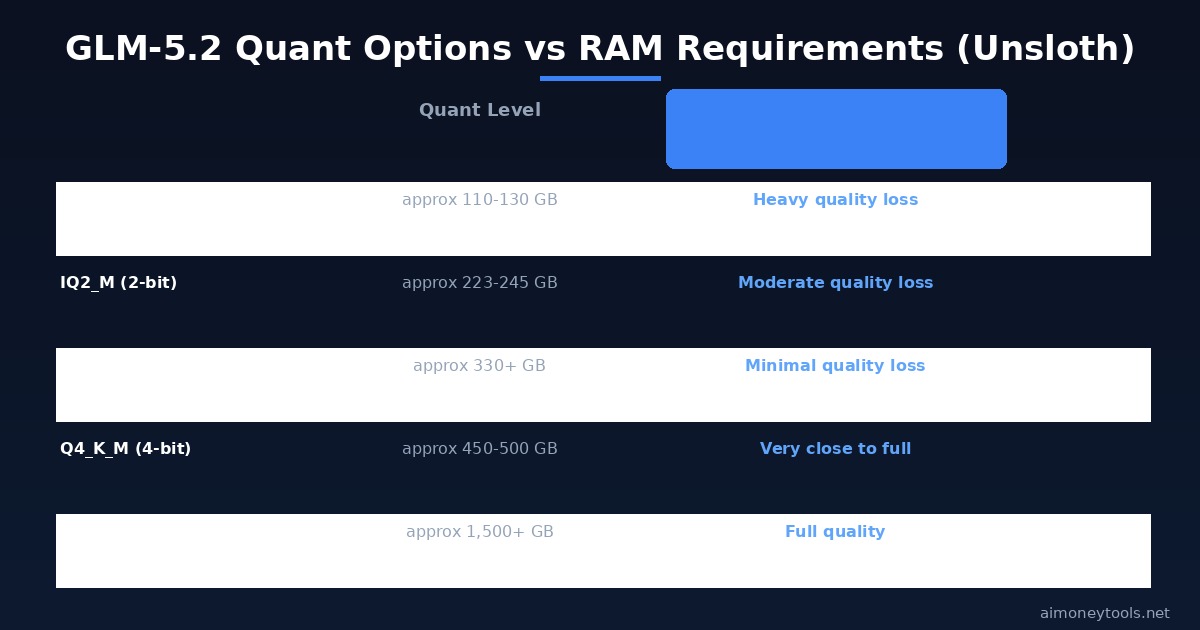
| Quant | Bits/weight | RAM/VRAM Required | Accuracy vs Full |
|---|---|---|---|
| UD-IQ1_S | 1-bit | ~110–130 GB | Significant quality loss |
| UD-IQ2_M | 2-bit | ~223–245 GB | Moderate quality loss |
| UD-IQ3_M | 3-bit | ~330+ GB | Minimal quality loss |
| UD-Q4_K_M | 4-bit | ~450–500 GB | Very close to full |
| Full BF16 | 16-bit | ~1,500+ GB | Full quality |
The most commonly recommended starting point — UD-IQ2_M — requires a minimum of 245 GB of combined VRAM and system RAM. That means:
- A Mac Studio with the M4 Ultra chip (192GB unified memory) is not enough on its own
- A Mac Studio with M4 Ultra at 256GB configuration is the minimum viable consumer hardware
- Most Windows desktop PCs with even high-end GPUs (RTX 5090: 32 GB VRAM) fall far short without a large RAM offload setup
- Enterprise multi-GPU setups (4× H100 80GB = 320 GB VRAM) can run the 3-bit quant comfortably
To check how much VRAM your current setup has, see our how to check VRAM for AI guide.
The 256GB Mac Setup (Best Consumer Path)
If you have a Mac Studio M4 Ultra with 256GB unified memory, you're in the best position of any consumer hardware:
- Install Unsloth Studio (macOS app from unsloth.ai)
- Download the
UD-IQ2_Mquant (~223 GB download — yes, that's a large file) - Set memory allocation in Unsloth Studio to allow 240+ GB for the model
- Inference speed will be slow (expect 1–3 tokens/second) but fully functional
For most people, this is either not their current hardware or represents a significant cost (~$4,000–6,000 CAD for the 256GB M4 Ultra Mac Studio).
The Multi-GPU Windows Path
If you have multiple NVIDIA GPUs:
- 4× RTX 3090/4090 (96 GB VRAM combined) + large RAM offload can run the 2-bit quant with heavy offloading to system RAM — expect 0.1–0.5 tokens/second, barely usable
- 4× H100 80GB SXM (data center hardware, ~$120,000+) runs the 3-bit quant cleanly
- 8× A100 40GB (~96,000+ USD) gets you there with 320 GB VRAM
This is enterprise territory. For most hobbyists, this is not realistic.
Actually Running It: Step-by-Step (256GB Mac)
If you have compatible hardware, here's how to get started with Unsloth:
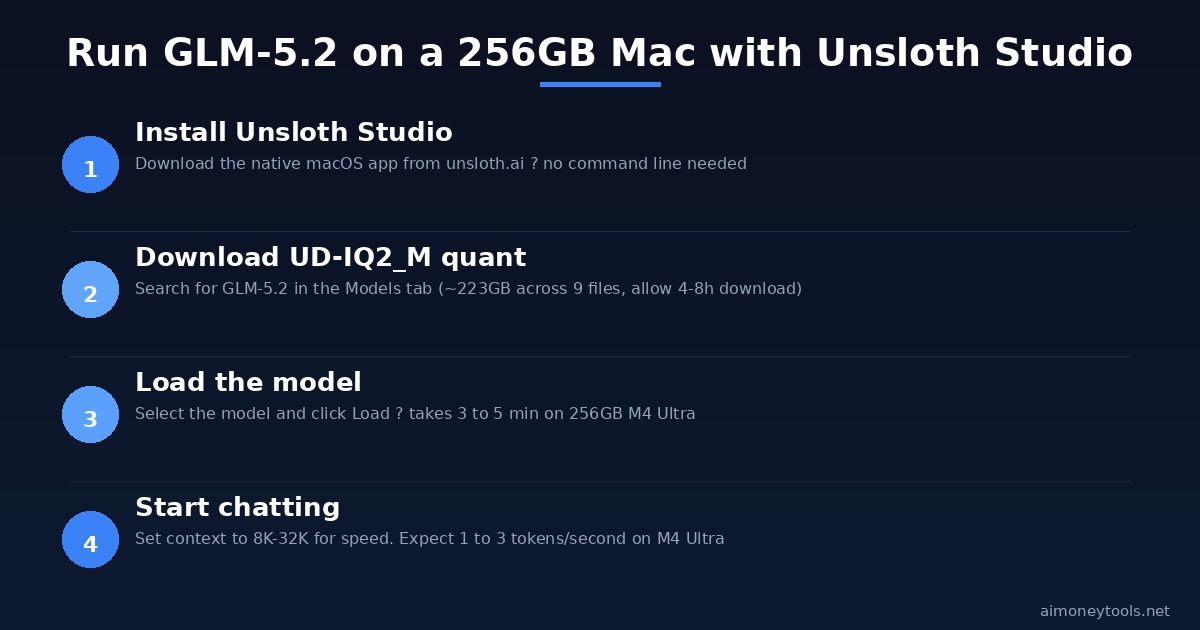
Step 1: Install Unsloth Studio Download from unsloth.ai. It's a native macOS app with a GUI — no command line needed for basic inference.
Step 2: Open the Models tab and search for GLM-5.2
Look for GLM-5.2-UD-IQ2_M-00001-of-00009.gguf (the model splits across 9 files totalling ~223 GB).
Step 3: Download the model files This is the slow part. Expect 4–8 hours depending on your internet connection.
Step 4: Load the model Once downloaded, select the model in Unsloth Studio and click Load. On a 256GB Mac, this takes 3–5 minutes.
Step 5: Start a chat Set the context window to match your task. For short conversations, 8K–32K is fine and much faster than maxing out the 1M window.
Inference speed at UD-IQ2_M on a 256GB M4 Ultra Mac Studio: approximately 1–3 tokens per second — usable for testing but not fast enough for real-time applications.
What If You Don't Have 245 GB of RAM?
This is the situation most readers are in. Here are the practical alternatives:
Option 1: Use GLM-5.2 via API (Free and Instant)
The fastest way to access GLM-5.2 without any local hardware is through an API router. OpenRouter provides access to GLM-5.2 through their unified API — you pay per token at a fraction of proprietary model pricing, or you can access it for free within rate limits.
We have a full OpenRouter beginner guide that walks through setting it up in 10 minutes, no hardware required.
Option 2: Try Smaller GLM Models Locally
If you want GLM locally and have 8–24 GB of VRAM, look at the smaller models in the GLM family:
- GLM-4-9B: Runs on a single RTX 3080 (10 GB VRAM), available on Hugging Face
- GLM-5.1-32B (when available): Should run on 24–48 GB VRAM in 4-bit quant
These are not GLM-5.2 — they're less capable — but they give you the local experience without enterprise hardware.
Option 3: Cloud GPU Rental
If you need full GLM-5.2 performance with reasonable speed, renting cloud GPU hardware is the most practical option for developers and content creators. Ampere Cloud provides on-demand GPU access priced by the hour — you get A100 or H100 instances without buying hardware.
For a test run or short project, renting a 4× A100 80GB instance for 2–3 hours to experiment with GLM-5.2 costs roughly $5–15 USD — far cheaper than buying hardware.
Option 4: Unsloth Studio Cloud (Coming Soon)
Unsloth is working on a hosted cloud version of Unsloth Studio that lets you run large models in their infrastructure. As of June 2026, this is in early access — check unsloth.ai for current availability.
Is GLM-5.2 Worth Running Locally?
Honest take: for most people, no — not right now.
The hardware requirements put it out of reach for the vast majority of hobbyists and even most small development teams. And the free API options (OpenRouter, GLM's own API) give you full GLM-5.2 quality without any setup.
Where local deployment makes sense:
- Privacy-sensitive applications where you can't send data to external APIs
- Enterprise deployments where you already have the server hardware
- Research where you need to fine-tune or modify the model weights
- You already have a 256GB Mac and want to experiment
Where local deployment doesn't make sense:
- Building a hobby project or testing the model
- Production applications where speed matters
- Anything where budget is a constraint
For most beginners, the API route via OpenRouter is the right call. Save the local setup for when your project grows to the scale where it justifies the hardware investment.
Frequently Asked Questions
How much RAM does GLM-5.2 need to run locally? The minimum is approximately 245 GB of combined VRAM and system RAM for the UD-IQ2_M (2-bit) quantization. The most accessible consumer hardware is the Mac Studio with M4 Ultra at 256 GB unified memory.
Can I run GLM-5.2 on an RTX 4090? Not as a standalone card — the RTX 4090 has 24 GB of VRAM, which is far below the 245 GB minimum. You could attempt heavy offloading to system RAM but inference speed would be extremely slow (less than 0.1 tokens/second).
What is the best way to use GLM-5.2 for free? Use the OpenRouter API, which provides access to GLM-5.2 within free-tier rate limits. See our OpenRouter beginner guide for setup instructions.
What is Unsloth and do I need it? Unsloth is a framework for running large language models locally with optimized memory usage and speed. For GLM-5.2, you need Unsloth (or a compatible GGUF runner like llama.cpp) to run the quantized versions of the model. Unsloth Studio provides a GUI that simplifies the process significantly.
Is GLM-5.2 better than GPT-5.5? Both models compete at the frontier level. GLM-5.2 is open-weight (you can download and run it), while GPT-5.5 is proprietary. For most tasks, GPT-5.5 has an edge in instruction-following; GLM-5.2 reportedly has stronger performance on long-context tasks and coding benchmarks. See our GPT-5.5 vs GLM-5.2 comparison for a detailed breakdown.
Can I fine-tune GLM-5.2 with Unsloth? Fine-tuning a 744B model requires even more hardware than inference — you're looking at multi-node H100 clusters. Unsloth supports fine-tuning of smaller models efficiently, but GLM-5.2 fine-tuning is out of reach for individual developers currently.

Alex the Engineer
•Founder & AI ArchitectSenior software engineer turned AI Agency owner. I build massive, scalable AI workflows and share the exact blueprints, financial models, and code I use to generate automated revenue in 2026.
Related Articles

How to Start an AI-Assisted Resume Writing Side Hustle in 2026 (Beginner's Guide)
A step-by-step guide to using AI resume tools to offer a paid resume and cover letter writing service — what to charge, which tools to use, and how to find your first clients.

How to Build and Sell AI Voice Receptionists to Local Businesses in 2026
A beginner's guide to building AI voice agents that answer business phone calls — the tools to use, what to charge, and how to find your first client.

How to Make Money on Fiverr with AI Tools in 2026: 7 Gigs You Can Start This Week
Discover 7 real Fiverr gigs you can launch using free and low-cost AI tools in 2026 — no experience required. Real pricing data, step-by-step setup, and tools that actually work.