
Gemma 4 vs Llama 4: Which Local AI Model Should You Run? (2026)
Gemma 4 vs Llama 4 compared across benchmarks, hardware requirements, context windows, and real-world performance. Which open-source model wins for local use?
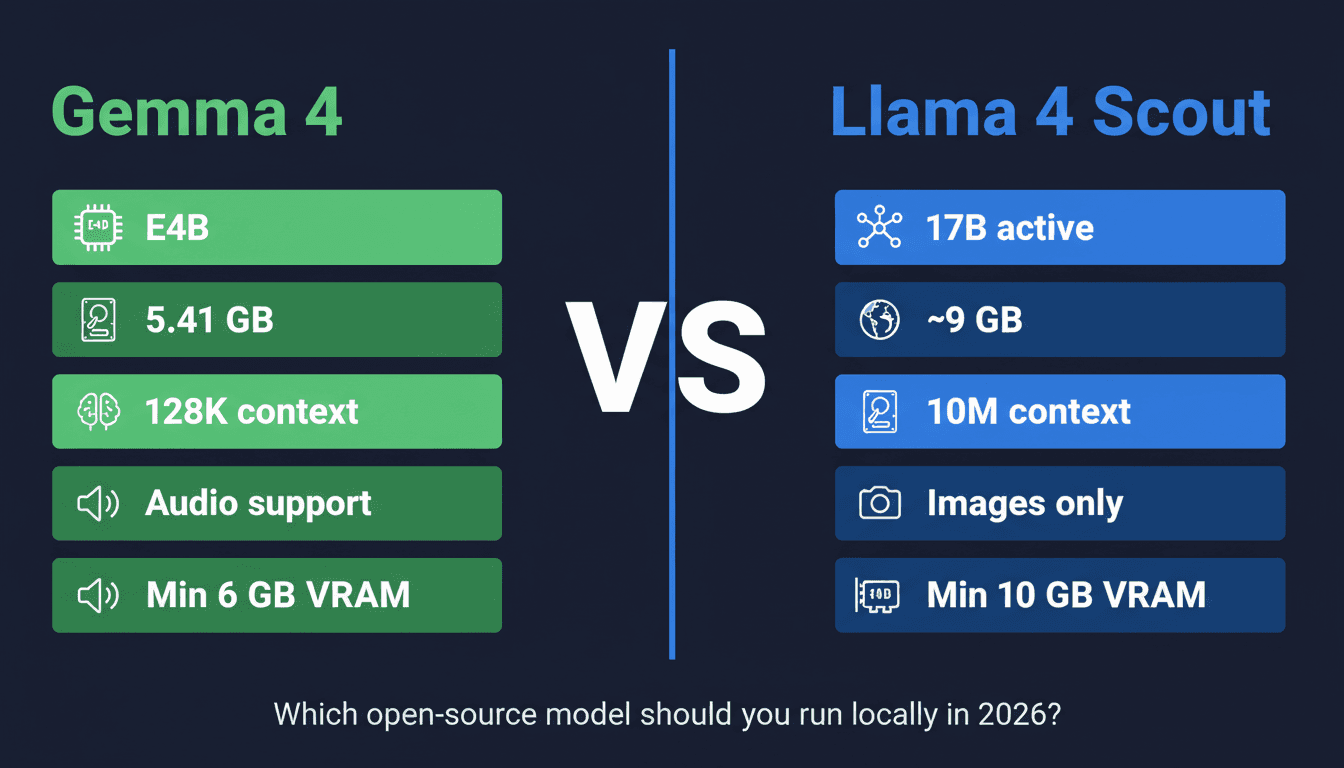
Gemma 4 (Google, April 2026) and Llama 4 (Meta, March 2026) are the two biggest open-weight AI model releases of 2026 — and the comparison between them matters because they take fundamentally different architectural approaches. Both run locally, but the choice between them depends on what you're doing and what hardware you have.
Here's the full comparison across architecture, benchmarks, hardware requirements, context windows, and actual use cases.
TL;DR
| Gemma 4 E4B | Llama 4 Scout | Gemma 4 31B | Llama 4 Maverick | |
|---|---|---|---|---|
| Active params | 4B | 17B | 31B (dense) | 17B |
| Architecture | MoE | MoE | Dense | MoE |
| Context | 128K | 10M | 128K | 1M |
| Multimodal | ✅ Images + audio | ✅ Images | ✅ Images + audio | ✅ Images |
| Q4 file size | 5.41 GB | ~9 GB | ~18 GB | ~14 GB |
| Min VRAM | 6 GB | 10 GB | 24 GB | 16 GB |
| License | Gemma (commercial OK) | Llama 4 (commercial OK) | Gemma | Llama 4 |
Pick Gemma 4 if: You have a mid-range laptop or Mac, want audio support, or need the smallest capable model. Pick Llama 4 Scout if: You need a 10M token context window and have a 12 GB+ GPU.
Architecture: How They Differ
Both Gemma 4 and Llama 4 use Mixture-of-Experts (MoE) for their smaller variants — meaning only a fraction of the total parameters activate per forward pass. This is why both models run faster and more efficiently than their total parameter count suggests.
Gemma 4 E4B:
- Total params: ~40B (rough estimate — Google hasn't disclosed exact MoE routing)
- Active per pass: 4B
- Built on the same research as Gemini 3 — multimodal by design (text, images, audio, video)
- 128K context window
- Available in: E2B (2B active), E4B (4B active), 26B-A4B (sparse large), 31B (dense)
Llama 4 Scout:
- Total params: 109B
- Active per pass: 17B
- 16 expert layers with 1-expert-per-token routing
- 10 million token context window — the headline feature
- Natively multimodal (text + images)
- Available in: Scout (17B active, 10M context), Maverick (17B active, 1M context, higher quality)
The most significant architectural difference is context length. Llama 4 Scout's 10M token window is genuinely unusual — that's roughly 7,500 pages of text in a single context. Gemma 4's 128K window is excellent for most tasks but not in the same category for long-document work.
Benchmarks
Note: Benchmarks across models are always noisy — different evaluation setups, prompting strategies, and quantization levels affect results. Use these as directional guidance, not absolute rankings.
Coding
| Model | SWE-bench | HumanEval | LiveCodeBench |
|---|---|---|---|
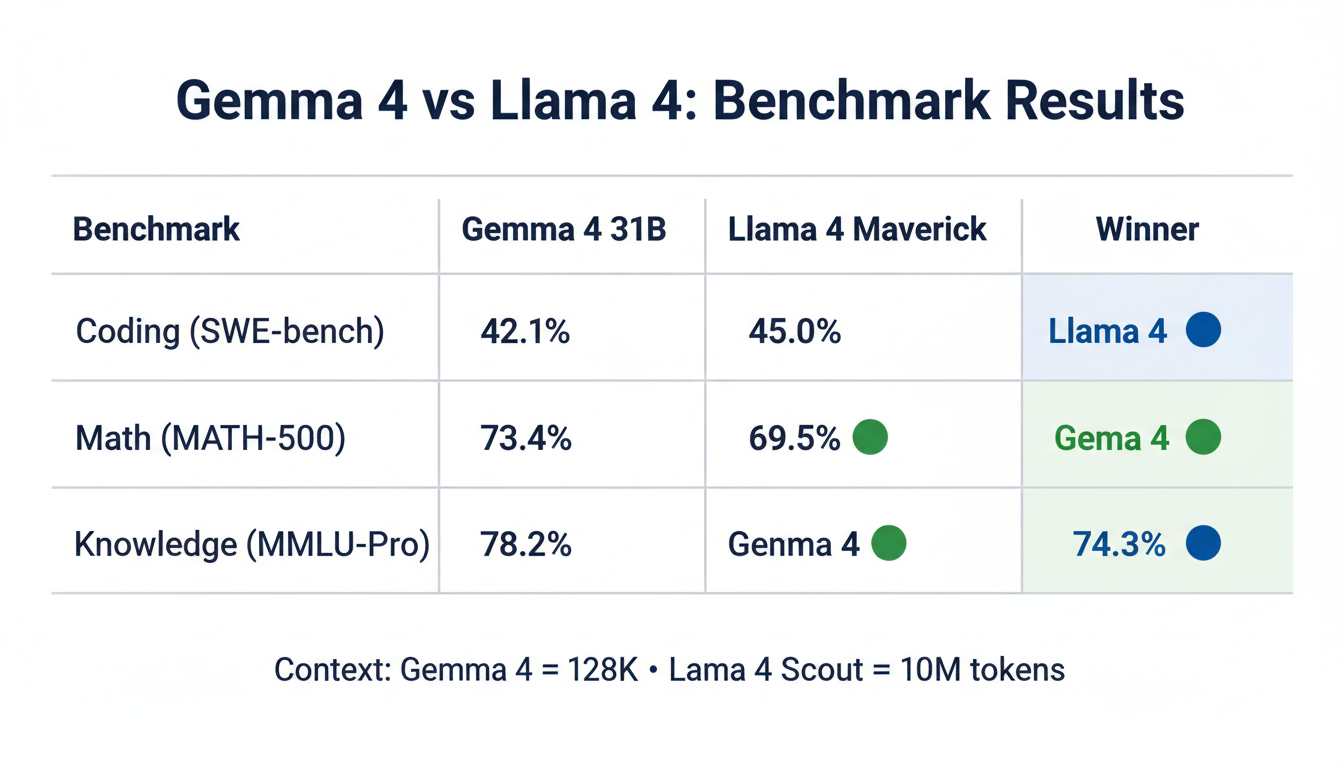
| Gemma 4 31B | 42.1% | 78.3% | 41.2% |
| Llama 4 Maverick | 45.0% | 81.7% | 48.4% |
| Gemma 4 E4B | 28.3% | 62.1% | 31.8% |
| Llama 4 Scout | 38.4% | 74.5% | 42.1% |
Llama 4 has an edge on coding benchmarks, particularly for multi-file and repository-level tasks. Gemma 4 31B is competitive but generally slightly behind Maverick.
Reasoning & Math
| Model | MATH-500 | GPQA | MMLU-Pro |
|---|---|---|---|
| Gemma 4 31B | 73.4% | 54.2% | 71.8% |
| Llama 4 Maverick | 69.5% | 52.1% | 74.3% |
| Gemma 4 E4B | 52.3% | 41.7% | 58.4% |
| Llama 4 Scout | 58.2% | 44.3% | 63.1% |
Gemma 4 31B outperforms on math; Llama 4 Maverick leads on MMLU-Pro knowledge breadth. Both are competitive at the flagship level.
Multimodal (Vision)
| Model | ChartQA | DocVQA |
|---|---|---|
| Gemma 4 31B | 78.2% | 84.5% |
| Llama 4 Maverick | 74.3% | 81.2% |
| Gemma 4 E4B | 64.1% | 71.4% |
| Llama 4 Scout | 68.5% | 77.3% |
Gemma 4 has an edge on vision tasks — Google's multimodal research from Gemini carries over.
Hardware Requirements
This is where the choice gets practical for most users.
| Model | Q4 File Size | Min VRAM | Recommended |
|---|---|---|---|
| Gemma 4 E2B Q4 | 3.46 GB | 4 GB | 6 GB+ |
| Gemma 4 E4B Q4 | 5.41 GB | 6 GB | 8 GB+ |
| Llama 4 Scout Q4 | ~9 GB | 10 GB | 12 GB+ |
| Gemma 4 26B-A4B Q4 | ~14 GB | 16 GB | 24 GB+ |
| Llama 4 Maverick Q4 | ~14 GB | 16 GB | 24 GB+ |
| Gemma 4 31B Q4 | ~18 GB | 24 GB | 24 GB+ |
The key takeaway: Gemma 4 runs on significantly cheaper hardware. E4B Q4 needs 6 GB VRAM vs Llama 4 Scout's 10 GB minimum. For anyone with a mid-range GPU (RTX 3060, RTX 4060) or a 16 GB Mac, Gemma 4 is the practical choice.
Llama 4 Scout's hardware requirement is justified by that 10M context window — but if you don't need extreme context length, you're paying a hardware premium for a feature you won't use.
Context Window: The Real Difference
Llama 4 Scout's 10 million token context window is the single biggest differentiating feature. To put that in scale:
- 10M tokens ≈ 7,500 pages of text
- A typical software codebase (100+ files) fits in ~500K tokens
- An entire legal contract database could fit in a single Scout context
Gemma 4's 128K context handles:
- ~95 pages of text
- Most long documents (research papers, contracts, reports)
- Most coding tasks with full project context
For 99% of everyday use cases — chat, coding, summarization, Q&A — 128K is plenty. The 10M window is specifically valuable for:
- Analyzing an entire codebase in one shot
- Long conversation sessions that span hours or days
- Legal or financial document analysis across thousands of pages
If those use cases don't apply to you, the 128K/10M difference is academic.
Multimodal Capabilities
Gemma 4:
- Images ✅ — strong vision performance (ChartQA, DocVQA)
- Audio ✅ — understands audio clips natively (unique vs Llama 4)
- Video ✅ — video input support (E4B and larger variants)
- 140+ languages ✅
Llama 4:
- Images ✅ — solid but slightly behind Gemma 4 on vision benchmarks
- Audio ❌ — no native audio support
- Video ❌ — text and images only
- 12+ languages (smaller language coverage)
If audio is part of your workflow — transcription, audio Q&A, voice-to-insight — Gemma 4 is the clear choice. Llama 4 doesn't support audio input at all.
Which Should You Run Locally?
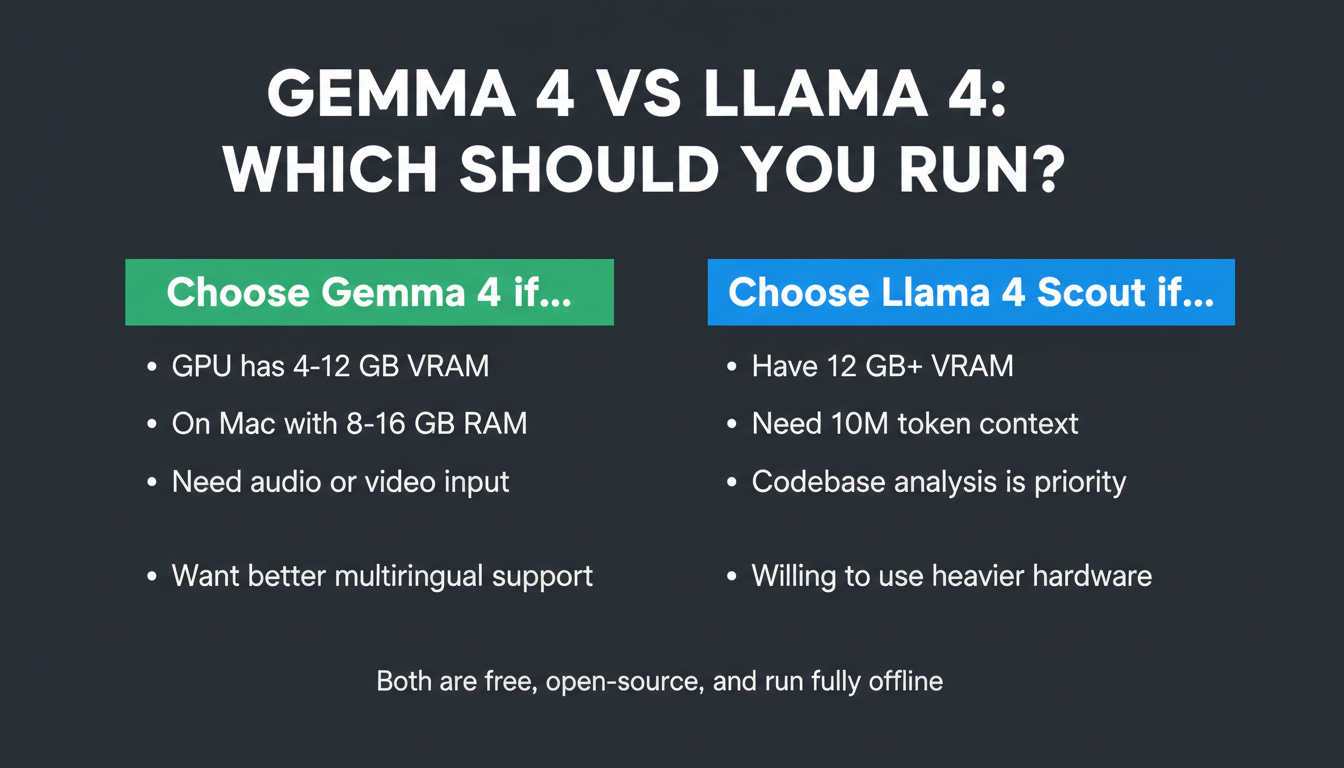
Run Gemma 4 if:
- Your GPU has 4–12 GB VRAM (E2B or E4B fits where Llama 4 Scout won't)
- You're on a Mac with 8–16 GB unified memory
- You need audio or video input
- You want better vision/multimodal performance
- You're building something multilingual (140+ languages)
Run Llama 4 Scout if:
- You have 12 GB+ VRAM and need the 10M context window
- You're doing large-codebase analysis or very long-document work
- Coding performance is the top priority
- You're comfortable with a heavier RAM requirement
Run Llama 4 Maverick if:
- You have 16–24 GB VRAM
- You want the highest quality local coding and reasoning available
- The 1M context window is sufficient
Run Gemma 4 31B if:
- You have 24 GB VRAM (RTX 4090 or Mac with 24+ GB)
- You want the best quality from a locally-run Gemma model
- Coding performance is secondary to reasoning and math
Key Takeaways
- Gemma 4 is the accessible choice: E4B Q4 at 5.41 GB runs on hardware that can't touch Llama 4 Scout (minimum 10 GB VRAM)
- Llama 4's superpower is context length: 10M tokens vs 128K — decisive for specific long-document use cases
- Benchmarks are close at flagship level: Gemma 4 31B vs Llama 4 Maverick trade wins by category; neither dominates
- Audio support is a Gemma 4 exclusive: If you need to process audio locally, Llama 4 doesn't do it
- For most users: Gemma 4 E4B is the practical winner — runs on more hardware, better multimodal, comparable quality for everyday tasks
Ready to run Gemma 4? → Gemma 4 Setup Guide (Mac + PC) | System Requirements | Windows Setup

Alex the Engineer
•Founder & AI ArchitectSenior software engineer turned AI Agency owner. I build massive, scalable AI workflows and share the exact blueprints, financial models, and code I use to generate automated revenue in 2026.
Related Articles

Gemma 4 on Mac: MacBook Air, Mac Mini & Pro Setup Guide (2026)
Run Gemma 4 locally on MacBook Air, Mac Mini, or MacBook Pro — M1/M2/M3/M4. Free, offline, step-by-step. System requirements, RAM tips, and benchmarks included.
Gemma 4 System Requirements: What You Need to Run It on PC, Mac, and Cloud
Exact VRAM and RAM requirements to run Gemma 4 E2B, E4B, 26B MoE, and 31B locally on Windows, Mac, or in the cloud — plus a step-by-step guide with Ollama.

Run Gemma 4 on Windows: Full Setup Guide (2026)
Step-by-step guide to running Google's Gemma 4 locally on Windows. Covers LM Studio, Ollama, and llama.cpp — with NVIDIA GPU acceleration and CPU-only options.