
Claude API Tutorial: How to Get Started for Absolute Beginners
Learn how to use the Claude API in under 10 minutes. Step-by-step guide covering setup, API key, Python SDK, and your first call — with real code examples.

Anthropic's Claude API is one of the cleanest AI APIs to work with — the documentation is solid, the Python SDK is straightforward, and new accounts get free credits to get started. If you've been meaning to try it but haven't gotten around to it, this guide will get you from zero to a working API call in under 10 minutes.
This is written for people who know how to open a terminal and run a Python script. If that's new to you, check out our terminal guide for beginners first.
What You'll Need
- A computer with Python 3.8+ installed
- A terminal (Mac/Linux: Terminal app; Windows: Command Prompt or PowerShell)
- A credit card for the Anthropic Console (only billed if you exceed the free tier)
That's it. No special hardware, no GPU required.
Step 1: Create Your Anthropic Console Account
Go to console.anthropic.com and sign up with your email. Anthropic gives new accounts $5 in free API credits — that's enough for thousands of test calls on Claude Haiku 4, which costs $0.80 per million input tokens.
Once you're logged in, you'll land on the Console dashboard.
Step 2: Generate Your API Key
- Click API Keys in the left sidebar
- Click Create Key
- Give it a name (e.g., "my-first-project")
- Copy the key — it starts with
sk-ant-...
Store it somewhere safe. You won't be able to see it again in the Console. A password manager or a local .env file works well.
Step 3: Install the Anthropic Python SDK
Open your terminal and run:
pip install anthropic
That's the official Anthropic SDK. It handles authentication, request formatting, and error handling automatically.
If you're using a virtual environment (recommended for any Python project), activate it first, then install:
python -m venv claude-env
source claude-env/bin/activate   # Mac/Linux
claude-env\Scripts\activate      # Windows
pip install anthropic
Step 4: Make Your First API Call
Create a new file called first_call.py and add this:
import anthropic

client = anthropic.Anthropic(api_key="sk-ant-YOUR-KEY-HERE")

message = client.messages.create(
    model="claude-sonnet-4-5",
    max_tokens=1024,
    messages=[
        {"role": "user", "content": "Explain what an API is in two sentences."}
    ]
)

print(message.content[0].text)
Run it:
python first_call.py
You should see Claude's response printed in your terminal. If you get an AuthenticationError, double-check your API key.
Which Claude Model Should You Use?
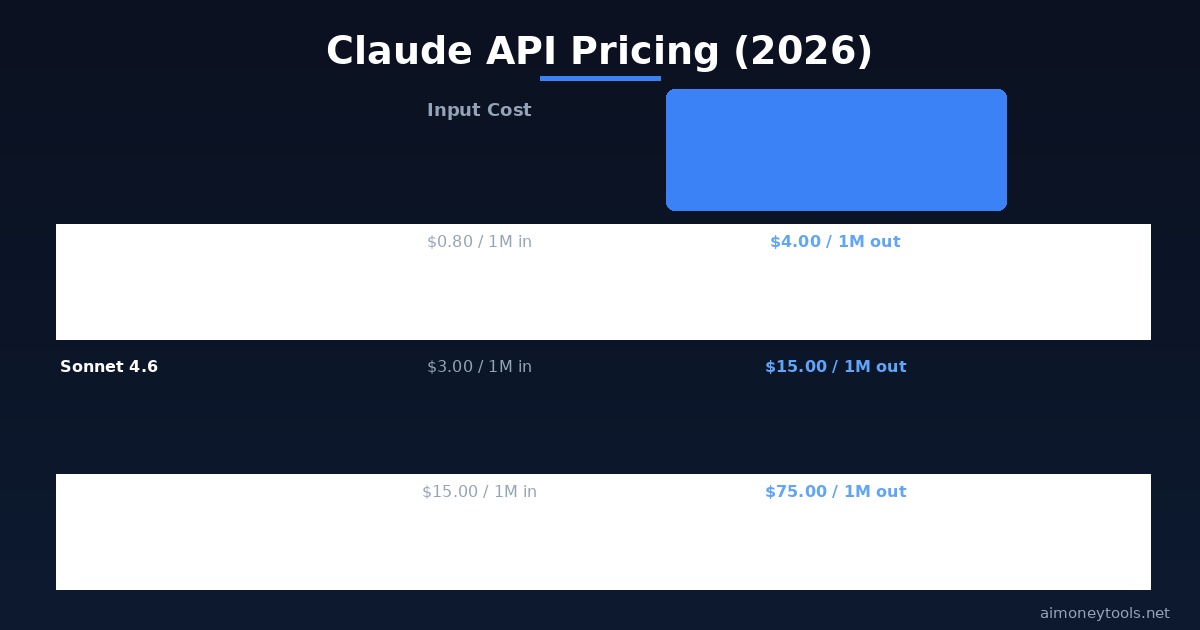
There are three Claude 4 models available via API, each at a different price point:
Claude Haiku 4 — fastest and cheapest. Good for classification, summarization, and tasks where you need high throughput at low cost. $0.80/M input, $4.00/M output.
Claude Sonnet 4.6 — the balanced option. Best for most practical use cases: content generation, coding help, data extraction, Q&A. $3.00/M input, $15.00/M output.
Claude Opus 4.7 — maximum capability. Use for complex reasoning, multi-step analysis, or tasks where quality matters more than cost. $15.00/M input, $75.00/M output.
For learning and prototyping, start with Haiku 4. Switch to Sonnet 4.6 when you need better output quality.
To switch models, just change the model parameter:
model="claude-haiku-4-5"    # fast, cheap
model="claude-sonnet-4-5"   # balanced
model="claude-opus-4-5"     # max capability
Using Environment Variables (Correct Way)
Hardcoding your API key in code is a bad habit — it's easy to accidentally push it to GitHub. Use environment variables instead:
import anthropic
import os

client = anthropic.Anthropic(api_key=os.environ.get("ANTHROPIC_API_KEY"))
Set the environment variable before running your script:
# Mac/Linux
export ANTHROPIC_API_KEY="sk-ant-YOUR-KEY-HERE"

# Windows PowerShell
$env:ANTHROPIC_API_KEY="sk-ant-YOUR-KEY-HERE"
Or create a .env file and load it with python-dotenv:
pip install python-dotenv
from dotenv import load_dotenv
load_dotenv()

import anthropic, os
client = anthropic.Anthropic(api_key=os.environ.get("ANTHROPIC_API_KEY"))
Practical Example: Summarize Any Text
Here's a real-world pattern — summarizing a block of text:
import anthropic
import os

client = anthropic.Anthropic(api_key=os.environ.get("ANTHROPIC_API_KEY"))

def summarize(text: str) -> str:
    message = client.messages.create(
        model="claude-haiku-4-5",
        max_tokens=300,
        messages=[
            {
                "role": "user",
                "content": f"Summarize this in 3 bullet points:\n\n{text}"
            }
        ]
    )
    return message.content[0].text

article_text = """
Anthropic released Claude Sonnet 4.6 as its primary production model in 2026.
The model scores significantly higher than previous versions on coding and reasoning benchmarks.
Pricing remains at $3 per million input tokens and $15 per million output tokens, unchanged
from the Sonnet 3.7 era. New API features include extended context windows up to 200K tokens.
"""

print(summarize(article_text))
This pattern — pass text, get structured output — covers a large percentage of real API use cases.
Keeping Costs Under Control
The free $5 credit won't last forever. Here's how to stay within budget while learning:
- Use Haiku 4 for development and testing; only switch to Sonnet for production
- Set
max_tokensconservatively — 500-1,000 is enough for most tasks - Set usage limits in the Console under Billing → Usage Limits to cap your monthly spend
- Cache responses when testing the same prompts repeatedly — don't hit the API every run
At Haiku 4 pricing, $5 of credit gets you approximately 6 million input tokens — more than enough to build a complete prototype.
Key Takeaways
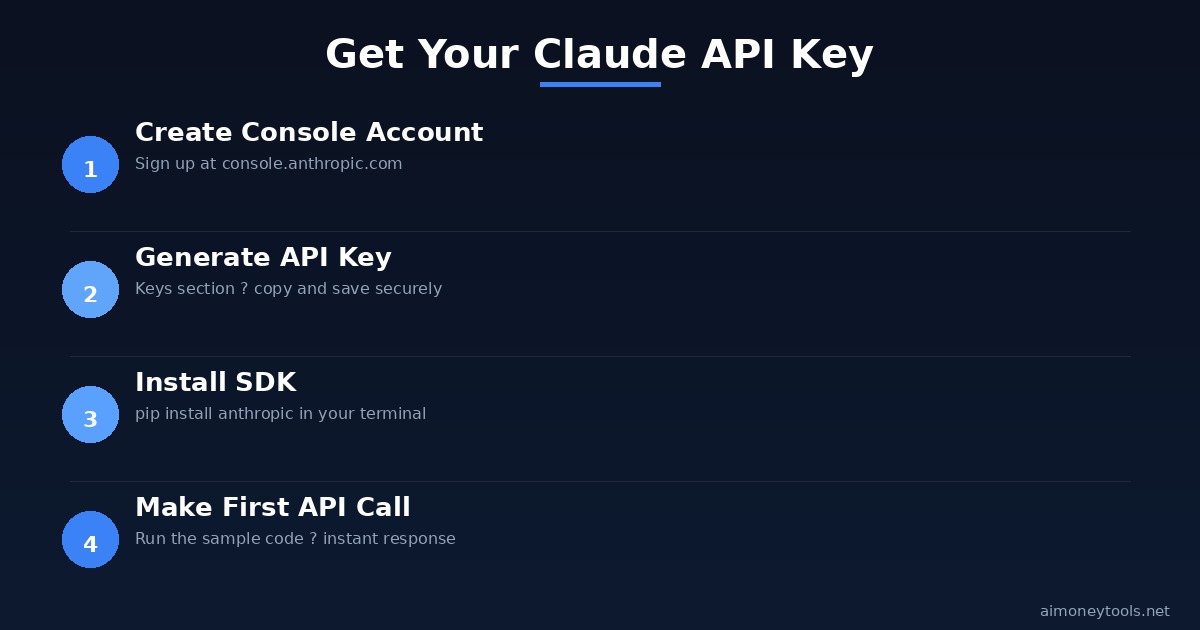
- The Claude API setup takes under 10 minutes: Console account → API key →
pip install anthropic→ first call - New accounts get $5 in free credits — enough for thousands of Haiku calls
- Use environment variables for your API key, never hardcode it
- Haiku 4 for cheap/fast tasks, Sonnet 4.6 for quality, Opus 4.7 for complex reasoning
- Set billing limits in the Console to avoid unexpected charges
Frequently Asked Questions
Do I need a credit card to get the free credits? Yes — Anthropic requires a payment method on file before activating free credits. You won't be charged unless you exceed the $5 credit.
What's the context window for Claude API calls? Claude Sonnet 4.6 and Opus 4.7 both support up to 200K token context windows. Haiku 4 supports up to 48K tokens. For most beginner projects, this is more than enough.
Can I use the Claude API without Python? Yes. Anthropic has official SDKs for Python and TypeScript/JavaScript. You can also call the REST API directly from any language using standard HTTP requests.
Is the Claude API better than OpenAI's API? Both are capable. Claude tends to be preferred for instruction-following, document analysis, and writing tasks. OpenAI has broader ecosystem integrations. For most solo projects, either works well — the choice often comes down to pricing and which model gives better output for your specific task.
How do I handle errors in production?
Wrap API calls in try/except blocks and catch anthropic.APIError. For rate limits (anthropic.RateLimitError), implement exponential backoff. The SDK documentation at docs.anthropic.com covers all error types.
Where can I find official documentation? The full API reference is at docs.anthropic.com. The Claude Console also includes a built-in Workbench for testing prompts without writing code.

Alex the Engineer
•Founder & AI ArchitectSenior software engineer turned AI Agency owner. I build massive, scalable AI workflows and share the exact blueprints, financial models, and code I use to generate automated revenue in 2026.
Related Articles

How to Start an AI-Assisted Resume Writing Side Hustle in 2026 (Beginner's Guide)
A step-by-step guide to using AI resume tools to offer a paid resume and cover letter writing service — what to charge, which tools to use, and how to find your first clients.

How to Build and Sell AI Voice Receptionists to Local Businesses in 2026
A beginner's guide to building AI voice agents that answer business phone calls — the tools to use, what to charge, and how to find your first client.

How to Make Money on Fiverr with AI Tools in 2026: 7 Gigs You Can Start This Week
Discover 7 real Fiverr gigs you can launch using free and low-cost AI tools in 2026 — no experience required. Real pricing data, step-by-step setup, and tools that actually work.