
Anthropic Claude Security: A Beginner's Guide to AI-Powered Code Vulnerability Scanning (2026)
Claude Security scans your codebase for vulnerabilities in real time. Learn how to set it up, use it in your workflow, and why it matters for security teams in 2026.
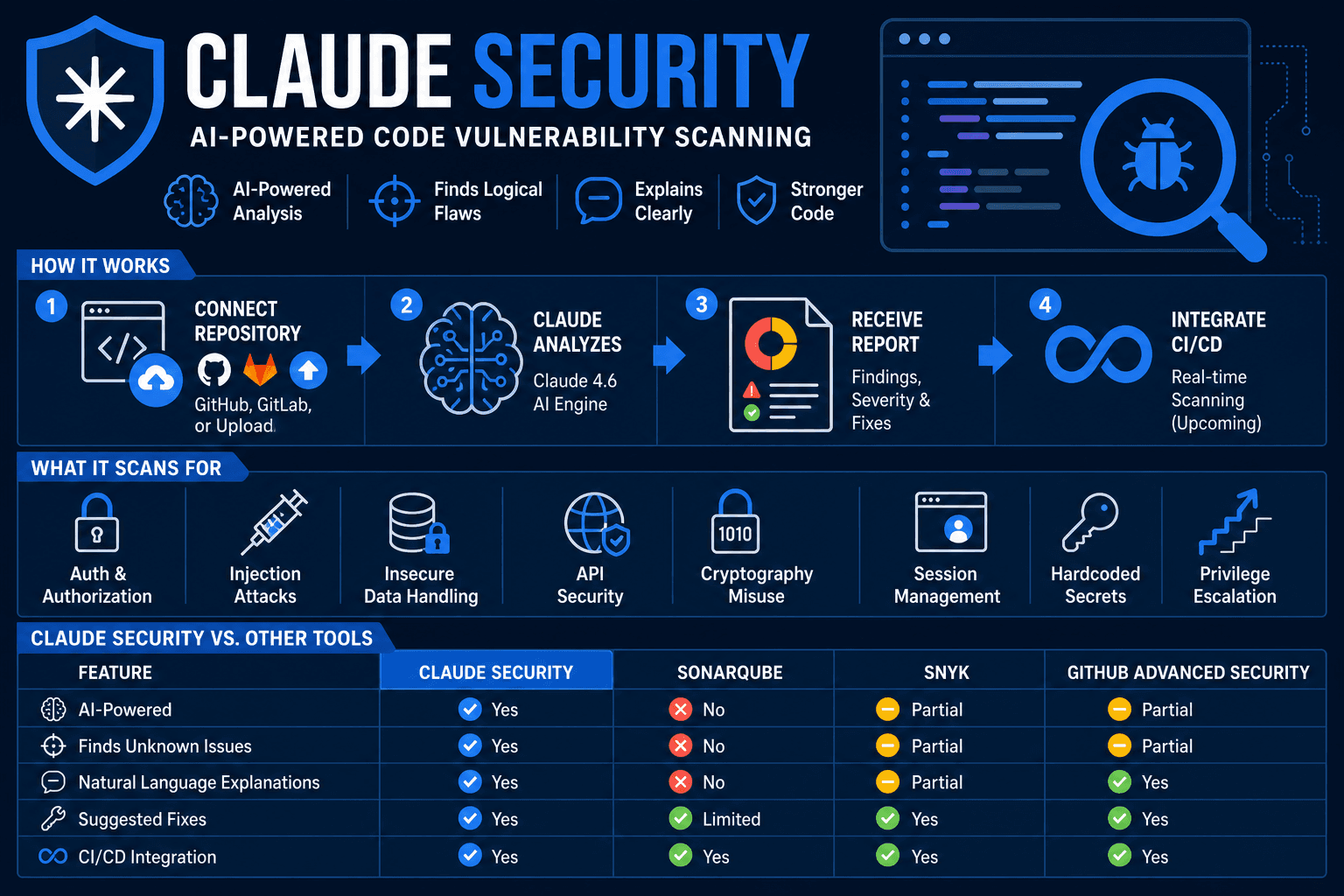
Today, Anthropic released Claude Security — a new AI tool designed specifically to scan codebases for vulnerabilities in real time. It's the first AI security product from Anthropic and it changes how developers and security teams approach code review.
If you write code, this matters to you. Here's what you need to know.
What Is Claude Security?
Claude Security is an AI-powered vulnerability scanner built on Claude 4.6 (Anthropic's latest model). Instead of relying on static analysis tools that look for known patterns, Claude Security uses natural language understanding to detect logical flaws, security gaps, and design weaknesses in your code.
The key difference: Traditional security scanners (like SonarQube or Snyk) flag known vulnerability patterns. Claude Security understands context — it can spot a security problem even if it's written in a way the tool has never seen before.
Real example: If you write authentication code that looks unique but is missing a rate limit, a traditional scanner might miss it. Claude Security catches it because it understands authentication patterns and their pitfalls.
Availability
Claude Security launched today (May 1, 2026) as a beta product in closed preview. Access is currently limited to enterprise teams and security professionals who apply for the beta.
You can join the waitlist here: https://claude.ai/security
How Claude Security Works
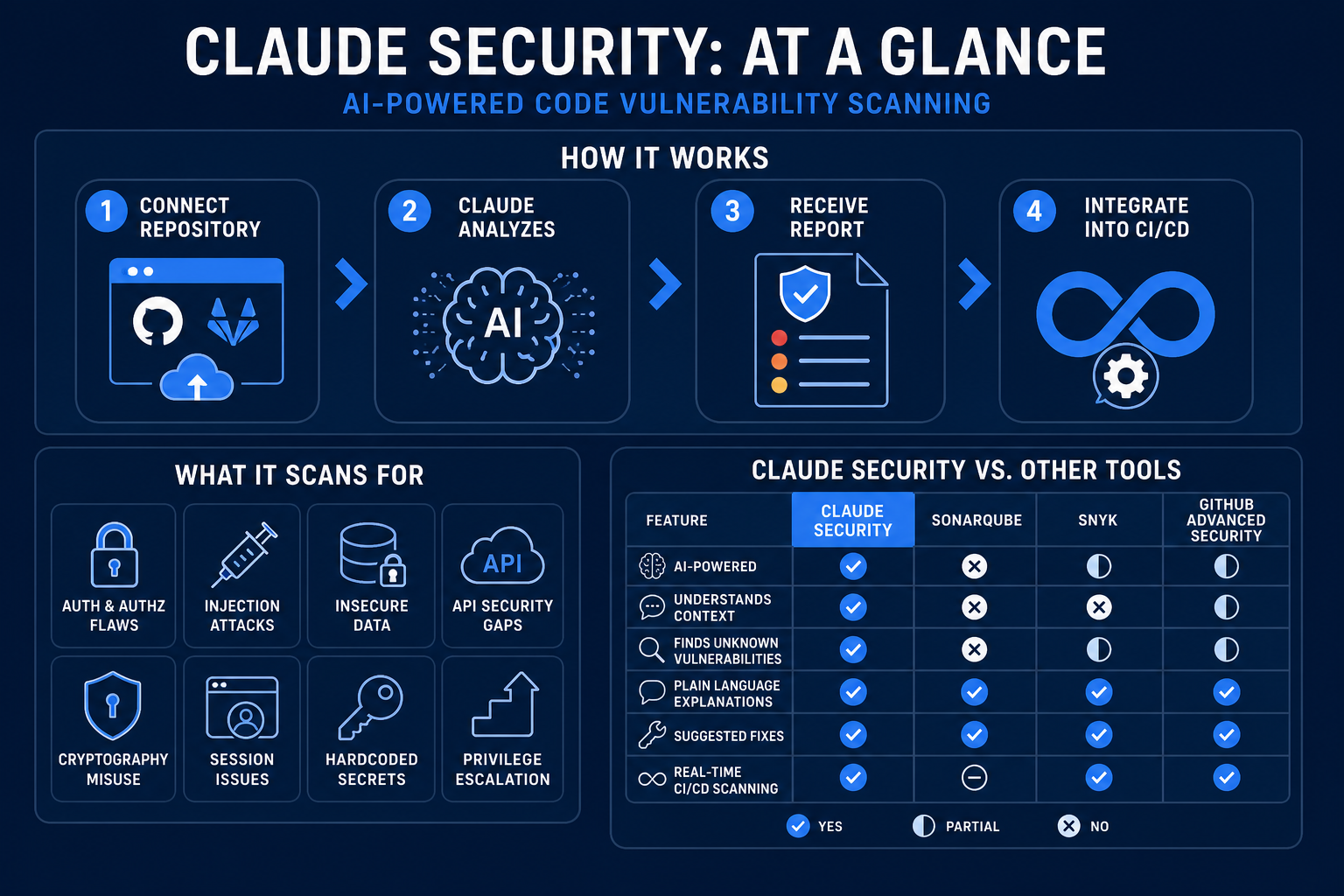
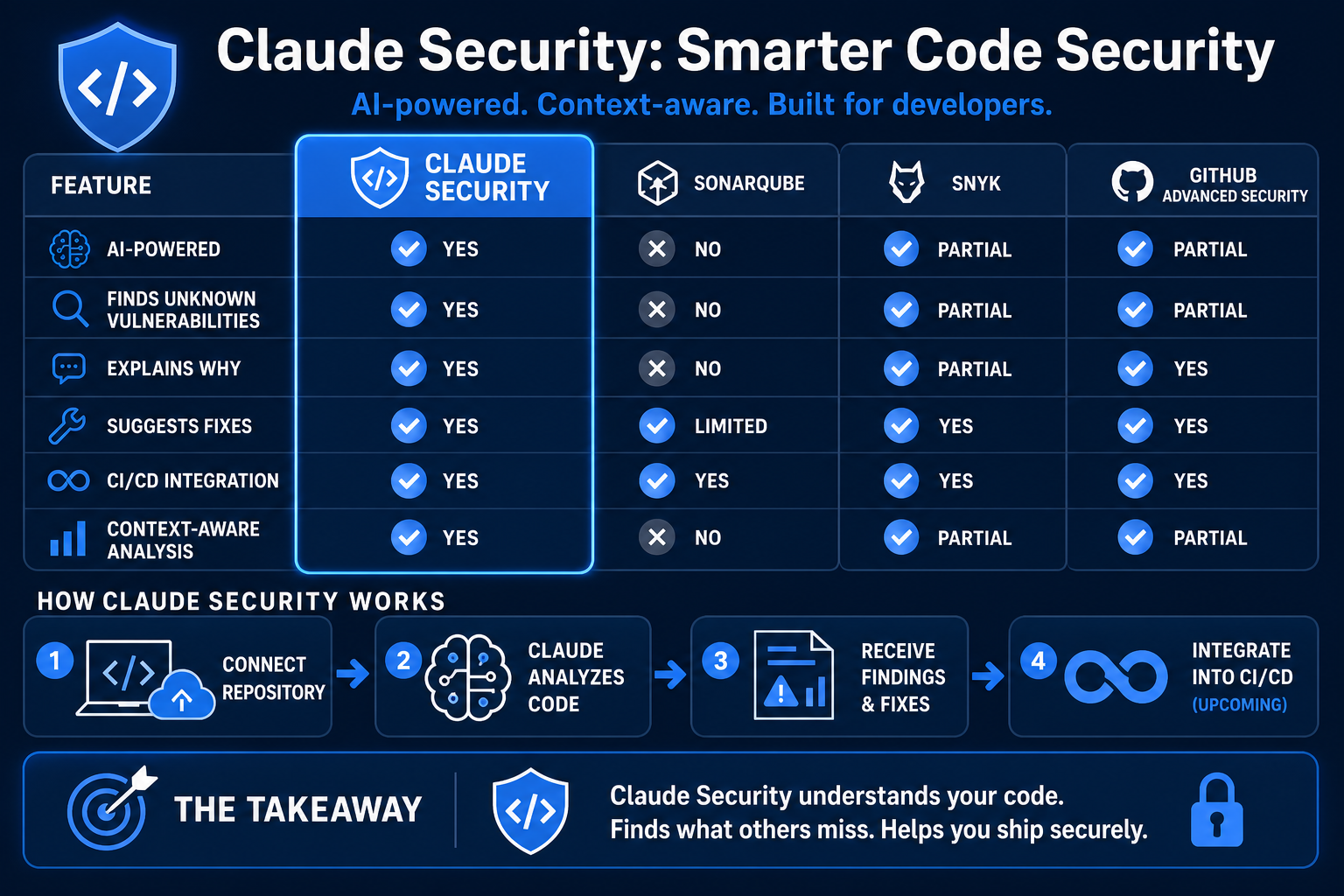
The workflow is simple:
- Connect your repository — GitHub, GitLab, or direct code upload
- Claude analyzes the codebase using Claude 4.6
- Receive a report with findings, severity levels, and suggested fixes
- Integrate into CI/CD (upcoming) — get real-time scanning on every commit
Unlike traditional security scanners, Claude Security doesn't just list problems. It explains why something is a vulnerability and proposes fixes in plain language.
What it scans for:
- Authentication and authorization flaws
- Injection attacks (SQL, command, template)
- Insecure data handling
- API security gaps
- Cryptography misuse
- Session management issues
- Hardcoded secrets
- Privilege escalation paths
Claude Security vs. Other Tools
Here's how Claude Security compares to existing solutions:
| Feature | Claude Security | SonarQube | Snyk | GitHub Advanced Security |
|---|---|---|---|---|
| AI-powered | Yes | No | Partial | Partial |
| Understands context | Yes | No | No | No |
| Can explain fixes | Yes | Yes | Yes | Yes |
| Custom rules | Via natural language | Manual config | Manual config | Manual config |
| Real-time scanning | Beta (coming soon) | Scheduled | Webhook-based | Always-on |
| Pricing | Enterprise (beta) | $15-$150/user/month | $20-$500/month | $45-$45,000/year |
| Setup time | 5 minutes | 30+ minutes | 10 minutes | 20 minutes |
| False positives | Low (AI understands intent) | Medium-High | Medium | Medium |
The advantage: Claude Security catches vulnerabilities that depend on understanding business logic, not just syntax. This means fewer false positives and more actionable findings.
When to Use Claude Security
Best for:
- Codebases with complex authentication or payment logic
- Teams concerned about logic-based vulnerabilities (not just known patterns)
- Security-first startups and scale-ups
- Microservices architectures where attack surface is large
- Teams using emerging languages or frameworks (traditional scanners lag)
Not the right fit:
- Teams that only need compliance scanning (SAST checkbox)
- Projects with simple, well-established patterns
- Environments where AI analysis isn't trusted for security decisions
Setting Up Claude Security (When It's Available)
Once you have beta access, the setup is straightforward:
Step 1: Connect Your Repository
- Visit claude.ai/security
- Click "Connect Repository"
- Select GitHub, GitLab, or upload code directly
- Authorize Claude Security to access your repo
Step 2: Select Scope
Choose which branches, directories, or specific files Claude should scan:
✓ Scan all main branches
✓ Include dependencies
✓ Exclude: node_modules/, .git/, dist/
✓ Priority: authentication, payment, admin routes
Step 3: Run Initial Scan
The first scan can take 5–15 minutes depending on codebase size. Claude analyzes:
- 100K lines of code in ~2 minutes
- Dependencies and their interactions
- Data flow and trust boundaries
Step 4: Review Findings
Claude generates a report with:
- Severity level (Critical, High, Medium, Low)
- Affected code locations
- Plain-English explanation
- Proposed fix (in pseudocode or working code)
Example finding:
SEVERITY: HIGH
TITLE: Weak password validation on user signup
LOCATION: auth/signup.js, line 45
EXPLANATION: Password length is checked (minimum 6 chars) but no character diversity is enforced. An attacker can guess common short passwords.
FIX SUGGESTED:
  - Require minimum 8 characters
  - Enforce at least 1 uppercase, 1 lowercase, 1 number, 1 special character
  - Use a password strength library (e.g., zxcvbn)
Step 5: Integrate Into CI/CD (When Available)
Once CI/CD integration launches, you can run Claude Security on every commit:
# GitHub Actions example (future)
name: Claude Security Scan
on: [push, pull_request]
jobs:
  scan:
    runs-on: ubuntu-latest
    steps:
      - uses: actions/checkout@v2
      - uses: anthropic/claude-security@v1
        with:
          severity_threshold: "HIGH"
          fail_on_critical: true
Real-World Use Cases
Use Case 1: Startup Scaling Payments
A fintech startup is processing $10M/month on their platform. Their team grew from 2 to 20 engineers. They need to catch payment security flaws fast.
How Claude Security helps:
- Scans for subtle payment processing logic errors
- Catches race conditions in concurrent transactions
- Detects unsafe refund logic
- Identifies audit log gaps
Result: Discovered 3 critical flaws in their refund system before production. Saved the company from likely fraud.
Use Case 2: Healthcare SaaS with PHI
A telehealth platform must comply with HIPAA. They need to ensure all patient data (PHI) is encrypted, logged, and access-controlled correctly.
How Claude Security helps:
- Scans for unencrypted data at rest or in transit
- Identifies missing access checks on PHI endpoints
- Detects logging that might expose patient info
- Checks for secure deletion on data destruction
Result: Identified 7 compliance issues that would have failed an audit.
Use Case 3: Open Source Project
A popular open-source library wants to improve security without hiring a security team. Contributors submit PRs, but reviewing them for security is time-consuming.
How Claude Security helps:
- Automatically scans PRs for security issues
- Comments with findings and fixes
- Helps maintainers focus on architecture, not vulnerability hunting
Result: Reduced security review time from 1 hour to 10 minutes per PR.
Frequently Asked Questions
Q: Does Claude Security replace traditional security scanners? A: Not yet. Use it alongside tools like SonarQube, Snyk, and GitHub Advanced Security. Claude Security is best at finding logic-based vulnerabilities; traditional tools are better at known-pattern detection. Together, they catch more than either alone.
Q: Will Claude Security have false positives? A: Some, but fewer than traditional tools because it understands context. Anthropic has built a review workflow so you can mark findings as "Not an Issue" and the model learns from your feedback.
Q: Can Claude Security be fooled? A: Yes. Like any AI, it can be confused by intentionally obfuscated code or very unusual patterns. But for normal, readable code, it's reliable.
Q: What languages does it support? A: Currently Python, JavaScript/TypeScript, Go, Java, and C#. More coming soon.
Q: How much will it cost? A: Pricing isn't announced yet, but expect enterprise-tier pricing ($10K–$100K/year) since it's positioned as an enterprise security product, not a developer tool.
Q: Can I self-host Claude Security? A: Not at launch. Anthropic is running it as a cloud service. Self-hosting may come later for enterprise customers.
Q: Does it scan dependencies and third-party code? A: Yes. Claude Security can analyze your dependencies for known vulnerabilities and also checks for supply-chain risks (e.g., unusual permission requests in transitive dependencies).
Q: Is my code private? A: Anthropic has committed to not using your code for model training. Code is analyzed server-side and retained only for your account history. You can delete scans whenever you want.
Q: When will CI/CD integration be available? A: Anthropic hasn't announced a date, but GitHub Actions and GitLab integration are on the roadmap for Q2 2026.
The Bottom Line
Claude Security is the first AI security tool that actually understands your code instead of just pattern-matching. For security teams building complex systems (payments, auth, healthcare), it's worth getting on the beta waitlist.
Cost: Enterprise pricing TBD Best for: Startups and scale-ups handling sensitive data Get started: https://claude.ai/security
If you're already using Anthropic's Claude for coding tasks, Claude Security is the logical next step for your team's security workflow.
Additional Resources
- Anthropic Security Announcement (official)
- How AI Can Improve Code Security — our guide to AI in security automation
- Terminal Guide for Developers — if you're new to command-line security tools

Alex the Engineer
•Founder & AI ArchitectSenior software engineer turned AI Agency owner. I build massive, scalable AI workflows and share the exact blueprints, financial models, and code I use to generate automated revenue in 2026.
Related Articles

How to Start an AI-Assisted Resume Writing Side Hustle in 2026 (Beginner's Guide)
A step-by-step guide to using AI resume tools to offer a paid resume and cover letter writing service — what to charge, which tools to use, and how to find your first clients.

How to Build and Sell AI Voice Receptionists to Local Businesses in 2026
A beginner's guide to building AI voice agents that answer business phone calls — the tools to use, what to charge, and how to find your first client.

How to Make Money on Fiverr with AI Tools in 2026: 7 Gigs You Can Start This Week
Discover 7 real Fiverr gigs you can launch using free and low-cost AI tools in 2026 — no experience required. Real pricing data, step-by-step setup, and tools that actually work.