
Best AI Tools for Local Service Businesses in 2026 (Practical Guide)
Plumber, electrician, landscaper, cleaner — here are the exact AI tools helping local service businesses save 5-10 hours a week, win more clients, and look more professional.
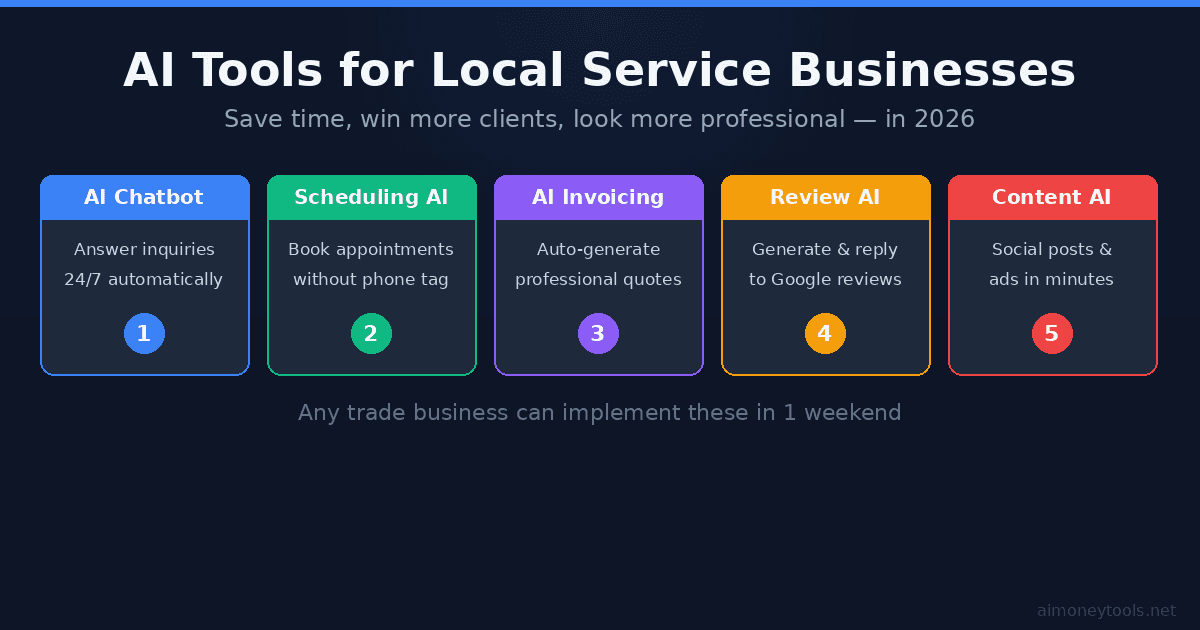
Running a local service business is harder than it looks. You're doing the actual work — then also answering calls, chasing invoices, managing bookings, and trying to get more Google reviews. Most people don't have time for all of it.
That's exactly where AI tools now shine. Not the hype kind — the practical, saves-you-time kind. This guide covers the five most useful AI tools for local service businesses in 2026, what each one actually does, and how to get started fast.
No coding required. No expensive software. Just tools that work.
Why AI Makes Sense for Local Service Businesses
Local service businesses — plumbers, electricians, landscapers, cleaning companies, HVAC techs, roofers — share a few things in common:
- High inbound demand (lots of calls, texts, contact forms)
- Repetitive admin tasks (quotes, invoices, scheduling, follow-ups)
- Word-of-mouth dependent (reviews matter enormously)
- Time-poor owners (you can't do marketing if you're on a job)
AI tools address all four. The goal isn't to replace your team — it's to stop losing jobs because you didn't answer a text at 9 PM, or because your invoice took four days to arrive.
The 5 Best AI Tools for Local Service Businesses
1. CustomGPT — AI Chatbot That Knows Your Business
Most generic chatbots are useless. They say "I'll have someone contact you" and that's it.
CustomGPT is different. You feed it your actual business information — your services, service areas, pricing, FAQ — and it becomes a knowledgeable assistant that can answer client questions instantly, 24/7, on your website or Facebook page.
What it actually does for a service business:
- Answers "Do you serve [neighborhood]?" at midnight
- Explains your pricing tiers without you picking up the phone
- Qualifies leads (asks what job they need, when, what size)
- Collects contact info for follow-up
Who it's for: Any business that gets repetitive inbound questions. If you're a plumber and 30% of your calls are people asking if you do drain cleaning — CustomGPT handles that.
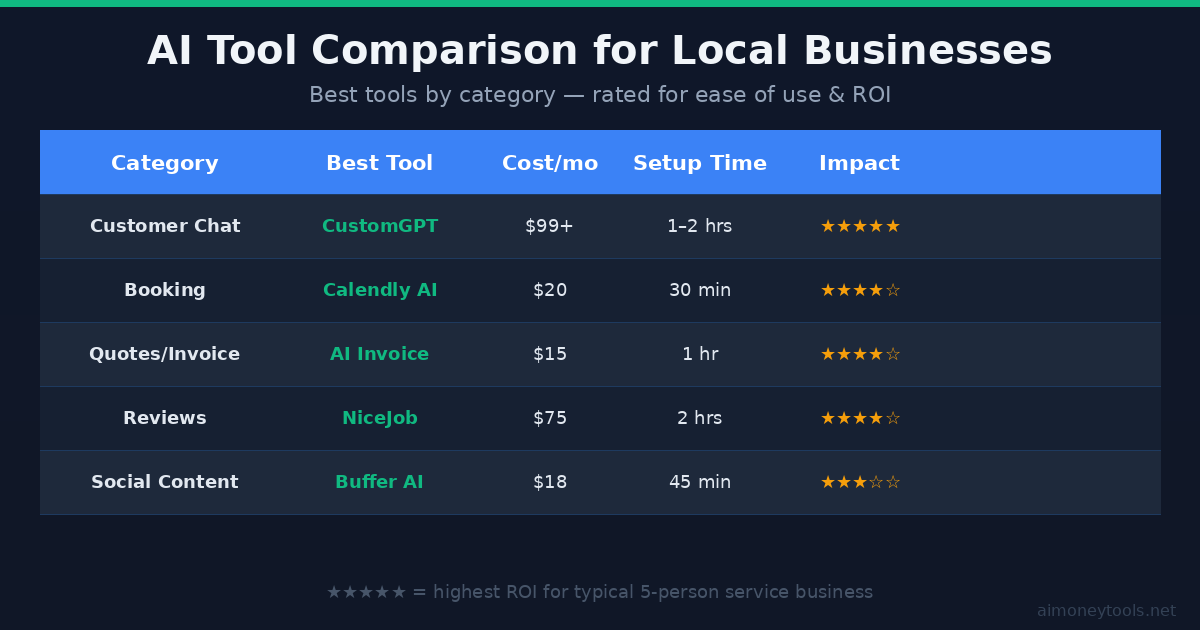
Setup time: 1–2 hours to configure, embed on your site, and test.
2. Calendly (with AI Scheduling) — End Phone-Tag Booking
Phone-tag costs you jobs. Someone calls when you're on a roof, you call back, they don't answer, three days later they've hired someone else.
Calendly solves this with self-booking. Clients pick a time from your available slots. It syncs with Google Calendar, sends reminders automatically, and cuts no-shows significantly.
The AI layer (added in 2025) can suggest optimal meeting windows, auto-reschedule conflicts, and route different job types to different team members.
Best for: Any service business that does estimates, consultations, or recurring scheduled visits.
Cost: Free for basic use; $20/month for business features.
3. AI Quoting & Invoicing — Get Paid Faster
Tools like Invoice Ninja (with AI templates) or Jobber let you generate professional quotes from a mobile phone in under two minutes. You fill in the job, it creates a branded PDF, sends it automatically, and follows up if unpaid.
The AI part: it learns your pricing patterns and pre-fills common jobs (e.g., "furnace service call" auto-fills to $175 base + parts). Some tools also send automatic payment reminders at 7, 14, and 30 days.
Why it matters: Getting paid faster is revenue in the bank. Most service businesses leave $5,000–$20,000 in delayed receivables per year simply from slow or manual invoicing.
Recommendation: Jobber for field service businesses. Invoice Ninja for solo operators and small crews.
4. NiceJob — AI-Powered Review Generation
Google reviews make or break local service businesses. One competitor with 200 reviews versus your 40 — they win the click, even if you're better.
NiceJob automates review requests. After a job is marked complete, it automatically texts the client asking for a Google review. The timing and message are optimized for response rates.
The AI layer monitors your reviews and flags negative sentiment before it becomes a public problem.
Typical result: Businesses using NiceJob report 2–4× more reviews in the first 3 months.
Cost: ~$75/month. Pays for itself with one or two extra jobs per month.
5. Buffer (AI Assist) — Social Content Without the Hustle
You know you should post on Facebook and Instagram. You just never do it.
Buffer's AI Assist feature lets you describe what you did today ("replaced hot water heater, finished fast, client happy") and generates a ready-to-post social caption with relevant hashtags. Takes 90 seconds.
Pair it with a simple photo of your work, and you have genuine, trust-building content your competitors aren't posting.
Tip: One post per week showing finished work + client results is enough to be the most visible contractor in your area.
Cost: ~$18/month for 3 social channels.
AI Tool Comparison at a Glance
How to Actually Implement These (4-Week Plan)
Don't try to set up five tools at once. Here's a sequenced approach that gets you fully automated in one month:
Week 1 — AI Chatbot. Get CustomGPT configured and embedded on your website. Train it on your top 20 most common questions. Test it by asking it things your real clients ask.
Week 2 — Booking. Set up Calendly with your availability. Add the link to your Google Business Profile and website. Start sending it to leads instead of playing phone tag.
Week 3 — Quoting & Invoicing. Pick your invoicing tool, set up templates for your 5 most common jobs, connect it to your bank account. Start sending digital invoices same-day, every job.
Week 4 — Reviews & Content. Connect NiceJob to your job completion workflow. Set up Buffer with 3 social accounts and use AI Assist for your first 3 posts.
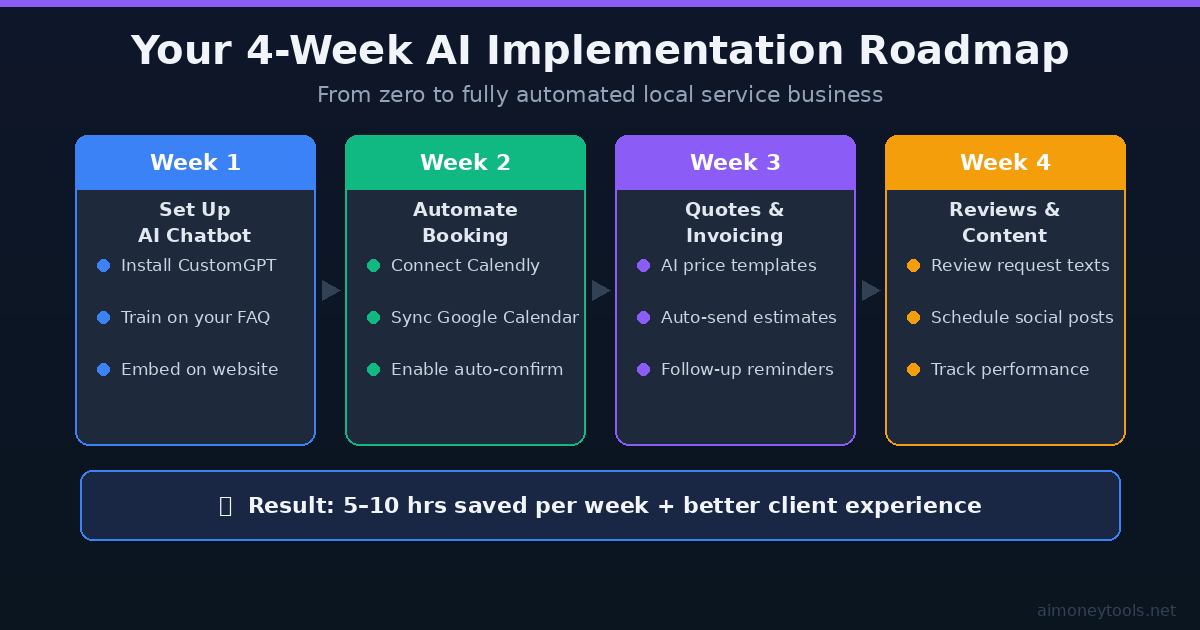
By week 4, you have: 24/7 lead capture, automated booking, fast invoicing, and a growing review base. That's a real competitive advantage in most local markets.
What AI Won't Do
Be realistic about what you're getting:
- AI won't replace your skilled work or judgment on the job
- A bad chatbot can frustrate clients — invest 2 hours training it properly
- Review tools need you to actually do great work first — they just amplify it
- Social posts with no photos don't work; AI writes the caption, you take the photo
The businesses winning with AI aren't fully automated — they're using AI for the repeatable admin layer while the owner focuses on quality and relationships.
Who This Works Best For
These tools work particularly well for:
- Single-trade contractors (plumber, electrician, HVAC tech) operating solo or with 1–5 employees
- Cleaning businesses with regular recurring clients
- Landscaping/lawn care companies with seasonal booking spikes
- Handyman services with high quote volume
If you're in one of these categories and you're still running your business like it's 2015 — competitors are gaining ground. AI tools have become cheap enough that there's no reason to wait.
For more on using AI to build revenue streams, see our guide on AI tools for making money online and how to add AI to your customer service.
Frequently Asked Questions
Do I need technical skills to use these tools? No. All five tools listed have drag-and-drop setup, video tutorials, and live chat support. If you can use a smartphone, you can set these up.
How much does it cost to run all five tools? Roughly $230/month for all five at their entry tiers. One extra job per week more than covers that cost for most service businesses.
Is an AI chatbot better than a human receptionist? For 24/7 availability and instant first response — yes. For complex situations requiring judgment or empathy — no. Most service businesses use both: AI handles the first response and basic qualification, a human follows up within a few hours for bookings.
Will clients know they're talking to AI? With CustomGPT, you can be transparent or seamless depending on your preference. Many businesses brand it as their "virtual assistant" and clients don't mind — they care about getting fast, accurate answers.
What's the biggest mistake businesses make with these tools? Setting them up and not maintaining them. Your chatbot needs updates when your pricing changes. Your booking calendar needs to reflect your actual availability. Spend 30 minutes per month reviewing and updating each tool.
Which tool should I start with if I can only pick one? The AI chatbot (CustomGPT). Capturing leads you would have lost at 11 PM on a Sunday is the highest-ROI change most service businesses can make.
Tools mentioned: CustomGPT (affiliate), Calendly, Jobber, NiceJob, Buffer.

Alex the Engineer
•Founder & AI ArchitectSenior software engineer turned AI Agency owner. I build massive, scalable AI workflows and share the exact blueprints, financial models, and code I use to generate automated revenue in 2026.
Related Articles

How to Start an AI-Assisted Resume Writing Side Hustle in 2026 (Beginner's Guide)
A step-by-step guide to using AI resume tools to offer a paid resume and cover letter writing service — what to charge, which tools to use, and how to find your first clients.

How to Build and Sell AI Voice Receptionists to Local Businesses in 2026
A beginner's guide to building AI voice agents that answer business phone calls — the tools to use, what to charge, and how to find your first client.

How to Make Money on Fiverr with AI Tools in 2026: 7 Gigs You Can Start This Week
Discover 7 real Fiverr gigs you can launch using free and low-cost AI tools in 2026 — no experience required. Real pricing data, step-by-step setup, and tools that actually work.