
Murf.ai Review 2026: Best AI Voice Generator for YouTube Creators?
Honest Murf.ai review for 2026. Tested pricing, voice quality, 200+ voices, YouTube use cases, and how it compares to ElevenLabs. Plus: who should actually pay for it.
If you make YouTube videos, online courses, or explainer content, you've probably hit the same wall: either you record your own voice (inconsistent, takes time), hire a voice actor ($300+ per hour), or use a robotic text-to-speech tool that sounds exactly like what it is.
Murf.ai is the middle path. Studio-quality AI voiceovers, no microphone required, starting at $19/month. But is it actually worth it for YouTube creators in 2026? I dug into the pricing, tested the features, and compared it to the main alternatives. Here's the honest breakdown.
What Is Murf.ai?
Murf.ai is a cloud-based AI voice generator that converts your script into natural-sounding speech. You type (or paste) your text, pick a voice, adjust the pacing and emphasis, and export the audio — or sync it directly to video.
The platform offers over 200 AI voices across 20+ languages. For YouTube creators, the practical selling point is simple: you can produce a polished voiceover in under 10 minutes without ever touching a microphone.
Founded in 2024, Murf has been steadily building out its toolset. Today it integrates with Canva, Google Slides, and offers API access for more advanced workflows.
Murf.ai Pricing: The Real Numbers
Most reviews show you the headline prices. Here are the actual plan details, including what's missing from each tier:
| Plan | Price (Annual) | Voice Time | Voices | Notable Limits |
|---|---|---|---|---|
| Free | $0 | 10 min total | Limited | No downloads, no commercial use |
| Creator Lite | $19/mo ($228/yr) | 24 hrs/year | 60 voices | No voice changer |
| Creator Plus+ | $33/mo ($396/yr) | 48 hrs/year | 120+ voices | Voice changer included |
| Business Lite | $26/mo ($312/yr) | 48 hrs/year | 120+ voices | Team collaboration |
| Business Plus+ | $52/mo ($624/yr) | 240 hrs/year | All voices | Advanced collaboration |
| Enterprise | $75+/mo | Unlimited | All voices | Voice cloning unlocked |
What that means for a YouTube creator: If you're producing 2-4 videos per week with voiceovers averaging 5-10 minutes, Creator Plus+ at $396/year gives you 48 hours of generation — enough for roughly 250-500 standard videos per year.
The hidden catch: Annual time allocations don't roll over. If you have a slow month, you're losing what you paid for.
Voice cloning is Enterprise only. Cloning your own voice to maintain consistency requires the $75+/month plan. That's a significant jump, and one that most YouTube creators don't need right away.
Voice Quality: How Good Is It Actually?
The voice quality is the main reason to consider Murf over cheaper alternatives. After testing across English, Spanish, French, and Hindi voices:
English: Excellent. American, British, Australian, and Indian accents are all available and sound genuinely natural for narration-style content.
Emotional range: This is where it shows its limits. Basic intonation, pacing, and emphasis work well. But subtle emotion — sarcasm, warmth, urgency — is harder to replicate consistently. For YouTube commentary or storytelling content, a skilled human voice actor still wins. For instructional, explainer, and educational content, Murf is easily good enough.
Long-form consistency: Occasional artifacts in very long scripts (30+ minutes). For most YouTube videos, this isn't an issue. For audiobook-length projects, plan for some editing.
Murf.ai Key Features
Pronunciation control. You can save custom pronunciations for brand names, technical terms, or unusual words. This matters if you're doing niche content where the default AI mispronounces things.
Emphasis and pacing. Granular controls for emphasis placement, pause length, pitch, and speed. Unlike basic TTS tools where you get what you get, Murf lets you actually tune the delivery.
SSML support. For creators comfortable with markup, you can use Speech Synthesis Markup Language for advanced control over how the voice behaves.
Video sync. Upload a video, apply a voiceover, and Murf handles the timing. Works well for straightforward content; needs manual adjustment for complex timelines.
Canva and Google Slides integration. Directly add voiceovers inside Canva projects or Slides presentations. Useful if you're making explainer videos or course content that starts as a slideshow.
How to Use Murf.ai for YouTube Videos
The workflow is simpler than most editors expect:
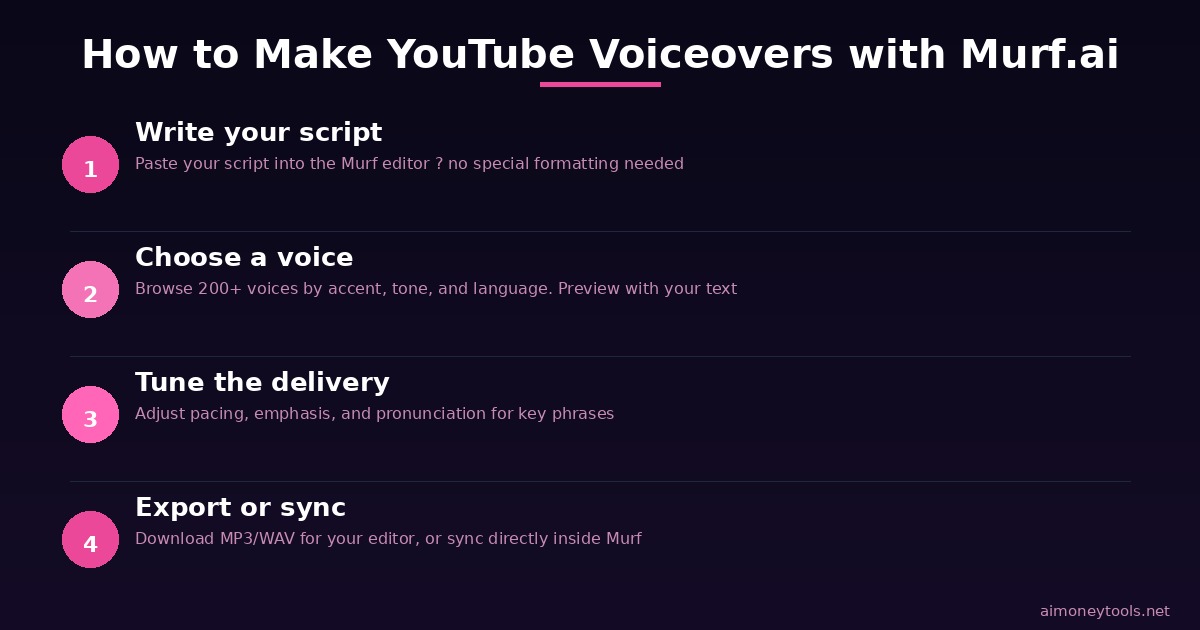
Step 1: Write your script. Paste it into the Murf editor. You don't need to format it — just drop the text in.
Step 2: Choose a voice. Browse by language, accent, gender, and tone. Preview any voice with your text before committing.
Step 3: Tune the delivery. Adjust pacing, emphasis, and pronunciation for key phrases. This is where 10 minutes of effort makes the difference between "AI voice" and "natural voiceover."
Step 4: Export or sync. Export as MP3/WAV for your video editor, or use the built-in video sync if your footage is ready.
Step 5: Done. Pair it with your footage in DaVinci, Premiere, or whatever editor you use.
The whole process for a 10-minute script runs 15-30 minutes including tuning — much faster than recording, editing, and cleaning up a real microphone track.
Murf.ai vs ElevenLabs: Quick Comparison
This is the real choice most creators face. Here's the honest breakdown:
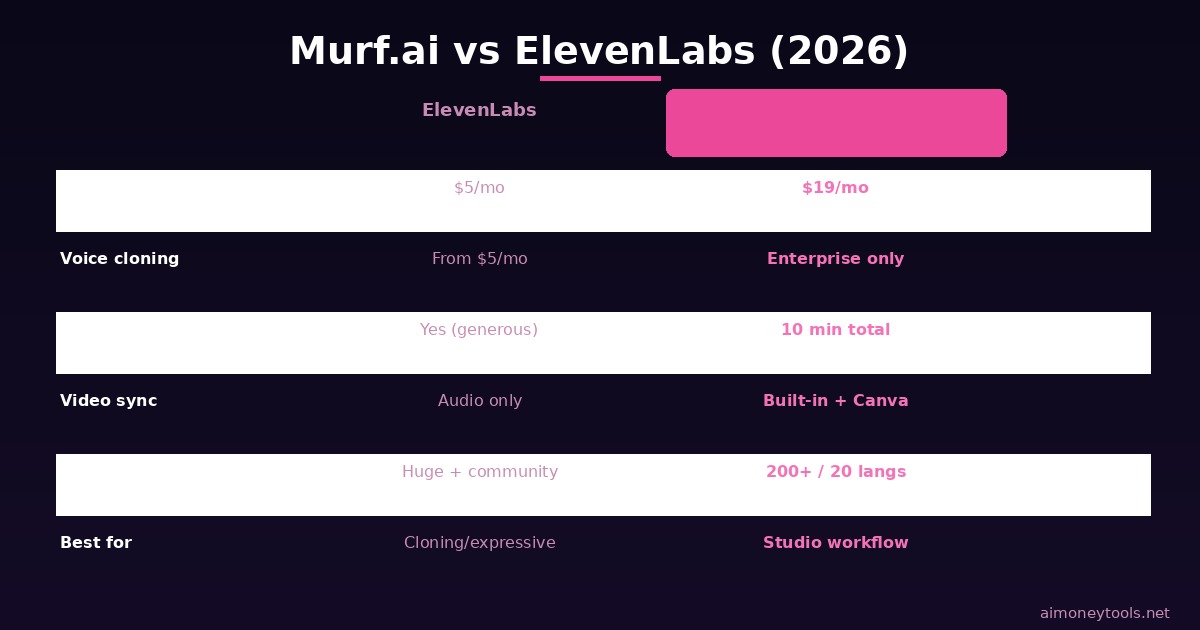
| Murf.ai | ElevenLabs | |
|---|---|---|
| Starting price | $19/mo (annual) | $5/mo |
| Free plan | 10 min total | Yes (limited) |
| Voice library | 200+ voices, 20+ languages | Massive library + community voices |
| Voice cloning | Enterprise only ($75+/mo) | Available on Starter plan ($5/mo) |
| Video workflow | Built-in sync + Canva | Audio-focused, no video tools |
| Best for | Streamlined voiceover production | Voice cloning, expressive narration |
Which should you pick?
If you need voice cloning (narrating in your own voice, or creating a consistent character voice), ElevenLabs is better value — cloning is available at $5/month vs $75+/month on Murf.
If you want a clean, simple workflow with Canva/Slides integration and don't need cloning, Murf's studio-style interface is genuinely easier for beginners.
For most YouTube creators just starting out: try ElevenLabs free tier first (more generous than Murf's). If you find you need the workflow integrations or prefer Murf's voice quality, upgrade there.
Who Should Pay for Murf.ai?
Good fit:
- YouTube creators producing educational, explainer, or tutorial content consistently
- Course creators who need polished narration without recording setup
- Small teams where multiple people need to create branded voiceovers
- Marketers making product demos, explainer videos, or presentation content
Not a great fit:
- Creators who primarily need their own voice cloned — go with ElevenLabs
- Occasional use cases — the annual allocation model penalizes low-volume users
- Podcasters who want conversational, emotional delivery — Murf's emotional range is limited
Frequently Asked Questions
Is Murf.ai free? There's a free plan with 10 minutes of total voice generation and no commercial use rights. It's enough to test the voices, but not for real production.
Does Murf.ai have a free trial? Yes — first-time signups get a free trial that lets you explore all voices and premium features. No credit card required to start.
Can I use Murf.ai voices on YouTube commercially? Yes, on any paid plan (Creator Lite and above), you get commercial usage rights for your voiceovers.
How many languages does Murf.ai support? Over 20 languages with native speaker voices, including English (multiple accents), Spanish, French, German, Hindi, Japanese, and more.
Is voice cloning included? No — voice cloning requires the Enterprise plan at $75+/month. If that's your main need, ElevenLabs is cheaper.
Can multiple team members use one Murf.ai account? Team collaboration requires Business Lite ($26/mo) or higher.
Verdict
Murf.ai delivers on its core promise: professional-quality voiceovers without a microphone, fast, at a fraction of voice actor rates. For YouTube creators making tutorial, explainer, or educational content regularly, it's a practical tool.
The pricing model works best if you're producing consistently — the annual allocation system punishes low-volume users. And if voice cloning is your priority, ElevenLabs gets you there for much less.
For most beginner YouTube creators, start with the free trial. If the voice quality fits your content, the Creator Plus+ plan at $396/year is the sweet spot for ongoing production.

Alex the Engineer
•Founder & AI ArchitectSenior software engineer turned AI Agency owner. I build massive, scalable AI workflows and share the exact blueprints, financial models, and code I use to generate automated revenue in 2026.
Related Articles

How to Start an AI-Assisted Resume Writing Side Hustle in 2026 (Beginner's Guide)
A step-by-step guide to using AI resume tools to offer a paid resume and cover letter writing service — what to charge, which tools to use, and how to find your first clients.

How to Build and Sell AI Voice Receptionists to Local Businesses in 2026
A beginner's guide to building AI voice agents that answer business phone calls — the tools to use, what to charge, and how to find your first client.

How to Make Money on Fiverr with AI Tools in 2026: 7 Gigs You Can Start This Week
Discover 7 real Fiverr gigs you can launch using free and low-cost AI tools in 2026 — no experience required. Real pricing data, step-by-step setup, and tools that actually work.