
Microsoft Just Canceled Claude Code Licenses: What It Means and Which AI Coding Tool to Use in 2026
Microsoft is pulling Claude Code from thousands of developers and switching to GitHub Copilot CLI. Here is what actually happened and which AI coding tool makes sense for beginners in 2026.

Microsoft gave its own engineers a bold AI experiment in late 2024: free access to Claude Code, Anthropic's terminal-based AI coding agent. For six months, thousands of developers inside the company's Experiences + Devices division — the team responsible for Windows, Microsoft 365, Outlook, Teams, and Surface — used it daily. They preferred it over Microsoft's own GitHub Copilot CLI.
Then, on May 14, 2026, The Verge broke the news: Microsoft is canceling those Claude Code licenses by June 30.
If you are just starting to explore AI coding tools, this story is worth understanding — not because it changes what tools are available to you, but because it reveals a lot about how AI coding tools actually compare and what token-based billing really means for your wallet.
What Microsoft Actually Said
The decision came from Rajesh Jha, EVP of Microsoft's Experiences + Devices group, in an internal memo obtained by The Verge:
"Claude Code was an important part of that learning… at the same time, Copilot CLI has given us something especially important: a product we can help shape directly with GitHub for Microsoft's repos, workflows, security expectations, and engineering needs."
The official line is product consolidation: Microsoft wants one standard agentic CLI tool across its engineering teams. But sources inside the company told The Verge there is also a direct financial motive — Claude Code's token-based billing became expensive at scale, and June 30 is the last day of Microsoft's financial year.
The key nuance here: Microsoft is not dropping Anthropic. Claude models still power features inside Microsoft 365 Copilot. The company still has a standing deal giving Azure Foundry customers access to Claude Sonnet and Opus. This is specifically about the standalone Claude Code CLI tool being replaced by Copilot CLI for one internal division.
What Is Claude Code, and Why Did It Matter?
Claude Code is Anthropic's command-line AI coding agent. Unlike IDE plugins that suggest completions as you type, Claude Code operates in your terminal — it reads your codebase, writes files, runs tests, and executes multi-step engineering tasks based on natural language instructions.
The reason Microsoft's engineers liked it: it handles genuinely complex tasks. You can ask Claude Code to refactor an entire module, write a full feature implementation, or debug a system-level issue — and it understands context across multiple files without losing the thread. For backend engineers working on complex systems, it has earned a strong reputation.
Claude Code pricing in 2026:
- Pro plan: $20/month
- Max 5x plan: $100/month
- Max 20x plan: $200/month
These are subscription plans with a token budget that resets on a rolling 5-hour cycle. Heavy usage on large codebases burns through that budget quickly, which is exactly what happened at Microsoft scale.
What Is GitHub Copilot CLI?
GitHub Copilot CLI is Microsoft's own agentic coding tool, designed to work outside IDEs in the terminal — the same space Claude Code operates in. It is part of the broader GitHub Copilot product, which already has a 91 percent adoption rate across Microsoft's own engineering teams.
For Microsoft, the appeal is obvious: it is a product they own and can shape directly. Copilot CLI is also model-agnostic — it supports Microsoft's internal models, OpenAI models, and, notably, Anthropic Claude models are still accessible through it. So engineers do not completely lose access to Claude's capabilities — they just lose the standalone Claude Code tool.
The honest assessment from independent developers who have tested both: Copilot CLI is good for simple completions and tasks within VS Code, but Claude Code has generally outperformed it on complex, multi-step agentic tasks. Microsoft engineers preferred Claude Code, which is part of why the transition is described internally as not being easy.
The Three AI Coding Tools Compared
For beginners deciding which tool to use in 2026, the real comparison is across three products:
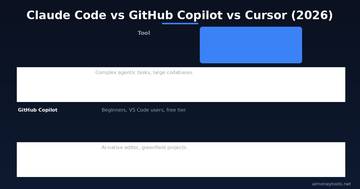
Claude Code ($20–$200/mo) is the strongest pure agent for complex tasks. If you are building serious projects in the terminal and want an AI that can reason across a large codebase, it is the most capable. The cost scales with usage, which makes it expensive for heavy users — as Microsoft discovered.
Cursor ($20/mo) is an AI-native code editor. It replaces VS Code as your entire coding environment and integrates AI at the IDE level rather than the terminal. Developers building new projects or doing greenfield work tend to prefer Cursor for its speed and in-editor experience. It is better suited for visual learners who want to see changes in context, not just in a terminal.
GitHub Copilot (free tier available, paid from $10–$19/mo) has the lowest barrier to entry and the deepest integration with VS Code. For beginners writing code for the first time, it is the sensible starting point — it works inside the editor you are probably already using, the free tier is genuinely useful, and you can upgrade if you need more.

What This Means If You Are Exploring AI Coding Tools as a Beginner
A few takeaways that are directly relevant to beginners thinking about AI coding tools for their own projects or side hustles:
Token costs are real. Claude Code's billing is usage-based at scale, and if you write a lot of code or work on a large project, costs can climb fast. The $20/month Pro plan is manageable for light usage, but if you are running long agentic sessions daily, you will hit the limit. Microsoft's experience at enterprise scale is an extreme version of what individual power users also feel.
The best tool depends on what you are building. If you are using AI coding tools to build small apps, automate scripts, or prototype side-hustle projects, GitHub Copilot's free tier or Cursor at $20/month are both reasonable starting points. Claude Code at $20/month makes more sense once you are working on larger or more complex codebases.
Anthropic is not losing the Microsoft relationship. This story is about one internal tool being replaced, not about Microsoft and Anthropic parting ways. Claude models still power key features in Microsoft 365 Copilot. For users building on Azure or using Microsoft products, Claude capabilities are still very much available.
GitHub Copilot's gap is real. The fact that Microsoft's own engineers preferred Claude Code over their company's flagship product is notable. Microsoft knows this — the internal memo is essentially a directive to fix Copilot CLI, not a declaration that it is already better. If you are evaluating the two tools today, the gap is real and worth accounting for.
The Bigger Picture: AI Tool Consolidation
What Microsoft is doing internally is something every individual and business using AI tools will eventually face: deciding which tools to standardize on, especially when token bills grow unpredictably.
The answer for most beginners is not to chase the most powerful tool — it is to start with the most accessible one. GitHub Copilot's free tier or Cursor at $20/month gives you genuine AI coding capability without surprise billing. You can always upgrade as your projects grow and your needs become clearer.
For non-coders who want to use AI to build tools or automate work without writing code, a platform like CustomGPT lets you build custom AI-powered tools for your business without touching a terminal at all.
FAQ
Q: Is Claude Code being shut down for everyone? A: No. Microsoft is canceling Claude Code licenses internally for one division (Experiences + Devices). Claude Code remains fully available for anyone to subscribe to at claude.ai/code. This change only affects Microsoft employees in that team.
Q: Which AI coding tool should a complete beginner start with? A: GitHub Copilot's free tier is the lowest-friction starting point — it works inside VS Code, which you are probably already using. Once you have a project worth investing in, Cursor at $20/month is worth trying for its editor-native experience. Claude Code makes most sense once you are doing serious backend work on complex projects.
Q: Is GitHub Copilot CLI the same as GitHub Copilot? A: Not exactly. GitHub Copilot is the umbrella product that includes in-editor completions, chat, and code review features across IDEs. Copilot CLI is the terminal-based agentic component — the part that directly competes with Claude Code's workflow. Most developers use the IDE version; the CLI component is a newer addition.
Q: Why did Microsoft's engineers prefer Claude Code over Copilot CLI? A: Based on developer feedback from independent tests and internal reports, Claude Code outperforms Copilot CLI on complex, multi-step agentic tasks — the kind that require reasoning across large codebases. Copilot is stronger for simple completions and IDE-integrated work. Microsoft acknowledged this gap and is now under pressure to close it.
Q: Will Microsoft re-adopt Claude Code if GitHub Copilot CLI stays behind? A: Possibly. The internal memo frames this as a financial year cutoff and a product consolidation, not a permanent verdict on quality. Sources told The Verge the transition will not be easy, and Microsoft is actively telling GitHub to improve Copilot CLI. If the gap remains, Claude Code could return — or Microsoft could acquire Cursor, which it has reportedly considered.

Alex the Engineer
•Founder & AI ArchitectSenior software engineer turned AI Agency owner. I build massive, scalable AI workflows and share the exact blueprints, financial models, and code I use to generate automated revenue in 2026.
Related Articles

How to Start an AI-Assisted Resume Writing Side Hustle in 2026 (Beginner's Guide)
A step-by-step guide to using AI resume tools to offer a paid resume and cover letter writing service — what to charge, which tools to use, and how to find your first clients.

How to Build and Sell AI Voice Receptionists to Local Businesses in 2026
A beginner's guide to building AI voice agents that answer business phone calls — the tools to use, what to charge, and how to find your first client.

How to Make Money on Fiverr with AI Tools in 2026: 7 Gigs You Can Start This Week
Discover 7 real Fiverr gigs you can launch using free and low-cost AI tools in 2026 — no experience required. Real pricing data, step-by-step setup, and tools that actually work.