
How to Use the Claude API: A Beginner's Step-by-Step Tutorial (2026)
Learn how to use the Claude API from scratch. Get your API key, install the Python SDK, make your first call, and build a simple chatbot in under 30 minutes.
Anthropic's Claude API is one of the most powerful AI interfaces available to developers right now — and you do not need years of coding experience to use it. If you can run Python commands and follow instructions, you can have a working Claude-powered app in under 30 minutes.
This guide walks you through everything from scratch: getting your API key, installing the SDK, making your first call, controlling costs, and building a simple multi-turn chatbot.
What Is the Claude API?
The Claude API is a web service that lets your code send messages to Claude and receive responses programmatically. Instead of typing into chat.claude.ai, your program does it — and you can embed that intelligence into any project you're building.
You send a message (called a "prompt"), and Claude sends back a response. You pay per the number of tokens (roughly words) processed. Everything else — the UI, the logic, how you display the results — is up to you.
Use cases include:
- Automated content drafts
- Customer support chatbots
- Document summarizers
- Code review assistants
- Personal productivity tools
Step 1: Create Your Anthropic Account and Get an API Key
Before you write a single line of code, you need an API key. This is the credential that authenticates your requests.
- Go to console.anthropic.com
- Click Sign up or log in with Google
- From the dashboard, navigate to API Keys in the left sidebar
- Click Create Key
- Give the key a name (e.g., "my-first-project")
- Copy the key immediately — it will only be shown once
Important: Never put your API key directly in your code file. Never commit it to GitHub. The right way is to set it as an environment variable, which is covered in Step 3.
New accounts receive a small free credit allocation for testing. Check the Usage section in the console to monitor how much you have spent.
Step 2: Install Python and the Anthropic SDK
If you do not have Python installed, download it from python.org and choose Python 3.10 or newer. Run python --version in your terminal to confirm it is installed.
Then install the official Anthropic Python SDK:
pip install anthropic
That is the only dependency you need for your first project. The SDK handles authentication, HTTP requests, retries, and response parsing automatically.
Step 3: Set Your API Key as an Environment Variable
On Mac and Linux, open your terminal and run:
export ANTHROPIC_API_KEY='sk-ant-your-key-here'
On Windows (Command Prompt):
set ANTHROPIC_API_KEY=sk-ant-your-key-here
On Windows (PowerShell):
$env:ANTHROPIC_API_KEY="sk-ant-your-key-here"
Note: These commands set the variable for your current terminal session only. To make it permanent, add it to your shell profile (.bashrc, .zshrc) or your system's environment variables settings.
Step 4: Make Your First API Call
Create a file called first_call.py and paste this in:
import anthropic

client = anthropic.Anthropic()

message = client.messages.create(
    model="claude-haiku-4-5",
    max_tokens=256,
    messages=[
        {"role": "user", "content": "Explain what an API is in two sentences for a complete beginner."}
    ]
)

print(message.content[0].text)
Run it:
python first_call.py
You should see Claude's response printed to your terminal. If you see a response — congratulations, you are using the Claude API.
What the code does:
anthropic.Anthropic()creates a client that reads yourANTHROPIC_API_KEYenv variable automaticallymessages.create()sends a request to Claudemodelchooses which Claude version to usemax_tokenscaps how long the response can be (controls cost)messagesis the conversation — a list of role/content pairs
Step 5: Understand Claude Models and Pricing
Anthropic offers three main Claude model tiers. Choose based on your task's complexity and budget.

Claude Haiku 4.5 — Fastest and cheapest
- Cost: $1.00 per million input tokens / $5.00 per million output tokens
- Best for: Simple Q&A, classifications, quick summaries, high-volume tasks
- Speed: Responds in under 1 second for most requests
Claude Sonnet 4.6 — Balanced (recommended for most projects)
- Cost: $3.00 per million input tokens / $15.00 per million output tokens
- Best for: Production applications, writing assistants, coding help
- Speed: 2–4 seconds for typical responses
Claude Opus 4.8 — Most capable
- Cost: $5.00 per million input tokens / $25.00 per million output tokens
- Best for: Complex reasoning, long documents, research tasks
- Speed: 4–8 seconds; not suited for real-time chat at scale
What is a token? Roughly 0.75 words or 3–4 characters. A 1,000-word document is approximately 1,300 tokens.
Real-world cost example: Running 10,000 user requests per day on Claude Haiku 4.5, each 200 tokens in and 150 tokens out, costs roughly $0.35 per day — under $11 per month.
Step 6: Add a System Prompt
A system prompt tells Claude who it is and how to behave before the conversation starts. This is how you customize Claude for your specific use case.
import anthropic

client = anthropic.Anthropic()

message = client.messages.create(
    model="claude-haiku-4-5",
    max_tokens=512,
    system="You are a helpful assistant for a small business owner. Keep responses concise, practical, and under 150 words. Avoid technical jargon.",
    messages=[
        {"role": "user", "content": "What is the best way to handle customer refund requests?"}
    ]
)

print(message.content[0].text)
The system parameter is separate from messages and sets the persistent behavior context for the entire conversation.
Step 7: Build a Simple Multi-Turn Chatbot
The real power of the API is multi-turn conversation. Here is a terminal chatbot that keeps the full conversation history:
import anthropic

client = anthropic.Anthropic()
conversation = []

print("Chat with Claude (type 'quit' to exit)\n")

while True:
    user_input = input("You: ").strip()

    if user_input.lower() == "quit":
        break

    if not user_input:
        continue

    conversation.append({
        "role": "user",
        "content": user_input
    })

    response = client.messages.create(
        model="claude-haiku-4-5",
        max_tokens=512,
        system="You are a knowledgeable and concise assistant.",
        messages=conversation
    )

    assistant_reply = response.content[0].text

    conversation.append({
        "role": "assistant",
        "content": assistant_reply
    })

    print(f"\nClaude: {assistant_reply}\n")
Save this as chatbot.py and run it with python chatbot.py. You now have a working AI chatbot that remembers context within the session.
Note: The conversation list grows with each turn. For production apps, you will want to trim older messages once the total token count gets too large, or use Anthropic's prompt caching feature to reduce costs on repeated context.
Step 8: Use Streaming for Real-Time Responses
For chat interfaces, streaming makes the response appear word-by-word instead of waiting for the full reply:
import anthropic

client = anthropic.Anthropic()

with client.messages.stream(
    model="claude-haiku-4-5",
    max_tokens=512,
    messages=[
        {"role": "user", "content": "Write a short story about a robot learning to code."}
    ]
) as stream:
    for text in stream.text_stream:
        print(text, end="", flush=True)
    print()
Streaming is available on all Claude models. It significantly improves perceived performance for end users in web and desktop applications.
Not a Developer? Try the No-Code Alternative
If you want Claude's capabilities without writing Python code, CustomGPT is the best no-code option. You upload your documents, set your instructions visually, and get an embeddable chatbot in under 5 minutes.
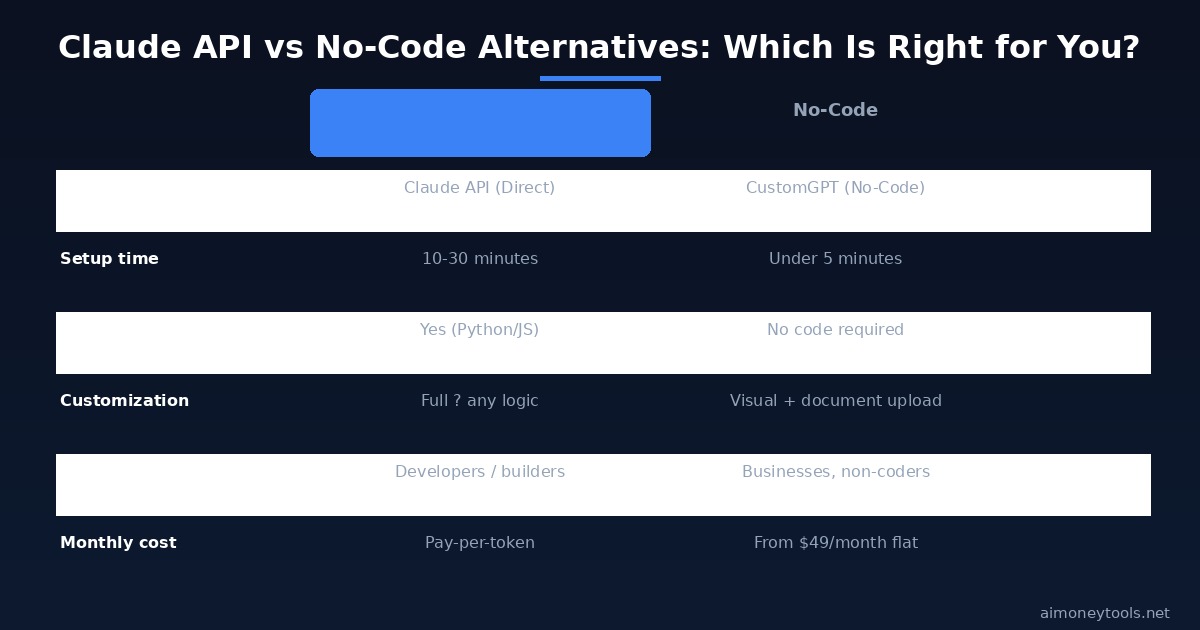
It is built on top of models like Claude and handles the API complexity behind the scenes. Plans start from $49/month for one agent. The tradeoff is less flexibility vs. building with the raw API, but for most business use cases — a knowledge base chatbot, a customer support agent, a FAQ assistant — it works perfectly.
Cost Optimization Tips
Use Haiku for drafts, Sonnet for production. Prototype with Haiku at $1/MTok, then upgrade only the specific calls that need more capability.
Set conservative max_tokens. Most responses do not need 4,096 tokens. Cap at 256–512 for conversational replies and you will cut output costs by 50–80%.
Use the Batch API for non-realtime tasks. Anthropic's Batch API offers a 50% discount on all models for requests that do not need instant responses — perfect for bulk content generation, nightly reports, or email drafts.
Cache your system prompt. If your system prompt is long (detailed instructions, a knowledge base), use prompt caching. Cache writes cost 1.25x base price, but cache reads cost only 10% — it pays for itself after just two requests with the same context.
Frequently Asked Questions
How much does the Claude API cost for beginners? You start with a free credit allowance on your account. After that, Claude Haiku 4.5 costs $1.00 per million input tokens and $5.00 per million output tokens — meaning most small projects cost less than $1/month in API fees.
Do I need to know Python to use the Claude API?
Python is the most beginner-friendly path. Anthropic also offers official SDKs for TypeScript, Go, Java, Ruby, PHP, and C# if you work in other languages. There is also a REST API you can call with curl from the command line.
What is the difference between the Claude API and Claude.ai? Claude.ai is the chat interface at claude.ai — you type in a browser. The Claude API is for developers who want to embed Claude's capabilities into their own apps, scripts, or workflows. The underlying AI is the same; the access method is different.
Can I use the Claude API commercially? Yes. Anthropic's usage policies allow commercial use. Review the Anthropic usage policies page for restrictions (no CSAM, no weapons assistance, etc.) but for standard business applications, commercial use is fully permitted.
What happens to my API key if Anthropic goes public? Nothing changes for existing API keys or pricing in the short term. Following Anthropic's recent IPO filing, the company is preparing to list publicly but API service and pricing continuity are expected. Annual pricing agreements and enterprise contracts will be honored.
How do I handle errors in the Claude API?
The SDK raises typed exceptions: anthropic.AuthenticationError (wrong key), anthropic.RateLimitError (too many requests), anthropic.APIStatusError (server issues). Wrap your calls in try/except blocks and use exponential backoff for rate limit errors.
Is there a rate limit on the Claude API? Yes. New accounts start at Tier 1: 50 requests per minute (RPM) and 40,000 tokens per minute (TPM). Limits increase automatically as you spend more. Check the rate limits documentation page in the Anthropic console for your current tier.

Alex the Engineer
•Founder & AI ArchitectSenior software engineer turned AI Agency owner. I build massive, scalable AI workflows and share the exact blueprints, financial models, and code I use to generate automated revenue in 2026.
Related Articles

How to Start an AI-Assisted Resume Writing Side Hustle in 2026 (Beginner's Guide)
A step-by-step guide to using AI resume tools to offer a paid resume and cover letter writing service — what to charge, which tools to use, and how to find your first clients.

How to Build and Sell AI Voice Receptionists to Local Businesses in 2026
A beginner's guide to building AI voice agents that answer business phone calls — the tools to use, what to charge, and how to find your first client.

How to Make Money on Fiverr with AI Tools in 2026: 7 Gigs You Can Start This Week
Discover 7 real Fiverr gigs you can launch using free and low-cost AI tools in 2026 — no experience required. Real pricing data, step-by-step setup, and tools that actually work.