
Free AI Video Generator Tools 2026: Create Money-Making Content with Zero Budget
Learn the best free AI video generators for beginners in 2026. Create YouTube, TikTok, and content for monetization with no budget. Compare Synthesia, HeyGen, TryHolo, and open-source alternatives.
Creating videos used to be expensive. Professional software, cameras, microphones, editing time — it all adds up. In 2026, AI video generators let you create talking-head videos, product demos, educational content, and faceless YouTube videos in minutes. For free.
This guide walks you through the best free AI video generators available right now, how to use them for monetization (YouTube, TikTok, affiliate content), and what the paid tiers offer when you're ready to scale.
Why AI Video Generators Are Game-Changing for Beginners
Time: Create a 5-minute video in 30 seconds instead of 3 hours of filming + editing.
Cost: Free tier includes everything you need to start. No camera, lighting, or editing software required.
Quality: AI video generators produce professional-looking videos. Better than phone-recorded selfie videos for audience trust.
Monetization: YouTube allows AI-generated content. Many creators earn $500–$5,000/month with 50–100 short AI videos.
No Skill Required: Pick a template, paste text, click publish. Zero video editing experience needed.
Scalability: One creator manages 10+ YouTube channels using AI video generators. That's passive income potential.
The downside? Free tiers are limited (resolution, features, monthly videos). But they're enough to test if video content works for your niche before spending money.
Best Free AI Video Generators in 2026
1. Synthesia (Free Tier: Professional for Beginners)
What it does: You type a script → Synthesia reads it with an AI avatar. Generates polished videos in 90 seconds.
Free tier includes:
- 1 video per month
- 120 seconds max
- 85+ AI avatars (male, female, different ethnicities, accents)
- 120+ templates
- Standard resolution (720p)
Best for: Business explainers, educational content, product demos, "How to X" tutorials.
Why it's free? Synthesia wants you to see the quality. When you love it, you'll upgrade to unlimited videos ($25/month).
Getting started:
- Sign up at synthesia.io (email only, no card)
- Create a new video
- Pick an avatar (e.g., John, female presenter, etc.)
- Write your script in the text box
- Choose background + music
- Click Generate
- Download or share
Monetization potential: Medium-high. Synthesia videos work great for YouTube explainer channels, product reviews, and educational content. Users earn $300–$2,000/month with 30–50 Synthesia videos + YouTube ads + affiliate links.
2. HeyGen (Free Tier: Generous Video Limit)
What it does: Similar to Synthesia, but HeyGen emphasizes faceless YouTube shorts and personalized video marketing.
Free tier includes:
- 3 videos per month
- 720p resolution
- 100+ AI avatars
- Lip-sync technology (avatars move their lips to match words)
- Custom voice cloning (in premium, but free tier gets basic voices)
Best for: YouTube Shorts, TikTok videos, sales videos, faceless content channels.
Why it's free? HeyGen targets creators who want to scale — they'll upgrade when you need unlimited videos.
Getting started:
- Go to heygen.com
- Sign up (Google, email, or LinkedIn)
- Create a new video
- Choose avatar + background
- Write or paste script
- Select voice (English, Spanish, Chinese, etc.)
- Customize (add subtitles, logo, CTA)
- Generate
- Download
Example workflow: Create a YouTube Shorts channel around "AI tools reviews". Record 1 HeyGen video/day using free tier (3/month), schedule across 90 days, monetize with YouTube ads + affiliate links.
Monetization potential: High. Faceless YouTube Shorts channels using HeyGen earn $200–$1,500/month at 10K–100K subscribers.
3. TryHolo (Free Tier: Limited but Powerful)
What it does: AI avatars + text-to-video. TryHolo specializes in realistic human avatars (looks less "AI" than competitors).
Free tier includes:
- 1 video per month (480p)
- 50+ realistic avatars
- 100+ templates
- Basic editing (text, background, music)
Best for: LinkedIn videos, personal brand content, faceless YouTube channels where avatar quality matters.
Why it's free? TryHolo is newer and wants to build market share. Free tier = future paid customers.
Paid tier: $12/month for 5 videos + better avatars + higher res.
Getting started:
- Visit tryholo.com
- Sign up (email)
- Start video
- Pick avatar (Holo avatars look more human than competitors)
- Paste script
- Add background, music, subtitles
- Generate (takes 2–5 min)
- Download MP4
Monetization potential: High. LinkedIn creators use TryHolo for B2B content (software tutorials, business advice). YouTube channels earn $300–$2,000/month.
Start with TryHolo Free Tier →
4. D-ID (Free Tier: Text-to-Video with Realism)
What it does: You upload a photo or create a digital avatar → It lip-syncs your script. Most realistic avatar animation available.
Free tier includes:
- 1 video per month
- 1 minute max
- 10+ languages
- Basic avatars
Best for: Personal brand videos, faceless YouTube with high-quality avatars, multilingual content.
Why it's free? D-ID is enterprise-focused. Free tier shows what's possible before enterprises upgrade.
Getting started:
- d-id.com
- Sign up
- Choose "Create Video" or upload your photo
- Paste script
- Select voice/language
- Generate
- Download
5. Open-Source Options: Caligari + Picogen (Completely Free, Open-Source)
What it does: Text → Video without cloud uploads. Runs locally on your computer. Privacy-first, no watermarks.
Best for: Privacy-conscious creators, bulk video generation, custom modifications.
Downside: Requires basic technical setup (Python, command line, or GUI app). Avatar quality is lower than commercial tools.
Getting started:
- Caligari: github.com/caligari-project
- Picogen: github.com/picogen
For most beginners: Skip open-source unless you love command-line tools. Synthesia/HeyGen/TryHolo are simpler.
Side-by-Side Comparison: Which Free AI Video Generator Should You Use?
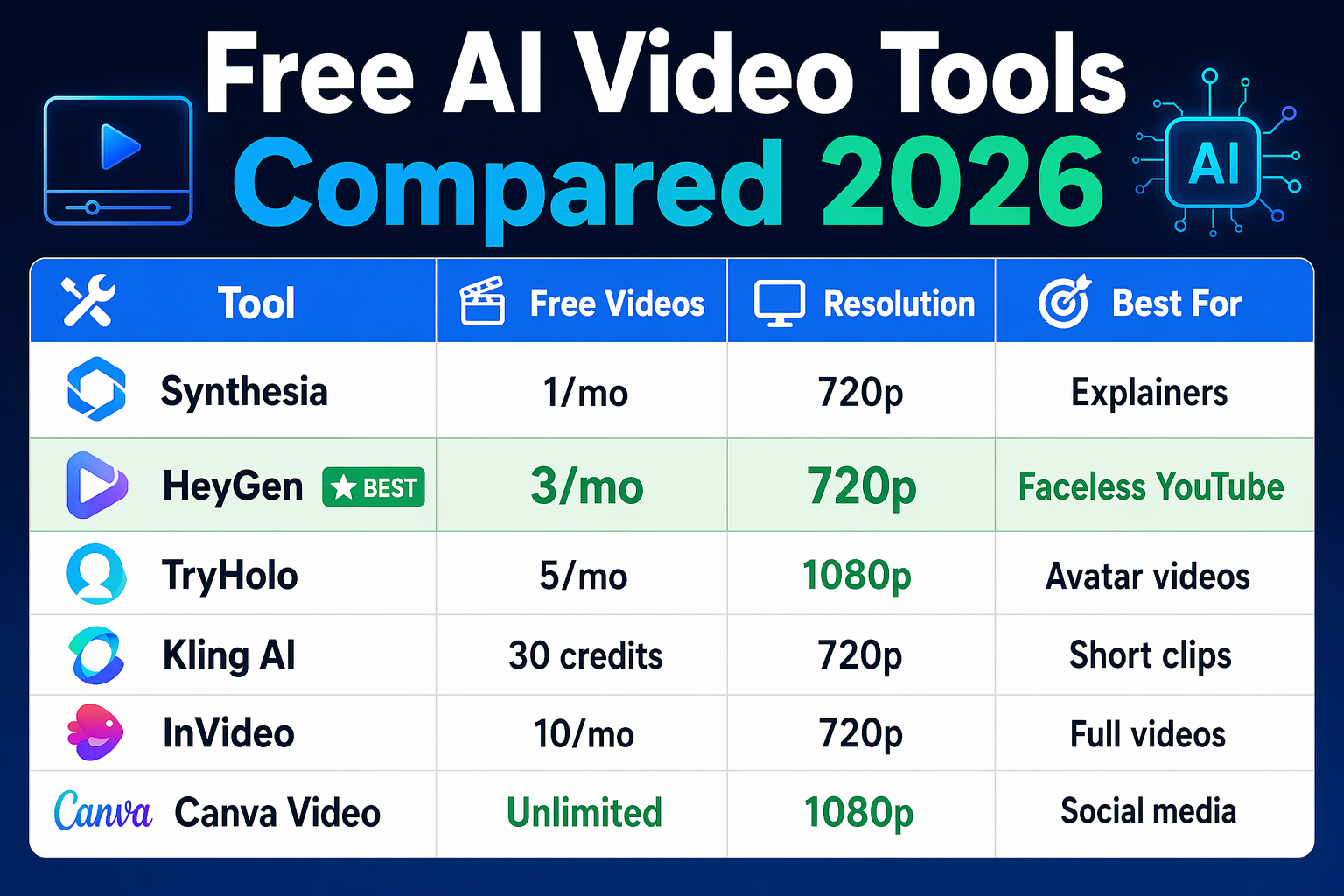
| Tool | Free Videos/Month | Resolution | Best For | Upgrade Cost |
|---|---|---|---|---|
| Synthesia | 1/month | 720p | Explainers, tutorials, B2B | $25/mo |
| HeyGen | 3/month | 720p | YouTube Shorts, TikTok | $15/mo |
| TryHolo | 1/month | 480p | LinkedIn, personal brand | $12/mo |
| D-ID | 1/month | 720p | High-quality avatars | $10/mo |
| Open-source | Unlimited | Variable | Privacy, bulk | Free |
My recommendation: Start with HeyGen (3 videos/month) because you get 3x the free quota. If avatar quality matters (LinkedIn, personal brand), try TryHolo.
How to Monetize Free AI Videos
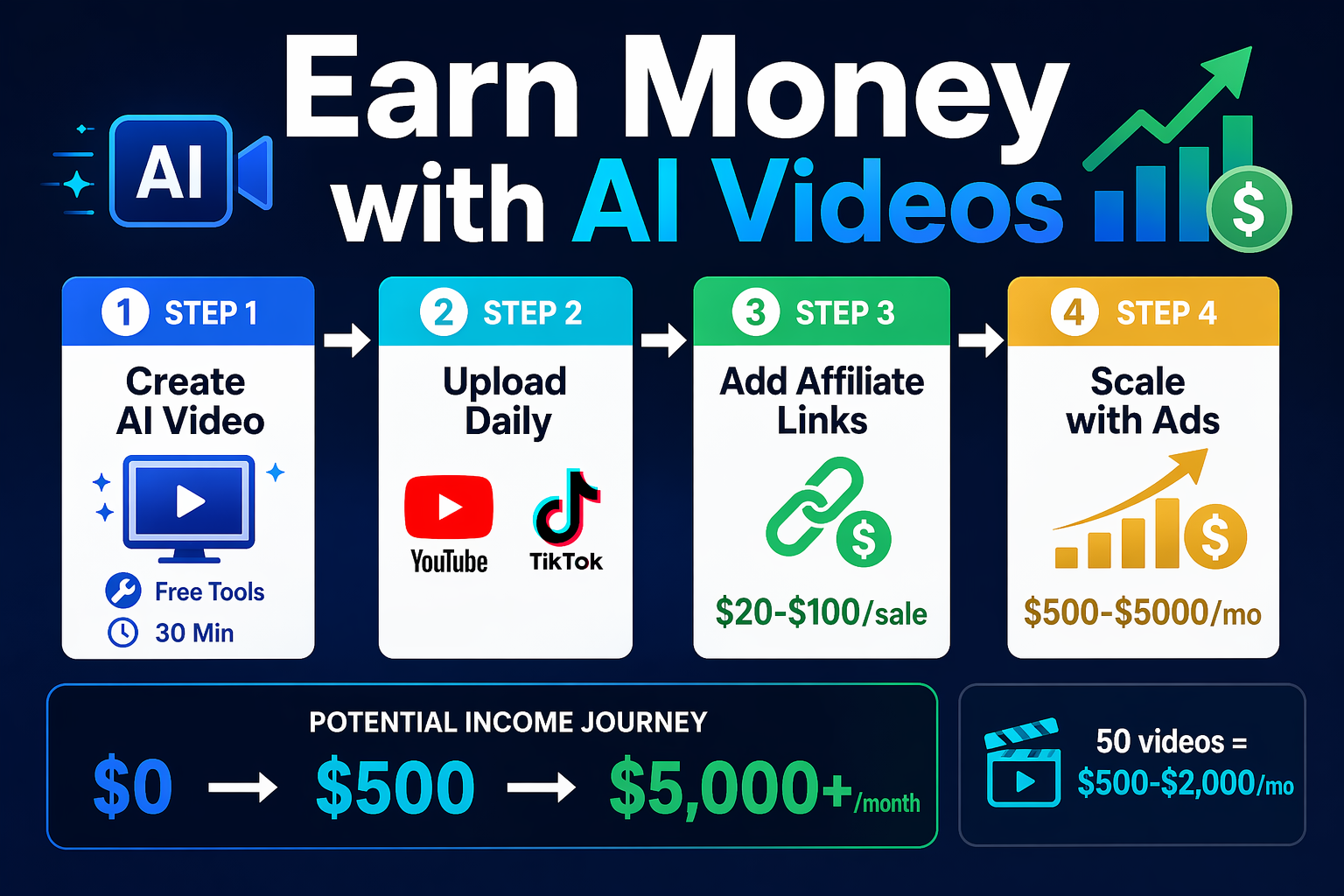
Strategy 1: YouTube Monetization (CPM-Based)
Steps:
- Create a YouTube channel (e.g., "AI Tools Explained", "Money Tips for Beginners")
- Generate 1 HeyGen video per day (use free tier = 3/month)
- Edit clips together or upload individually as Shorts
- Build to 1,000 subscribers + 4,000 watch hours (takes 3–6 months)
- Enable monetization
- Earn $200–$5,000/month (depending on audience location + niche)
Timeline: 6 months to first revenue, $50–$500/month sustained.
Strategy 2: Faceless YouTube Channel (Affiliate Revenue)
Steps:
- Create a channel about a high-demand topic (e.g., "Best AI Tools for Beginners", "How to Make $1K/Month with AI")
- Generate 1 video every 2 days using free tier
- In each video, mention relevant tools (Synthesia, HeyGen, etc.)
- Link to affiliate programs (see below) in description
- Earn $2–$10 per video from affiliate commissions (varies by tool/audience)
- Scale to 50–100 videos = $100–$1,000/month
Tools with affiliate programs:
- Synthesia: 25% commission per referral
- HeyGen: 20% commission
- TryHolo: 20% commission →
Strategy 3: Fiverr/Freelance Video Services
Steps:
- Offer "AI Video Creation Services" on Fiverr ($50–$200 per video)
- Use HeyGen/Synthesia free tier to create client videos
- Upgrade to paid tier for client work
- Scale to $1,000–$5,000/month with 10–20 clients
Example:
- Client: "Create a product demo video"
- You: Use HeyGen ($15 video) → Sell for $100 → Profit $85
- 20 videos/month = $1,700 profit
Strategy 4: Sell Video Courses
Steps:
- Create a course about your niche (e.g., "How to Start a Faceless YouTube Channel")
- Use AI video generators for all course videos
- Sell on Gumroad, Kajabi, or Podia
- Earn $20–$50 per course sale
- Scale to $500–$5,000/month with 10–50 sales/month
Tools for selling:
- Gumroad (simplest, highest fees)
- Kajabi (most features, higher fees)
- Podia (good balance)
Tips for Getting the Most Out of Free Tier Limits
Tip 1: Batch Your Videos
Don't create 1 video per day. Instead, create your 3 HeyGen videos at the start of the month (3-video limit). Schedule them for release across 30 days on YouTube/TikTok. This maximizes free-tier usage.
Tip 2: Mix AI Videos with Repurposed Content
- Monday: HeyGen video (AI-generated)
- Tuesday: Clip from Monday's video (repurposed)
- Wednesday: TikTok Short (repurposed)
- Thursday: LinkedIn post (text excerpt)
Result: 4 pieces of content from 1 AI video.
Tip 3: Use Templates
All free tiers include templates (business, education, product demo, etc.). Templates reduce creation time from 5 minutes to 2 minutes. Use them.
Tip 4: Script First
Write your script in Notion or Google Docs before opening the AI video generator. This reduces trial-and-error in the tool. Faster video generation = more free quota left for next month.
Tip 5: Upgrade Strategically
After 3 months of free-tier usage, you'll know if video content works for your audience. Then upgrade to paid. Don't pay upfront without testing.
Common Issues & Fixes
"The video quality is too AI / looks fake"
Fix: Use TryHolo or D-ID instead of Synthesia. Their avatars look more human.
Also: Add subtitles + music. Production value helps. Bad audio = looks cheap even if video is good.
"My script got cut off / doesn't sound natural"
Fix: Break scripts into short sentences (8–10 words each). AI voice generators sound most natural with short, punchy sentences.
Bad: "The best AI video generator in 2026 that you absolutely should know about is HeyGen because of its incredible avatar technology."
Good: "HeyGen is the best. It has 100+ avatars. They look realistic. Free tier: 3 videos/month."
"I hit the free video limit"
Fix: Wait until next month, OR upgrade to paid tier for your niche ($10–$25/month). If you're making money from videos, the upgrade pays for itself quickly.
"Can I use AI videos for commercial use?"
Yes. All major AI video generators (Synthesia, HeyGen, TryHolo) allow commercial use of videos created on paid tiers. Free tier: Check their terms. Most allow YouTube monetization + affiliate videos.
"TikTok / YouTube is flagging my video as AI-generated"
Fix: Declare it in your video description: "This video uses AI avatars for efficiency." YouTube doesn't ban AI videos. TikTok doesn't either. Being transparent actually builds trust.
Next Steps
Week 1:
- Pick one tool (HeyGen recommended)
- Create 1 test video
- Post to YouTube or TikTok
- See if your audience engages
Week 2–4:
- Create 2–3 more free videos
- Experiment with different scripts/avatars
- Track which videos get most views
- Decide: Keep it free, or upgrade?
Month 2+:
- If working: Upgrade to paid tier
- Scale production (2–5 videos/week)
- Start monetizing (ads, affiliates, services)
FAQ
Is AI video generation legal?
Yes. Creating content with AI video generators is legal. Monetizing it (YouTube, TikTok, affiliate links) is also legal. YouTube explicitly allows AI-generated content as long as you disclose it if required by law.
Can I use AI videos on TikTok?
Yes. TikTok allows AI-generated videos. Many faceless TikTok creators earn $100–$1,000/month using HeyGen.
Which free AI video generator is best?
HeyGen — 3 videos/month (best free quota). TryHolo — best avatar quality. Synthesia — best for professional explainers.
How much can I earn with free AI videos?
$0–$500/month initially (testing phase). Once you scale to 50–100 videos + audience: $500–$5,000/month from YouTube ads + affiliate commissions.
Do I need to edit the AI videos?
No. But adding subtitles, music, text overlays, and a simple intro/outro (5 min in CapCut) makes videos 10x more professional.
Can I use AI videos for client work?
Yes. Fiverr allows AI-generated videos. Clients don't always know (or care). Charge $50–$200 per video, use free tier, profit.
What avatar should I choose?
Choose someone who doesn't look exactly like you (to avoid uncanny valley effect). Different ethnicity, age, or gender often works better. Test 3–5 avatars in your first video.
Is there a tool that's better than HeyGen?
For quantity: HeyGen (3 videos/month). For quality: TryHolo or D-ID. For ease of use: Synthesia.
Can I create videos in other languages?
Yes. All tools support 10–50 languages. HeyGen and D-ID are best for non-English languages.
How long does a video take to generate?
30 seconds to 5 minutes. Most tools deliver within 2 minutes after you click "Generate."

Alex the Engineer
•Founder & AI ArchitectSenior software engineer turned AI Agency owner. I build massive, scalable AI workflows and share the exact blueprints, financial models, and code I use to generate automated revenue in 2026.
Related Articles

How to Start an AI-Assisted Resume Writing Side Hustle in 2026 (Beginner's Guide)
A step-by-step guide to using AI resume tools to offer a paid resume and cover letter writing service — what to charge, which tools to use, and how to find your first clients.

How to Build and Sell AI Voice Receptionists to Local Businesses in 2026
A beginner's guide to building AI voice agents that answer business phone calls — the tools to use, what to charge, and how to find your first client.

How to Make Money on Fiverr with AI Tools in 2026: 7 Gigs You Can Start This Week
Discover 7 real Fiverr gigs you can launch using free and low-cost AI tools in 2026 — no experience required. Real pricing data, step-by-step setup, and tools that actually work.