
Claude for Small Business: What It Does and Who It's For
Anthropic just launched Claude for Small Business — 15 ready-to-run AI workflows inside QuickBooks, PayPal, HubSpot, Canva, and more. Here's exactly what it does and whether it's worth it.
Anthropic just launched Claude for Small Business — and it's one of the more practically focused AI announcements of the year.
Instead of a new chat interface or another model version, this is a package of ready-to-run workflows and app integrations built specifically for small business owners. The pitch: connect Claude to the tools you already use, and it handles the administrative work that piles up after hours.
Here's what's actually in it, how it works, who it's for, and what the honest limitations are.
What Is Claude for Small Business?
Claude for Small Business is a set of 15 agentic workflows and 15 skill tools that run inside a product called Claude Cowork. You toggle it on, connect your existing business accounts, and choose which jobs you want Claude to handle.
The connected apps at launch include:
- Intuit QuickBooks — accounting, payroll, invoicing
- PayPal — payments and settlements
- HubSpot — CRM and sales pipeline
- Canva — marketing asset creation
- DocuSign — contract and document signing
- Google Workspace — Gmail, Docs, Sheets, Drive
- Microsoft 365 — Outlook, Word, Excel, Teams
These aren't just read-only connections. Claude can take action across them — queue emails for approval, prepare a month-end package, draft campaign assets — and then waits for your sign-off before anything actually sends, posts, or pays.
"Claude does the work; you approve before anything sends, posts, or pays." That human-in-the-loop model is deliberate, and for small business owners who need to stay in control without spending hours on admin, it's the right call.
The 15 Workflows: What Claude Can Actually Do
The workflows span six categories. Here's what's confirmed at launch:
Finance
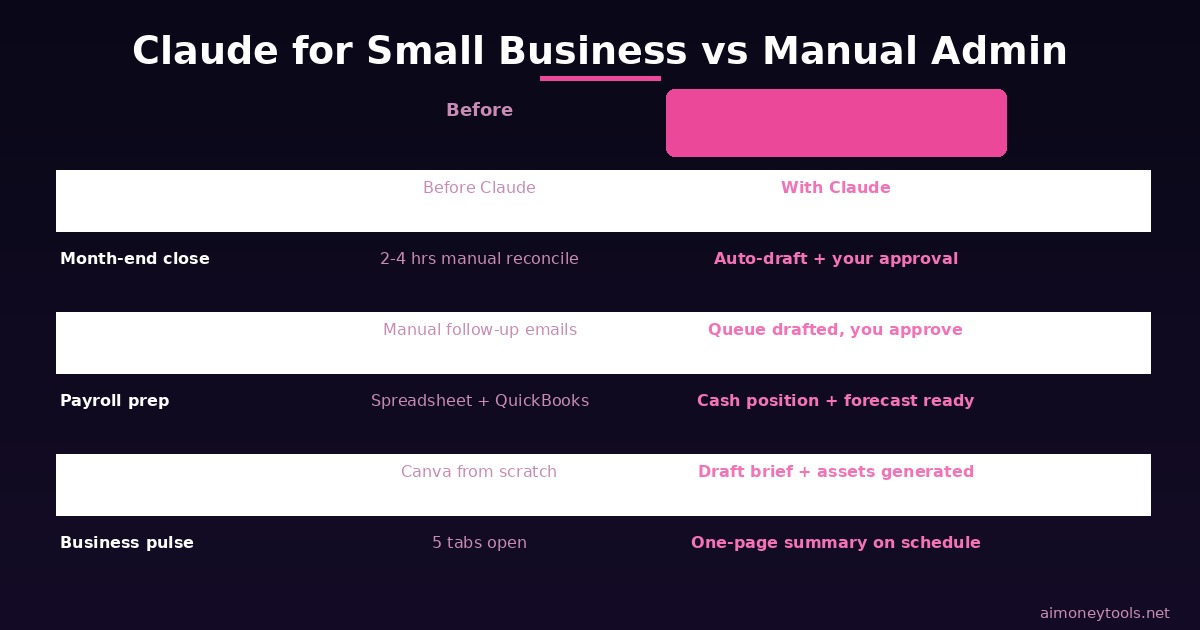
- Payroll planning: Cross-references your QuickBooks cash position with incoming PayPal settlements, builds a 30-day forecast, ranks what's overdue, and queues payment reminders for your approval
- Month-end close: Reconciles your books against settlements, flags mismatches, writes a plain-English P&L summary, and exports a close packet you can send to your accountant
- Margin analyzer: Surfaces your margin data and flags problem areas
- Tax-season organizer: Collects and organizes documents across your connected accounts before filing season
Operations
- Business pulse: Combines your cash position (QuickBooks), sales trend, pipeline movement, and weekly commitments into a single summary on your schedule
- Invoice chaser: Identifies overdue invoices and queues follow-up messages for approval before sending
- Month-end prepper: Runs through a pre-close checklist so nothing gets missed
- Contract reviewer: Reviews DocuSign documents for standard clauses and flags anything unusual
Sales & Marketing
- Campaign runner: Finds slow periods in your revenue data, analyzes HubSpot campaign performance, drafts a promo strategy, and generates campaign assets in Canva for your review
- Lead triager: Sorts and prioritizes incoming leads based on your HubSpot pipeline data
- Content strategist: Analyzes what content is working and recommends next steps
Customer Service & HR
- Customer service workflows: Drafts responses to common inquiries for your review
- HR workflows: Handles repeatable people-ops tasks (hiring comms, onboarding docs)
Anthropic describes the product as 15 workflows + 15 skills — the distinction being that skills are more modular, repeatable building blocks (like "reconcile this account" or "draft an invoice reminder") while workflows are full multi-step jobs.
Why Anthropic Built This
The business case is straightforward: small businesses are the US economy (44% of GDP, nearly half the private-sector workforce), but their AI adoption has lagged badly behind enterprises.
The main barriers aren't cost or access — they're that most AI tools weren't built for how small businesses actually operate. Existing tools require prompt engineering skills most owners don't have. They don't connect to the actual software running the business. And the results are generic, not business-specific.
Claude for Small Business attempts to close that gap by meeting small business owners where they already are — inside QuickBooks, HubSpot, and Canva — rather than asking them to learn a new interface.
Daniela Amodei, Anthropic's Co-founder and President, put it this way:
"Small businesses make up nearly half the American economy, but they've never had the resources of bigger companies. AI is the first technology that can finally close that gap."
This is also explicitly part of Anthropic's public benefit mission, not just a commercial product launch. The announcement pairs with small business training resources and partnerships to support adoption.
Who It's Actually For
This product makes the most sense if you:
- Run a small business with 1–20 employees
- Already use QuickBooks, HubSpot, PayPal, or Google Workspace
- Spend hours each week on admin work — invoicing, reporting, payroll prep, monthly close
- Want AI to handle the mechanics while you stay in control of final decisions
- Don't have time to learn prompt engineering or build custom AI workflows
It's not designed for:
- Individual freelancers with no team and minimal accounting complexity (simpler tools will serve you fine)
- Businesses with highly specialized workflows not in the supported app list
- Users who want a fully autonomous AI with no approval step — the human-in-the-loop design is intentional
Honest Notes: Pricing and Limitations
One important clarification: Claude for Small Business is not a new standalone plan with its own pricing. It runs inside the existing Claude Team/Enterprise plan structure.
The main limitation flagged by early users is that Claude's Team plan still requires a minimum of 5 seats. For a solo founder or a 2-person team, that means you're paying for seats you don't use.
As of this writing, Anthropic has not announced separate pricing for Claude for Small Business as a standalone tier. If you're a very small team (1–3 people), check the official page at claude.com/solutions/small-business for the latest on how access is structured, as this may change post-launch.
App support at launch is also limited to the listed integrations — QuickBooks, PayPal, HubSpot, Canva, DocuSign, Google Workspace, and Microsoft 365. If you run on different tools (Xero instead of QuickBooks, Pipedrive instead of HubSpot), you'll need to wait for expanded integrations.
How to Get Started
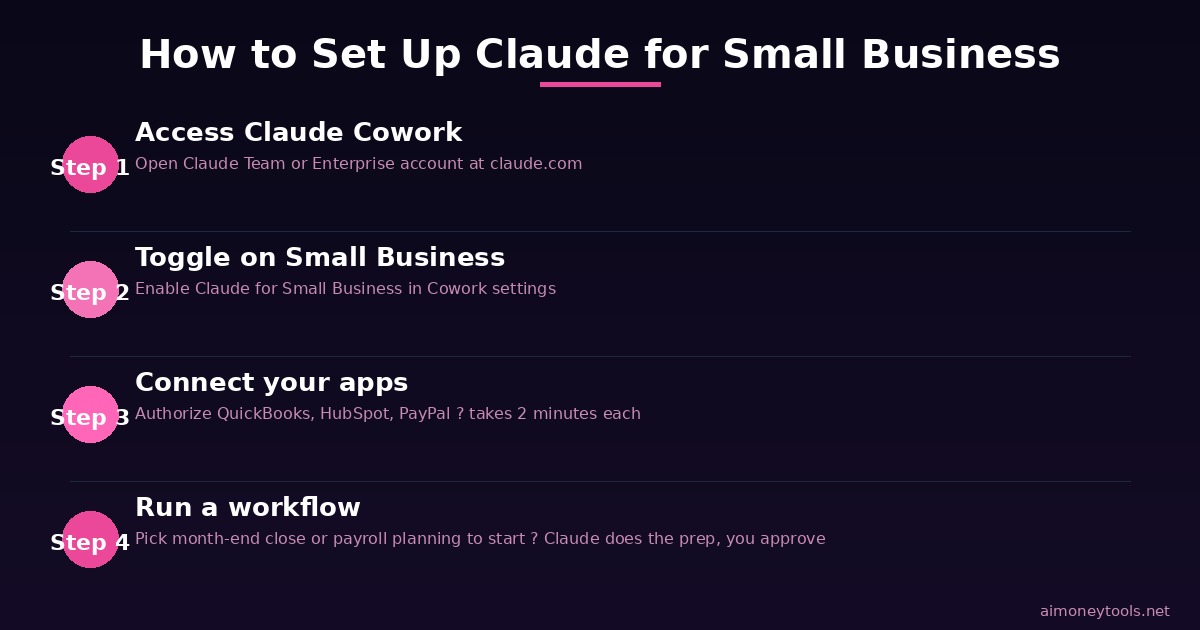
Getting set up is designed to be straightforward:
- Access Claude Cowork via your Claude Team or Enterprise account at claude.com
- Toggle on Claude for Small Business in your Cowork settings
- Connect your apps — authorize QuickBooks, HubSpot, PayPal, or whichever integrations match your stack
- Choose a workflow — start with payroll planning or month-end close if you want to see the highest-impact use case first
Claude walks you through the rest. Each workflow produces an output you review before anything takes effect.
How This Compares to Other AI Business Tools
Claude for Small Business occupies a different space than most AI tools on the market:
| Tool | Approach | Best For |
|---|---|---|
| Claude for Small Business | App-connected workflows, human-in-loop approval | Small businesses using QuickBooks, HubSpot, PayPal |
| ChatGPT Business | General AI assistant, custom GPTs | Businesses wanting flexible chat + internal tools |
| CustomGPT | AI chatbot trained on your own business data | Customer service, knowledge base, client-facing bots |
| Zapier AI | Automation + AI triggers across 7,000+ apps | Process automation across a wide app ecosystem |
| Jasper | AI writing for marketing | Content teams needing branded copy at scale |
The key differentiator is that Claude for Small Business goes deeper on specific financial and operational workflows (payroll, month-end close, invoice management) than general AI assistants, while staying inside the tool ecosystem small businesses already use.
Is It Worth It?
If your business runs on QuickBooks and you spend meaningful hours each month on month-end close, payroll prep, and invoice chasing — yes, this looks genuinely useful.
The human-in-the-loop design reduces the risk of mistakes on anything financial. The integrations are the right ones for the US small business market. And the workflow templates solve the "I don't know how to prompt AI for my business" problem that blocks most small business owners from getting real value from AI tools.
The caveats are real: limited app support, minimum seat requirements that may not suit very small teams, and no confirmed pricing for a standalone small-business tier yet.
Watch claude.com/solutions/small-business for updates as the product matures. This launch feels like v1 with more integrations and pricing flexibility likely to follow.
If you want to explore complementary AI tools for running and growing a business:
FAQ
Q: What is Claude for Small Business? A: Claude for Small Business is a package of 15 ready-to-run AI workflows and 15 skill tools from Anthropic. It connects Claude to apps small businesses already use — QuickBooks, PayPal, HubSpot, Canva, DocuSign, and Google/Microsoft workspace tools — to handle admin tasks like payroll planning, month-end close, invoice chasing, and campaign management.
Q: How much does Claude for Small Business cost? A: As of the May 2026 launch, it runs within Claude's existing Team/Enterprise plan structure. Anthropic has not announced a separate standalone pricing tier. The Team plan requires a minimum of 5 seats. Check claude.com/solutions/small-business for current pricing details.
Q: What apps does Claude for Small Business connect to? A: At launch: Intuit QuickBooks, PayPal, HubSpot, Canva, DocuSign, Google Workspace, and Microsoft 365. More integrations are expected as the product expands.
Q: Does Claude for Small Business act automatically or do I have to approve things? A: All actions require your approval before they take effect. Claude prepares the work — draft emails, payment queues, month-end packets — and nothing sends, posts, or pays until you sign off.
Q: Is Claude for Small Business a new AI model? A: No. It's a product built on Claude's existing AI models with dedicated workflows and app integrations. It uses the same underlying Claude AI, structured specifically for small business tasks.
Q: Can a solo freelancer use Claude for Small Business? A: Technically yes if you're on a qualifying plan, but the minimum seat requirement on Team plans (5 seats) may make it expensive for a 1-person operation. Very small teams may want to wait for a solo-friendly pricing tier.
Q: How is Claude for Small Business different from just using Claude Pro? A: Claude Pro is a general-purpose AI assistant. Claude for Small Business adds direct app integrations (QuickBooks, PayPal, HubSpot) and pre-built workflows optimized for specific business tasks. It's the difference between asking Claude to help with payroll vs. having Claude pull your actual QuickBooks data and prepare the payroll analysis for you.

Alex the Engineer
•Founder & AI ArchitectSenior software engineer turned AI Agency owner. I build massive, scalable AI workflows and share the exact blueprints, financial models, and code I use to generate automated revenue in 2026.
Related Articles

How to Start an AI-Assisted Resume Writing Side Hustle in 2026 (Beginner's Guide)
A step-by-step guide to using AI resume tools to offer a paid resume and cover letter writing service — what to charge, which tools to use, and how to find your first clients.

How to Build and Sell AI Voice Receptionists to Local Businesses in 2026
A beginner's guide to building AI voice agents that answer business phone calls — the tools to use, what to charge, and how to find your first client.

How to Make Money on Fiverr with AI Tools in 2026: 7 Gigs You Can Start This Week
Discover 7 real Fiverr gigs you can launch using free and low-cost AI tools in 2026 — no experience required. Real pricing data, step-by-step setup, and tools that actually work.