
AI Content Strategy for Beginners: Plan 30 Days of Posts in 2 Hours (2026)
Learn how to plan a full month of social, email, or blog posts in just 2 hours using free AI tools. A practical step-by-step system for beginners — no experience needed.
Most people who start posting online stall out in week two. Not because they run out of ideas — because they never had a system. They post when inspired, go quiet when busy, and eventually stop altogether.
The fix is not more motivation. It is a repeatable system that takes two hours once a month and runs itself the rest of the time.
AI makes that system genuinely easy to build, even if you have never written content professionally or do not consider yourself creative. This guide covers exactly how to do it.
What Is an AI Content Strategy?
A content strategy is a plan for what you will publish, when, and for whom. An AI content strategy uses AI tools to speed up three parts of that process:
- Topic generation — coming up with what to write about
- Writing — drafting the actual posts, emails, or articles
- Organization — sorting posts into a calendar and schedule
You still make the decisions. The AI handles the time-consuming parts. The result is a month of content planned in an afternoon rather than pieced together in panic every Sunday night.
What You Need
- A free AI tool: ChatGPT (free tier), Claude (free tier), or Gemini. Any of these works for the full system.
- A spreadsheet or Notion page: For your content calendar.
- A scheduling tool (optional): Buffer, Later, or your platform's native scheduler.
- 30–60 minutes of focused time.
That is it. You do not need to pay for anything to start.
If you want to go further and create a branded AI assistant that knows your business, voice, and past content — tools like CustomGPT (affiliate) let you build that on top of your own documents and data without any coding.
Step 1: Define Your 3–5 Content Pillars (20 minutes)
Content pillars are the repeating topics your audience expects from you. They are the reason someone follows you in the first place.
Open your AI tool and paste this prompt:
I am a [describe yourself: job, skill, or niche] who helps [describe your audience].
Generate 5 content pillars I should post about consistently to build trust and grow an audience.
For each pillar, give me a one-sentence description and two example post topics.
Example output for a freelance video editor:
- Behind-the-work — Show real client projects and what made them work
- Tool tutorials — Quick guides on Premiere, DaVinci, CapCut
- Pricing and business — Rates, contracts, client communication
- Trending formats — What's working on YouTube/TikTok right now
- Beginner questions — Answer common "how do I start" questions
Choose 3–5 that feel authentic. Write them down — these are your compass for everything you publish.
Step 2: Generate 30 Post Ideas (30 minutes)
For each pillar, prompt the AI:
Generate 8 short-form post ideas on the topic of [your pillar] for [your audience].
Mix formats: practical tips, personal stories, questions, and myth-busting posts.
Keep each idea to one sentence.
Do this for each pillar. You will end up with 40–50 ideas. Pick your 30 favorites — roughly 6 per pillar.
Tips for choosing:
- Pick ideas you have something real to say about
- Mix formats — not every post should be a tip list
- Include at least 3–4 "opinion or experience" posts per month — these get the most engagement
You now have a full month of topics without ever staring at a blank page.
Step 3: Write All 30 Posts in Batches (40 minutes)
Batch-writing is the efficiency unlock. Instead of writing one post at a time, you give the AI 5–6 topics from the same pillar in one message:
Write a 150-word social media post for each of these topics:
1. [topic 1]
2. [topic 2]
3. [topic 3]
4. [topic 4]
5. [topic 5]

Tone: [casual / professional / direct — pick one]
Audience: [your audience]
Do not use hashtags unless I ask.
Review each output. Edit anything that does not sound like you — add a specific example, swap a word, adjust the ending. The AI writes the structure; you provide the authenticity.
Repeat for each pillar. At 6 pillars × 10 minutes each, you are done in under an hour.
For longer content (blog posts, emails): Use the same pillar-by-pillar approach but ask for outlines first, then expand one section at a time. A 1,000-word blog post takes about 20 minutes this way.
Step 4: Build Your Calendar and Schedule (20 minutes)
Copy your 30 posts into a simple spreadsheet with three columns: Date | Pillar | Post text. Assign one post per day, or however often you plan to publish.
Recommended posting frequencies for beginners:
- Social media (LinkedIn, X, Instagram): 1/day or 3–5/week
- Email newsletter: 1–2/week
- Blog: 2–4/week
Use a scheduling tool to queue everything at once. Buffer's free tier handles 3 social channels with 10 scheduled posts each — enough for most beginners. If you are using LinkedIn, the native creator scheduler is free and works well.
Once your queue is loaded, your only job is to show up and reply to comments.
Making Your AI Content Sound Like You
The biggest beginner mistake is publishing AI output without editing. Raw AI text is recognizable — it is pleasant, balanced, and forgettable.
Three edits that fix this:
- Add one specific detail. Instead of "this tool saved me time," write "this cut my Monday planning from 3 hours to 25 minutes."
- Cut the opener. AI almost always starts with a setup sentence that adds nothing. Delete the first sentence and see if the post gets sharper.
- End with a point of view, not a question. "What do you think?" is weak. "This is why I stopped posting daily and tripled my engagement" is memorable.
These three changes take 2 minutes per post and completely change how the content reads.
The Best Free AI Tools for Content Strategy
| Tool | Best for | Free tier |
|---|---|---|
| ChatGPT | Bulk post writing, brainstorming | 40 messages/3 hours (GPT-4o) |
| Claude | Long-form writing, maintaining voice | Unlimited with rate limits |
| Gemini | Google Workspace integration | Full access |
| Perplexity | Research-backed post ideas | 5 AI searches/day |
For teams or businesses that want AI trained on their own brand documents, product pages, and past content, CustomGPT (affiliate) builds a private branded chatbot from your uploads. Useful when multiple people are creating content and need the AI to stay on-brand without constant prompting.
How Long Does This Actually Take?
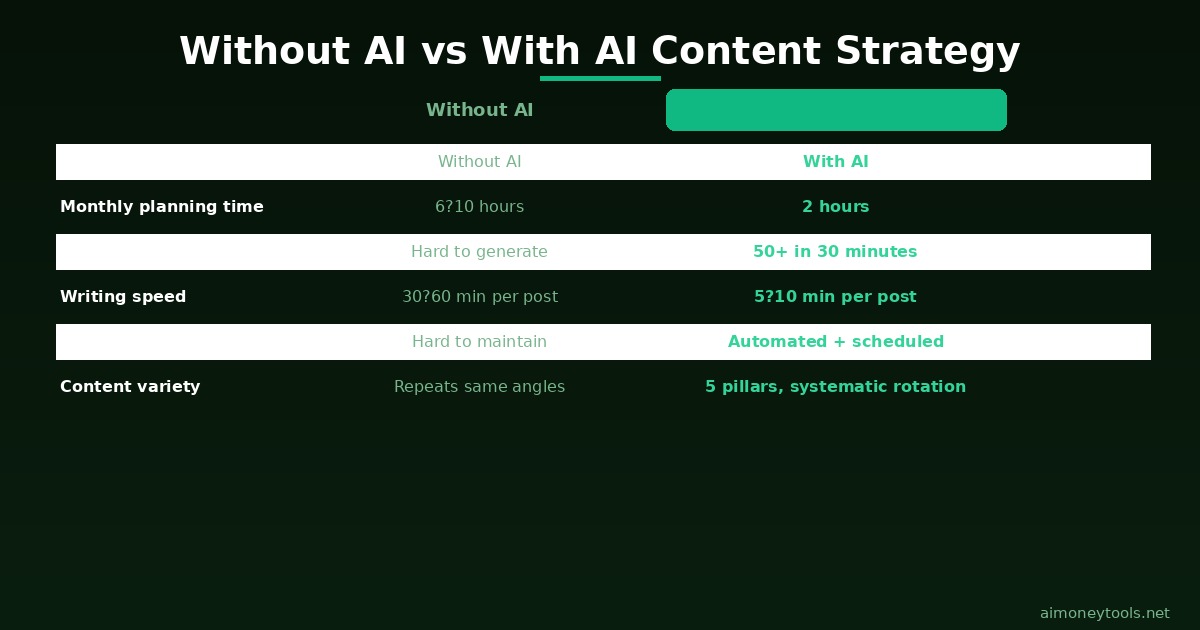
The first time you run through this system, expect it to take closer to 3 hours — you are figuring out your pillars, refining prompts, and setting up your calendar.
By the second month, it genuinely takes 90 minutes. By the third month, 60–90 minutes. The prompts get reusable, the calendar template is already there, and you know which pillar each post belongs to without thinking.
The compounding effect is what makes this worth it: at the end of 3 months, you have 90 posts published, a clear brand voice, and data on what your audience actually responds to.
Frequently Asked Questions
Can I use this system for any platform? Yes. The pillar framework and batch-writing method work for LinkedIn, X/Twitter, Instagram captions, email newsletters, YouTube scripts, and blog posts. The only thing that changes is the word count and format guidance you give the AI.
What if I don't know my niche yet? Start with what you do for work or what people ask you about most. Your niche becomes clearer after 2–3 months of posting — the posts that get the most engagement tell you what your audience wants more of. Use the AI content system to test 3–4 different angles in the first month.
Is free ChatGPT enough for this, or do I need a paid account? The free tier (GPT-4o with rate limits) is enough to build your content plan. If you hit the limit mid-session, switch to Claude or Gemini — all three produce comparable quality for this use case.
How do I keep AI content from sounding generic? Feed the AI specific context about yourself: your background, an example of writing you like, one or two personal stories from your work. The more specific your prompt, the less generic the output.
Should I disclose that I used AI to write my content? Platform policies vary. LinkedIn and X do not require disclosure. If you are writing journalism, academic work, or content where originality is part of the value proposition, disclose. For marketing and social content, using AI as a writing tool is broadly accepted.
How many pillars should a beginner start with? Start with 3. It is easier to maintain consistency across 3 topics than 5, and you will naturally develop strong opinions on all 3 before expanding. Add a fourth and fifth only after you have 30+ posts published.
Can I use this to plan a YouTube channel instead of social media? Yes. For YouTube, replace "post ideas" with "video ideas" and adjust the word count to match script length. The pillar framework works especially well for YouTube because the algorithm rewards topic consistency.

Alex the Engineer
•Founder & AI ArchitectSenior software engineer turned AI Agency owner. I build massive, scalable AI workflows and share the exact blueprints, financial models, and code I use to generate automated revenue in 2026.
Related Articles

How to Start an AI-Assisted Resume Writing Side Hustle in 2026 (Beginner's Guide)
A step-by-step guide to using AI resume tools to offer a paid resume and cover letter writing service — what to charge, which tools to use, and how to find your first clients.

How to Build and Sell AI Voice Receptionists to Local Businesses in 2026
A beginner's guide to building AI voice agents that answer business phone calls — the tools to use, what to charge, and how to find your first client.

How to Make Money on Fiverr with AI Tools in 2026: 7 Gigs You Can Start This Week
Discover 7 real Fiverr gigs you can launch using free and low-cost AI tools in 2026 — no experience required. Real pricing data, step-by-step setup, and tools that actually work.