
Best Freelancing Platforms for 2026: Find High-Paying Gigs Fast
Top 12 freelancing platforms for beginners and experienced freelancers. Upwork, Fiverr, Toptal, Guru, PeoplePerHour compared. Side hustle income guide with real earnings data.
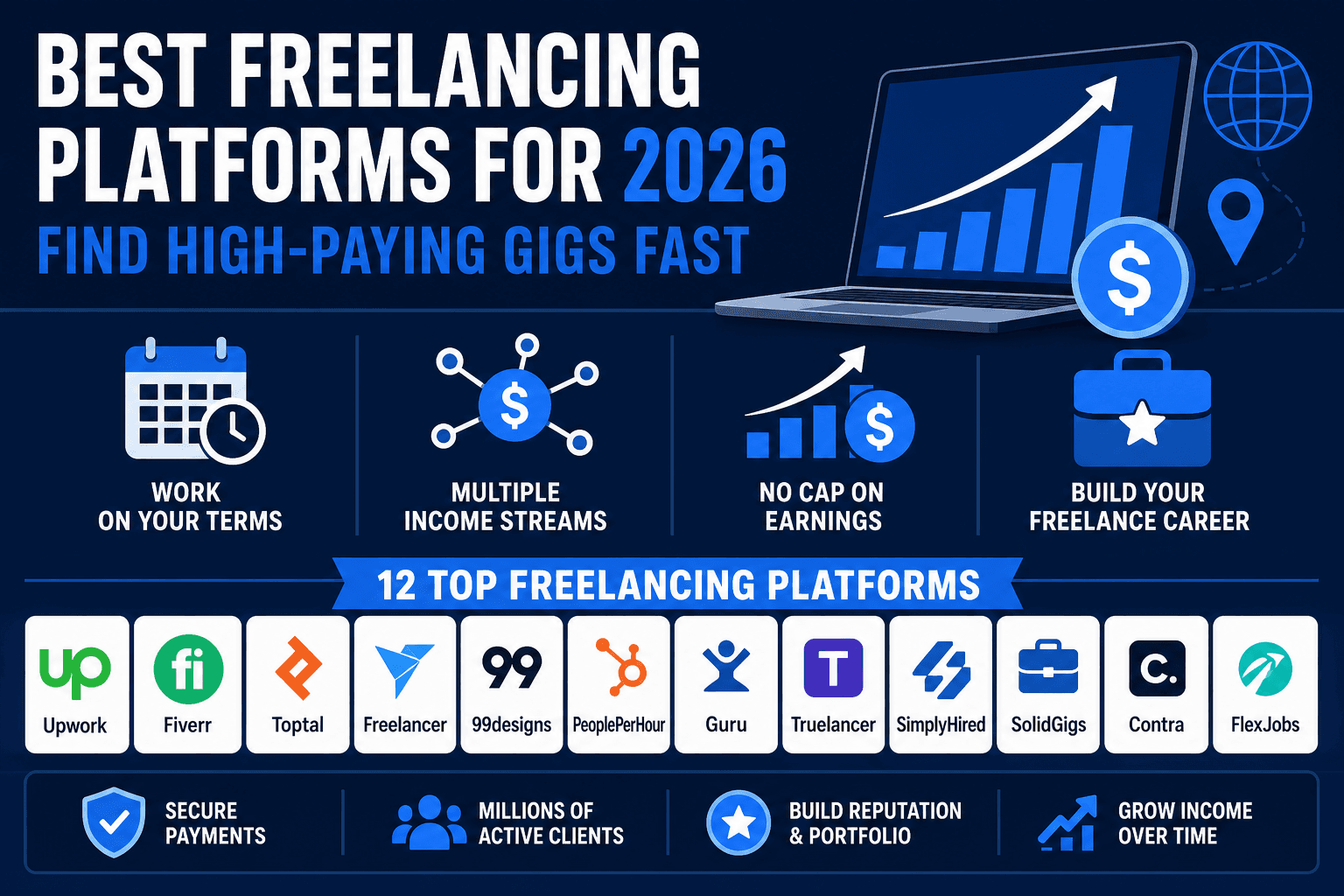
Looking to start freelancing? The good news: there are more platforms than ever to find high-paying work. The bad news: not all of them are worth your time.
Today, freelancing is no longer a side hustle—it's mainstream income. Whether you're a writer, designer, developer, or virtual assistant, the platforms you choose make the difference between earning $100/month and $5,000+/month.
This guide covers the 12 best freelancing platforms for 2026, broken down by platform type, earnings potential, and who they're best for.
Why Freelance in 2026?
Income flexibility: Work when you want, from anywhere.
Multiple income streams: Stack clients across platforms.
No cap on earnings: Unlike salaried positions, you control your rate.
Career builder: Portfolio work leads to higher-rate clients.
The challenge? Finding the RIGHT platform. Each has different fee structures, client quality, payment reliability, and earning potential.
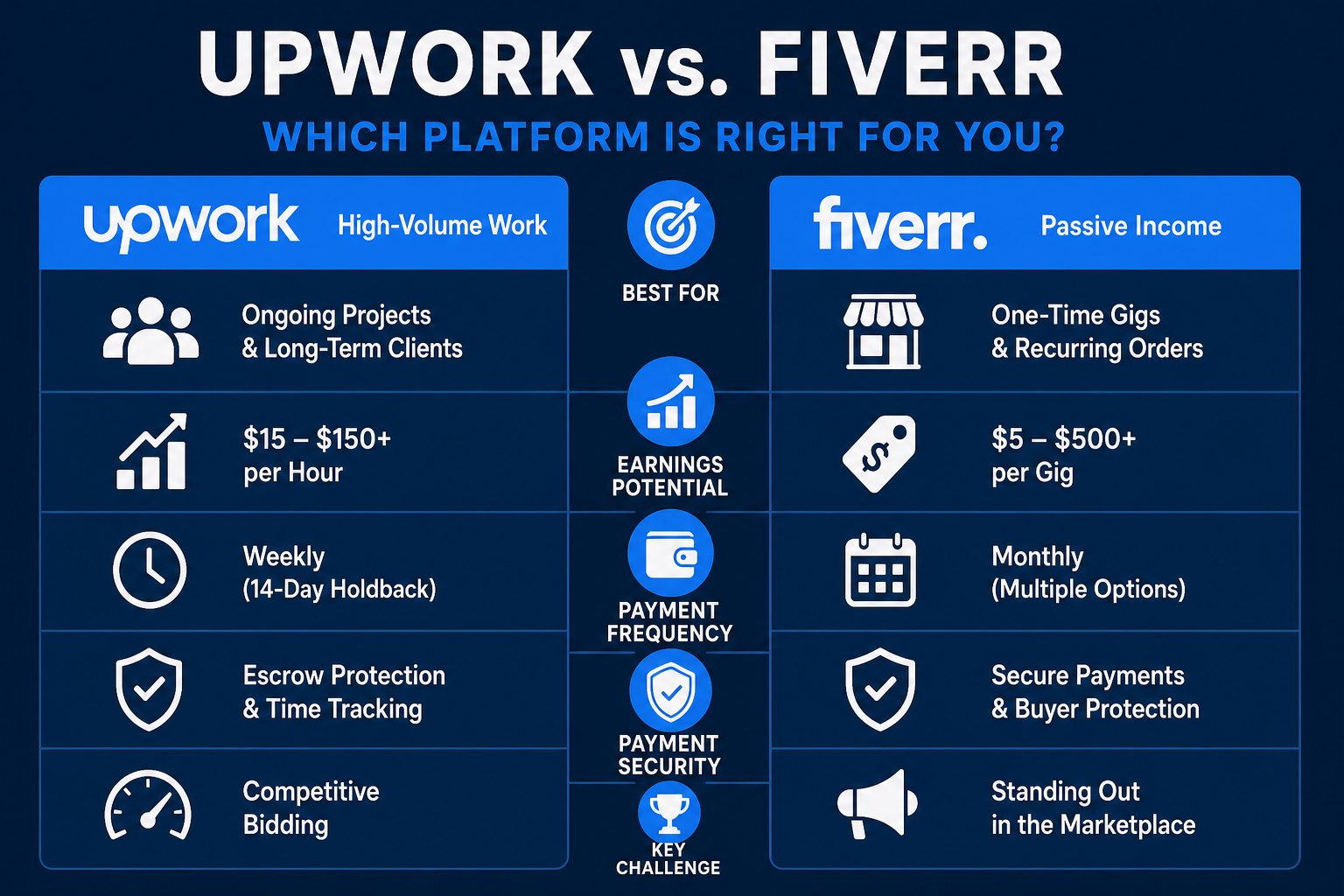
1. Upwork — Best for Finding High-Volume Work
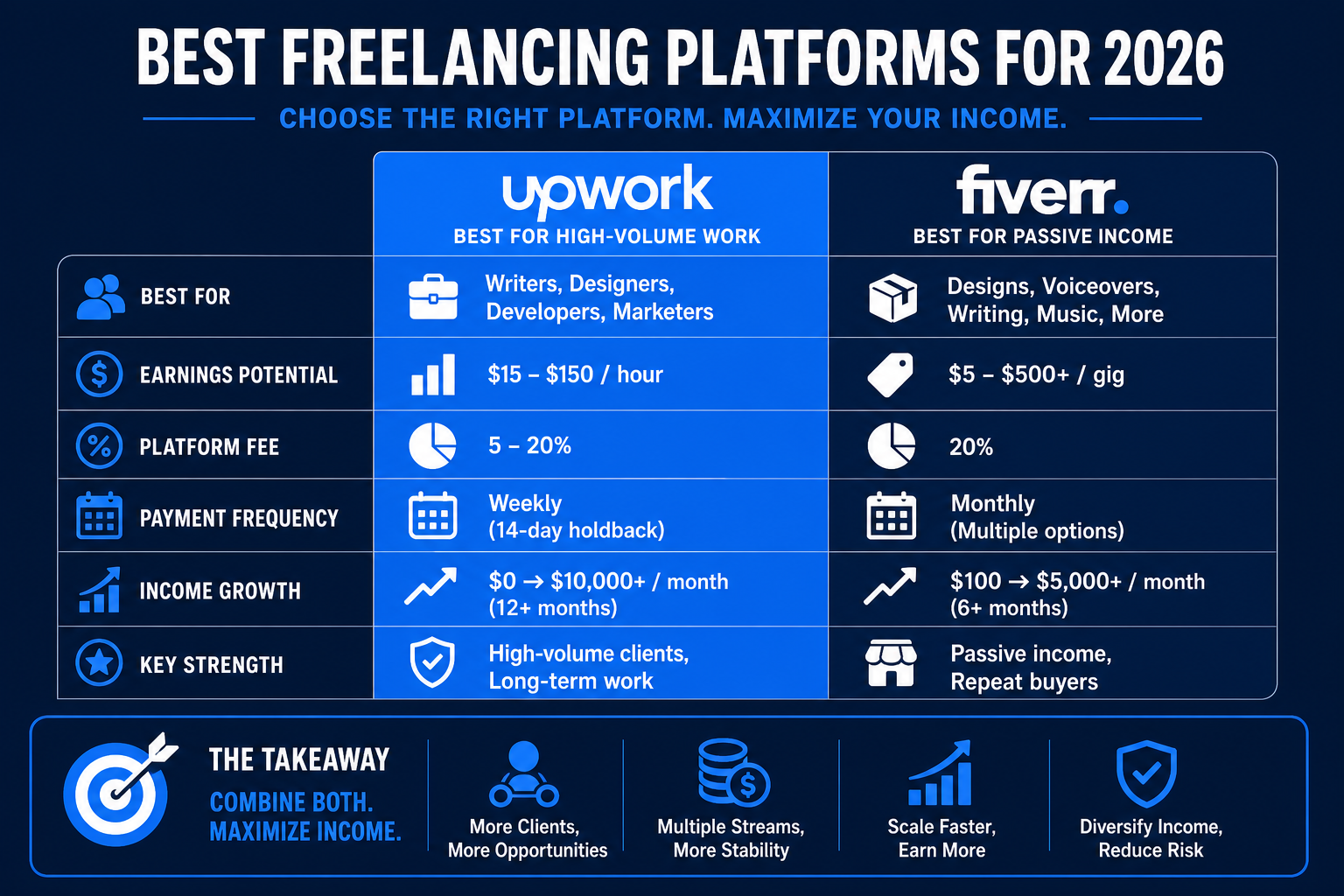
Fee: 5–20% (based on lifetime billing)
Payment: Weekly (with 14-day holdback)
Best for: Writers, designers, developers, marketers
Earnings potential: $15–$150/hour depending on skill
Why it's great:
- Largest pool of active clients (5M+ projects posted monthly)
- Work availability 24/7 across all skill levels
- Strong payment protection with time-tracking
- Builds long-term client relationships
- Escrow system holds client funds before payment
Challenges:
- Competitive bidding model (you compete on price)
- Upwork takes 5% after you hit $500 in earnings with a client
- Requires strong profile + portfolio to win bids
- High rejection rate for new freelancers
Realistic earnings for beginners:
- Month 1–2: $0–$200 (building profile)
- Month 3–6: $500–$2,000 (as clients stick around)
- Month 12+: $3,000–$10,000+ (long-term clients, higher rates)
Getting started:
- Create a detailed profile with portfolio examples
- Use 3–5 proposals/day on relevant projects
- Accept 1–2 low-rate projects to build reputation
- Raise rates after first 10–20 completed projects
- Target repeat clients (80% of income comes from repeat work)
2. Fiverr — Best for Passive Recurring Income
Fee: 20% (Fiverr takes cut; you set the price)
Payment: Monthly (via PayPal, Payoneer, direct bank)
Best for: Gigs with standardized deliverables (designs, voiceovers, writing, music)
Earnings potential: $5–$500+ per gig
Why it's great:
- Set your own gigs + pricing (no bidding)
- Passive income once gigs are listed (clients find you)
- Repeat clients built into the model
- Easy to scale (offer multiple gigs in one category)
- Strong buyer protection → reliable payments
Challenges:
- Fiverr takes 20% (highest among major platforms)
- Algorithm-dependent (good gigs rank, bad ones buried)
- Requires consistent 5-star reviews to earn featured status
- Gig quality matters more than platform marketing
Realistic earnings for beginners:
- Month 1–2: $0–$100 (new gigs get no visibility)
- Month 3–6: $200–$800 (as gigs gain reviews)
- Month 12+: $1,000–$5,000+ (portfolio of proven gigs)
Getting started:
- Create 3–5 different gigs (same skill, different angles)
- Price competitively at first ($5–$25 gigs to build reviews)
- Deliver exceptional work (5-star reviews = algorithm boost)
- After 10 reviews, start raising prices $10–$15/gig
- Create "Pro" gigs (premium pricing, faster delivery)
3. Toptal — Best for High-Paying Tech & Design Work
Fee: 10% (flat, after $500 earned)
Payment: Bi-weekly via bank transfer
Best for: Developers, designers, project managers, finance professionals
Earnings potential: $50–$200+/hour
Why it's great:
- Highest average earnings (vets talent, attracts high-budget clients)
- Direct relationships with clients (no bidding wars)
- Premium positioning (clients pay for quality)
- Stable work (many long-term contracts)
- Low fee structure (10% flat vs. 5–20% on Upwork)
Challenges:
- Strict vetting process (only ~3% of applicants get in)
- Requires proven portfolio + client references
- Not beginner-friendly for job market entry
- Best if you already have 2+ years experience
Realistic earnings:
- After joining: $3,000–$10,000+ monthly (if you get accepted)
Getting started:
- Build a strong portfolio (GitHub, Dribbble, Behance)
- Get client testimonials from prior work
- Apply via their vetting process
- Be honest about experience level (they value accuracy)
4. Guru — Best for Competitive Rates + Job Diversity
Fee: 4.95–9% (tiered, lower as you earn more)
Payment: Weekly (PayPal, Wise, direct bank)
Best for: Writers, designers, developers, virtual assistants
Earnings potential: $10–$100+/hour
Why it's great:
- Lower fees than Upwork (4.95–9% vs. 5–20%)
- Larger project variety (less saturated than Upwork)
- SafePay escrow system protects both parties
- Beginner-friendly bidding model
- Multiple payment methods supported
Challenges:
- Smaller client base than Upwork (fewer projects)
- Lower profile awareness (less mainstream)
- Requires active job hunting (projects don't find you automatically)
Realistic earnings:
- Similar to Upwork for comparable experience level
Getting started:
- Create detailed profile with work samples
- Bid on 5–10 projects/day
- Emphasize unique value prop in bids
- Build relationships with repeat clients
5. PeoplePerHour — Best for EU/UK Freelancers
Fee: 20% (platform + payment processing)
Payment: Monthly (PayPal, bank transfer)
Best for: Designers, developers, writers, marketers (UK/EU focus)
Earnings potential: £10–£100+/hour
Why it's great:
- Strong UK/EU client base
- Lower competition for EU freelancers
- Built-in project insurance
- Easy quoting system (no complex bidding)
Challenges:
- 20% platform fee (higher than Upwork at scale)
- Smaller global reach than Upwork/Fiverr
- Less active for US market
6. 99Designs — Best for Designers (Logo, Brand, Web)
Fee: 20% (designer fee; client pays full price)
Payment: Monthly (PayPal, bank transfer)
Best for: Graphic designers, brand designers, web designers
Earnings potential: $100–$5,000+ per project
Why it's great:
- Contests (clients choose winning design among many submissions)
- Direct client interaction (understand project needs deeply)
- High-paying projects (branding, web design often $500–$5,000)
- Portfolio-building focus
Challenges:
- Work is unpaid until client chooses your design (risk)
- Competitive (many designers per project)
- Better for established designers than beginners
7. Freelancer.com — Best for Budget-Conscious Entry
Fee: 10% (after first $500)
Payment: Weekly (Payoneer, bank transfer, cryptocurrency)
Best for: All skill types (writers, developers, designers, VAs)
Earnings potential: $5–$100+/hour
Why it's great:
- Competitive bidding (lower fees than Upwork)
- Global client base
- No long-term contracts required
- Multiple payment methods
Challenges:
- Client quality varies (low-budget projects common)
- More "tire kickers" than other platforms
- Requires screening clients before accepting work
8. Fancy Hands — Best for Virtual Assistant Work (Micro-Tasks)
Fee: None (you set rates; Fancy Hands takes 25–50% cut)
Payment: Bi-weekly via PayPal
Best for: Virtual assistants, administrative support, research
Earnings potential: $15–$50+ per task (15–30 min tasks)
Why it's great:
- Simple task model (no long projects, just quick gigs)
- Repeat clients (same users = recurring income)
- Predictable work schedule
Challenges:
- Lower hourly rate than other platforms ($15–$50/task)
- Time-based (you need volume to make real income)
- Limited to VA-type work
9. Rev — Best for Transcription + Captioning
Fee: None (you set rates based on per-minute)
Payment: Weekly (PayPal, direct bank)
Best for: Transcriptionists, captioning specialists, audio editors
Earnings potential: $0.30–$1.10 per audio minute
Why it's great:
- Stable work (always demand for transcription)
- No bidding (accepted = guaranteed work)
- Fast payment (weekly)
Challenges:
- Requires accuracy + fast turnaround
- Lower hourly rate than custom work
- Time-intensive (audio editing takes focus)
10. RemoteOK — Best for Full-Remote Job Boards
Fee: None (free job posting search)
Payment: Varies (direct with employer)
Best for: Remote jobs, contracts, part-time roles
Earnings potential: Variable (depends on role)
Why it's great:
- Huge board of remote opportunities
- Not just freelance (includes part-time/full-time roles)
- Filterable by pay, timezone, experience
- Free to browse + apply
Getting started:
- Browse jobs by salary range
- Filter by timezone/experience level
- Apply directly to roles
11. Upland — Best for Content Creators (Writers, Designers)
Fee: Platform takes 10–20% (varies by project type)
Payment: Monthly (PayPal, direct bank)
Best for: Content writers, graphic designers, video creators
Earnings potential: $50–$500+ per project
Why it's great:
- Marketing + content-specific projects
- High-paying work (companies with marketing budgets)
- Repeat projects (same clients over time)
- Easy project browsing
12. Patreon — Best for Passive Income (Creators)
Fee: 5% (Patreon takes 5%, payment processors take ~2.2%)
Payment: Monthly (Stripe, PayPal)
Best for: Writers, artists, podcasters, course creators
Earnings potential: $100–$50,000+ monthly (depends on fan base)
Why it's great:
- Recurring monthly income (subscribers = predictable)
- Direct relationship with fans/audience
- Build community around your work
- Unlimited earning potential (you control tier pricing)
Challenges:
- Requires existing audience (hard to start from zero)
- Ongoing content creation required (not one-time gigs)
- Best for established creators
Earnings Comparison: Real Numbers (2026)
| Platform | Beginner Monthly | 12-Month Monthly | Fee | Best For |
|---|---|---|---|---|
| Upwork | $200–$500 | $2,000–$5,000 | 5–20% | Volume work, long-term clients |
| Fiverr | $50–$200 | $1,000–$3,000 | 20% | Gig-based, passive income |
| Toptal | (Not beginner) | $5,000–$15,000 | 10% | Tech pros only |
| Guru | $200–$500 | $1,500–$4,000 | 4.95–9% | Diverse gigs, lower fees |
| 99Designs | $0–$500 | $2,000–$10,000 | 20% | Design contests |
| Freelancer.com | $100–$300 | $1,000–$3,000 | 10% | Budget work, quick start |
| Rev | $200–$400 | $500–$2,000 | 0% | Transcription specialists |
How to Maximize Earnings: 7 Proven Strategies
1. Join 3–4 Platforms, Not Just One
Diversify across Upwork (volume), Fiverr (gigs), and Guru (variety). Each platform brings different client types. If one's slow, others keep income flowing.
2. Specialize (Don't Generalize)
"I write blog posts AND copywriting AND emails" → loses to specialists.
"I write SEO blog posts for AI SaaS companies" → wins.
Specialization = higher rates + loyal clients.
3. Build a Portfolio Site
Link your personal website (not just platform profiles). Clients trust independent portfolios over platform profiles alone. This also gives you negotiating power ("Let's do this off-platform at my site").
4. Raise Rates Every 3 Months
- Month 0–3: Competitive rate (build portfolio)
- Month 3–6: +20% (now you have reviews)
- Month 6–12: +30% more (proven track record)
- Month 12+: +50% (established reputation)
Most freelancers stay at beginner rates forever. Don't be that person.
5. Get Testimonials (5-Star Reviews)
Every positive testimonial is marketing. Ask clients to leave reviews after project completion. More reviews = higher visibility = more bids won = higher rates justified.
6. Create Service Packages (Not À la carte)
Instead of: "Blog post = $50"
Offer: "Monthly retainer = $800/month (4 posts + revisions)"
Packages = predictable income + repeat revenue.
7. Track Your Time + Hourly Rate
Most freelancers underestimate their work hours. Track everything. If you're making $10/hour, you're competing with overseas talent. Raise rates or improve efficiency.
Red Flags: Platforms to Avoid
- Very low minimum rates ($1–$5 gigs) — race to the bottom
- No escrow system — risk of payment default
- High platform fees (>20%) — eat into earnings
- Requires upfront payment — sign of scam
- Poor payment track record — check reviews first
FAQ: Freelancing Platforms
Q: Which platform pays the fastest?
A: Rev (weekly), Upwork (weekly), Guru (weekly). Fiverr pays monthly.
Q: Can I work on multiple platforms at once?
A: Yes, it's recommended. Don't rely on one platform.
Q: Do I need a business license to freelance?
A: Depends on location. In most US states, you can freelance as a solo contractor. Check your local regulations.
Q: How much should I charge?
A: Research your skill + experience. Beginners: 50–75% below market rate to build portfolio. After 20 projects: market rate. After 50 projects: 20% above market rate.
Q: How do I avoid scams?
A: (1) Check client rating + history. (2) Use escrow system. (3) Get 50% upfront. (4) Avoid "job tests" for free. (5) Trust your gut.
Q: Can I make full-time income on these platforms?
A: Absolutely. Many freelancers earn $5,000–$15,000+/month. It takes 6–12 months of consistent work to get there.
Q: Which platform is easiest for beginners?
A: Fiverr (set it and forget it) or Freelancer.com (low competition, high volume). Upwork requires more active bidding but offers higher rates.
Your First 30 Days: Action Plan
Week 1: Setup
- Create profiles on Upwork + Fiverr (start with 2)
- Build detailed profiles with portfolio samples
- Set competitive beginner rates
- Write compelling service descriptions
Week 2: Launch
- Post 5–10 Fiverr gigs
- Bid on 50 Upwork projects (5–10/day)
- Target beginner-friendly projects to build reviews
Week 3: Optimize
- Track which proposals are winning
- Refine pitch based on successful bids
- Raise rates 10–20% for winning bids
Week 4: Scale
- Get first testimonials/reviews
- Create package deals
- Add second platform (Guru or Freelancer.com)
The Bottom Line
The best freelancing platform is the one that matches your skill + market. Start with Upwork or Fiverr, master one platform, then expand to 2–3 others as you grow.
Consistency beats platform choice. Pick one, commit to 30 days, and build from there.
Ready to start? Sign up for Upwork or Fiverr today. Your first gig could be this week.
Good luck! 🚀

Alex the Engineer
•Founder & AI ArchitectSenior software engineer turned AI Agency owner. I build massive, scalable AI workflows and share the exact blueprints, financial models, and code I use to generate automated revenue in 2026.
Related Articles

How to Start an AI-Assisted Resume Writing Side Hustle in 2026 (Beginner's Guide)
A step-by-step guide to using AI resume tools to offer a paid resume and cover letter writing service — what to charge, which tools to use, and how to find your first clients.

How to Build and Sell AI Voice Receptionists to Local Businesses in 2026
A beginner's guide to building AI voice agents that answer business phone calls — the tools to use, what to charge, and how to find your first client.

How to Make Money on Fiverr with AI Tools in 2026: 7 Gigs You Can Start This Week
Discover 7 real Fiverr gigs you can launch using free and low-cost AI tools in 2026 — no experience required. Real pricing data, step-by-step setup, and tools that actually work.